

Build guide
Microsoft Teams AI chatbot: what Teams already gives you, and when to build your own
A Microsoft Teams AI chatbot answers employee questions in Teams chats and channels from your company's documents and systems, takes simple actions and hands off to a person when it is unsure. This guide is for IT, ops, HR and support leads in Microsoft 365 companies deciding between what Microsoft already includes, a Copilot Studio agent, a third-party Teams app and a custom bot built on the Teams SDK. It covers the Teams-specific mechanics, permissions, tenant approval and what each route costs to run.
Get a free build plan
Two lines is enough. A specialist replies within one business day.
Spec: quick answer
How do you build an AI chatbot in Microsoft Teams?
You can build a Microsoft Teams AI chatbot four ways: use Copilot Chat and agents Microsoft already includes, publish a Copilot Studio agent to Teams, install a third-party Teams app, or build a custom engine agent with the Microsoft Teams SDK registered through Azure Bot Service. Each needs admin approval, permission-aware retrieval and a human handoff.
- Check Copilot Chat first: eligible Microsoft 365 business plans include it at no extra Copilot charge.
- Copilot Studio agents cost licensed users nothing; unlicensed users consume Copilot Credits.
- Teams is a standard Azure Bot Service channel, so a custom bot pays nothing per message there.
- In channels, a bot sees only @mentions unless owners grant resource-specific consent.
What can a Microsoft Teams AI chatbot do?
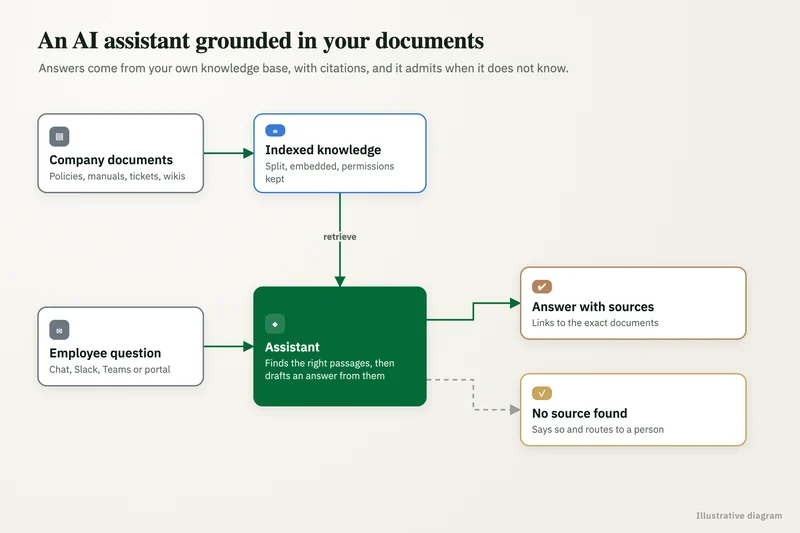
A Microsoft Teams AI chatbot sits where your staff already ask each other questions. It can answer in a one-to-one chat, in a group chat, or in a channel when someone mentions it, and Microsoft's bot documentation names these three scopes as personal, group chat and channel.
The useful bots do three things. They answer from approved sources such as SharePoint, OneDrive, Confluence, a help center or a policy library, and link the document they used. They take bounded actions, such as opening a ServiceNow or Jira ticket, checking a leave balance or looking up an order in Dynamics 365 or NetSuite, after the user confirms on an Adaptive Card. And they pass the question to a named team when confidence is low, rather than guessing.
Typical first projects are an IT help desk bot for password, VPN and device questions, an HR and benefits bot for policy questions, a sales enablement bot for pricing rules and product specs, and an operations bot that answers from runbooks and SOPs.
What are your options for an AI chatbot in Teams?
There are four routes, and the right one depends on where the knowledge lives, whether the bot must act in other systems and who is licensed for what. The table sets out the trade-offs we walk buyers through.
| Question | Copilot Chat and built-in agents | Copilot Studio agent in Teams | Third-party Teams app | Custom engine agent (Teams SDK) |
|---|---|---|---|---|
| Knowledge | Web grounding; work data with a Microsoft 365 Copilot license | SharePoint, Dataverse, Graph connectors, websites, uploaded files | The vendor's connectors and uploaded documents | Any source you can reach by API, with your own retrieval rules |
| Actions in other systems | Limited | Power Platform connectors and agent flows | Whatever the vendor supports | Anything you build, with your own confirmation steps |
| Model choice | Microsoft's | Microsoft's, or your own model through Foundry | The vendor's | OpenAI, Claude, Gemini, Bedrock or open-weight models |
| Running cost | Included in eligible plans; Microsoft 365 Copilot is $30/user/month | Copilot Credits for unlicensed users | Vendor subscription | Hosting, model tokens and a vector database, billed to your accounts |
| Data location | Your Microsoft 365 tenant | Your tenant and Power Platform environment | The vendor's servers | Your own Azure or other cloud account |
| Best for | General drafting and search | Microsoft-centric teams with low-code skills | A quick FAQ bot over a few documents | Bots that act, span many systems or need strict data rules |
Do you already have an AI chatbot in Teams?
Possibly, so check before you build. Microsoft's support documentation says Copilot Chat is available at no additional Copilot charge to users on eligible plans, including Microsoft 365 Business Basic, Business Standard and Business Premium, Teams Essentials and Teams Enterprise, and many Office 365 enterprise plans. Without a Microsoft 365 Copilot license, Copilot Chat is grounded in the web, and agents used by those staff are billed on a metered basis.
Microsoft's Copilot Studio pricing page lists the Microsoft 365 Copilot add-on at $30 per user per month, paid yearly, and says licensed users can create internal agents that work within Microsoft 365. For a company where most staff already hold that license, a Copilot Studio agent published to Teams may be the cheapest route by far.
What Copilot Chat does not do on its own is act as a governed help desk for one function: it will not follow your escalation rules, route a question to the HR channel when it is unsure, or create a ticket in a non-Microsoft system. That is where a purpose-built agent comes in.
How much does a Microsoft Teams AI chatbot cost to run?
Cost depends on the route and on who is licensed. Microsoft Learn's Copilot Studio billing rates page, updated October 30, 2026, lists 2 Copilot Credits for a generative answer, 5 for an agent action and 10 for tenant graph grounding, with no charge when the user holds a Microsoft 365 Copilot license and the agent runs under their identity. Microsoft's pricing page lists a $200 monthly pack of 25,000 credits, and pay-as-you-go runs at $0.01 per credit.
Worked example: a 400-person company runs an HR and IT agent in Teams that gets 2,000 questions a month, each a generative answer grounded in the tenant graph, so 12 credits per question. If the askers are unlicensed, that is 24,000 credits a month: one $200 pack, or about $240 on pay-as-you-go. If all 400 staff were licensed, the agent would cost no credits, but licensing everyone at $30 a month is $12,000 a month, so nobody should buy Copilot licenses just to run one bot. Add one ticket-creating action per question and usage rises to 34,000 credits, which no longer fits one pack.
A custom bot is priced differently. Azure's Bot Service pricing page lists Microsoft Teams as a standard channel with unlimited messages included, so there is no per-message fee for the Teams connection. You pay for hosting (Azure App Service or functions), Application Insights, the model provider's tokens and a vector database such as Azure AI Search, Pinecone or Qdrant. We measure tokens per question in the pilot and set a monthly cap with an alert at 80%, because passage length varies too much between documents to guess. Our Copilot Studio consultant guide goes deeper on credit forecasting, and our AI chatbot cost guide lists published build ranges.
When does a custom Teams bot make sense?
Build a custom engine agent when the built-in and low-code routes cannot meet a hard requirement. In our scoping, these are the requirements that usually tip the decision.
- Knowledge lives outside Microsoft 365: Confluence, Notion, Google Drive, Zendesk Guide, a product database or an ERP.
- The bot must write to non-Microsoft systems such as Salesforce, HubSpot, NetSuite, Jira or ServiceNow with approval steps you control.
- You need a specific model provider, or one your company already has a data agreement with.
- Many unlicensed users will ask many questions, so per-answer credits would exceed the cost of your own hosting and tokens.
- The same retrieval layer must also serve Slack, a web portal or a customer-facing chat.
- You need full logs of prompts, retrieved passages, answers and costs in your own cloud for audit.
How is a custom Microsoft Teams AI chatbot built?
Microsoft's current toolkit is the Microsoft Teams SDK, which is what the Teams AI Library was renamed to in November 2025. According to Microsoft's developer blog, it is generally available in C# and JavaScript with Python in preview, consolidates Bot Framework, Microsoft Graph and Adaptive Cards support into one library, and supports Model Context Protocol (MCP) and agent-to-agent communication. Microsoft Learn now marks Teams AI library v1 as deprecated, so a bot built on it should be on an upgrade plan. The companion tool is the Microsoft 365 Agents Toolkit, formerly Teams Toolkit.
Microsoft calls an AI-enabled Teams bot that uses the model of your choice a custom engine agent. When we build one, each question follows the same path.
- Register: an Entra ID app registration and an Azure Bot resource, single-tenant, with a Teams app manifest that declares the bot, its scopes and its permissions.
- Identify: sign the user in with Teams single sign-on so the bot knows who is asking and which groups they belong to.
- Retrieve: search an index of approved sources, filtered by that user's permissions, and pull the top passages.
- Answer: send the question and passages to the model with instructions to answer only from them and cite each source, streaming the reply into the chat.
- Decide: if retrieval scores or model confidence fall below a threshold, say so and post the question to the owning team's channel with a link back.
- Act: for allowed actions, show an Adaptive Card summarizing the change and wait for the user to confirm before writing to any system.
- Log: record the question, sources, answer, tokens, cost and any thumbs-down feedback for weekly review.
How do you get a Teams bot approved and deployed in your tenant?
A custom bot is a custom Teams app, so your Teams administrator controls who can install it. Microsoft's admin documentation describes two routes: a Global or Teams administrator uploads the app package in the Teams admin center under Teams apps, where it becomes available to the organization after a few hours with no further approval, or a user submits it from the Teams client and it goes live after an admin approves it. App setup policies decide which users may upload custom apps at all.
Channel behavior needs a deliberate decision. By default a bot in a channel receives only messages that @mention it. Microsoft's documentation explains that a bot can receive every message in a channel or chat only when the conversation owner grants resource-specific consent, declared in the manifest as ChannelMessage.Read.Group or ChatMessage.Read.Chat, and Microsoft states these permissions may not be used to extract large amounts of customer data. For a help bot, @mentions are usually enough, and they keep the bot out of conversations nobody asked it to join.
Plan the rollout like any internal app: make the app available to a pilot group only, using the app availability settings in the Teams admin center, then widen access once the logs look right.
How do you stop a Teams chatbot from exposing confidential files?
Make every answer respect the asker's own permissions, and remember who else can see the reply. The most common failure is an index built with an admin or service account, which lets any employee ask about files only managers can open.
Four controls cover most of the risk. Index only folders and sites each data owner has approved, and remove stale or duplicate documents first. Filter retrieved passages by the user's Entra ID groups before they reach the model. Treat channel replies as public to the channel: a bot answering in a 200-person channel shows the answer to all 200, even if only the asker could open the source, so restrict sensitive topics to personal chat. And keep HR case data, health information and financial records out of scope until your compliance lead approves the design; this is not legal advice.
How to launch a Teams AI chatbot in six steps
A focused bot for one team, over sources already in reasonable shape, typically reaches a pilot in four to six weeks. These are the steps we follow.
- Pick one team and collect 50 real questions from its Teams channels, help desk inbox or tickets, with the correct answer and source for each.
- Check licensing: who already has Copilot Chat or Microsoft 365 Copilot, and whether a Copilot Studio agent would cover the need before custom code.
- Agree on sources and access rules with each data owner, and clean up outdated documents.
- Build the agent with citations, a confidence threshold, an Adaptive Card confirmation for actions and a handoff to the team's channel.
- Run the 50-question test set, fix the source or prompt behind each wrong answer and repeat until the team signs off.
- Release to the pilot group only, review logs and thumbs-down answers weekly for a month, then widen access.
Common mistakes, and when not to build one
The mistakes we see most often are indexing an entire SharePoint tenant, launching to the whole company before one team has tested it, letting the bot answer sensitive topics in busy channels, judging success by message count rather than questions resolved without a person, and having no owner who reviews wrong answers every week.
Do not build a custom bot if Copilot Chat or a licensed agent already answers what your staff ask, if the help channel gets only a few questions a week, or if the source documents are so out of date that a person would give the wrong answer too. Fix the documents first. If your knowledge lives almost entirely in SharePoint, read our SharePoint AI chatbot guide, which covers the built-in SharePoint agents in detail.
How we build Microsoft Teams AI chatbots
We build Teams AI chatbots as Copilot Studio agents or as custom engine agents on the Teams SDK, and we recommend one only after checking your licensing, sources and the actions the bot must take. Every build includes permission-aware retrieval with citations, Teams single sign-on, a confidence threshold, a handoff to the owning team, Adaptive Card confirmations before anything is written to Salesforce, HubSpot, NetSuite, Jira or ServiceNow, and logging of every answer and its cost.
Each project starts with a free review of your questions, sources, licensing and data rules, followed by a fixed price for a defined scope. You own the Teams app, Azure resources, code, prompts, index and data from day one, and model and hosting bills go to your own accounts. Our AI chatbot for business service covers the same build for websites, Slack and other channels.
Case study · Logistics company, UK
Route planning automation
Dispatch typed every address into Google Maps, which optimizes only 25 stops and cannot add time at each stop. A Python tool that loads addresses automatically, adds buffer time per stop and optimizes the full route.
- Manual address entry eliminated
- Delivery estimates customers could rely on
FAQ
Frequently asked questions
Does Microsoft Teams have a built-in AI chatbot?
Yes. Copilot Chat is available in Teams at no additional Copilot charge on eligible Microsoft 365 business and enterprise plans, according to Microsoft's support documentation. Without a Microsoft 365 Copilot license it is grounded in the web rather than your work data. For answers from specific company sources, escalation rules or actions in other systems, teams add a Copilot Studio agent or a custom bot.
How do I create an AI chatbot in Microsoft Teams?
The low-code route is to build an agent in Copilot Studio and publish it to Teams. The developer route is a custom engine agent built with the Microsoft Teams SDK and Microsoft 365 Agents Toolkit, registered as an Azure Bot and packaged as a Teams app. Either way, an admin must approve the app in the Teams admin center.
Can a Teams bot read every message in a channel?
Only if the channel or chat owner grants resource-specific consent. By default a bot receives just the messages that @mention it. Microsoft documents the ChannelMessage.Read.Group and ChatMessage.Read.Chat permissions for reading all messages and forbids using them to extract large amounts of customer data.
Is it free to connect a custom bot to Microsoft Teams?
The Teams connection is. Azure's Bot Service pricing lists Microsoft Teams as a standard channel with unlimited messages included. You still pay for hosting the bot, monitoring, model tokens and any vector database, all billed to your own accounts.
What is the Microsoft Teams SDK?
It is the new name for the Teams AI Library, announced in November 2025. Microsoft says it is generally available in C# and JavaScript, with Python in preview, and supports MCP and agent-to-agent communication. Microsoft Learn marks Teams AI library v1 as deprecated.
Can a Teams AI chatbot answer from Confluence, Google Drive or Salesforce?
A custom bot can index or query any source with an API, including Confluence, Google Drive and Salesforce, and filter results by each user's permissions. Copilot Studio reaches some of these through Graph connectors or Power Platform connectors. Check that permissions carry over before indexing anything sensitive.
Should we choose Copilot Studio or a custom build for a Teams bot?
Choose Copilot Studio when most users hold Microsoft 365 Copilot licenses, the knowledge lives in Microsoft 365 and actions fit Power Platform connectors. Choose a custom build when many unlicensed users will ask questions, sources and actions sit outside Microsoft, or you need your own model and full logs. Some companies run both.
Keep reading
Related pages
Get started
Tell us what you want automated
Describe the task, the systems involved and the volume. We reply within one business day with an architecture, the tools we would use, running costs and a fixed-price build plan.
- Free 30-minute build review
- Fixed quote before any work starts
- You own the accounts, code, prompts and data
Prefer email? info@aiimplementationconsultants.com
Get a free build plan
Two lines is enough to start.