

Workflow automation
AI workflow automation that runs your repeat processes end to end
We build AI workflow automation that takes a repeat process, such as triaging requests, chasing approvals or moving data between systems, and runs it end to end with AI steps where judgment is needed and people where it matters. It is for operations, finance and support leads who can describe the process step by step and want it built, connected and kept running.
Get a free build plan
Two lines is enough. A specialist replies within one business day.
Quick answer
What is AI workflow automation?
AI workflow automation connects triggers, systems and AI steps into one process that runs without manual handoffs. A trigger such as a new email or form starts the flow, a language model classifies, extracts or drafts where rules alone fall short, and confidence checks send uncertain cases to a person before anything reaches customers or money.
- Rules handle the predictable steps; AI handles reading, sorting and drafting.
- Confidence thresholds and approval steps keep people in charge of risky actions.
- Every run is logged with inputs, outputs, cost and errors for audit and debugging.
- We build in n8n, Make, Zapier, Apps Script or Python, chosen by fit.
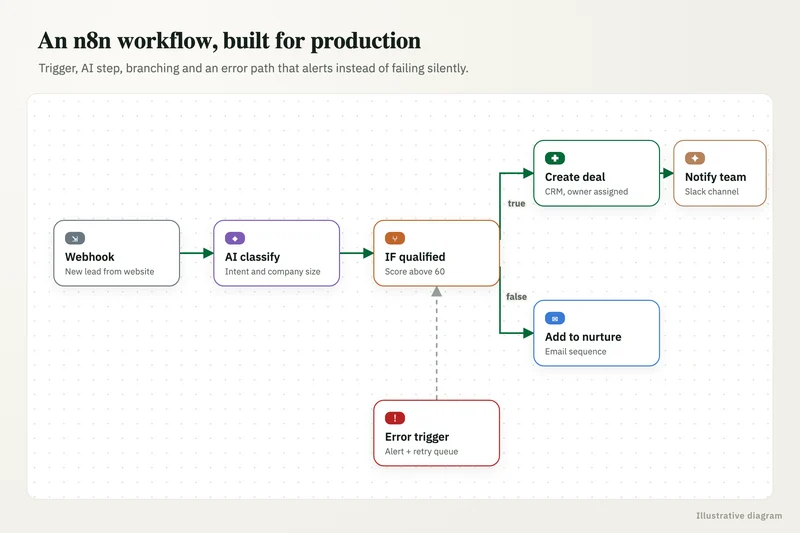
What can AI workflow automation handle that rules-based automation cannot?
Classic automation moves data when the input is predictable. AI steps let a workflow handle the messy middle: reading a free-text email to work out what the customer wants, pulling fields from an attachment, summarizing a long thread for an approver, or drafting a reply that a person checks.
The design principle is to use AI only where reading or judgment is needed and keep plain rules everywhere else. Rules are cheaper, faster and easier to test. A typical flow is mostly ordinary steps (lookups, updates, notifications) with two or three AI steps placed where a person used to read and decide.
- Inbox triage: classify, tag and route support, sales or AP emails to the right queue.
- Request intake: turn forms and emails into tickets or records with the fields filled.
- Approvals: summarize the request, route it to the right approver, chase reminders, record the decision.
- Reporting: gather data from several systems, draft commentary and send it on a schedule.
n8n vs Zapier vs Make: which should we use?
Each fits a different situation, and we work in all three. n8n is self-hostable, has AI agent nodes and supports MCP, which suits teams that want data to stay on their own servers, need complex branching or expect high run volumes. Zapier is hosted for you, quick for a non-technical team to pick up, and offers Zapier Agents. Make sits between them, with a visual builder that handles branching and data mapping well.
For logic that outgrows a visual builder, we write Python services, and for teams living in Google Workspace, Apps Script is often the simplest option. The choice follows your systems, volumes, data rules and who will maintain it, not our preference.
What you get
What we deliver
Scoped and quoted at a fixed price after a free review.
Process map
The current process written step by step, with the AI steps, rules, approvals and failure paths marked.
Working workflows
Built in n8n, Make, Zapier, Apps Script or Python, connected to your live systems.
AI steps
Prompts for classification, extraction or drafting, each with an eval set and a confidence threshold.
Approval flows
Slack, Teams or email approvals for actions touching money, customers or regulated data.
Error handling
Retries, an exceptions list and alerts to a named owner when something fails.
Run log and dashboard
Every run recorded with inputs, outputs, duration and cost, plus a weekly summary.
How do you build n8n automation that does not break quietly?
Silent failure is the most common reason automations lose trust, so error handling is designed in, not added later. Each workflow has an error branch that retries transient failures, parks bad records in an exceptions list and alerts a named owner in Slack, Teams or email.
We also log every run: what came in, what each AI step returned, how long it took and what it cost. AI steps carry a cost cap per run and per day, prompts are stored in version control, and changes go through a test workflow with an eval set before they reach production. If a change misbehaves, rolling back to the previous version takes minutes.
Where should a person stay in the loop?
Anywhere the workflow touches money, customers or regulated data. That means a payment, a refund, an outbound message to a customer, a change to a contract or a record containing health or financial details waits for a person to approve it.
Approvals are made easy so they do not become the new bottleneck: a message with the summary, the proposed action and approve or reject buttons. As the log shows a step is reliably right, you can choose to relax its review, one step at a time.
Which systems do your workflows connect to?
Most workflows touch three to six systems. Common ones are Outlook and Gmail, Slack and Teams, HubSpot and Salesforce, NetSuite and QuickBooks, Zendesk for support, SharePoint and Google Drive for files, and Google Sheets or a Postgres database as a working store.
Where a system has a solid API, we use it directly. Where it does not, we look for webhooks, scheduled exports or an existing connector before considering anything fragile like screen automation. Credentials are stored in the platform's secret store under accounts you control, with the minimum permissions each step needs.
What results can workflow automation deliver?
MIT NANDA reported that the biggest returns from generative AI came from back-office automation, even though more than half of budgets went to sales and marketing. That matches what we see: the quiet internal processes often pay back first.
One of our case studies is a regulatory consulting firm where we built a compliance management tool with recurring task generation, owners, due-date reminders and client-wise dashboards. Status reports now take under 15 minutes instead of 4-5 hours, and the firm saves more than 30 hours a month.
What does it cost to run automated workflows?
Running costs are the automation platform's plan or your hosting for self-hosted n8n, plus model calls for the AI steps. Most workflows spend far more on platform runs than on AI, and the dashboard shows both per workflow.
We build at a fixed price agreed after a free review of the process. Our AI implementation cost guide covers third-party market rates if you are budgeting.
Case study · Insurance brokerage, Australia
Automation and dashboarding
Policy data arrived as spreadsheets from several insurers, each in a different structure, and every client report took hours of manual cleanup. An automated pipeline that standardizes every insurer's file and feeds a single reporting dashboard.
- Report time cut from 4-5 hours to under 5 minutes
- Reporting accuracy up from about 75% to 99%

How it works
How an engagement runs
- 01
Free review
You walk us through the process and systems; we flag what to automate and what to leave alone.
- 02
Fixed quote
We agree scope, tools, approvals and success measures, then quote a fixed price.
- 03
Build and test
We build in a test environment and run real past cases through it, including the edge cases.
- 04
Parallel run
The workflow runs beside your team until its output matches theirs.
- 05
Go live
We switch it on, hand over accounts and documentation, and monitor the first weeks with you.
FAQ
Frequently asked questions
Is n8n better than Zapier for AI workflows?
It depends. n8n suits self-hosting, complex branching and high volumes, and it has AI agent nodes and MCP support. Zapier is hosted, easy for business users to edit and offers Zapier Agents. We recommend after looking at your systems and volumes.
Can n8n be self-hosted so our data stays in-house?
Yes. n8n can run on your own server or cloud account, so workflow data stays in your environment. AI steps can call model APIs on business tiers or open-weight models hosted in your cloud if data must not leave.
What happens when an automated workflow fails?
A well-built workflow retries temporary errors, moves bad records to an exceptions list and alerts a named owner. Nothing should fail silently, and the run log shows exactly which step broke and why.
Which processes are good candidates for AI workflow automation?
High-volume, repetitive processes with clear inputs and outcomes: inbox triage, request intake, approvals, data entry between systems and scheduled reports. Processes that change weekly or depend on unwritten judgment are poor first candidates.
Do we need clean data before automating?
Not perfect data, but consistent inputs help. We usually add validation at the start of the workflow so bad records are caught and fixed rather than passed downstream.
Who maintains the workflows after launch?
Your team can, using the documentation we hand over, or we can stay on for support. Either way, the accounts, workflows and prompts belong to you.
Keep reading
Related pages
Get started
Tell us what you want automated
Describe the task, the systems involved and the volume. We reply within one business day with an architecture, the tools we would use, running costs and a fixed-price build plan.
- Free 30-minute build review
- Fixed quote before any work starts
- You own the accounts, code, prompts and data
Prefer email? info@aiimplementationconsultants.com
Get a free build plan
Two lines is enough to start.