

Video automation
AI video generation pipelines for product, training and sales videos at scale
We build AI video generation pipelines that turn your product catalog, training material or CRM records into finished, on-brand videos without a production crew for every clip. It is for marketing, enablement and sales teams who need dozens or hundreds of videos, each slightly different, and want a repeatable process with a person approving what goes out.
Get a free build plan
Two lines is enough. A specialist replies within one business day.
Quick answer
How does automated AI video generation work for a business?
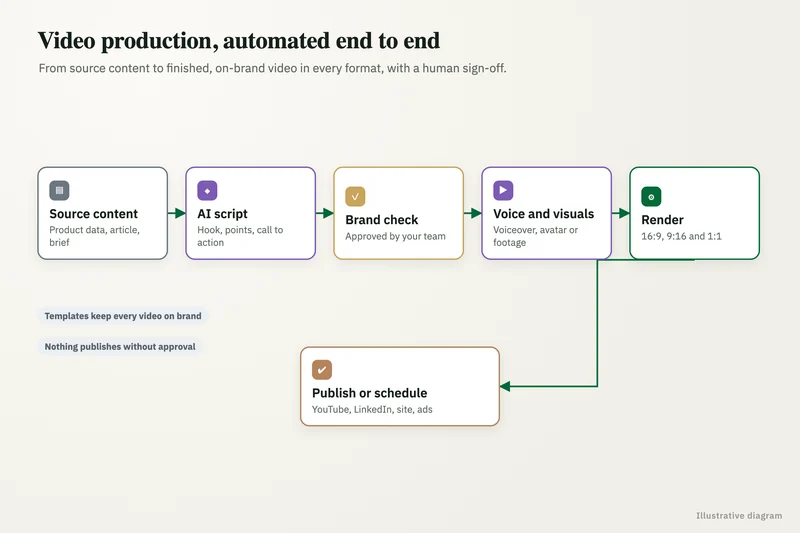
Automated AI video generation starts from structured input, such as a product record or a training outline. A language model writes the script, a platform like HeyGen, Synthesia, Runway or Google Veo renders scenes or an avatar presenter, a brand template adds logos, captions and music, and a reviewer approves each video before it is published.
- Videos are generated from data, so one template can produce hundreds of variations.
- Brand templates lock fonts, colors, logos, captions and end cards for every render.
- A named reviewer approves each video or batch before anything is published.
- Synthetic media is labeled, in line with EU AI Act Article 50 where it applies.
What kinds of business videos can AI video generation produce?
The strongest fit is any video you need many versions of, where the structure stays the same and the details change. Four patterns cover most requests we see.
- Product videos: one short clip per SKU built from the catalog record, photos and key specs, sized for the product page, marketplaces and social.
- Training videos: an avatar presenter walks through a policy, process or software screen, regenerated in minutes when the procedure changes or a new language is needed.
- Social clips: cut-downs, hooks and captioned variants from longer content, produced in the aspect ratios each channel expects.
- Personalized sales videos: a short message per prospect that uses the name, company and use case from the CRM, sent from the rep's own sequence.
Which video platforms do you build on?
We pick the renderer by the job. HeyGen is strong for avatar presenters and personalized talking-head messages. Synthesia is aimed at training video. Runway and Google Veo generate scenes and motion from text or images, which suits product b-roll and social clips.
Many pipelines combine two or three of them: generated scenes from one, a presenter from another, and final assembly with your brand template in code. We call each platform through its API, so the pipeline can swap a renderer later without rebuilding the rest.
What you get
What we deliver
Scoped and quoted at a fixed price after a free review.
Brand template
Reusable layouts with your logos, fonts, colors, captions, music rules and end cards for each format.
Script generator
Prompts and a tone guide that turn product, training or CRM data into scripts within set length limits.
Render integration
API connections to HeyGen, Synthesia, Runway or Google Veo, with retries and spend caps per job.
Review queue
A screen showing each video with its script, source data and checklist, with approve and reject actions.
Publishing hooks
Approved videos delivered to your product pages, YouTube, social scheduler, LMS or sales sequences.
Disclosure setup
On-screen labels and metadata for synthetic media, plus a consent record for any avatar or voice.
How is the automated video pipeline put together?
It runs as a workflow in n8n or Python with clear stages, each logged. A trigger, such as a new SKU in Shopify, a changed SOP in SharePoint or a deal moving stage in HubSpot, starts a job. The job collects the source data, a language model writes a script within a word limit and tone guide, and the renderer produces the footage.
Assembly then applies the brand template: intro and end cards, lower thirds, font and color rules, captions generated from the script, background music at a set level and the right export sizes. The finished file lands in a review queue with the script and source data beside it.
Cost caps sit on every stage. Each job has a ceiling for model and rendering spend, failed renders retry a fixed number of times, and anything that keeps failing goes to a person rather than looping.
Who approves AI-generated videos before they go out?
A named person on your team does, every time, at least until a template has a long record of clean output. The review screen shows the video, the script, the data it used and a checklist: correct product, correct claims, pronunciation of names, brand rules, captions in sync.
Approval can be per video for sales messages or per batch for catalog clips. Rejected videos go back with a note, and recurring issues are fixed in the prompt or template rather than one clip at a time. Nothing publishes to YouTube, social accounts, the website or a sales sequence without that approval recorded.
Do AI-generated videos need to be labeled?
Often, yes. The EU AI Act's transparency duties in Article 50, which include labeling synthetic media, apply from August 2, 2026, and they reach US companies whose AI output is used in the EU. If your videos are seen by EU audiences, we build disclosure into the template, such as an on-screen note and metadata.
Avatars and cloned voices raise a second issue: consent. We only build presenters from people who have agreed in writing to the use of their likeness and voice, and we keep that record with the project. This is not legal advice; your counsel should confirm the labeling and consent approach for your markets.
How do you keep generated videos accurate and on brand?
Accuracy starts with the data: scripts may only use facts present in the source record, such as the product's actual specs or the SOP's actual steps, and the prompt forbids invented claims, prices or comparisons. A check compares the script against the source fields before rendering, which saves paying to render a video that would be rejected.
Brand consistency comes from the template rather than the model. Fonts, colors, logo placement, caption style and pronunciation of product names are fixed in code and a pronunciation list. We keep a small eval set of past scripts and approved videos, and rerun it whenever a prompt, template or platform setting changes.
What does it cost to run an AI video pipeline?
Running cost is mostly per-minute or per-credit fees from the video platforms, plus small model costs for scripts and captions. Volume, video length and the renderer chosen drive the total, so we estimate cost per finished video during the review and show actual spend per job on a dashboard after launch.
The build is quoted at a fixed price after a free review. Platform accounts sit in your name, and you own the templates, prompts, code and every rendered file.
How it works
How an engagement runs
- 01
Free review
We look at the videos you need, the data behind them and where they will be published.
- 02
Pilot template
We build one template and render a small batch so your team can judge quality and tone.
- 03
Fixed quote
With the pilot approved, we agree volume, formats and platforms and quote a fixed price.
- 04
Pipeline build
We connect triggers, scripting, rendering, review and publishing, with cost caps and logging.
- 05
Launch and hand over
Reviewers are trained, accounts transferred, and the first live batches run with us watching.
FAQ
Frequently asked questions
Can AI make a product video for every item in our catalog?
Yes. A pipeline can read each product record from Shopify or your PIM, write a short script, render a clip with your template and queue it for review. Batch approval keeps the human check practical when there are hundreds of SKUs.
HeyGen or Synthesia: which is better for training videos?
Both are avatar video platforms. Synthesia focuses on training video, while HeyGen centers on avatar presenters that also suit sales and marketing messages. We test your actual script on the shortlisted platform during the pilot before committing.
Can we send a personalized video to every prospect?
Yes. The pipeline pulls the prospect's name, company and context from your CRM, renders a short message, and drops the link into the rep's email sequence once approved. Keep the personal details accurate, because a wrong name in a video is worse than no video.
Do we have to label AI-generated videos?
If your videos reach people in the EU, the EU AI Act's Article 50 transparency duties for synthetic media apply from August 2, 2026, including to US companies. We build labels into the template. This is not legal advice.
Can we use our own CEO or trainer as the avatar?
Yes, with their written consent to use their likeness and voice, which we record with the project. Custom avatars usually need a short recorded session following the platform's capture guidelines.
Who owns the videos and templates?
You do. Platform accounts are in your name, and the templates, prompts, pipeline code and rendered files stay with you if we stop working together.
Keep reading
Related pages
Get started
Tell us what you want automated
Describe the task, the systems involved and the volume. We reply within one business day with an architecture, the tools we would use, running costs and a fixed-price build plan.
- Free 30-minute build review
- Fixed quote before any work starts
- You own the accounts, code, prompts and data
Prefer email? info@aiimplementationconsultants.com
Get a free build plan
Two lines is enough to start.