

Chatbots and RAG
An AI chatbot for business that answers from your own documents, with sources
We build an AI chatbot for business that answers questions from your own policies, manuals, contracts, product sheets and help center, and shows the source behind every answer. It is for support, HR, sales enablement and operations teams who are tired of answering the same questions and want an assistant on the website, in Slack or Teams, or inside Zendesk that only says what your documents say.
Get a free build plan
Two lines is enough. A specialist replies within one business day.
Quick answer
How does an AI chatbot for business answer from company documents?
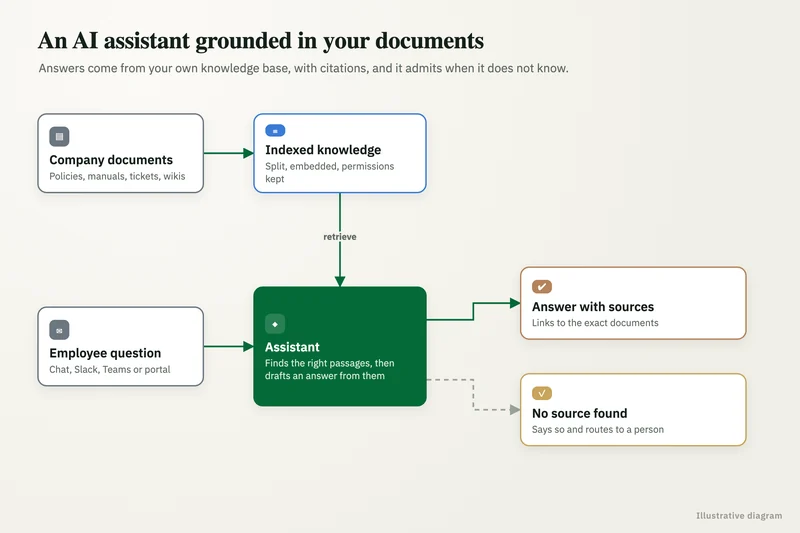
An AI chatbot for business answers from company documents using retrieval: it searches an index of your files for the passages most relevant to the question, gives only those passages to the model, and has it answer with citations. If nothing relevant is found, it says so and hands the question to a person.
- Answers come only from your indexed documents, with a citation for each claim.
- File permissions carry into the index, so people see only what they could open.
- Below a relevance threshold, the bot says it does not know and escalates.
- A weekly eval set catches wrong answers before your customers or staff do.
What is an AI chatbot for business, and what makes it trustworthy?
It is an assistant that answers in plain language from a defined body of company knowledge. What makes it trustworthy is not the model but the design: it answers only from retrieved passages, cites them, and refuses when the evidence is missing.
Generic chatbots fail because they answer from the model's general training, which sounds confident and is often wrong about your products, prices and policies. Ours is grounded. Every answer links to the page, section or file it came from, so a customer can check it and an employee can open the full policy in one click.
How does retrieval with citations work?
Retrieval-augmented generation, usually shortened to RAG, works in two stages. First, your documents are split into passages and stored in a search index that understands meaning, not just keywords. Then, for each question, the system pulls the closest passages and asks the model to answer only from them, quoting where each point came from.
Good RAG development is mostly about the first stage. We split documents along their real structure (headings, clauses, table rows) rather than fixed lengths, attach metadata such as product, region and effective date, and combine meaning-based search with keyword search so part numbers and policy codes are found exactly. Indexes live in Pinecone, Qdrant, Supabase with pgvector or Azure AI Search, depending on where your data is allowed to sit.
What you get
What we deliver
Scoped and quoted at a fixed price after a free review.
Source inventory
A list of every document source, its owner, sync method and access rules.
Search index
Structured, permission-aware passages in a vector database in your account.
Chat interface
A website widget, Slack or Teams app, or Zendesk integration, branded and scoped.
Grounding rules
Citation requirements, relevance thresholds and escalation paths.
Eval set
Real questions with correct answers and expected refusals, rerun after every change.
Gap report
Escalated and unanswered questions grouped by topic, showing which documents to fix.
Which sources can the AI knowledge base include?
Most text your teams already maintain can go in: SharePoint sites and document libraries, Google Drive folders, help center articles, PDFs, Word files, spreadsheets and exported wiki pages. Solved tickets from Zendesk can be added too, which helps the bot answer the long tail of questions your help articles never covered.
The knowledge base stays in sync. We schedule re-indexing or trigger it when files change, remove passages from deleted or superseded documents, and record each source's last update date. A policy updated on Monday is what the bot cites on Tuesday.
- SharePoint and OneDrive libraries.
- Google Drive and Google Docs.
- Zendesk help center articles and solved tickets.
- PDF manuals, contracts and product sheets.
- Structured data such as price lists or spec tables.
Where can the chatbot live: website, Slack, Teams or Zendesk?
Wherever the questions are asked. A public website widget serves customers with public content only. An internal assistant in Slack or Microsoft Teams serves staff with internal content filtered by their permissions. Inside Zendesk, the bot can draft a reply with sources for the support agent to edit and send.
The same knowledge base can power all three with different rules for each channel. Public bots get tighter scope and a clear route to a human, such as a ticket form or live chat handoff. Internal bots can cover HR policy, IT how-tos, sales collateral and SOPs, each section visible only to the groups that should see it.
Each channel also gets its own analytics: questions asked, answer rate, escalation rate and the topics people return to most. Support leads use that view to decide which help articles to write next, and HR or IT teams use it to spot policies that staff keep misreading.
How do you stop the chatbot from making things up?
By refusing to answer without evidence, and by measuring it. If retrieval returns nothing above a relevance threshold, the bot says it could not find an answer and offers to pass the question on. The model is instructed to use only the supplied passages, and a check confirms each answer includes at least one valid citation.
Before launch we build an eval set of real questions with correct answers, including questions the bot should decline. We score accuracy, citation correctness and refusal behavior, and rerun the set after every document sync or prompt change. Questions that end in escalation are logged, which shows you exactly which documents are missing or out of date.
Is our data safe in an AI chatbot?
It can be, with the right account terms and architecture. We call models only through API or enterprise tiers rather than consumer apps, keep the index in your own cloud account where required, and log prompts and outputs so you can audit what was asked and answered.
Permissions are enforced at retrieval time: the bot only searches passages the user is allowed to see, so an internal assistant cannot leak a salary sheet to someone outside HR. For regulated content, models can run through Amazon Bedrock, Microsoft Foundry or as open-weight models inside your network, and any health data requires a signed BAA with each vendor that touches it.
Case study · Logistics company, UK
Route planning automation
Dispatch typed every address into Google Maps, which optimizes only 25 stops and cannot add time at each stop. A Python tool that loads addresses automatically, adds buffer time per stop and optimizes the full route.
- Manual address entry eliminated
- Delivery estimates customers could rely on
How it works
How an engagement runs
- 01
Free review
We look at your documents, channels and the questions people ask most.
- 02
Scope and sources
We agree sources, permissions, channels and a fixed price.
- 03
Index and build
We structure and index the documents, then build the chat interface.
- 04
Evaluate
We score answers against real questions and fix retrieval gaps.
- 05
Launch and monitor
The bot goes live with logging, escalation and a regular gap report.
FAQ
Frequently asked questions
What is RAG and why does a business chatbot need it?
RAG, or retrieval-augmented generation, means the chatbot searches your documents first and answers only from the passages it finds. Without it, a chatbot answers from general training data and will confidently get your products and policies wrong.
Can a chatbot answer from SharePoint or Google Drive?
Yes. We index SharePoint libraries and Google Drive folders, keep the index in sync as files change, and carry each file's access permissions into search so users only get answers from documents they can open.
Should we build a chatbot or an AI agent?
Build a chatbot when people need answers from documents. Build an agent when the system must also take actions, such as updating a record or creating a task. Many teams start with a grounded chatbot and add actions later.
How accurate is an AI knowledge base?
Accuracy depends mostly on the quality and structure of the source documents. We measure it on an eval set of your real questions before launch and track it after every change, rather than quoting a general figure.
Can the chatbot hand over to a human?
Yes. When it cannot find a confident answer, or when the user asks, it can open a ticket, start a live chat handoff or post the question to a named Slack or Teams channel with the conversation attached.
What does an AI chatbot for business cost?
We quote a fixed build price after a free review, based on the number of sources, channels and permission rules. Ongoing model, hosting and vector database costs are billed to your accounts, and our AI implementation cost guide covers market rates.
Keep reading
Related pages
Get started
Tell us what you want automated
Describe the task, the systems involved and the volume. We reply within one business day with an architecture, the tools we would use, running costs and a fixed-price build plan.
- Free 30-minute build review
- Fixed quote before any work starts
- You own the accounts, code, prompts and data
Prefer email? info@aiimplementationconsultants.com
Get a free build plan
Two lines is enough to start.