

Integration
AI integration services that connect models to the systems you already run
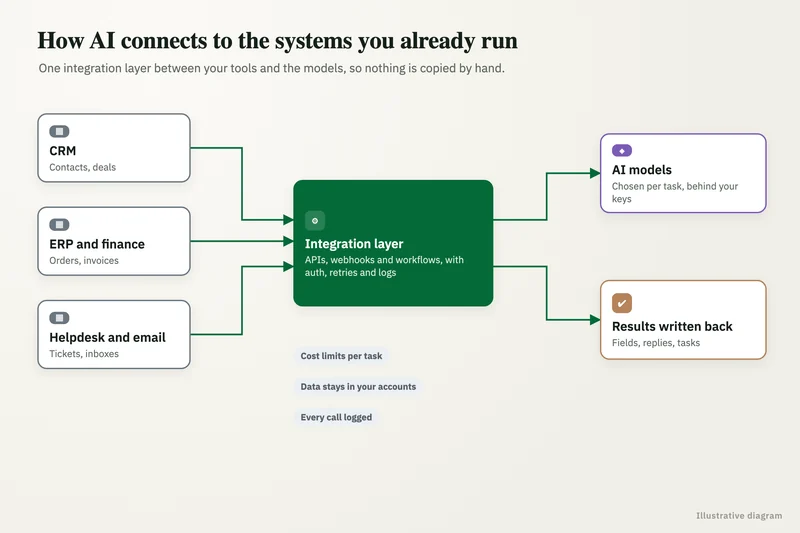
Our AI integration services connect language models to the CRM, ERP, accounting, ticketing and document systems your teams use every day, so AI output lands as a record, a note or a draft where people already work. They are for IT and operations leads who want AI reading from and writing to Salesforce, HubSpot, NetSuite, QuickBooks, Zendesk or SharePoint without opening a security hole or creating a second copy of the truth.
Get a free build plan
Two lines is enough. A specialist replies within one business day.
Quick answer
What are AI integration services?
AI integration services connect AI models to a company's business systems so the AI can read the data it needs and write results back safely. The work covers API access, field mapping, permission scopes, retries and error handling, write-back rules, and logging of every prompt and output, so the integration can be audited and maintained.
- We map every field the AI reads and every field it may change before go-live.
- Service accounts use least-privilege scopes, and every call is logged.
- Failed writes retry safely and alert a person instead of failing silently.
- Integrations run in n8n, your cloud or Python, whichever your team can maintain.
What do AI integration services cover?
They cover the plumbing between a model and your systems: authentication, reading the right records, shaping them into a prompt, validating what comes back and writing it to the right place. The model call itself is usually the smallest part of the work.
As an AI integration company we spend most of our time on questions like these. Which Salesforce object holds the information the AI needs? Should the AI update the opportunity directly or leave a task for the rep? What happens when the NetSuite API rate limit is hit halfway through a batch? Who gets told when a write fails? Answering them in writing before the build is what keeps an integration working a year later.
How do you integrate AI with Salesforce or HubSpot?
We connect through each CRM's official API with a dedicated integration user, then agree a short list of objects and fields the AI may touch. Common builds summarize a call or email thread into a note on the contact, classify inbound leads and set an owner, draft follow-up emails for a rep to approve, or flag deals whose activity has gone quiet.
Triggers come from CRM webhooks or workflow rules, for example a new form submission in HubSpot or a stage change in Salesforce. The AI step runs outside the CRM, in n8n or a small Python service, and writes back only through the integration user. Drafts that reach customers are created as tasks or unsent emails, never sent automatically, unless you choose otherwise for a specific low-risk case.
- Lead classification and owner assignment on form submission.
- Call and email summaries posted as notes on the record.
- Draft replies queued for rep approval inside the CRM.
- Data hygiene: duplicate detection and missing-field suggestions.
What you get
What we deliver
Scoped and quoted at a fixed price after a free review.
Field map
A document listing every object and field the AI reads or writes, with the reason for each.
Integration build
Working connections to your CRM, ERP, accounting or document systems via official APIs.
Validation layer
Business rules that check AI output before any write, with failures sent to review.
Retrieval index
A permission-aware search index over SharePoint, Google Drive or help center content where needed.
Logging and alerts
Full prompt, output and write logs, plus alerts to a named owner when a run fails.
Runbook
Plain instructions for rotating keys, rerunning failed jobs and changing field mappings.
Can AI read from and write to NetSuite or QuickBooks?
Yes, with tighter controls than a CRM because the records involve money. Typical builds read vendor bills, purchase orders and item lists so the AI can match an incoming invoice, propose a GL coding or flag a price mismatch.
Writes to NetSuite or QuickBooks go through validation first: the vendor must exist, totals must reconcile with line items, and the coding must fall within an allowed list. Anything that fails, or anything above an amount you set, waits in a review queue. We use sandbox accounts for testing wherever the platform offers them, so nothing reaches your live ledger until the eval set passes.
How do you connect AI to SharePoint, Google Drive and Zendesk?
Document sources are connected for retrieval: we index the files, keep the index in sync and respect the permissions people already have. A sales rep should not get an answer drawn from an HR folder they cannot open, so access rules travel with each document into the search index.
For SharePoint and Google Drive we sync on a schedule or on change, split documents into passages and store them in a vector database such as Azure AI Search, Pinecone, Qdrant or Supabase with pgvector. For Zendesk we can pull help center articles and solved tickets, then let the AI suggest a reply with links to its sources inside the agent's ticket view.
Where should the integration run: n8n, Python or your cloud?
Run it where your team can maintain it. n8n suits teams that want to see and edit each step visually, and it can be self-hosted so data stays in your environment. Python services suit heavier logic, large batches or teams with developers. Make and Zapier work for lighter flows with modest volume.
When data cannot leave your cloud, we deploy inside your AWS or Azure account and call models through Amazon Bedrock or Microsoft Foundry. Some teams now expose internal tools to models through MCP, which n8n supports; we use it where it reduces custom glue code, and avoid it where a plain API call is simpler to secure.
How do you keep AI integrations secure and auditable?
Every integration uses its own service account with the minimum scopes it needs, and keys live in a secrets store rather than in workflow text. Every prompt, model response and resulting write is logged with a timestamp and record ID, so you can trace any change back to the input that caused it.
We also handle the failures people forget. Writes are idempotent, so a retry does not create a duplicate record. Rate limits trigger a back-off rather than a crash. A failed run alerts a named person in Slack, Teams or email with enough detail to fix it. One of our case studies, an Australian insurance brokerage, shows why this matters: the pipeline that standardizes every insurer's spreadsheet into one dashboard lifted reporting accuracy from about 75% to 99% because every input is validated before it is loaded.
Case study · Insurance brokerage, Australia
Automation and dashboarding
Policy data arrived as spreadsheets from several insurers, each in a different structure, and every client report took hours of manual cleanup. An automated pipeline that standardizes every insurer's file and feeds a single reporting dashboard.
- Report time cut from 4-5 hours to under 5 minutes
- Reporting accuracy up from about 75% to 99%

How it works
How an engagement runs
- 01
Free review
We look at the systems, the API access available and what the AI should change.
- 02
Field and permission map
We agree read and write scopes in writing before any access is granted.
- 03
Sandbox build
We build and test against sandbox or copy data using real past cases.
- 04
Live cutover
The integration goes live with review queues on and alerts routed to your team.
- 05
Handover
You receive the code, workflow exports, logs and runbook.
FAQ
Frequently asked questions
Can we integrate our own choice of AI model with Salesforce?
Yes. We connect models from OpenAI, Anthropic, Google or AWS to Salesforce through its standard API with a dedicated integration user. That keeps the model choice yours and lets you control exactly which objects and fields are touched.
Does AI integration require replacing our current systems?
No. The point of an integration is to add AI to the systems you already have. The AI reads from and writes to your existing CRM, ERP and document stores through their APIs.
Is our data used to train the AI model?
We only use model vendors on API or enterprise tiers, and during scoping we check the data terms that apply to your account before any real records are sent. Where those terms are not strict enough, models can run through Amazon Bedrock, Microsoft Foundry or as open-weight models in your own cloud.
What happens if the AI writes something wrong into our CRM or ERP?
Every write is logged against its input, so it can be found and reversed. Validation rules and confidence thresholds stop most bad outputs before they are written, and high-risk changes always wait for a person to approve.
Should we use n8n, Zapier or Make for AI integrations?
n8n suits teams that want self-hosting and complex branching, Zapier suits simple flows across many SaaS apps, and Make sits in between. We recommend based on volume, data rules and who will maintain the flows after handover.
What does an AI integration project cost?
We quote a fixed price after a free review, based on the number of systems, the write-back rules and the volume. Ongoing vendor costs are paid on your accounts, and our AI implementation cost guide covers market rates.
Keep reading
Related pages
Get started
Tell us what you want automated
Describe the task, the systems involved and the volume. We reply within one business day with an architecture, the tools we would use, running costs and a fixed-price build plan.
- Free 30-minute build review
- Fixed quote before any work starts
- You own the accounts, code, prompts and data
Prefer email? info@aiimplementationconsultants.com
Get a free build plan
Two lines is enough to start.