

Build guide
Slack AI chatbot: when to use Slackbot, a no-code tool or a custom build
A Slack AI chatbot answers employee questions inside Slack using your company's documents, tickets and systems, and hands off to a person when it cannot. This guide is for IT, ops, support and people teams who want one, and need to decide between Slack's built-in Slackbot, a no-code bot tool and a custom app built for their own workspace, with the architecture, costs and pitfalls of each.
Get a free build plan
Two lines is enough. A specialist replies within one business day.
Spec: quick answer
How do you build a Slack AI chatbot for company knowledge?
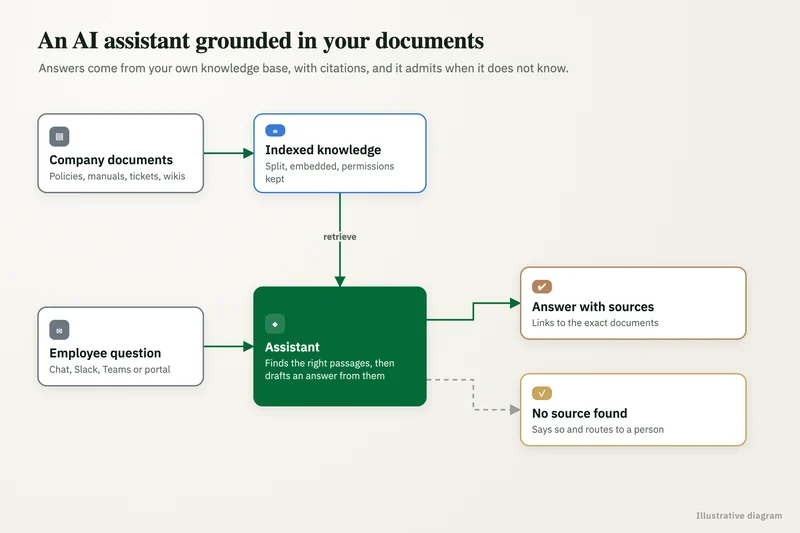
A Slack AI chatbot for company knowledge is a Slack app that receives messages, searches approved sources such as Google Drive, SharePoint, Confluence or a ticketing system, asks a model such as OpenAI, Claude or Gemini to answer with citations, and escalates to a human channel when confidence is low. You can use Slackbot, a no-code tool or a custom internal app.
- Try Slack's built-in Slackbot first if answers only need Slack conversations and files.
- Slack's 2025 API limits slow down third-party bots that are not Marketplace-approved.
- Internal apps built for your own workspace keep the higher Slack API limits.
- Retrieval quality, permissions and human handoff decide success more than the model.
What can a Slack AI chatbot do?
A Slack AI chatbot works where your staff already ask questions: in direct messages, in a help channel such as #ask-it or #hr-help, or in a thread under a post. The useful versions do three jobs well. They answer from approved sources and show which document the answer came from, they take simple actions such as opening a ticket or looking up an order, and they pass the question to a named person when they are not sure.
The most common internal uses are IT help desk questions (VPN, password resets, laptop requests), HR and benefits policy questions, sales enablement (pricing rules, product specs, approved case material) and operations runbooks. Customer-facing bots that route website chats into a Slack channel for staff to answer are a different product category; this guide covers the internal kind.
Slackbot, a no-code tool or a custom build: which should you choose?
Start with what Slack already includes, move to a no-code tool when you need outside sources with little setup, and build a custom app when the bot must reach internal systems, take actions or follow strict data rules. Slack's pricing page (checked November 2026) lists Slackbot as a personal AI agent along with AI search, conversation summaries and file summaries across its plans, and adds enterprise search across connected apps, databases and systems on Enterprise+.
The table sets out the trade-offs we discuss with buyers. None of these options is wrong; they fit different scopes.
| Question | Built-in Slackbot | No-code bot tool | Custom internal app |
|---|---|---|---|
| Knowledge it can use | Slack messages and files; connected apps on Enterprise+ | Uploaded docs and the tool's own connectors | Any source you can reach by API, with your own retrieval rules |
| Actions in other systems | Limited to what Slack and its partners support | Depends on the tool's integrations | Whatever you build: tickets, CRM lookups, approvals |
| Slack API limits | Not affected (Slack's own feature) | Slower history reads if the app is not Marketplace-approved | Higher limits for internal customer-built apps |
| Data location | Inside Slack | The vendor's servers | Your own cloud account and model provider |
| Setup effort | Hours | Days | Weeks |
| Best for | Searching and summarizing Slack itself | A quick FAQ bot over a few documents | Bots that act, follow strict permissions or span many systems |
How do Slack's 2025 API rate limits affect AI chatbots?
Slack cut the read limits for third-party apps that are not approved for the Slack Marketplace, and that changes how well some bots can read conversation history. According to Slack's developer changelog of May 29, 2025, the conversations.history and conversations.replies methods for commercially distributed, non-Marketplace apps dropped to 1 request per minute with a maximum of 15 objects per request. The change applied at once to new apps and new installations, and later to existing installations.
The same changelog states that internal customer-built applications are not affected and keep the earlier allowance of more than 50 requests per minute and up to 1,000 objects per request. In practice that means a bot that needs to read thread context or summarize a long channel works far better as an app registered in your own workspace than as an unlisted third-party tool installed from a vendor's website.
Before buying a no-code Slack bot, ask the vendor whether its app is Marketplace-approved, and if not, how it reads thread history under the lower limits. Slack also reinforced rules on how third-party apps store, use and share data accessed through its APIs, which is a second reason to know exactly where a vendor keeps your messages.
How does a custom Slack AI chatbot work?
A custom Slack AI chatbot is mostly a retrieval system with a Slack front end. Slack's developer documentation now provides surfaces built for AI apps: a split-view container, app threads, text streaming so answers appear as they are written, and suggested prompts. It also documents a Slack MCP server and a Slackbot MCP client for connecting agents to tools. Slack's own Bolt for Python sample chatbot lets an admin choose Anthropic, OpenAI or Google Vertex AI as the model provider, which shows the model is the easiest part to swap.
When we build one, the flow for each question is the same. The design choices inside each step are what separate a trusted bot from one people stop using after a week.
- Receive: the app gets the message event, the user's ID and the thread it belongs to.
- Check access: map the Slack user to their identity in Google Workspace or Microsoft Entra ID and load only the sources they are allowed to see.
- Retrieve: search an index of approved documents (Google Drive, SharePoint, Confluence, Notion, help center articles) stored in a vector database such as Pinecone, Qdrant or Supabase with pgvector.
- Answer: send the question and the top passages to the model with instructions to answer only from them and cite each source.
- Decide: if retrieval scores are low or the model reports low confidence, say so plainly and route the question to the owning team's channel with a link to the thread.
- Act: for allowed actions, such as creating a Jira or Zendesk ticket, ask the user to confirm before writing anything.
- Log: store the question, sources used, answer, cost and any thumbs-down feedback for review.
How do you keep a Slack bot from exposing private information?
Make the bot respect the same permissions as the source systems, and never index anything you would not show the whole company unless you also enforce per-user access at query time. The most common failure is a bot indexed with an admin account, so any employee can ask about files only managers should see.
Three controls cover most of the risk. First, index only approved folders and spaces, chosen with each data owner. Second, filter retrieved passages by the asking user's group memberships before they reach the model. Third, decide which channels the bot may answer in, since an answer posted in a public channel is visible to everyone in it, even if the asker was entitled to the source. For health, financial or HR case data, keep the bot out of scope until your compliance lead approves the setup; this is not legal advice.
What does a Slack AI chatbot cost?
Cost depends on the route. Slackbot features come with your Slack plan, so the only cost is the plan itself. No-code tools charge their own subscription or usage fees. A custom app has a one-time build plus a monthly bill for model usage, the vector database, hosting and logging, all paid to your own vendor accounts.
Running costs for a custom bot are driven by question volume and how much text is sent with each question. The model line is simple arithmetic: questions per month x average tokens per question (the question, about six retrieved passages and the answer) x your provider's published per-token rate. A 300-person company where staff ask 1,500 questions a month should measure the middle number during the pilot rather than guess it, because passage length varies widely between a short FAQ and a long policy manual. We log tokens per question in the pilot, set a monthly cap and alert at 80% of it, so the first invoice holds no surprises. For published market figures on chatbot builds and subscriptions, see our AI chatbot cost guide.
The bigger cost is usually people's time if the bot is wrong. Every confident wrong answer about a policy creates rework and erodes trust, which is why the evaluation and handoff steps below are not optional.
How to build a Slack AI chatbot in six steps
A focused internal bot for one team typically goes from kickoff to pilot in four to six weeks when the sources are already in good shape. These are the steps we follow.
- Pick one team and one channel, and collect 50 real questions from its history with the correct answers and source documents.
- Agree on sources with each data owner, clean up stale or duplicate documents, and record who may see what.
- Register an internal Slack app in your workspace with the minimum scopes it needs, and connect it to your identity provider.
- Build the retrieval index and answer flow with citations, a confidence threshold and a human handoff to the team's channel.
- Run the 50-question test set, fix the sources or prompts behind each wrong answer, and repeat until the team signs off.
- Launch to the pilot team, review logs and thumbs-down answers weekly for a month, then add the next team.
Common mistakes and when not to build a Slack bot
The mistakes we see most are pointing the bot at an entire Drive or wiki full of outdated pages, launching to the whole company before one team has tested it, measuring success by message count instead of questions resolved without a human, and having no owner who reviews wrong answers each week.
Do not build a custom bot if Slackbot already answers the questions your staff ask, if fewer than a few dozen questions a week reach the help channel, or if the underlying documents are so out of date that a person would give the wrong answer too. Fix the documents first. And if your company is moving from Slack to Microsoft Teams, build the retrieval layer so it can serve either front end; our SharePoint AI chatbot guide covers the Microsoft side.
How we build Slack AI chatbots
We build Slack AI chatbots as internal apps registered in your own workspace, grounded in your approved documents with citations, permission checks against your identity provider, confidence thresholds, human handoff to the owning team and logging of every answer. They can create tickets in Jira, Zendesk or ServiceNow and look up records in HubSpot, Salesforce or NetSuite, always with a confirmation step before anything is written.
Every project starts with a free review of your questions, sources and data rules, then a fixed price for a defined scope. You own the Slack app, code, prompts, index and data from day one, and model and hosting bills go to your accounts. Our AI chatbot for business service covers the same build for websites and other channels.
Case study · Logistics company, UK
Route planning automation
Dispatch typed every address into Google Maps, which optimizes only 25 stops and cannot add time at each stop. A Python tool that loads addresses automatically, adds buffer time per stop and optimizes the full route.
- Manual address entry eliminated
- Delivery estimates customers could rely on
FAQ
Frequently asked questions
Does Slack have a built-in AI chatbot?
Yes. Slack's pricing page lists Slackbot as a personal AI agent alongside AI search and conversation summaries, and Enterprise+ adds enterprise search across connected apps and systems. It works best for questions answered by Slack messages and files. For other sources, actions in other systems or strict access rules, teams add a custom or third-party app.
Can a Slack bot answer questions from Google Drive, SharePoint or Confluence?
Yes. A custom Slack app can index approved folders and spaces from those systems, retrieve the relevant passages for each question and have the model answer with links to the source documents. Access should be filtered by each user's permissions so the bot does not reveal files they cannot open.
Which AI model is best for a Slack chatbot?
OpenAI, Claude and Gemini all work well for internal question answering, and Slack's own sample app supports all three providers. Retrieval quality and source hygiene affect answers far more than the model choice. Pick the provider your company already has a data agreement with, and keep the code able to switch.
Do Slack's API rate limits affect custom AI bots?
Internal apps built by a company for its own workspace are not affected by Slack's May 2025 limits, according to Slack's developer changelog. The lower limits of 1 request per minute for reading conversation history apply to commercially distributed apps that are not approved for the Slack Marketplace.
How long does it take to build a Slack AI chatbot?
A focused bot for one team, over sources already in decent shape, typically reaches pilot in four to six weeks. Cleaning up outdated documents, adding actions in other systems and rolling out to more teams add time.
How do you stop a Slack AI bot from making up answers?
Make it answer only from retrieved passages, require a citation for every answer, and set a confidence threshold below which it says it does not know and routes the question to a person. Test it against a set of real questions with known answers before launch and review thumbs-down answers every week.
Can a Slack AI chatbot create tickets or update our CRM?
Yes, a custom app can create Jira, Zendesk or ServiceNow tickets and look up or update HubSpot or Salesforce records through their APIs. Any write should show the user what will change and wait for confirmation, and every action should be logged.
Keep reading
Related pages
Get started
Tell us what you want automated
Describe the task, the systems involved and the volume. We reply within one business day with an architecture, the tools we would use, running costs and a fixed-price build plan.
- Free 30-minute build review
- Fixed quote before any work starts
- You own the accounts, code, prompts and data
Prefer email? info@aiimplementationconsultants.com
Get a free build plan
Two lines is enough to start.