

Build guide
SharePoint AI chatbot: which build fits, what it costs and how to keep it safe
A SharePoint AI chatbot answers employee questions from your SharePoint sites, pages and document libraries, with a link to the file each answer came from. You can get one three ways: Microsoft's built-in agents in SharePoint, an agent built in Copilot Studio, or a custom build on Microsoft Graph and a model of your choice. This guide is for IT, ops and support leads who need to pick a route, budget it with Microsoft's published meter, and launch without exposing files people should never see.
Get a free build plan
Two lines is enough. A specialist replies within one business day.
Spec: quick answer
How do you build an AI chatbot for SharePoint?
A SharePoint AI chatbot can be built three ways: a built-in agent in SharePoint for one site's documents, a Copilot Studio agent when you need actions and Teams deployment, or a custom build on Microsoft Graph when you need your own model, other systems or tight cost control. Every route must respect each user's SharePoint permissions and cite its sources.
- Built-in SharePoint agents are fastest, but unlicensed users cost $0.12 per answered question on Microsoft's meter.
- Permissions are the real project: fix oversharing in SharePoint before any chatbot reads it.
- Custom builds suit mixed sources, non-Microsoft models, actions in other systems or strict per-question cost caps.
- Test with 50 to 100 real questions and known answers before anyone outside IT uses it.
What is a SharePoint AI chatbot, and what can it actually do?
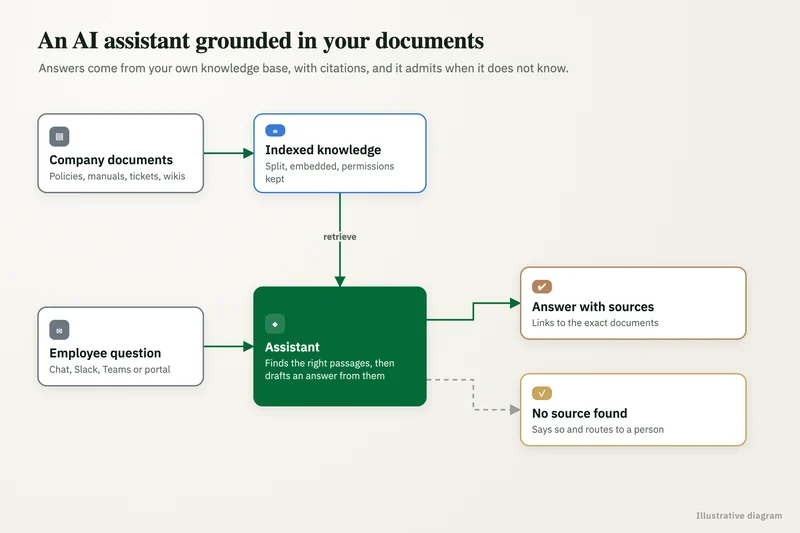
A SharePoint AI chatbot is a question-and-answer assistant grounded in the content you already store in SharePoint: policies, SOPs, contracts, product specs, project files and intranet pages. An employee types a question in plain language, the system retrieves the most relevant passages the person is allowed to see, and a language model writes a short answer with links to the source files.
This retrieval step is what separates a useful chatbot from a generic one. The model does not memorize your documents. It reads a handful of retrieved passages each time, so answers stay current when files change, and the citations let a reader check the answer in seconds.
What it should not do on day one is act without a person. Answering "What is our travel per diem for Chicago?" is low risk. Approving the expense, editing a contract or emailing a customer is not, and those steps belong behind a confirmation or a human-review queue.
- HR and policy questions: leave rules, benefits, handbook clauses, with the exact policy page linked.
- IT and ops help desk: how-to answers from runbooks before a ticket is raised in ServiceNow, Zendesk or Jira.
- Sales and support enablement: product specs, pricing rules and approved answers from a curated library.
- Project and engineering knowledge: specs, past proposals and lessons learned scattered across team sites.
What are the three ways to build a SharePoint AI chatbot?
The three routes differ mainly in licensing, control and how far beyond SharePoint the chatbot can reach. Most of the vendor pages that rank for this topic push their own tool and skip the comparison, so here it is side by side.
Agents in SharePoint are the built-in option. Microsoft's documentation (updated October 2026) says they need no activation: once a user has a Microsoft 365 Copilot license, or the organization has set up pay-as-you-go billing, agents become available on eligible sites where that user has permissions. Creating an agent requires a Copilot license; using one only requires a license or pay-as-you-go.
Copilot Studio is Microsoft's low-code builder. It suits a chatbot that needs topics, actions through Power Automate connectors, and deployment in Teams or on an intranet page, while staying inside Microsoft's stack.
A custom build uses Microsoft Graph or the Microsoft 365 Copilot Retrieval API for retrieval and calls OpenAI, Claude, Gemini or an open-weight model for the answer, usually inside an Azure, AWS or Google Cloud account you own. It takes more engineering, and gives you full control over the model, the prompt, logging, cost caps and connections to systems outside Microsoft 365.
| Factor | Agents in SharePoint | Copilot Studio agent | Custom build (Graph or Retrieval API) |
|---|---|---|---|
| Best for | Q&A over one site or library | Q&A plus simple actions inside Microsoft 365 | Mixed sources, own model, actions in other systems |
| Who can build it | Users with a Copilot license | Makers with Copilot Studio access | An engineering team or implementation partner |
| Model choice | Microsoft's | Microsoft-hosted models | Any: OpenAI, Claude, Gemini, Bedrock, open-weight |
| Where it runs | SharePoint and Copilot surfaces | Teams, web, Microsoft 365 | Teams, intranet, Slack, web app, API |
| Permission handling | Uses the user's own access | Uses the user's own access when signed in | Must be designed: delegated tokens or stored access lists |
| Cost model | Copilot seat, or $0.01 per message pay-as-you-go | Copilot Studio licensing; check Microsoft's current plans | Build fee plus model, search and hosting usage |
| Time to first answer | Same day | Days to weeks | Weeks, depending on scope |
How much does a SharePoint AI chatbot cost to run?
Microsoft publishes the meter for the built-in route, which makes it the easiest to budget. Its pay-as-you-go pricing page lists agents in SharePoint at $0.01 per message, and its billing documentation explains that each interaction uses 12 messages: 10 for grounding in your tenant's data and 2 for the generated answer. That works out to about $0.12 per answered question for a user without a Copilot license.
For users who do hold a Microsoft 365 Copilot license, Microsoft's billing table says interactive use of generative answers and tenant grounding is included at no extra cost. So the cost question becomes a seat question: are enough people asking enough questions to justify a Copilot license, or is per-question billing cheaper for occasional users?
A custom build has a different shape: a one-time build fee, then usage for the model, the search index, hosting and logging. Those costs depend heavily on question volume and document size, so we measure tokens per question during testing and set a cap per question rather than guess. Our AI chatbot cost guide covers published market ranges for custom builds.
Worked example: budgeting pay-as-you-go SharePoint agents
Take a 300-person company where 60 people already have Copilot licenses and 240 do not. The unlicensed group uses a policy assistant built as a SharePoint agent on the HR site, and each of them asks about 10 questions a month.
That is 2,400 interactions a month. At Microsoft's published 12 messages per interaction and $0.01 per message, the bill is 2,400 x $0.12 = $288 a month, charged to the Azure subscription linked to the billing policy. The 60 licensed users add nothing for interactive use.
Two things change this number quickly. If usage doubles after launch, so does the bill, because pay-as-you-go has no ceiling of its own. Microsoft's documentation points admins to budgets and alerts in Microsoft Cost Management, and lets you assign a billing policy to one security group per policy (up to 10 policies), which is how you limit the agent to the department that needs it. Set the budget alert before launch, not after the first invoice.
When do you need a custom SharePoint AI chatbot instead of built-in agents?
Start with the built-in agent if it answers the question well enough. Move to a custom build only when one of the conditions below is true, because each one is a real limit rather than a preference.
The Microsoft 365 Copilot Retrieval API sits between the two routes. Microsoft describes it as a way to ground your own AI solution in SharePoint, OneDrive and Copilot connectors without copying data into a separate index, while preserving permissions and compliance settings. It is included for users with a Copilot add-on license, and offered as pay-as-you-go in preview for unlicensed users on tenant-level sources such as SharePoint (not OneDrive). It also has documented limits worth checking against your content: up to 200 requests per user per hour, at most 25 results per query, semantic retrieval only for .doc, .docx, .pptx, .pdf, .aspx and .one files, and no retrieval from images or charts.
- You need answers that combine SharePoint with systems outside Microsoft 365, such as Salesforce, NetSuite, Zendesk or a product database.
- You want a specific model, such as Claude or an open-weight model in your own cloud, for quality, cost or data-residency reasons.
- The chatbot must take actions: create a ticket, draft a reply, update a record, with a person approving before anything is written.
- Key knowledge lives in scanned PDFs, spreadsheets or drawings that need extraction before they are searchable.
- You need per-question cost caps, full prompt and output logs, or an evaluation set rerun on every change.
- Most of the people asking questions will never get a Copilot license, and question volume makes per-message billing expensive.
How is a custom SharePoint AI chatbot built?
A custom build follows the same sequence every time, and most of the effort sits in access and testing rather than in the model call. These are the steps we follow, with the decisions made at each one.
- Scope the content: list the sites and libraries in scope, the owners who vouch for them, and the folders to exclude, such as drafts, archives and HR case files.
- Register the app in Microsoft Entra ID with the narrowest access that works. Sites.Selected grants nothing by default; an admin then gives the app Read on named sites only, instead of tenant-wide Sites.Read.All.
- Choose retrieval: the Copilot Retrieval API with a delegated user token (permissions enforced by Microsoft), or a sync through Graph delta queries into Azure AI Search, Qdrant or pgvector, storing each chunk's access list and filtering by the user's groups at query time.
- Parse and chunk: extract text from Word, PDF and pages, keep headings and the file URL with each chunk, and send scanned files through OCR.
- Write the answer prompt: answer only from retrieved passages, cite every file used, and say "I could not find this" with a suggested contact when retrieval comes back empty.
- Build the eval set: 50 to 100 real employee questions with known correct answers and source files, including questions the bot must refuse because the asker lacks access.
- Deploy where people work, usually Teams or an intranet web part, with Entra sign-in, prompt and output logging, a thumbs-down button that opens a review item, and a cost cap per question.
- Hand over: you own the Azure or cloud accounts, the code, the prompts and the logs, with a runbook for adding a site or changing a model.
How do you stop a SharePoint chatbot from exposing confidential files?
The chatbot will show people whatever their SharePoint permissions already allow, and that is the main risk. Built-in agents and permission-trimmed custom builds both respect access, which means any file shared with "Everyone except external users" years ago becomes searchable by everyone in a sentence. AI does not create oversharing; it makes existing oversharing easy to find.
So the first workstream is permissions, not prompts. Run a sharing report on the sites in scope, remove broad grants on sensitive libraries, apply sensitivity labels where your Microsoft 365 plan supports them, and exclude folders that should never be in scope. Then test with accounts from different departments and confirm that a question about payroll returns nothing for someone outside HR.
For a custom build, two further controls matter. If you index content into your own search store, the access list on every chunk must refresh when permissions change, or a removed user can still retrieve old passages. And logs of questions and answers are themselves sensitive, so they need the same retention and access rules as the documents.
SharePoint AI chatbot launch checklist
Use this list before anyone outside the project team gets access. Each item is cheap to do before launch and painful to retrofit once people rely on the answers.
- A named owner for every site and library in scope, who signs off that content is current.
- Oversharing cleanup done and tested with accounts from at least three departments.
- Duplicate and outdated versions removed or excluded, so the bot does not quote last year's policy.
- An eval set with pass rates recorded for correct answer, correct citation and correct refusal.
- A clear "I don't know" path that names a person, team or ticket queue.
- Budget alerts in Microsoft Cost Management, or a per-question cap in a custom build.
- Prompt and output logging with a retention period agreed with IT and legal.
- A feedback button and a weekly review of thumbs-down answers for the first month.
Common mistakes, and when not to build one
The most common mistake is pointing the chatbot at an entire tenant. Broad scope means more conflicting versions, more permission risk and vaguer answers. Start with one well-maintained library and one audience, such as the HR policy site for all staff or the support runbooks for the help desk.
The second is judging quality on demo questions. A bot that answers ten questions its builder chose can still fail half of what employees actually ask. Collect real questions from the help desk inbox or Teams channels first and test against those.
Do not build a SharePoint AI chatbot when the content itself is the problem. If nobody owns the documents, three versions of each policy exist and half the knowledge lives in people's heads, the chatbot will confidently quote the wrong file. Fix ownership and versions first. And if the real need is to pull fields out of invoices or forms and write them into a system, that is document processing, not a chatbot.
How we deliver a SharePoint AI chatbot
We start with a free review: the sites in scope, who will ask questions, a sample of real questions, your Microsoft 365 licensing and the systems the answers touch. If built-in SharePoint agents will do the job, we say so and help you set them up with sensible scope and budget alerts, because a custom build you do not need is wasted money.
When a custom build is the right call, we quote a fixed price for a defined scope. You own the Entra app registration, the cloud accounts, the code, the prompts and the logs from day one. A person stays in the loop on anything that touches money, customers or regulated data, and the eval set comes with the handover so your team can retest after every change.
Case study · Logistics company, UK
Route planning automation
Dispatch typed every address into Google Maps, which optimizes only 25 stops and cannot add time at each stop. A Python tool that loads addresses automatically, adds buffer time per stop and optimizes the full route.
- Manual address entry eliminated
- Delivery estimates customers could rely on
FAQ
Frequently asked questions
Can I add an AI chatbot to SharePoint without a Copilot license?
Yes. Microsoft lets organizations enable pay-as-you-go billing so users without a Copilot license can use agents in SharePoint, billed at $0.01 per message to an Azure subscription. Creating a new agent still requires a Copilot license, so at least one licensed person usually builds it. A custom build on Microsoft Graph needs no Copilot licenses at all.
How much does a SharePoint agent cost per question?
Microsoft's billing documentation says each SharePoint agent interaction uses 12 messages, 10 for grounding in tenant data and 2 for the answer. At $0.01 per message that is about $0.12 per answered question for unlicensed users. Interactive use by users with a Microsoft 365 Copilot license is included at no extra cost.
Does a SharePoint AI chatbot respect user permissions?
Built-in agents answer based on each user's existing access, and the Copilot Retrieval API preserves SharePoint permissions too. A custom build that copies content into its own index must store and refresh access lists itself, or it can leak files. In every case, a chatbot exposes whatever is already overshared, so clean up sharing first.
Can a SharePoint chatbot read PDFs, Excel files and scanned documents?
Text-based PDFs, Word files, PowerPoint decks and SharePoint pages work well. Microsoft's Retrieval API documentation limits semantic retrieval to .doc, .docx, .pptx, .pdf, .aspx and .one files and does not retrieve from images or charts. Scanned documents and complex spreadsheets need OCR or extraction in a custom pipeline before they are searchable.
Is Copilot Studio better than a custom build for a SharePoint chatbot?
Copilot Studio is usually faster and cheaper to start when everything lives in Microsoft 365 and the bot needs simple actions through Power Automate. A custom build makes more sense when you need a non-Microsoft model, data from systems like Salesforce or NetSuite, strict cost caps per question, or full logs and evaluation under your own control.
How long does it take to build a SharePoint AI chatbot?
A built-in SharePoint agent on one site can answer questions the same day it is created. A custom build typically takes several weeks, and most of that time goes into permissions cleanup, document parsing and testing against real questions rather than the model itself. Narrow scope, one library and one audience, is the biggest factor in speed.
Keep reading
Related pages
Get started
Tell us what you want automated
Describe the task, the systems involved and the volume. We reply within one business day with an architecture, the tools we would use, running costs and a fixed-price build plan.
- Free 30-minute build review
- Fixed quote before any work starts
- You own the accounts, code, prompts and data
Prefer email? info@aiimplementationconsultants.com
Get a free build plan
Two lines is enough to start.