

Integration guide
Dynamics 365 AI integration: Copilot, Copilot Studio, MCP or a custom build
Dynamics 365 AI integration in 2026 means picking one of four routes: the Copilot features and prebuilt agents Microsoft ships inside Dynamics 365, agents you build in Copilot Studio, the Dataverse MCP server that lets Claude and other MCP clients work with your CRM data, or an external service that reads and writes records through the Dataverse or Business Central APIs. This guide is for sales, service, finance and IT leads running Dynamics 365 who know which job they want automated and need to choose a route, work out what it costs to run, and switch it on without corrupting records.
Get a free build plan
Two lines is enough. A specialist replies within one business day.
Spec: quick answer
How do you integrate AI with Dynamics 365?
You integrate AI with Dynamics 365 by switching on the Copilot features and agents in your licence, building Copilot Studio agents billed in Copilot Credits, connecting Claude or another MCP client to the Dataverse MCP server, or running an external service on the Dataverse or Business Central APIs for high-volume, rules-heavy work with human approval.
- Sales Enterprise includes Copilot; Premium adds 1,000 Copilot Credits per user each month.
- Copilot Studio agents bill per action, and prepaid tenants that pass 125% of capacity get agents disabled.
- The Dataverse MCP server suits people asking questions in Claude, not unattended record processing.
- Dataverse cancels any operation over 2 minutes, so long model calls belong outside plug-ins.
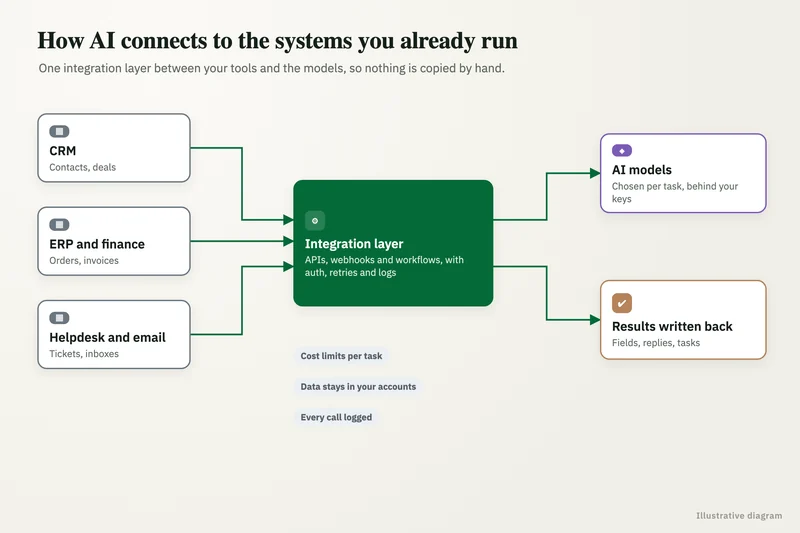
What are the four ways to integrate AI with Dynamics 365?
The right route depends on who starts the work and whose rules it follows. If a seller wants a pipeline summary or a draft follow-up, the Copilot features already in Dynamics 365 Sales may do the job with no build at all. If a new lead, a support email or a vendor invoice should be read, classified and written back to the record with nobody typing a prompt, you are choosing between Copilot Studio and an external service.
Dynamics 365 is not one product under the hood, and that matters for integration. Sales, Customer Service, Field Service and Customer Insights store their data in Dataverse, so they share one API, one MCP server and one set of limits. Business Central, the small and mid-size ERP, has its own API and its own limits. Finance and Supply Chain Management sit in a third stack. Most of this guide covers the Dataverse apps and Business Central, which is where most US mid-market teams start.
| Route | What it is | Best for | Main limit |
|---|---|---|---|
| Built-in Copilot and prebuilt agents | Copilot features and Microsoft agents that come with Dynamics 365 Sales Enterprise, Sales Premium and the Customer Service plans | Summaries, email drafts, case and knowledge agents where Microsoft's default logic fits | You configure, you do not design; usage beyond included credits is billed in Copilot Credits |
| Copilot Studio agents | Microsoft's low-code agent builder, with Dataverse knowledge, Power Automate flows and connectors as tools | Agents for Teams, a website or an internal process that run inside Microsoft's security model | Every answer and action consumes credits, and behaviour stays within what the builder supports |
| Dataverse MCP server | Microsoft's MCP endpoint for Dataverse that Claude desktop, Claude Code and other MCP clients can connect to | Managers and analysts asking questions of CRM data and making small edits in a chat client | A person drives each session; nothing runs on a trigger or schedule |
| External custom service | Your own code using an Entra app registration, the Dataverse Web API or Business Central API, and any model provider | High-volume, multi-system or rules-heavy jobs: lead routing, email-to-case triage, invoice matching, data cleanup | Needs design, testing, monitoring and a named owner |
What did Microsoft add to Dynamics 365 AI in October 2026?
Microsoft moved Dynamics 365 data into Microsoft 365 Copilot and Teams. According to Microsoft 365 message center post MC1492151, a phased rollout that began on 8 October 2026 brings thirty sales and service skills (pipeline summaries, opportunity risk checks, follow-up drafts, segment building) into Microsoft 365 Copilot, Dynamics 365 CRM inside Teams as a public preview, and a Sales Development Agent in public preview for automated prospecting.
Two details matter for budgeting. The post says the experience needs licences for Microsoft 365 Copilot, Dynamics 365 and Teams, plus admin activation for the channel agent and the Sales Development Agent. It also says that from 16 November 2026 the Sales Development Agent moves to usage-based billing through Copilot Credits. In other words, the newest Microsoft agents follow the same pattern as Copilot Studio: the licence opens the door and the credits pay for the work. Before you switch any of them on, decide who owns the credit budget and which environment's capacity they draw from.
How much does Dynamics 365 AI cost to run?
The cost has two layers: the user licence that unlocks AI features, and Copilot Credits that pay for agent activity. Microsoft's Dynamics 365 Sales pricing page (October 2026) lists Sales Professional at $65 per user per month, Sales Enterprise at $105 with Copilot in Dynamics 365 and agentic capabilities included, and Sales Premium at $150 with 1,000 Copilot Credits per user per month. All three are billed yearly. Microsoft 365 Copilot is a separate $30 per user per month add-on, billed yearly.
Copilot Studio is priced in credits pooled across the tenant. Microsoft's Copilot Studio pricing page lists a prepaid pack of 25,000 Copilot Credits for $200 a month, which works out to $0.008 per credit, with pay-as-you-go billing through Azure as the alternative. Microsoft Learn's billing rates page (updated 27 October 2026) sets the price of each activity, shown in the second table. Employee-facing use is included at no charge when the person using the agent holds a Microsoft 365 Copilot licence and the agent runs under that person's identity. An agent triggered by a new record runs on its own and pays the standard rate.
One rule surprises teams. On prepaid capacity, Microsoft Learn says enforcement starts when a tenant reaches 125% of its prepaid credits: custom agents are disabled and users see a message that the agent has reached its usage limit. Either link a pay-as-you-go meter or set a monthly cap per agent in the Power Platform admin center so a busy month does not switch off a customer-facing agent.
| Item (Microsoft pricing and Learn pages, Oct 2026) | Listed price or rate | What it means in practice |
|---|---|---|
| Dynamics 365 Sales Enterprise | $105 per user per month | Copilot in Dynamics 365 and prebuilt agents included |
| Dynamics 365 Sales Premium | $150 per user per month | Adds 1,000 Copilot Credits per user per month |
| Copilot Studio credit pack | $200 per month for 25,000 credits | About $0.008 per credit |
| Generative answer | 2 credits | About $0.016 at the pack rate |
| Agent action (trigger, tool call, reasoning step) | 5 credits | About $0.04 at the pack rate |
| Tenant graph grounding | 10 credits per message | Optional; switch it off where you do not need it |
| Agent flow actions | 13 credits per 100 actions | Cheap for fixed steps that need no reasoning |
Can you connect Claude or ChatGPT to Dynamics 365?
Yes, through the Dataverse MCP server, which covers the Dataverse-based apps such as Sales and Customer Service. Microsoft Learn's guide to connecting non-Microsoft clients (June 2026) names Claude desktop and Claude Code and documents two methods. The local proxy uses Microsoft's @microsoft/dataverse npm package and needs a tenant admin to consent once and enable the Dataverse CLI client for the environment. The remote endpoint at your-org/api/mcp needs your own Microsoft Entra app registration with the Dynamics CRM mcp.tools permission, added to the environment's allowed MCP clients list in the Power Platform admin center.
Other MCP clients, including ChatGPT, can use the remote endpoint if they support the sign-in flow your Entra app needs, so test that before promising it to users. Whatever the client, the server is switched on per environment and the client signs in as the user, so their Dataverse security roles still apply. That makes it a good fit for a sales director asking which large opportunities have had no activity for 30 days. It is a poor fit for anything that must happen without a person: it does not watch for new records, apply your routing rules overnight or hold an update for approval.
When do you need a custom Dynamics 365 AI integration?
You need a custom build when the work must run without anyone starting it, follows rules specific to your business, or pulls in data that lives outside Dynamics 365. Copilot and Copilot Studio handle common jobs well. They get expensive or awkward when volume is high, when a step must read long documents, or when you want a different model provider for each task.
The reverse is also true, and a good partner should say it plainly. If the job is a summary, a draft email or a knowledge answer for licensed staff, and the data already lives in Dynamics 365, the features in your Enterprise or Premium licence may be enough. Paying for a custom build there is waste. The signals that point to a build are below.
- The trigger is a record change, an inbound email, a form or a schedule, hundreds or thousands of times a month.
- Decisions follow your rules: territory, ideal customer profile, entitlement level, credit terms, discount bands.
- The job needs data from another system: Business Central, a billing tool, a shared inbox, SharePoint or the web.
- The output changes owner, stage, credit status or customer messages, so it needs validation and an approval step.
- You want to choose OpenAI, Claude, Gemini, Bedrock or an open-weight model per task and see its cost per run.
- You need prompt and output logs, a test set of real records and a rollback path that you control.
Which Dynamics 365 API limits shape the build?
Limits decide the architecture more than the model does. The first rule: never call a model from inside a synchronous plug-in. Microsoft Learn's plug-in performance page says a Dataverse message operation, including every synchronous and asynchronous plug-in registered on it, must finish within 2 minutes or Dataverse rolls the whole operation back, and it advises keeping each plug-in under 2 seconds. A model call that reads an email thread and an attachment can blow through that, so the plug-in or a Power Automate trigger should only hand the record ID to an outside service that does the slow work and writes back.
The second rule: share the API budget politely. Dataverse service protection limits apply per user, per web server, over a five-minute sliding window, and a 429 response carries a Retry-After header that your code must honour. Daily entitlements sit on top: 40,000 Power Platform requests per paid Dynamics 365 user per 24 hours, and a tenant pool for application users of 500,000 requests plus 5,000 per licence, up to 10 million. Business Central runs its own limits, set per user, so a single integration account can hit them quickly; Microsoft suggests spreading heavy workloads across several service principals.
| Limit (Microsoft Learn, 2026) | Dataverse (Sales, Customer Service) | Business Central online |
|---|---|---|
| Request rate | 6,000 requests per user per 5 minutes, per web server | 6,000 OData requests per user per 5-minute sliding window |
| Concurrency | 52 or more concurrent requests per user | 5 concurrent OData requests per user; up to 95 more wait in a queue |
| Long work | 20 minutes of combined execution time per 5 minutes; 2-minute cap per operation | 8-minute timeout per OData request |
| Batching | Up to 1,000 operations per ExecuteMultiple request, but small batches are usually faster | Up to 100 operations per $batch request |
| Error to handle | 429 Too Many Requests with Retry-After | 429 when the queue is full; 503 after 8 minutes queued |
Worked example: AI lead qualification in Dynamics 365 Sales
This is an illustration with round numbers, not a client result. A US distributor receives 2,000 web and email leads a month into Dynamics 365 Sales. For each one, an inside sales rep checks whether the company already exists as an account, looks up size and industry, decides whether it fits, picks an owner by territory and creates a follow-up task. At 5 minutes a lead, that is about 167 hours a month.
As a Copilot Studio agent triggered on each new lead, suppose the agent takes five actions (read the lead, search accounts, check for duplicates, update the lead, create the task) and gives one generative answer to write the fit summary. At Microsoft's listed rates that is 25 + 2 = 27 credits a lead, or 54,000 credits a month. At the pack rate of $0.008 that is about $432 a month in credits, before any reasoning-model tokens, which Microsoft bills separately at 10 credits per 1,000 tokens. Because the agent runs on a trigger and not under a licensed user's identity, the Microsoft 365 Copilot inclusion does not apply.
As an external service, an Entra application user receives the new lead ID from a Power Automate trigger or a webhook, makes about six Dataverse calls per lead (read lead, search accounts, check duplicates, read territory, update lead, create task), roughly 12,000 calls a month. That is a tiny share of the 500,000-plus daily pool for application users. Its running cost is your model provider's token charges plus hosting, which we measure on a sample of real leads instead of guessing. If most leads clear the confidence threshold and the rest take a minute to review, the 167 hours drop to a few hours of exceptions. Which route wins depends on how custom the fit rules are and whether you need data from outside Dynamics 365, so we test both on your own records before quoting.
How do you keep Dynamics 365 data safe when you add AI?
Safety rests on three choices: which identity the AI acts as, which columns it may change, and where record data travels. The most damaging shortcut is running an integration under a user with the System Administrator role, because a bug or a cleverly worded email can then reach every table in the environment.
Treat inbound text as data, never as instructions. A lead's notes field, an email body or a chat message can carry wording meant to steer the model, so the service should only return a fixed set of fields and never pick its own tools based on what a customer wrote. If Dynamics 365 holds protected health information, each AI vendor that touches it must sign a Business Associate Agreement, and model vendors offer these only on certain API or enterprise tiers. This is not legal advice.
- An Entra application user with a custom security role limited to the tables and columns the job needs.
- AI output written to separate columns (AI Fit Score, AI Summary, AI Suggested Owner) before it touches anything reps rely on.
- Owner, stage, credit limit and outbound customer email changes held behind an approval step or a logged rule.
- Every prompt, output, cost and write logged against the Dataverse row ID or Business Central record, so changes can be traced and reversed.
- Built in a sandbox environment, then switched on for one team, queue or company before the whole tenant.
- A monthly Copilot Credit cap per agent, and an alert before any environment nears its allocation.
How do you choose a Dynamics 365 AI integration partner?
Choose a partner who starts with the route, not the tool they prefer to sell. If your licence already covers the job, a good partner will tell you and save you a build. If a build is right, the difference shows up on messy records: a contact attached to the wrong account, a lead from a free email domain, a Business Central customer with two ship-to addresses, a record locked by a nightly import.
We scope every Dynamics 365 build after a free review of your environment, a sample of real records and the systems around it, then quote a fixed price. You own the Entra app registration, code, prompts and model accounts from day one, and a person approves anything that changes money, ownership or what a customer receives. Ask every vendor on your shortlist the questions below, us included.
- Which route would you use for this job (built-in Copilot, Copilot Studio, MCP or a custom service), and why not the others?
- Which identity and security role will the integration run under, and which columns may it write?
- Where does a record go when the model is unsure, and who reviews it?
- How will you handle 429 responses, the 2-minute operation limit and our existing integrations' share of the API budget?
- How many real records will you test on before go-live, and what accuracy will you measure?
- What will it cost per month in Copilot Credits or model usage, and where is the cap set?
Case study · Logistics company, UK
Route planning automation
Dispatch typed every address into Google Maps, which optimizes only 25 stops and cannot add time at each stop. A Python tool that loads addresses automatically, adds buffer time per stop and optimizes the full route.
- Manual address entry eliminated
- Delivery estimates customers could rely on

FAQ
Frequently asked questions
Does Dynamics 365 have built-in AI?
Yes. Microsoft's pricing page says Dynamics 365 Sales Enterprise includes Copilot in Dynamics 365 and agentic capabilities such as prebuilt agents, and Sales Premium adds 1,000 Copilot Credits per user per month. Sales Professional at $65 is listed with core sales features only. Heavier agent use is billed in Copilot Credits.
How much do Copilot Credits cost?
Microsoft lists a prepaid Copilot Studio pack of 25,000 Copilot Credits for $200 a month, about $0.008 per credit, with pay-as-you-go billing through Azure as the alternative. Microsoft Learn rates a generative answer at 2 credits and an agent action at 5 credits, so cost depends on how many steps each conversation or task takes.
Can I connect Claude to Dynamics 365?
Yes. Microsoft documents connecting Claude desktop and Claude Code to the Dataverse MCP server, either through the @microsoft/dataverse local proxy or the remote /api/mcp endpoint with your own Entra app registration. An admin must enable the server and the client for each environment, and the client signs in as the user, so their security roles still apply.
Can I use OpenAI or Claude models instead of Microsoft's in Dynamics 365?
Yes, in two ways. Copilot Studio supports bring-your-own-model configurations through Azure Foundry, which Microsoft bills separately from Copilot Credits. Alternatively, an external service can call any provider (OpenAI, Claude, Gemini, Bedrock or an open-weight model) and write results back through the Dataverse or Business Central APIs.
Should I use Copilot Studio or build a custom Dynamics 365 AI integration?
Use Copilot Studio when the job is mostly conversational, the data lives in Microsoft systems and the credit cost at your volume is acceptable. Choose a custom build when the job runs on triggers at high volume, follows your own rules, needs data from other systems or must hold high-impact changes for approval.
Does AI work with Business Central as well as Dynamics 365 Sales?
Yes, but Business Central uses its own API rather than Dataverse, with per-user limits of 6,000 OData requests per five minutes and five concurrent requests. A custom service can read sales orders, vendor invoices or item data, run a model step and write results back, as long as it queues requests and retries on 429 responses.
How long does a Dynamics 365 AI integration take?
Turning on built-in Copilot features or connecting an MCP client is mostly licensing, admin settings and permission testing. A custom build, such as lead qualification with territory routing and a review queue, takes longer because it needs field mapping, sandbox testing on real records and monitoring. We size each workflow after a free review of your environment.
Keep reading
Related pages
Get started
Tell us what you want automated
Describe the task, the systems involved and the volume. We reply within one business day with an architecture, the tools we would use, running costs and a fixed-price build plan.
- Free 30-minute build review
- Fixed quote before any work starts
- You own the accounts, code, prompts and data
Prefer email? info@aiimplementationconsultants.com
Get a free build plan
Two lines is enough to start.