

Integration guide
NetSuite AI integration: connector, custom build or native features
NetSuite AI integration now has three routes: NetSuite's own built-in AI features, Oracle's free AI Connector Service that lets Claude or ChatGPT read and update records through MCP, and a custom build that runs unattended work like bill entry or order intake. This guide is for finance, ops and IT leads on NetSuite who know what they want automated and need to pick the right route, set it up safely and know when to bring in a build team.
Get a free build plan
Two lines is enough. A specialist replies within one business day.
Quick answer
How do you integrate AI with NetSuite?
You integrate AI with NetSuite in one of three ways: turn on native features such as Bill Capture and Text Enhance, connect an AI client like Claude or ChatGPT through the free NetSuite AI Connector Service (MCP), or build a custom integration over SuiteTalk REST, RESTlets or the N/llm module for unattended, high-volume work with human approval.
- The NetSuite AI Connector Service is free, but your AI client plan may not be.
- Chat connectors suit questions and light edits; scheduled work needs a custom build.
- Use a dedicated non-administrator role, because the connector refuses Administrator anyway.
- Concurrency limits are shared with your other integrations, so plan capacity before launch.
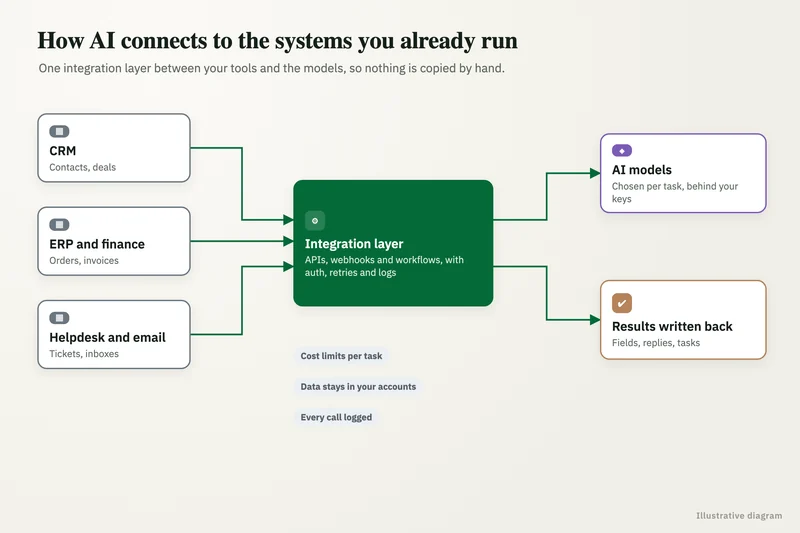
What are the three ways to do NetSuite AI integration?
The right route depends on who starts the work. If a person asks a question and reads the answer, the AI Connector Service with a chat client is usually enough. If documents, emails or orders arrive on their own and must be processed without anyone typing a prompt, you need a custom integration that runs on a trigger and writes back to NetSuite with checks in place.
Most NetSuite customers end up using more than one route. Finance might use the connector for ad hoc analysis in Claude while accounts payable runs a custom pipeline that reads vendor invoices from a shared inbox and creates bills for approval. The table below sets the three side by side.
| Route | What it is | Best for | Main limit |
|---|---|---|---|
| Native NetSuite AI features | AI built into NetSuite, such as Bill Capture, Text Enhance, Prompt Studio and NetSuite Expert | Teams that want AI inside screens they already use, with no extra systems | You get the features Oracle ships, configured within its options |
| AI Connector Service (MCP) | Oracle's protocol service plus the free MCP Standard Tools SuiteApp, used from Claude, ChatGPT or another MCP client | Analysts and managers asking questions, running saved searches and making small record edits in chat | A person drives every session; it is not a scheduler or document pipeline |
| Custom build | Code or workflow tooling calling SuiteTalk REST, RESTlets or SuiteScript (including the N/llm module), plus a model provider | Unattended, repeatable work: invoice and PO capture, order intake, vendor matching, exception triage | Needs design, testing, monitoring and someone to maintain it |
What is the NetSuite AI Connector Service and what can it do?
The NetSuite AI Connector Service is Oracle's implementation of the Model Context Protocol (MCP) for NetSuite. It sits between an AI client and your account, so a user can type a request in Claude or ChatGPT and the client calls NetSuite tools to answer it. Oracle's NetSuite Help Center FAQ (2026) says the service is not a paid feature and the MCP Standard Tools SuiteApp is free, although you may need a paid subscription for the AI client itself.
According to the same FAQ, the standard tools let you create, read and update records, run reports, run saved searches and execute SuiteQL queries, which are read-only. Every call respects the permissions of the NetSuite role the user connects with, and Oracle states that tools cannot run as administrators, cannot call external APIs and cannot run elevated scripts. You can also build your own tools on top of the service, and Oracle's setup documentation notes that custom tools can support MCP Apps, which show interactive screens inside compatible AI clients.
Client support is defined by protocol rather than by brand. Oracle lists the requirements as remote MCP support, protocol version 2025-06-18, streamable HTTP and OAuth 2.0 Authorization Code Grant with PKCE, and names Claude Pro or higher and ChatGPT as examples. Some clients need developer mode switched on before they will accept a custom MCP server.
How do you connect Claude or ChatGPT to NetSuite?
Setup takes an administrator a short session if the account is in good order, but the role design deserves more care than the clicks. Oracle's documentation and partner setup guides from Folio3 and Anchor Group describe the same sequence, summarized here.
- Enable features: Server SuiteScript, REST Web Services and OAuth 2.0 under Enable Features.
- Install the MCP Standard Tools SuiteApp from the SuiteApp Marketplace. Folio3 notes that the older sample tools SuiteApp is no longer listed.
- Create a dedicated, non-administrator role with the MCP Server Connection and OAuth 2.0 Access Tokens permissions, plus only the record, report and search permissions the use case needs.
- Assign that role to the users (or a named service user) who will connect, and restrict subsidiaries where relevant.
- In the AI client, add NetSuite as a custom connector using your account-specific MCP URL, then sign in through the OAuth screen and choose the MCP role.
- Test in a sandbox account first with read-only permissions, then add create and edit permissions one record type at a time.
When is the connector not enough for NetSuite AI integration?
The connector is built for a person in a conversation, so it stops being the right tool once the work has to happen without one. The clearest signal is a queue: vendor bills landing in an AP inbox, customer purchase orders arriving as PDFs, or item records that need enriching every night. Nobody should have to open Claude and type a prompt for each of those.
Volume and accuracy are the other signals. Oracle's FAQ says AI clients usually handle up to about 5,000 rows per call, which is fine for a question but awkward for a month-end reconciliation across a large ledger. And when output is written straight into transactions, you want validation rules, confidence thresholds and an approval step that a chat session does not give you.
A custom integration covers those gaps. A typical build watches a source (an email inbox, SharePoint or Google Drive folder, or an EDI drop), extracts fields with a model, checks them against NetSuite master data such as vendors, items and open purchase orders, and only then creates the record. Anything below the confidence threshold goes to a human-review queue instead of being posted. Our AI integration services page describes how we scope and hand over builds like this.
- Work is triggered by a file, email, form or schedule rather than a person.
- The same task runs dozens or hundreds of times a day.
- Output writes to transactions that affect money: bills, invoices, journal entries, credits.
- You need audit history longer than the connector's execution log keeps.
- The process also touches systems outside NetSuite, such as a CRM, a carrier portal or a supplier database.
What does a custom NetSuite AI integration look like in practice?
Here is a worked example using round numbers for illustration, not a client result. Suppose an AP team enters 600 vendor bills a month and each one takes about 4 minutes to key in, check against the purchase order and attach the PDF. That is roughly 40 hours a month of entry before any exceptions are chased.
A custom pipeline for this has five parts. A trigger picks up each invoice from the AP mailbox. An extraction step reads vendor, invoice number, dates, lines, tax and totals into a fixed schema. A matching step looks up the vendor and open purchase order in NetSuite through SuiteTalk REST or a RESTlet and compares quantities and amounts. A rules step flags duplicates, price variances and missing POs. Finally, clean matches are created as pending-approval vendor bills, and everything else lands in a review screen with the reason it was held.
If 70 percent of bills pass cleanly and the rest take a minute of review, the team's 40 hours shrink to a few hours of checking exceptions, and every posted bill still has a named approver. Your own pass rate depends on invoice quality and how clean your vendor and PO data are, which is why we measure it on a sample of real invoices before quoting. For AP specifically, compare this with NetSuite's native Bill Capture first, since it may cover simpler cases without any build.
How do you keep NetSuite data safe when you add AI?
Security in a NetSuite AI integration mostly comes down to roles, logs and where data goes. The connector inherits role permissions, so a sloppy role is the biggest risk. Oracle also points out that once you authorize a client, data sent to the third-party model is governed by that provider's privacy policy, so check whether your plan with OpenAI or Anthropic keeps prompts out of training and what retention applies.
Two Oracle details catch teams out. The connector's execution log, found on the integration record, keeps entries for 21 days in production and 7 days in sandbox, so export it if your auditors need a longer trail. And Oracle's setup documentation states that the AI Connector Service has not been assessed for HIPAA compliance, so healthcare organizations should not route ePHI through it without their own review. This is not legal advice.
- One dedicated role per use case (for example read-only finance analysis, and a separate role for edits).
- No Administrator or full-access roles; Oracle blocks Administrator for the connector anyway.
- Start read-only, then add create and edit permissions per record type after testing.
- Approval workflows stay on for bills, journals and credits, whoever or whatever creates them.
- Watch for prompt injection: text inside a vendor email or memo field should never be treated as an instruction.
- Export execution logs on a schedule and review them alongside your normal integration monitoring.
What about concurrency limits and other integrations?
AI traffic competes with everything else that talks to NetSuite. Oracle's FAQ says the connector's requests count against concurrency limits shared with your other integrations, and when the limit is exceeded, requests fail with a Too Many Requests error. If you already run a Shopify connector, a CRM sync and a 3PL feed, adding a busy AI client can cause those to fail at peak times, not just the AI.
Administrators can allocate concurrency per integration record, and that is worth doing before launch. For custom builds we also queue requests, retry with backoff, batch reads with saved searches or SuiteQL instead of record-by-record calls, and run heavy jobs outside business hours. These are cheap to design in and painful to add after a month-end failure.
Where do native NetSuite AI features and the N/llm module fit?
Native features are the first thing to check, because they cost nothing to build. Partner overviews such as Terillium's list Bill Capture for invoice capture in AP, Text Enhance and Prompt Studio for generating and tuning text inside NetSuite, NetSuite Expert as an in-product assistant, and exception management and narrative reporting in finance. If one of these covers your case well enough, turn it on before commissioning anything.
For developers, NetSuite's SuiteScript Generative AI API (the N/llm module, SuiteScript 2.1) calls large language models through Oracle Cloud Infrastructure Generative AI. NetSuite's product material describes methods to generate text, evaluate prompts stored in Prompt Studio and pass in documents for retrieval-grounded answers. It suits logic that must live inside NetSuite, such as summarizing a case on save. Work that spans other systems, or needs a specific model provider like OpenAI, Claude or Gemini, usually sits better in an external service that calls NetSuite's APIs.
How do you choose a partner for NetSuite AI integration?
Pick a partner who can show the failure handling, not just the demo. A chat connector answering a question about open sales orders looks the same from every vendor; the difference shows when an invoice has two PO numbers, the vendor record is a duplicate or the API returns a concurrency error at 5 p.m. on the last day of the month.
Ask each candidate the questions below and compare the answers in writing. We scope every NetSuite build after a free review of a real sample, quote a fixed price, and hand over the code, prompts, roles and accounts so you own all of it. For budgeting the build and the monthly model bill, see our AI implementation cost guide.
- Which route would you use for this workflow (native, connector or custom), and why not the others?
- What role and permissions will the integration use, and who approves changes to them?
- What happens to an input the model is unsure about, and who sees it?
- How will you test accuracy before go-live, on how many real documents?
- How do you handle concurrency limits alongside our existing integrations?
- Who owns the code, prompts and model accounts when the project ends?
Case study · Logistics company, UK
Route planning automation
Dispatch typed every address into Google Maps, which optimizes only 25 stops and cannot add time at each stop. A Python tool that loads addresses automatically, adds buffer time per stop and optimizes the full route.
- Manual address entry eliminated
- Delivery estimates customers could rely on

FAQ
Frequently asked questions
Is the NetSuite AI Connector Service free?
Yes. Oracle's NetSuite Help Center FAQ says the AI Connector Service is not a paid feature and the MCP Standard Tools SuiteApp is free. You may still need a paid plan for the AI client, such as Claude Pro or higher, and custom builds carry their own build and model usage costs.
Can ChatGPT connect to NetSuite?
Yes, through the NetSuite AI Connector Service, as long as the ChatGPT plan supports remote MCP connectors. Oracle notes some clients need developer mode enabled. The user signs in with OAuth and works under a non-administrator NetSuite role that limits what ChatGPT can see and change.
Why can't I use the Administrator role with the NetSuite MCP connector?
Oracle blocks the Administrator role for the AI Connector Service for access control and security. Create a custom role, or use an existing non-administrator role, and give it the MCP Server Connection and OAuth 2.0 Access Tokens permissions plus only the record permissions the use case needs.
Can AI create transactions in NetSuite?
Yes. The standard tools can create, read and update records if the connected role has those permissions, and custom integrations can create bills, sales orders or journals through SuiteTalk REST or RESTlets. For anything that moves money, keep NetSuite approval workflows on so a person approves AI-created transactions before they post.
Is NetSuite AI integration HIPAA compliant?
Not by default. Oracle's setup documentation says the AI Connector Service has not been assessed for HIPAA compliance and should not be used for ePHI unless you have independently confirmed it meets your obligations. A custom build can be designed around vendors that sign a BAA, but that needs its own review.
How long does a NetSuite AI integration take?
Connecting a chat client through the AI Connector Service is mostly configuration: enabling features, installing a free SuiteApp and designing a role, so the time goes into testing permissions in a sandbox. A custom pipeline, such as invoice capture with PO matching and an approval queue, takes longer because it needs extraction tuning, testing on real documents and monitoring, so scope it per workflow.
Does the NetSuite AI connector replace a NetSuite partner or developer?
For ad hoc questions and small edits, often yes, because it works out of the box with the right role. For scheduled processing, multi-system workflows, custom tools or longer audit trails, you still need someone to design, build and maintain the integration.
Keep reading
Related pages
Get started
Tell us what you want automated
Describe the task, the systems involved and the volume. We reply within one business day with an architecture, the tools we would use, running costs and a fixed-price build plan.
- Free 30-minute build review
- Fixed quote before any work starts
- You own the accounts, code, prompts and data
Prefer email? info@aiimplementationconsultants.com
Get a free build plan
Two lines is enough to start.