

Integration guide
Salesforce AI integration: Agentforce, hosted MCP or a custom build
Salesforce AI integration in 2026 comes down to four routes: Agentforce agents built on the platform, Salesforce's hosted MCP servers that let Claude, ChatGPT and other clients work with your org, the Models API with your own model provider, and an external service that reads and writes records through the Salesforce APIs. This guide is for sales, service and RevOps leads on Salesforce who know which job they want automated and need to choose a route, estimate what it costs to run and roll it out without damaging CRM data.
Get a free build plan
Two lines is enough. A specialist replies within one business day.
Quick answer
How do you integrate AI with Salesforce?
You integrate AI with Salesforce by building Agentforce agents (billed in Flex Credits or per conversation), connecting Claude, ChatGPT or another MCP client to Salesforce's hosted MCP servers, calling OpenAI, Bedrock, Azure OpenAI or Vertex AI through the Models API, or running an external service on the Salesforce APIs for high-volume, rules-heavy work with human approval.
- Agentforce bills per action or per conversation, so model your monthly volume before launch.
- Hosted MCP servers suit people asking questions in chat, not unattended record processing.
- Apex allows 100 callouts and 120 seconds per transaction, so long model work runs outside.
- Write AI output to dedicated fields first, and let a rule or a person promote it.
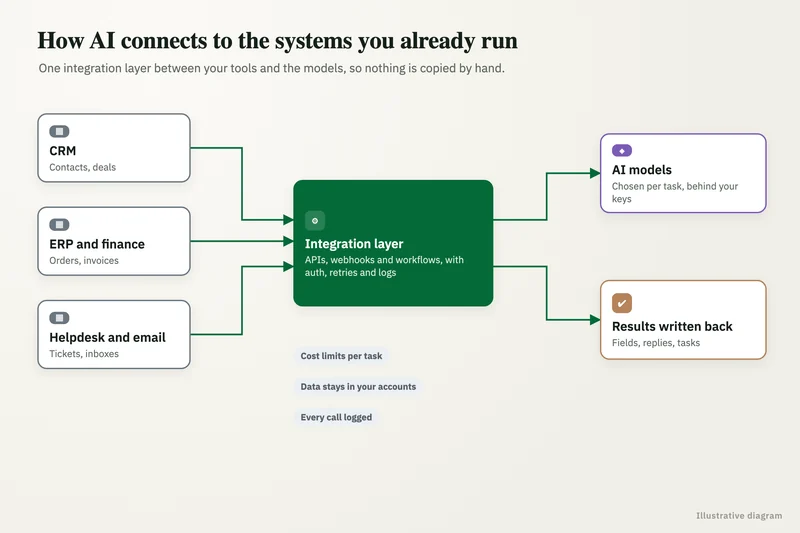
What are the four routes for Salesforce AI integration?
The route depends on who starts the work and how much of the logic is yours. If a rep asks a question and reads the answer, a chat client connected through MCP is often enough. If a new lead, an inbound email or a case update should trigger research, classification and field updates without anyone typing a prompt, you need Agentforce, Flow and Apex, or an external build.
Most Salesforce orgs end up running two routes side by side. Service might run an Agentforce agent on web chat, managers might query pipeline data through Claude, and RevOps might run an external service that enriches and routes every new lead. The table compares the four.
| Route | What it is | Best for | Main limit |
|---|---|---|---|
| Agentforce | Salesforce's own agent platform, configured with Agentforce Builder, Prompt Builder, topics and actions (Flows, Apex, prompt templates) | Service and sales agents that act on Salesforce data inside Salesforce's guardrails | Usage draws Flex Credits or per-conversation fees, and behaviour stays within what the platform supports |
| Hosted MCP servers | Salesforce-run MCP endpoints that expose records, Flows and Apex actions to Claude, ChatGPT, Cursor or your own agent over OAuth | People asking questions and making small edits from a chat client | A person drives each session; nothing runs on a schedule or a trigger |
| Models API with your own model | Prompt templates and Apex calling a model through Salesforce, including bring-your-own-LLM from OpenAI, Azure OpenAI, Amazon Bedrock or Vertex AI | Teams that want a specific provider but keep prompts inside Salesforce | Apex governor limits and the platform's supported provider list |
| External custom build | Your own service using a connected app, the REST or Bulk APIs, Change Data Capture or Platform Events, plus any model provider | High-volume, multi-system or rules-heavy jobs: lead triage, email-to-case, quote checks, data cleanup | Needs design, testing, monitoring and an owner who maintains it |
What does Agentforce cost in 2026?
Agentforce is priced by consumption or by user, and the consumption price is what moves with volume. Salesforce's Agentforce pricing page (October 2026) lists Flex Credits at $500 per 100,000 credits. A standard action uses 20 credits, which works out to $0.10, and an Agentforce Voice action uses 30 credits, about $0.15. The alternative consumption model is $2 per conversation.
An action is a step the agent takes: searching a knowledge source, running a Flow or Apex action, calling an external API, sending a message or handing off to a person. One customer conversation can therefore cost one action or a dozen, which is why the per-action and per-conversation models suit different traffic. Short, simple chats favour Flex Credits; long multi-step cases can favour the flat conversation fee.
Per-user options sit alongside this. The same page lists Agentforce add-ons for Sales, Service and Field Service at $125 per user per month, Industries add-ons at $150, and the Max edition from $550 per user per month with 2.75 million Flex Credits per org per year. Salesforce Foundations includes Agentforce Builder and Prompt Builder at no extra cost, so you can design and test before paying for usage.
| Agentforce item (salesforce.com pricing page, Oct 2026) | Listed price | What it means in practice |
|---|---|---|
| Flex Credits | $500 per 100,000 credits | $0.005 per credit |
| Standard action | 20 credits | About $0.10 per action |
| Agentforce Voice action | 30 credits | About $0.15 per action |
| Per conversation | $2 per conversation | Flat fee regardless of actions inside it |
| Sales, Service or Field Service add-on | $125 per user per month | For internal users working with agents |
| Max edition | From $550 per user per month | Includes 2.75M Flex Credits per org per year |
Can you connect Claude or ChatGPT to Salesforce?
Yes. Salesforce's hosted MCP servers became generally available at TDX 2026, and any MCP client, including Claude and ChatGPT, can connect to them over OAuth. Setup, as documented by Salesforce Time (July 2026), is an External Client App in Setup with OAuth and PKCE enabled, the mcp_api, refresh_token and offline_access scopes, and the client's callback URL. You then activate a server, copy its URL and add it as a custom connector in the client.
Salesforce ships standard servers for broad read and write access (sobject-all), read-only access (sobject-reads) and write-only operations (sobject-mutations), and you can define custom servers that expose specific Apex actions, Apex REST endpoints, Flows and Named Query API calls. The client works under the connected user's field-level security, sharing rules and permissions, so a rep cannot see more through Claude than in Salesforce itself.
Two vendor deals widen this. In October 2025 Salesforce and OpenAI announced Agentforce 360 inside ChatGPT and OpenAI models for building agents on the Salesforce Platform. On 26 August 2026 Salesforce and Anthropic announced Claudeforce, including Salesforce in Claude with 37 prebuilt sales skills, offered to pilot customers with an open beta expected in September 2026 (Digital Commerce 360). For a manager who wants to ask which renewals are at risk this quarter, these connectors may be all you need. They still assume a person in a chat session: they do not watch for new records, apply your scoring rules overnight or hold a write until someone approves it.
When do you need a custom Salesforce AI integration?
You need a custom build when work must run without a person starting it, when the rules are specific to your business, or when the data sits partly outside Salesforce. Agentforce and MCP cover common jobs well; they fit less well once volume is high, logic is unusual or a model call has to read large documents.
Apex is where many teams try first, and its limits decide how far that goes. Salesforce's Apex Developer Guide allows at most 100 callouts per transaction, with a cumulative callout timeout of 120 seconds and a default timeout of 10 seconds per callout. A model call that reads a long email thread, a contract PDF and a website can exhaust that budget, and it also ties the work to a single transaction. Heavier steps usually move to an external service that Salesforce notifies through Platform Events or Change Data Capture and that writes results back when it is done.
- Work is triggered by record changes, emails, forms or a schedule, many times a day.
- Decisions follow your rules: territory, ICP fit, entitlement, contract status, discount bands.
- The job needs data from NetSuite, a billing system, a support inbox, SharePoint or the web.
- Output writes to fields that drive routing, forecasts or customer messages, so it needs validation and approval.
- You want to choose the model provider (OpenAI, Claude, Gemini, Bedrock or an open-weight model) per task.
- You need prompt and output logs, cost caps per task, an eval set and a rollback path you control.
How is a custom Salesforce AI integration built?
A custom build has five stages: trigger, context, model, rules and write-back. Each has a Salesforce-specific detail that decides whether it survives the first busy month.
API allocation is the constraint most demos skip. Salesforce's published limits, as summarized by Coefficient (2026), give Enterprise Edition orgs 100,000 API requests per rolling 24 hours plus 1,000 per user license, so an org with 50 licenses gets about 150,000 a day, and allow 25 concurrent long-running requests (those over 20 seconds) in production. That allocation is shared with every existing integration: your marketing automation sync, ERP connector, data warehouse loader and any AppExchange packages. An AI service that reads each record one call at a time can push the org toward the limit, so we use composite and bulk calls, cache records that have not changed and monitor remaining requests.
- Trigger: Change Data Capture or a Platform Event published by a record-triggered Flow, so the service reacts to changes instead of polling.
- Context: one composite request for the lead or case, account, open opportunities and recent activity, plus outside data, with cached reads for unchanged records.
- Model step: a fixed output schema (category, fit score, reason, suggested owner, draft reply) so every field can be validated.
- Rules step: picklist values checked against the org's metadata, duplicate checks, a confidence threshold and a cost cap per task.
- Write-back: updates to AI-specific fields through an integration user, a Task or note with the reasoning, and low-confidence items routed to a review queue.
- Failure handling: queued requests, retries with backoff when limits or record locks bite, and an alert when a record fails twice; every write is safe to repeat.
Worked example: AI case triage on Service Cloud
This is an illustration with round numbers, not a client result. A B2B company receives 3,000 email-to-case cases a month. An agent spends about 4 minutes on each one reading the email, setting type, product and priority, linking the right account and contact, and picking a queue. That is 200 hours a month before anyone answers the customer.
On Agentforce, suppose the agent takes four standard actions per case: search knowledge, classify, update the case and draft a reply. That is 80 Flex Credits, about $0.40 per case, or roughly $1,200 a month at list price for 3,000 cases. Priced as conversations at $2 each it would be $6,000, which shows why the billing model matters as much as the agent design.
An external build listens for new cases through Change Data Capture, makes about five API calls per case (read case and contact, read account and entitlements, check for open duplicates, update fields, add a note), roughly 15,000 calls a month, which is a small share of even a 50-license Enterprise org's daily allocation. Its running cost is your model provider's token charges plus hosting, which we measure on a test sample rather than guess. If most cases clear the confidence threshold and the rest take a minute to check, triage time falls from 200 hours to a few hours of exception review. The right choice depends on how custom your routing rules are and which provider you want, so we test both on a sample of real cases before quoting.
How do you keep Salesforce data safe when you add AI?
Safety comes from three decisions: which user the AI acts as, which fields it may write, and where your data goes. The most common mistake is running the integration as a System Administrator, which lets any bug or injected instruction touch every object in the org.
Treat inbound text as data, never as instructions. An email body, web-to-lead field or chat message can contain text written to steer the model, so the service should only ever return its fixed schema and never decide which tools to call based on what a customer wrote. Inside Salesforce, Models API requests pass through the Einstein Trust Layer according to Salesforce's developer documentation; outside it, check that your model provider plan keeps prompts out of training and how long it retains them. Health data raises the bar further: where Salesforce holds protected health information, each AI vendor that touches it must sign a Business Associate Agreement, and model vendors sign these only on certain API or enterprise tiers, not consumer plans. This is not legal advice.
- A dedicated integration user with a permission set limited to the objects and fields the job needs.
- AI output written to separate fields (AI Category, AI Fit Score, AI Summary) before it overwrites anything reps rely on.
- Owner changes, stage changes, discounts and outbound customer emails kept behind an approval step or an auditable rule.
- Every prompt, output, cost and write logged against the Salesforce record ID, so changes can be traced and reversed.
- Build and test in a sandbox, then switch on for one queue or one team before the whole org.
How do you choose a Salesforce AI integration partner?
Pick a partner who starts by asking which route fits, not one who sells the same tool for every job. If Agentforce or a hosted MCP connector covers your case, a good partner will say so and save you a build. Where a build is right, the difference shows on awkward records: a person-account and a business account for the same customer, a case from an unknown email domain, a locked record during a nightly data load.
We scope each Salesforce build after a free review of your org's objects, a sample of real records and the systems around it, then quote a fixed price. You own the connected app, code, prompts and model accounts from day one, and a person stays in the loop on anything that changes money, ownership or customer messages. Put the questions below to every vendor on your shortlist, us included.
- Which route would you use for this job (Agentforce, MCP, Models API or custom build), and why not the others?
- Which user and permission set will the integration run as, and which fields may it write?
- Where does a record go when the model is unsure, and who reviews it?
- How many real records will you test on before go-live, and what accuracy do you expect to measure?
- How will the integration share our daily API allocation with existing syncs?
- What will it cost to run each month in Flex Credits or model usage, and where is that capped?
Case study · Logistics company, UK
Route planning automation
Dispatch typed every address into Google Maps, which optimizes only 25 stops and cannot add time at each stop. A Python tool that loads addresses automatically, adds buffer time per stop and optimizes the full route.
- Manual address entry eliminated
- Delivery estimates customers could rely on

FAQ
Frequently asked questions
Does Salesforce have built-in AI?
Yes. Salesforce's built-in AI is Agentforce, which includes Agentforce Builder, Prompt Builder and agents for sales, service and field service. Building and testing tools come with Salesforce Foundations, while live usage is billed through Flex Credits, per conversation or through per-user add-ons.
How much does Agentforce cost per action?
Salesforce's pricing page lists Flex Credits at $500 per 100,000. A standard action uses 20 credits, about $0.10, and a voice action uses 30 credits, about $0.15. Salesforce also offers a flat $2 per conversation model, which can be cheaper for long multi-step cases.
Can I connect ChatGPT or Claude to Salesforce?
Yes. Salesforce's hosted MCP servers, generally available since TDX 2026, let MCP clients such as Claude and ChatGPT read and update records over OAuth, under the user's own permissions and sharing rules. Salesforce and Anthropic also announced Salesforce in Claude in August 2026, with 37 prebuilt sales skills.
Can I use my own OpenAI or Bedrock account inside Salesforce?
Yes. Salesforce's bring-your-own-LLM option in the Models API supports OpenAI, Azure OpenAI, Amazon Bedrock and Google Vertex AI as providers, with requests routed through the Einstein Trust Layer. Inference is billed by your provider, while prompts are managed in Salesforce.
Can Apex call an AI model directly?
Yes, through an HTTP callout, usually with a Named Credential holding the API key. Salesforce allows up to 100 callouts per transaction and a cumulative callout timeout of 120 seconds, so short classification calls fit well. Long document or research tasks are safer in an external service that writes results back.
Should I use Agentforce or build a custom Salesforce AI integration?
Use Agentforce when the job is standard, the data lives in Salesforce and the credit cost at your volume is acceptable. Choose a custom build when the logic follows your own rules, pulls data from other systems, needs a specific model provider or writes high-impact fields that need an approval step.
How long does a Salesforce AI integration take?
Connecting an MCP client or switching on a standard agent is mostly configuration and permission testing. A custom build, such as case triage with routing and a review queue, takes longer because it needs field mapping, sandbox testing on real records and monitoring. We size each Salesforce workflow on its own after a free review of your org.
Keep reading
Related pages
Get started
Tell us what you want automated
Describe the task, the systems involved and the volume. We reply within one business day with an architecture, the tools we would use, running costs and a fixed-price build plan.
- Free 30-minute build review
- Fixed quote before any work starts
- You own the accounts, code, prompts and data
Prefer email? info@aiimplementationconsultants.com
Get a free build plan
Two lines is enough to start.