

Build guide
Google Drive AI chatbot: choosing between Gemini, no-code tools and a custom build
A Google Drive AI chatbot answers questions from the documents, sheets and PDFs your company keeps in Drive, and cites the file each answer came from. This guide is for operations, support and IT leads in Google Workspace companies deciding whether Gemini in Drive is enough, whether a no-code chatbot tool will do, or whether they need a custom build that respects permissions and connects to other systems.
Get a free build plan
Two lines is enough. A specialist replies within one business day.
Spec: quick answer
How do you build an AI chatbot on Google Drive documents?
You build a Google Drive AI chatbot in one of three ways: use Gemini in Drive for employees on eligible Workspace plans, connect selected folders to a no-code chatbot tool, or build a custom retrieval (RAG) system on the Drive API. The custom route is needed when the bot must respect each user's permissions, serve customers or update other systems.
- Gemini in Drive already answers employee questions and respects existing Drive permissions.
- No-code tools suit public, customer-facing bots fed from a few chosen folders.
- A custom build is needed for per-user permissions at scale, other systems and full logs.
- Sync of edits and deletions matters as much as the model behind the chatbot.
What can a Google Drive AI chatbot actually do?
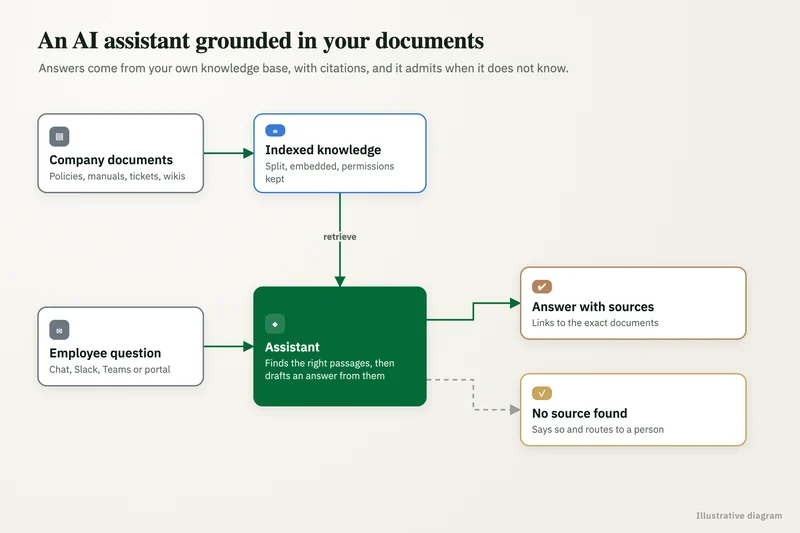
A Google Drive AI chatbot finds the passages in your files that answer a question and writes a short answer with links to those files. The technique is retrieval augmented generation: documents are split into chunks, indexed, searched at question time and passed to a model such as Gemini, OpenAI or Claude, which answers only from what was retrieved.
Typical uses are an internal help desk over policies and SOPs, a sales assistant over pricing sheets and case material, a support bot over product manuals, and an onboarding assistant for new staff. The hard parts are not the chat window. They are deciding who may see which file, keeping the index current when files change, and handling the formats Drive is full of: Google Docs, Sheets with many tabs, slide decks and scanned PDFs.
What are the three ways to build a Google Drive AI chatbot?
The right route depends on who will ask questions and what the bot must do with the answer. Gemini in Drive covers signed-in employees asking about files they can already open. No-code chatbot tools cover a public bot fed from a handful of folders. A custom build covers everything else.
Gemini in Drive is included in Google Workspace plans from Standard upward according to Google's Workspace pricing page (checked November 2026). Google's Drive Help states that collaborators must already have Drive permission to view a source file, and cannot reference its content in a Gemini conversation if they do not. That makes it the safest first step for internal questions.
No-code tools such as Wonderchat, CustomGPT and Ultimo Bots connect to Drive with a sign-in and let you pick folders or files. Ultimo Bots, for example, lists plans from $29 to $249 a month (checked November 2026) with re-sync schedules that vary by plan. They answer everyone the same way, because the bot reads Drive through one connected account.
| Factor | Gemini in Drive | No-code chatbot tool | Custom RAG build |
|---|---|---|---|
| Who asks | Signed-in Workspace users | Website visitors or one team | Employees, customers, partners or other systems |
| Permissions | Each user's own Drive access | Whatever the connected account can see | Engineered per user or group from Drive permissions |
| Channels | Drive, Docs and Gemini app | Website widget, sometimes Slack or WhatsApp | Any: website, Slack, Google Chat, helpdesk, phone |
| Actions in other systems | No | Limited, via integrations | Yes, for example create a HubSpot ticket or Zendesk reply |
| Logs and evaluation | Admin controls only | Vendor dashboard | Full prompt, source and answer logs you own |
| Cost model | Included in eligible plans | Monthly plan by volume | Build fee plus model, vector database and hosting usage |
When do you need a custom Google Drive chatbot?
Build custom when the bot has to behave differently for different people, or do something with the answer. The common triggers are below. If none apply, start with Gemini in Drive or a no-code tool and revisit later.
- Different users must see different answers, for example HR files visible only to HR, or client folders visible only to that account team.
- The bot serves customers or partners who have no Google Workspace account.
- Answers must combine Drive files with data in HubSpot, Salesforce, NetSuite, Zendesk or a database.
- The bot must act: open a ticket, draft a reply, update a record or route to a person.
- You need every question, retrieved source and answer logged for audit or quality review.
- Your content includes scanned PDFs, complex spreadsheets or large shared drives that simple connectors handle poorly.
How is a custom Google Drive AI chatbot built?
A custom build has five parts: ingestion, indexing, permission-aware retrieval, answering and monitoring. Each part has a few choices that decide whether the bot is trusted after the first month.
- Ingestion: a Google Cloud project with the Drive API, read-only access through OAuth or a service account with domain-wide delegation, and support for shared drives. Google Docs are exported to text, Sheets per tab with headers kept, PDFs parsed and scanned pages sent through OCR.
- Change sync: the Drive changes feed or push notifications tell the pipeline which files were edited, moved, re-shared or deleted, so the index is updated within minutes instead of on a monthly re-crawl.
- Indexing: chunks with file ID, title, folder path, modified date and permission metadata, stored in Pinecone, Qdrant, Supabase with pgvector or Vertex AI Vector Search.
- Retrieval and answering: hybrid keyword and vector search filtered by what the asking user may see, then a model answers only from retrieved chunks, cites file names and links, and says it does not know when nothing relevant is found.
- Monitoring: logs of questions, sources and answers, a feedback button, a weekly review of unanswered questions and a cost cap per question.
How do you stop a Drive chatbot from leaking confidential files?
The bot must never show a user content they could not open in Drive themselves. Most leaks come from one shortcut: indexing everything with a single admin or service account and answering every user from the full index.
We store each file's permissions next to its chunks: individual users, Google Groups, domain-wide sharing and link sharing. At question time the bot looks up the user's identity and group memberships and filters retrieval before the model sees anything. Files shared as "anyone with the link" need an explicit policy, because link sharing often exists for convenience, not because the file is meant for everyone.
A few further rules close the remaining gaps: exclude folders such as HR, legal and finance by default and add them deliberately; re-check permissions on the changes feed so a revoked share is removed from the index; and test with accounts from several departments before launch, not only with an administrator account that can see everything.
What does a Google Drive AI chatbot cost to run?
Running cost depends on the route. Gemini in Drive costs nothing extra if your Workspace plan already includes it. No-code tools charge a monthly plan tied to volume and number of sources. A custom build costs a one-time build plus usage: model calls per question, embedding when files are added or changed, vector database storage, hosting for the sync pipeline and the chat interface, and OCR for scanned pages.
For a custom build, three design choices move the monthly bill most. Re-embedding only changed files rather than the whole drive keeps indexing cheap. Retrieving five focused chunks instead of whole documents keeps model calls short. Routing simple lookups to a smaller model and reserving a larger one for synthesis questions cuts the per-question cost. Our AI chatbot cost guide covers build ranges and monthly line items in more detail.
Google Drive AI chatbot launch checklist
Run through this list before employees or customers see the bot. Each item is cheap to do before launch and expensive to fix after users lose trust.
- Scope: the folders and shared drives in scope are listed, owners named, and archive or draft folders excluded.
- Content: duplicates and outdated versions removed or marked, so the bot does not cite last year's price list.
- Permissions: tested with at least three users from different teams, including one with restricted access.
- Evaluation set: 50 to 150 real questions with expected answers and source files, with a pass threshold agreed.
- Refusals: the bot says it does not know, and offers a person or a link, when no source supports an answer.
- Sync: a test edit, move, permission change and deletion each reflected in the index within the agreed time.
- Logging and cost: question logs, feedback, monthly usage report and a cost cap per question switched on.
- Ownership: a named person reviews unanswered questions weekly and updates the source documents.
Common mistakes, and when not to build one
The most common mistake is pointing the bot at an entire drive. Answers then mix drafts, copies and other teams' files, and quality drops even though the model is fine. The second is treating Sheets as text: a pricing sheet split into random chunks loses its column headers and produces confident wrong numbers. The third is monthly re-crawls, which leave the bot citing files that were changed or deleted weeks ago.
Do not build a custom Google Drive AI chatbot if your users are all on eligible Workspace plans, only ask about files they can already open and do not need answers in another tool. Gemini in Drive will do that today at no extra cost. Do not build one either if the source documents are badly out of date. Fix the content first, because a chatbot repeats whatever the files say.
If your company runs on Microsoft 365 rather than Google Workspace, the same choices apply with different tools, which our SharePoint AI chatbot guide covers.
How we build Google Drive AI chatbots
We start with a free review of the folders, the people who will ask questions, a sample of real questions and the systems the answers should feed. If Gemini in Drive or a no-code tool covers the need, we say so. If it does not, we quote a fixed price for a custom build with permission-aware retrieval, change sync, citations and an evaluation set.
You own the Google Cloud project, code, prompts, index and logs, and model and hosting costs are billed to your own accounts. A person stays in the loop on anything that touches money, customers or regulated data, and low-confidence answers go to a review queue instead of being sent.
Case study · Logistics company, UK
Route planning automation
Dispatch typed every address into Google Maps, which optimizes only 25 stops and cannot add time at each stop. A Python tool that loads addresses automatically, adds buffer time per stop and optimizes the full route.
- Manual address entry eliminated
- Delivery estimates customers could rely on
FAQ
Frequently asked questions
Can ChatGPT or Gemini read my Google Drive?
Gemini in Drive can work with your Drive files on eligible Google Workspace plans, using your own access rights. ChatGPT and other assistants can connect to Drive through their own connectors, again limited to what the signed-in account can see. Neither is the same as a company chatbot that serves many users with different permissions and logs every answer.
Does a Google Drive chatbot respect file permissions?
Gemini in Drive does: Google's Drive Help states users cannot reference a file in a Gemini conversation if they lack permission to view it. No-code tools usually answer from whatever the connected account can see, for everyone. A custom build must store Drive permissions with each indexed chunk and filter retrieval by the asking user's identity and groups.
Can a Drive chatbot answer questions from Google Sheets?
Yes, but Sheets need different handling from documents. Each tab should be indexed with its column headers, and numeric questions such as prices or totals are often better answered by querying the sheet directly than by text search. Testing with real spreadsheet questions before launch catches most errors.
How does the chatbot stay up to date when files change?
A well-built pipeline listens to the Google Drive changes feed and re-indexes only files that were edited, moved, re-shared or deleted. That keeps answers current within minutes and avoids paying to re-embed the whole drive. Monthly or manual re-syncs, common in no-code tools, leave a window where outdated answers are possible.
Can I build a Google Drive chatbot with n8n?
Yes. n8n has Google Drive triggers, embedding and vector store nodes, and published templates that index a Drive folder into Pinecone and answer with Gemini. Templates are a good prototype, but they typically use one account for every user and do not handle permission filtering, deletions or scanned PDFs without extra work.
Can customers use a Google Drive chatbot on our website?
Yes, through a no-code tool or a custom build, but not through Gemini in Drive, which serves signed-in Workspace users. For a public bot, index only folders cleared for external use, keep internal files in a separate index, and log questions so you can spot gaps in the published content.
How long does a custom Google Drive chatbot take to build?
A focused build over a defined set of folders, with one channel and permission filtering, usually takes several weeks including testing. Timelines grow with the number of shared drives, scanned documents and connected systems. We fix scope and price after a free review of the folders and sample questions.
Keep reading
Related pages
Get started
Tell us what you want automated
Describe the task, the systems involved and the volume. We reply within one business day with an architecture, the tools we would use, running costs and a fixed-price build plan.
- Free 30-minute build review
- Fixed quote before any work starts
- You own the accounts, code, prompts and data
Prefer email? info@aiimplementationconsultants.com
Get a free build plan
Two lines is enough to start.