

Hiring guide
Copilot Studio consultant: what to hire for and what it costs to run
A Copilot Studio consultant designs, builds and governs AI agents on Microsoft's low-code agent platform, then connects them to your SharePoint, Dataverse, Dynamics 365 and outside systems. This guide is for IT, operations and support leads in Microsoft 365 companies who want an agent in production, not another demo. It covers what a consultant should deliver, how Copilot Credits turn into a monthly bill, how long builds take and when Copilot Studio is the wrong tool.
Get a free build plan
Two lines is enough. A specialist replies within one business day.
Spec: quick answer
What does a Copilot Studio consultant do?
A Copilot Studio consultant scopes the agent, builds its topics, knowledge sources, actions and agent flows, connects it to your systems, sets up environments, data loss prevention and monitoring, and forecasts Copilot Credit usage. Microsoft bills $0.01 per credit pay-as-you-go or $200 a month for 25,000 credits, so design choices directly set your running cost.
- Copilot Studio has no per-user maker fee; agents are billed in Copilot Credits per action.
- Tenant graph grounding and reasoning models can multiply the credits each answer consumes.
- Prepaid capacity blocks agents at 125% use unless a pay-as-you-go meter is linked.
- Hire for environments, governance and an evaluation set, not only for building topics.
What does a Copilot Studio consultant actually deliver?
A good Copilot Studio consultant delivers a working agent plus everything that keeps it safe and affordable after launch. The build itself (topics, knowledge, actions) is often the smaller part of the work. Most of the effort sits in connecting systems, deciding which identity each action runs under, testing answers against real questions and setting usage limits.
When you compare proposals, check that each item below is named explicitly. If a proposal only says "build and deploy agent", you are buying a demo and the governance work will land on your IT team later.
- Scope document: the questions and tasks the agent handles, what it must refuse, and who owns it.
- Knowledge design: which SharePoint sites, files, Dataverse tables or websites it reads, cleaned and scoped so answers stay specific.
- Actions and agent flows: connectors to Dynamics 365, Salesforce, ServiceNow, HubSpot or a custom API, with authentication decided per action.
- Environments: separate development, test and production environments with solutions moved between them, not edits made live.
- Data loss prevention policies and connector rules set in the Power Platform admin center.
- Evaluation set: 50 to 200 real questions with expected answers, rerun after every change.
- Credit forecast and monthly limits per agent, plus a usage report your team can read.
- Handover: documentation, admin training and a named owner on your side.
How is Copilot Studio priced in 2026?
Copilot Studio is billed in Copilot Credits, not per seat. Microsoft's pricing page (checked November 2026) lists a capacity pack of 25,000 credits for $200 a month on a pre-purchase plan, a pay-as-you-go meter billed monthly in arrears, and up to 20% savings on pre-purchased Copilot Credit Commit Units. Third-party guides put the pay-as-you-go rate at $0.01 per credit. The Microsoft 365 Copilot add-on is $30 per user per month paid yearly and includes Copilot Chat and the standard harness in Copilot Studio for internal agents.
What an agent consumes depends on its design. Microsoft Learn's billing rates page (updated October 30, 2026) lists the rates below. One user message can trigger several of them at once: Microsoft's own example of a tenant graph grounded answer costs 12 credits, 10 for grounding and 2 for the generative answer.
| Agent feature (Microsoft Learn, Oct 2026) | Copilot Credits | Charged to M365 Copilot licensed users? |
|---|---|---|
| Classic answer (authored response) | 1 | No |
| Generative answer | 2 | No |
| Agent action (trigger, reasoning step, topic transition) | 5 | No |
| Tenant graph grounding per message | 10 | No |
| Agent flow actions, per 100 actions | 13 | No, only via the agent-calls-flow trigger |
| Content processing tools, per page | 8 | No |
| Premium AI tools and reasoning models, per 1,000 tokens | 10 | No |
| GenAI voice, per minute | 35 | Not listed as included |
Worked example: what will our agent cost each month?
The cheapest design is rarely the default design, which is why credit forecasting belongs in the consultant's scope. Here are two common agents priced from Microsoft's published rates. These are illustrations of the method, not quotes.
Website support agent. A customer conversation averages six generative answers (12 credits) and one agent action to open a ticket (5 credits), so 17 credits per conversation. At 3,000 conversations a month that is 51,000 credits: about $510 on pay-as-you-go at $0.01, or three capacity packs at $600 if you buy only packs. Two packs plus a linked pay-as-you-go meter for the overflow lands near $410, and the agent never gets blocked.
Internal HR and policy agent. 200 staff without Microsoft 365 Copilot licenses ask five questions a working day, about 21,000 questions a month. With tenant graph grounding switched on, each answer costs 12 credits, so 252,000 credits or roughly $2,520 a month. Ground the same agent on a curated SharePoint library without tenant graph grounding and each answer costs 2 credits: 42,000 credits, roughly $420. Licensing all 200 users for Microsoft 365 Copilot at $30 would cost $6,000 a month, although it brings other Copilot features with it.
Reasoning models change the math again. Microsoft's own example of a support agent on a reasoning model bills 141 credits for one follow-up message and 461 credits when the same question starts a new conversation, on top of feature rates. At $0.01 per credit that is $1.41 and $4.61 for a single answer. A consultant should justify a reasoning model with test results, not use it by default.
What happens when an agent runs out of Copilot Credits?
On prepaid capacity, Microsoft allows some overage, then blocks agents once the tenant reaches 125% of its prepaid credits. A blocked agent stops responding, even in the middle of a conversation, and most users see a message that the agent has reached its usage limit. Microsoft Learn notes that users signed in with a Microsoft 365 Copilot license might not be blocked, which is exactly why this problem is often missed in testing by licensed IT staff.
Agent flows are enforced separately: new flow runs are blocked while the agent keeps answering questions that do not need a flow. Monthly limits you set on an agent do not stop the flows it calls. There is also a licensing trap for autonomous agents: the no-charge treatment for Microsoft 365 Copilot users does not apply when an agent is started by an event trigger, so an order-processing agent consumes credits even in a fully licensed tenant.
The fix is design, not luck. Allocate capacity per environment, link a pay-as-you-go billing plan to production so customer-facing agents are not cut off, set monthly limits on test agents, and review consumption in the Power Platform admin center every month.
How long does a Copilot Studio implementation take?
A first production agent usually takes weeks, not days, once integration and testing are counted. HSO, a large Microsoft partner, states on its Copilot Studio page that production-ready agents typically take 8-12 weeks and larger multi-agent rollouts 16-24 weeks. A proof of concept on a single SharePoint library can be shown in a day, which is where many "agent in a day" offers stop.
The calendar is driven by three things: how clean the knowledge sources are, how many systems the agent writes to, and how fast your security team approves connectors and service accounts. We split delivery into the phases below so each one has a clear exit test.
- Discovery: agree the questions and tasks in scope, collect 50 or more real examples and record today's handling time.
- Knowledge and access: clean and scope the sources, decide identities for every action, get connectors approved.
- Build in development: topics, knowledge, actions and agent flows, with the evaluation set run on every change.
- Pilot in test: a small group of real users, credit consumption measured against the forecast.
- Production: managed solution deployed, limits and pay-as-you-go plan set, monthly usage and accuracy review agreed.
Copilot Studio vs a custom agent build: which do you need?
Copilot Studio is the right default when your users live in Teams and Microsoft 365 and the agent mostly reads Microsoft data and calls standard connectors. A custom build (code on Azure, Amazon Bedrock or a model vendor's API, often with n8n or LangGraph) wins when you need full control of the model, the logs or the per-task cost. Many companies end up with both: Copilot Studio for employee-facing agents, a custom service behind it for the heavy logic, exposed as a connector or an MCP server.
| Factor | Copilot Studio agent | Custom agent build |
|---|---|---|
| Best fit | Employee agents in Teams, SharePoint and M365 | Customer-facing or high-volume agents, non-Microsoft stacks |
| Billing | Copilot Credits per feature, tenant-wide pool | Model tokens, hosting and vector database, billed to your own accounts |
| Identity and permissions | Entra ID and existing Microsoft 365 permissions | Must be engineered, for example per-user filtering on retrieval |
| Model choice | Models Copilot Studio offers, plus bring-your-own via Foundry (billed separately) | Any vendor or open-weight model |
| Logs and evaluation | Built-in analytics, export needed for deep review | Full prompt and output logging under your control |
| Who maintains it | Power Platform makers with admin oversight | Engineers or an implementation partner |
Questions to ask before you hire a Copilot Studio consultant
The answers to these questions separate teams that have run agents in production from teams that have built demos. Ask for specifics, and ask to see a credit forecast for an agent similar to yours.
- Which actions will run under the user's identity and which under a service account, and why?
- How will you forecast Copilot Credits, and what limits will you set per agent and environment?
- Will we have separate development, test and production environments with managed solutions?
- Which data loss prevention policies and connector restrictions will you apply?
- What is the evaluation set, who writes the expected answers, and what pass rate gates launch?
- What happens when a knowledge source changes, a connector fails or a user asks something out of scope?
- Who owns the agent, the solution files and the documentation when the engagement ends?
- When would you advise us not to use Copilot Studio for this agent?
Common mistakes that stall Copilot Studio projects
Most stalled agents fail on scope and data, not on the platform. These are the patterns we see most often when a pilot never reaches production.
- Pointing the agent at an entire SharePoint tenant, so answers mix old drafts, duplicates and the wrong region's policies.
- Over-permissioned service accounts that let an agent read or write records the user could not see.
- Testing only with licensed IT staff, so credit consumption and the 125% block show up after launch.
- Choosing a reasoning model for simple FAQ answers and paying for thousands of tokens per message.
- Building directly in production with no solution packaging, so nobody can roll back a bad change.
- No owner for knowledge content, so answers drift as policies change and trust drops.
When you should not hire a Copilot Studio consultant
Skip the consultant if the need is a single team asking questions of a few documents: Agent Builder in Microsoft 365 or an agent in SharePoint may be enough, and our SharePoint AI chatbot guide compares those options. Skip Copilot Studio altogether if most of your data lives outside Microsoft (Google Workspace, Salesforce, a custom ERP) and your users do not work in Teams, or if you need the agent to answer customers by phone at volume. GenAI voice is 35 credits a minute, about $0.35 at pay-as-you-go, while Retell AI's pricing page shows about $0.11 a minute all-in in its own example.
Also wait if you cannot name the process owner or measure today's baseline. An agent that saves time no one has measured cannot prove it paid back, which is one of the main reasons AI projects fail.
How we deliver Copilot Studio agents
We are AI implementation consultants, and we treat Copilot Studio as one delivery option among several. In a free review we look at the process, the systems involved, a sample of real questions and your Microsoft licensing, then recommend Copilot Studio, a custom build or a mix, with a credit or usage forecast for each.
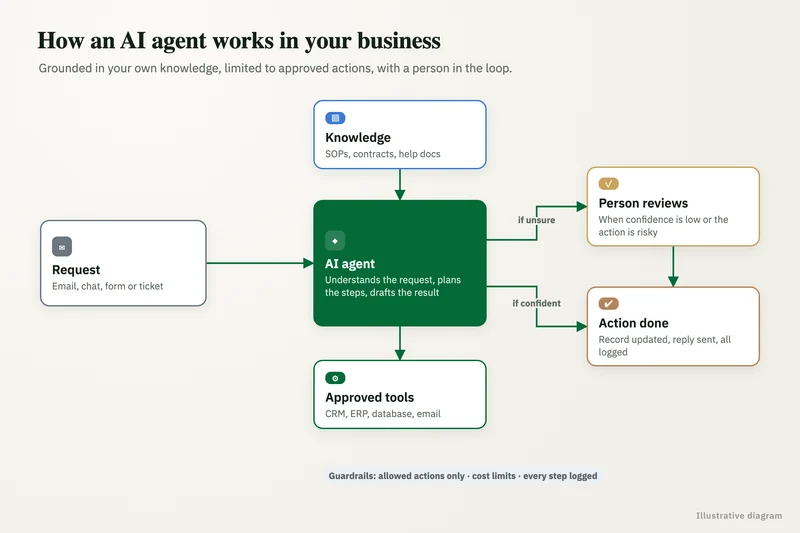
We quote a fixed price for the agreed scope. You own the tenant, environments, solution files, prompts and data, and every running cost is billed to your own Microsoft or cloud account. A person stays in the loop on anything that touches money, customers or regulated data, and you get the evaluation set and documentation so your team can maintain the agent without us.
FAQ
Frequently asked questions
How much does a Copilot Studio consultant cost?
Rates vary by firm size and region, so compare fixed-scope quotes rather than hourly rates. Our AI implementation cost guide lists published third-party ranges for agencies and freelancers. Remember to budget the running cost separately: Copilot Credits at $0.01 each pay-as-you-go or $200 a month per 25,000-credit pack, according to Microsoft's pricing page.
Is Copilot Studio included with Microsoft 365 Copilot?
Partly. Microsoft lists the $30 per user per month Microsoft 365 Copilot add-on as including Copilot Chat and the standard harness in Copilot Studio for internal agents. Employee use of Copilot Studio agents by licensed users, under their own identity, is not charged credits. Customer-facing agents, unlicensed users and autonomously triggered agents still consume Copilot Credits.
How many Copilot Credits does one answer use?
It depends on the features used. Microsoft lists 1 credit for a classic answer, 2 for a generative answer, 5 for an agent action and 10 for tenant graph grounding, so a grounded generative answer costs 12. Reasoning models add 10 credits per 1,000 billed tokens, which can reach hundreds of credits for one message.
What is the difference between Copilot Studio and Agent Builder?
Agent Builder in Microsoft 365 is a lightweight tool for creating simple agents over your files and instructions, aimed at individual users and teams. Copilot Studio is the full platform with topics, actions, agent flows, connectors, environments, analytics and publishing to channels beyond Microsoft 365. Most production agents that write to business systems need Copilot Studio.
Can Copilot Studio agents connect to Salesforce or HubSpot?
Yes. Copilot Studio agents can use Power Platform connectors, custom connectors to any REST API and agent flows to read and update records in systems such as Salesforce, HubSpot, ServiceNow or Dynamics 365. The work is in deciding which identity each action runs under and handling errors when the other system rejects an update.
Do we need a Microsoft partner to build Copilot Studio agents?
No. Any team with Copilot Studio skills can build in your tenant, and partner status does not guarantee production experience. Ask instead for an environment and governance plan, a credit forecast, an evaluation set and references for agents running in production.
What happens if our agent hits its usage limit?
On prepaid capacity, Microsoft blocks the tenant's agents once consumption reaches 125% of prepaid credits, and users see a message that the agent is unavailable. Linking a pay-as-you-go billing plan to the environment prevents the block and bills the overage instead. Monthly limits per agent let you cap test and low-priority agents.
Keep reading
Related pages
Get started
Tell us what you want automated
Describe the task, the systems involved and the volume. We reply within one business day with an architecture, the tools we would use, running costs and a fixed-price build plan.
- Free 30-minute build review
- Fixed quote before any work starts
- You own the accounts, code, prompts and data
Prefer email? info@aiimplementationconsultants.com
Get a free build plan
Two lines is enough to start.