

Integration guide
Shopify AI integration: when Sidekick is enough and when to build
Shopify AI integration means connecting an AI model to your store's orders, products, customers and inventory so it can answer, draft or act on them, either through Shopify's own Sidekick, an App Store app, or a custom agent built on the Shopify Admin API. This guide is for ecommerce ops, support and IT leads at US brands who want to know which route fits, how a custom build connects to Shopify and the systems around it, and what it costs to build and run.
Get a free build plan
Two lines is enough. A specialist replies within one business day.
Spec: quick answer
How do you integrate AI with Shopify?
You integrate AI with Shopify in one of three ways: use Sidekick, Shopify's built-in assistant, for admin tasks; install an App Store app for one job such as support chat or product copy; or build a custom integration that calls the Shopify Admin API and webhooks, connects your helpdesk, ERP or 3PL, and keeps a person approving refunds and other risky actions.
- Try Sidekick and one App Store app before paying for a custom build.
- Custom builds earn their cost when the job spans Shopify plus a helpdesk, ERP or 3PL.
- Admin API rate limits depend on your plan, so large backfills need bulk operations.
- Clean product data now feeds AI shopping channels, not just your own storefront.
What is Shopify AI integration?
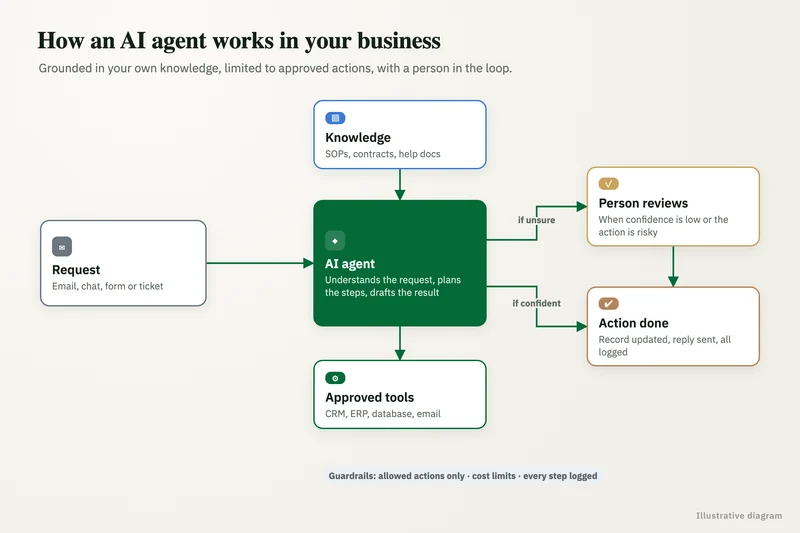
Shopify AI integration is any setup where an AI model reads from or writes to your Shopify store as part of daily work. That ranges from a merchant asking Sidekick to summarize last month's sales, to an app that drafts product descriptions, to a custom agent that answers where-is-my-order emails by looking up the order, the tracking event in your 3PL and the return policy, then writes a reply for a person to send.
There are now three layers to think about. Shopify's own tools work inside the admin. Third-party AI assistants can be connected to a store: Shopify's help center lists ChatGPT, Claude, Gemini, Grok, Perplexity, Muse and Microsoft Copilot, and says you can set how much data each one can access. And custom integrations use the Admin API, webhooks and, increasingly, MCP to put AI into workflows that span Shopify and the rest of your stack.
Sidekick, an app or a custom build: which Shopify AI integration fits?
Start with the cheapest route that does the job, and only build when the job crosses systems or needs rules Shopify and apps cannot enforce. Shopify's help center says Sidekick can build Shopify Flow workflows, write and run code to forecast or summarize store data, generate product descriptions and images, and handle tasks such as order edits from plain-language requests, with changes presented for the merchant to review. That covers a lot of admin work at no build cost.
App Store apps fill single gaps: support chat, search, reviews, email copy. eesel's 2026 guide to Shopify AI tools puts typical App Store AI apps at about $10 to $200 or more per month each. The problem appears when you stack five of them, none of which talks to your helpdesk or ERP, and each holds a separate copy of your data. The table shows where each route usually fits.
| Need | Sidekick | App Store app | Custom integration |
|---|---|---|---|
| Admin questions, reports, Flow automations | Good fit | Rarely needed | Overkill |
| Product descriptions and alt text at small scale | Good fit | Good fit | Only for large catalogs with rules |
| Support chat on the storefront | Not its job | Good fit for common questions | When answers need ERP, 3PL or warranty data |
| Order status and returns across Shopify, Gorgias or Zendesk, and a 3PL | No | Partial | Good fit |
| Bulk catalog enrichment from supplier files | Limited | Partial | Good fit |
| B2B emails or PDFs turned into draft orders | No | Rare | Good fit |
| Actions with money involved (refunds, discounts) | Merchant reviews each change | Depends on app | Rules, caps and human approval you define |
What can a custom Shopify AI agent do?
A custom Shopify AI agent is worth building when a task needs data from several systems, or rules that are specific to your business. These are the builds we see requested most, each described by the trigger, the data it reads and what it writes.
- Where-is-my-order replies: triggered by a new Gorgias or Zendesk ticket; reads the Shopify order, fulfillment and carrier tracking; drafts a reply and tags the ticket, with a person sending anything unusual.
- Returns triage: reads the order, return reason, photos and your policy; proposes approve, exchange or deny; never issues a refund above a set amount without approval.
- Catalog enrichment: reads supplier spreadsheets or PDFs; fills titles, attributes, metafields and alt text against your style guide; queues changes for review before they publish.
- B2B order intake: reads purchase orders arriving by email; matches SKUs and customer price lists; creates a draft order in Shopify for a rep to confirm.
- Inventory and ops alerts: watches webhooks for low stock, oversold variants or delayed fulfillments; posts a summary with suggested actions to Slack or Teams.
- Customer service assistant on the storefront: answers product and policy questions from your own help center and catalog, with order lookups only after the shopper verifies identity.
How does a custom Shopify AI integration connect to the store?
A custom build is a Shopify app (usually a private custom app for your store) that holds an access token with only the scopes it needs, listens to webhooks, and calls the GraphQL Admin API to read and write. The AI model sits in the middle: it reads the event, decides what to do, and returns structured output that your code validates before anything is written back to Shopify.
Rate limits shape the design. Shopify's developer documentation sets GraphQL Admin API restore rates by plan and caps any single query at 1,000 cost points. In practice that means a store on the Standard plan restores about 100 points a second, so one maximum-cost query uses ten seconds of budget. An agent that answers tickets one at a time rarely hits this, but a job that re-reads two years of orders or rewrites 50,000 product descriptions should use bulk operations, which Shopify says do not have the cost or rate limits of single queries.
Shopify's Spring '26 Edition (June 17, 2026) also changed the toolset: it made its AI Toolkit generally available, opened the Universal Commerce Protocol (UCP) and Catalog API to all developers without approval, added Sidekick app extensions so an app's data and actions can appear inside Sidekick, and rebuilt webhooks with field-level filtering. For internal agents, an MCP server that exposes a few named actions (look up order, create draft order, add note) is usually safer than giving a model a raw API token. Our MCP server development guide explains that pattern.
| Shopify plan | GraphQL Admin API restore rate (Shopify docs) |
|---|---|
| Standard plans | 100 points per second |
| Advanced Shopify | 200 points per second |
| Shopify Plus | 1,000 points per second |
| Shopify for enterprise (Commerce Components) | 2,000 points per second |
| Any plan, single query | Maximum cost of 1,000 points |
Agentic storefronts and UCP: what changes for your product data?
AI shopping channels now read your catalog directly, so product data quality has become an AI integration task in its own right. Industry coverage of Shopify, including Fudge's State of Shopify AI 2026 report, says Agentic Storefronts went live by default for eligible US merchants on March 24, 2026, making stores discoverable inside ChatGPT, Microsoft Copilot, Google AI Mode and the Gemini app. Shopify's Spring '26 announcement describes the Catalog API as the discovery layer for UCP and claims that AI searches powered by Shopify Catalog convert at twice the rate of those using scraped data.
You do not need a custom build to be listed. What you do need is a catalog an AI agent can match to a shopper's question: complete titles, consistent variant names, filled attributes and metafields, accurate inventory and clear return terms. Gaps that a human shopper forgives become missed matches when an agent filters on them. Enriching thousands of SKUs against a style guide is a good job for an AI pipeline with human review; our product data enrichment services guide covers how that work is scoped.
Which guardrails does a Shopify AI integration need?
Every Shopify AI integration that can see customer data or move money needs limits that live in code, not only in the prompt. A model can be talked into things; a refund cap enforced by your own service cannot. These are the controls we build in by default.
- Least-privilege scopes: read_orders for a lookup agent, never write_orders unless the workflow truly needs it.
- Identity check before order details: order number plus email or a one-time code on the storefront.
- Money limits: refunds, discounts and store credit above a set amount go to a person for approval.
- Human-review queue for low-confidence answers, new return reasons and anything mentioning chargebacks or legal threats.
- Draft first: product edits and B2B orders are created as drafts, then published by staff.
- Logging: every prompt, tool call and Shopify write stored with the ticket or order ID, so a mistake can be traced and reversed.
- Cost cap per task and alerts, so a loop cannot run up model spend overnight.
What does Shopify AI integration cost?
Costs split into the build and the monthly bill. Few vendors publish build prices; the figures below are the ones we found, read in November 2026, and they are market references rather than our prices.
Monthly running costs for a custom build usually include model usage billed per token by OpenAI, Anthropic or Google, hosting for the app and its queue, a workflow tool if one is used (n8n can be self-hosted; Zapier and Make are billed per plan), plus your existing helpdesk seats. Logging tokens per ticket during testing gives a reliable estimate before launch. For wider budget context, see our AI implementation cost guide.
| Source | Item | Published figure |
|---|---|---|
| Shopify plans (via eesel, 2026) | Shopify subscription | About $29 to $2,300+ per month |
| eesel (2026) | Typical App Store AI app | About $10 to $200+ per month per app |
| eesel pricing (2026) | eesel AI support platform | $299 per month for 500 credits |
| Silent Infotech service page | Single-use Shopify AI integration | $5,000 to $15,000; 4 to 8 weeks |
| Silent Infotech service page | Full-stack Shopify, AI and ERP build | $25,000 to $80,000+; 12 to 20 weeks |
| Softude (2026 guide) | Specialist AI agency projects in general | $25k to $150k |
Worked example: a where-is-my-order agent on Shopify and Gorgias
Here is how a typical first build is scoped. The volumes are illustrations, so replace them with your own helpdesk report.
Assume a brand on Shopify's Advanced plan receives 4,000 tickets a month in Gorgias, and its own tagging shows 1,500 of them ask where an order is. The agent is triggered by a new ticket, classifies it, and for order-status tickets looks up the order by email and order number, reads the fulfillment and tracking status from Shopify, checks the 3PL's portal for exceptions, and drafts a reply with the tracking link. Delayed or lost parcels, and any request for a refund, go to the review queue untouched.
Each ticket needs a handful of small Admin API queries, well within a 200-points-per-second restore rate, so no special rate-limit handling is needed for live tickets. The one-off backfill used to build the test set (six months of resolved tickets and their orders) runs as a bulk operation. Before launch, the agent's drafts are compared with what agents actually sent on 300 past tickets; it goes live in draft-only mode, and only after two weeks of approved drafts do routine replies send automatically.
The value comes from minutes saved per routine ticket multiplied by volume, which you can measure from Gorgias before you buy anything. If that number is small, a support app is the better spend.
How long does a Shopify AI integration take?
A single, focused workflow usually takes four to eight weeks, which matches the range Silent Infotech publishes; builds that also sync an ERP such as NetSuite take a quarter or more. Most of the time goes into data access, testing on real tickets or SKUs, and the review process, not the model.
This is the order we follow on Shopify projects.
- Week 1: free review of the workflow, store plan, apps, helpdesk, ERP or 3PL, and a sample of real tickets or SKUs.
- Weeks 1 to 2: custom app with minimum scopes, webhooks, access to the helpdesk and 3PL, and a test set with known correct outcomes.
- Weeks 2 to 5: agent logic, structured output, guardrails, review queue and logging; tested against the test set after every change.
- Weeks 5 to 7: draft-only launch with staff approving every action; weekly accuracy and cost review.
- Week 8 onward: automatic sending for routine cases that met the accuracy bar; next workflow chosen from real numbers.
When not to build a custom Shopify AI integration
Skip the custom build if Sidekick, Shopify Flow or one well-reviewed app already does the job, if your ticket or catalog volume is too small for minutes saved to cover a build, or if your product data is so incomplete that any AI on top of it will give poor answers. In the last case, fix the catalog first.
Also hold off if nobody on your team will own the workflow after launch. Shopify changes APIs on a published release schedule and model vendors retire models, so every integration needs someone to watch error rates and approve updates, whether that is your team or ours.
How we deliver Shopify AI integration
We are AI implementation consultants, so our Shopify work is engineering: custom apps on the Admin API, agents that connect Shopify with Gorgias, Zendesk, NetSuite, a 3PL or your PIM, catalog enrichment pipelines and storefront assistants grounded in your own help content. We are not a Shopify Partner agency for theme design, and we do not resell apps.
Every project starts with a free review and a fixed price for a defined scope. You own the Shopify app, the code, the prompts, the model and hosting accounts and the data from day one. A person stays in the loop on anything touching refunds, customer data or prices. See our AI integration services for how we connect AI to the rest of your systems.
Case study · Logistics company, UK
Route planning automation
Dispatch typed every address into Google Maps, which optimizes only 25 stops and cannot add time at each stop. A Python tool that loads addresses automatically, adds buffer time per stop and optimizes the full route.
- Manual address entry eliminated
- Delivery estimates customers could rely on

FAQ
Frequently asked questions
Does Shopify have built-in AI?
Yes. Sidekick is Shopify's built-in assistant, and Shopify's help center says it can build Shopify Flow workflows, analyze store data, generate product descriptions and images, and handle tasks such as order edits, with changes shown for review. It works inside the admin, so it does not answer your customers or connect to your helpdesk or ERP.
Can I connect ChatGPT or Claude to my Shopify store?
Yes. Shopify's help center lists ChatGPT, Claude, Gemini, Grok, Perplexity, Muse and Microsoft Copilot as AI tools that can connect to a store, and lets you set how much data each can access. That suits a merchant working in chat. Automated jobs that run on every ticket or order still need a custom integration.
How much does a custom Shopify AI integration cost?
Silent Infotech publishes $5,000 to $15,000 for a single-use Shopify AI integration and $25,000 to $80,000 or more for a full-stack build with an ERP. Monthly costs then include model usage, hosting and any workflow tool. We quote a fixed price after a free review.
What are the Shopify API rate limits for AI agents?
Shopify's documentation sets GraphQL Admin API restore rates at 100 points per second on Standard plans, 200 on Advanced, 1,000 on Plus and 2,000 on Commerce Components, with a 1,000-point cap per query. Live ticket agents rarely hit these. Large backfills should use bulk operations, which avoid those limits.
Is it safe to let an AI agent issue refunds in Shopify?
Only with limits enforced in code. We give agents the narrowest scopes they need, cap refund and discount amounts, and send anything above the cap or outside policy to a person for approval. Every action is logged against the order so it can be traced and reversed.
What is Shopify UCP and do I need it?
UCP, the Universal Commerce Protocol, is the open standard Shopify uses for AI agents to discover products and transact with merchants. Shopify's Spring '26 Edition opened it to all developers. Most merchants do not need to build on it; they need clean, complete product data so AI shopping channels can match their products.
Keep reading
Related pages
Get started
Tell us what you want automated
Describe the task, the systems involved and the volume. We reply within one business day with an architecture, the tools we would use, running costs and a fixed-price build plan.
- Free 30-minute build review
- Fixed quote before any work starts
- You own the accounts, code, prompts and data
Prefer email? info@aiimplementationconsultants.com
Get a free build plan
Two lines is enough to start.