

Integration guide
Zendesk AI integration: native AI agents, Copilot or a custom build
Zendesk AI integration comes down to four routes: Zendesk's own AI agents billed per automated resolution, the Copilot add-on for your human agents, a Marketplace app from a third party, or a custom build that reads and writes tickets through the Zendesk API. This guide is for support leads, CX ops and IT owners who run Zendesk and want to pick the route, price it at their real volume and set it up so it keeps working after Zendesk's 2026 changes to billing and authentication.
Get a free build plan
Two lines is enough. A specialist replies within one business day.
Quick answer
How do you integrate AI with Zendesk?
You integrate AI with Zendesk by switching on Zendesk AI agents (billed per verified automated resolution), adding the Copilot add-on for triage and reply suggestions, installing a Marketplace app, or building a custom service that listens to Zendesk webhooks, calls OpenAI, Claude or Gemini, and writes results back through the API using OAuth.
- Native AI agents bill per verified resolution, so model your monthly volume before switching them on.
- Copilot helps human agents with triage and drafts; it does not answer customers on its own.
- Zendesk API tokens stop working on April 30, 2027, so every custom integration needs OAuth.
- Write AI output to tags, fields and internal notes first, and let a person or rule send replies.
What are the four ways to do Zendesk AI integration?
The route depends on who the AI serves and how much of the logic is yours. If the goal is answering customers from your help center, Zendesk's native AI agents are the shortest path. If the goal is making your human agents faster, the Copilot add-on fits. If the work involves your own rules, other systems or a specific model provider, you are looking at a Marketplace app or a custom build.
Many teams combine routes. A common split is native AI agents on messaging for simple questions, Copilot for the agents who take the escalations, and a custom service that classifies email tickets, pulls order or account data from another system and leaves an internal note before a person opens the ticket.
| Route | What it is | Best for | Main limit |
|---|---|---|---|
| Zendesk AI agents | Zendesk's own customer-facing AI across messaging, email and web forms, billed per automated resolution | Answering common questions from your help center content | Behaviour is what Zendesk ships, and cost rises with every verified resolution |
| Copilot add-on | Agent-side AI: intelligent triage, auto assist, suggested first replies, ticket summaries and writing help | Speeding up human agents on the tickets that reach them | Priced per agent seat, and it assists rather than resolves on its own |
| Marketplace app | A third-party AI product installed from the Zendesk Marketplace into the agent workspace or messaging | A packaged feature such as a help center bot or QA scoring, without engineering | You inherit the vendor's model choice, pricing and data handling |
| Custom build | Your own service using Zendesk triggers, webhooks and the Support API, plus a model provider | Rules-heavy or multi-system work: triage, order lookups, refunds prep, backlog cleanup | Needs design, testing, monitoring and an owner |
How much do Zendesk AI agents and Copilot cost?
Zendesk prices its AI in two ways: automated resolutions for the customer-facing AI agents and a per-seat fee for Copilot. Zendesk's pricing page (checked October 2026) lists Suite Team at $55 per agent per month and Suite Professional at $115 on annual billing ($69 and $149 month to month). Suite Team includes 5 automated resolutions per agent per month and Suite Professional includes 10. Beyond that allowance, pay-as-you-go automated resolutions cost $2.00 each, with a lower committed rate available. The Copilot add-on is listed at $50 per agent per month, billed yearly.
What counts as billable changed on May 18, 2026. Zendesk's help article on automated resolution tiers splits AI agent outcomes into assisted escalation, contained resolution and verified resolution. Only verified resolutions count against your allowance and get billed, and a large language model reviews the finished conversation to decide whether the customer's request was actually resolved. In practice that means your bill tracks real resolutions more closely than before, but it also means you cannot predict it from conversation counts alone. Measure the verified rate in a pilot first.
| Item (Zendesk pricing page, Oct 2026) | Published price | Note |
|---|---|---|
| Suite Team | $55 per agent/mo annual, $69 monthly | Includes 5 automated resolutions per agent per month |
| Suite Professional | $115 per agent/mo annual, $149 monthly | Includes 10 automated resolutions per agent per month |
| Extra automated resolution | $2.00 pay as you go | Lower rate with a committed volume |
| Copilot add-on | $50 per agent/mo, billed yearly | Triage, auto assist, suggested replies, summaries |
What does the Zendesk Copilot add-on actually do?
Copilot is for the people working tickets, not for customers. Zendesk's help center lists intelligent triage, auto assist, suggested first replies, ticket summaries, writing enhancement, merge suggestions for related tickets, and call summaries and transcription for voice among its features.
Intelligent triage tags each incoming request with intent, language and sentiment, which your triggers can then use for routing. Auto assist reads the ticket and proposes the next steps to an agent, and can carry out actions the agent approves. Both are useful when your tickets follow patterns Zendesk's models already recognise. They are less useful when the right answer depends on data that lives outside Zendesk, such as a shipment status in your WMS, a contract term in your CRM or a balance in your billing system, unless that data is connected through actions or an integration.
When do you need a custom Zendesk AI integration?
You need a custom build when the AI must follow your rules, use your other systems or use a model provider you choose. Native features cover the standard jobs; they stop fitting when every tenth ticket needs a lookup in NetSuite, Shopify or Salesforce, or when your routing depends on contract tiers and SLAs Zendesk does not know about.
A custom build is also the safer option when you need full logs. Your own service can record every prompt, model output, cost and write against the ticket ID, keep that history as long as your policy requires, and replay a test set after every prompt change.
- Tickets need data from outside Zendesk before anyone can act: orders, invoices, subscriptions, warranty records.
- Routing follows your own logic: account tier, region, product line, contract status or language coverage.
- You want a specific model provider (OpenAI, Claude, Gemini or Bedrock) or an open-weight model in your own cloud.
- Volume is high enough that per-resolution pricing costs more than running your own service.
- You need audit history, cost caps per ticket and an evaluation set that reruns before each change ships.
- Work is back-office rather than conversational: tagging a backlog, cleaning fields, preparing refund approvals.
How is a custom Zendesk AI integration built?
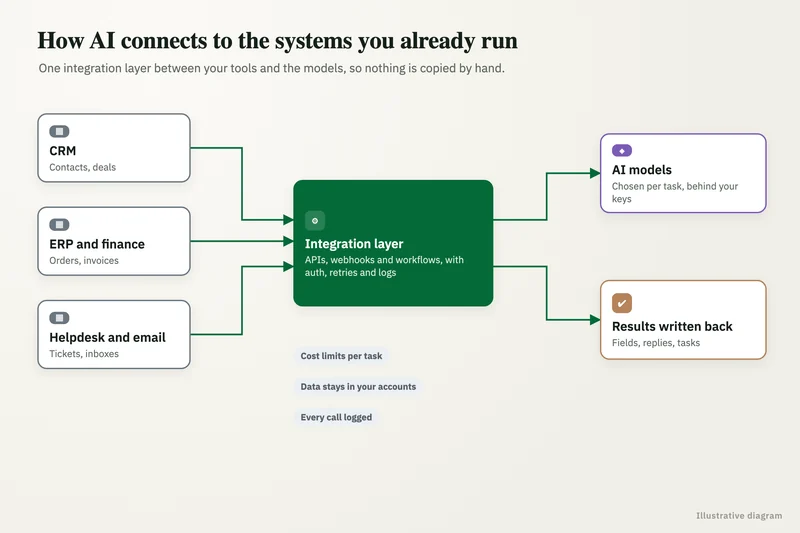
A custom integration has five parts: a trigger, a context step, a model step, a rules step and a write-back. The Zendesk-specific details in each one decide whether it survives real traffic.
Start with events, not polling. A Zendesk trigger fires on ticket creation or update and calls a webhook to your service. Zendesk signs webhook requests: its developer documentation says to verify the X-Zendesk-Webhook-Signature header by computing an HMAC SHA256 of the timestamp plus the request body with the webhook's signing secret, then comparing the base64 result. Skip that check and anyone who finds the endpoint can feed it fake tickets.
Rate limits shape the design. Zendesk's API documentation sets the Support API limits below, and a separate limit on the Update Ticket endpoint: 100 requests per minute per account (300 with the High Volume add-on) and 30 updates per ticket per user in 10 minutes. Exceeding a limit returns a 429 response with a Retry-After header, which your service must honour. The update limit matters most for backlog jobs: retagging 50,000 old tickets at 100 updates a minute takes a little over eight hours, so it has to run as a queued job, not a loop.
- Trigger: a Zendesk trigger on ticket created or updated, with conditions so only the right tickets call the webhook.
- Context: read the ticket, its comments, the requester and organization, search help center articles, and pull outside records by order or account ID.
- Model step: a fixed output schema (intent, urgency, suggested group, draft reply, confidence, cited articles) that can be validated field by field.
- Rules step: allowed values for each tag and field, a confidence threshold, a cost cap per ticket and a block on anything involving refunds or account changes.
- Write-back: tags, custom fields and an internal note with the draft and sources; public replies only for categories you have approved.
- Failure handling: queue every request, retry 429 and 5XX responses after the Retry-After interval, make writes safe to repeat and alert a person after two failures.
| Zendesk plan (Zendesk API docs) | Support API requests per minute |
|---|---|
| Team | 200 |
| Professional | 400 |
| Enterprise | 700 |
| High Volume API add-on | 2,500 (replaces the plan limit) |
What changes with Zendesk's API token removal?
Any Zendesk AI integration that authenticates with an API token has a deadline. Zendesk's OAuth migration guide sets three dates: from July 28, 2026, tokens unused for 30 days are deactivated; from October 27, 2026, accounts can no longer create new API tokens; and on April 30, 2027, all remaining tokens are permanently deactivated and requests using them fail.
For an unattended service, the replacement is an OAuth client using the client credentials grant. There is one trap the same guide calls out: actions taken with a client credentials token are attributed to the Zendesk user who created the OAuth client, usually an admin. That affects audit logs, comment authorship and permission checks, so internal notes written by your AI would appear to come from that admin. Zendesk recommends a dedicated service account to own the OAuth client, which is what we set up on every build so the AI's work is clearly labelled and can be filtered in views and reports.
If you already run scripts, Zapier zaps or older Marketplace apps against Zendesk, list them now and check how each one authenticates. Anything on an API token that nobody owns will stop on the April 2027 date.
Can Claude or ChatGPT connect to Zendesk through MCP?
Partly. Zendesk's MCP work so far mostly runs in the other direction: in June 2026 Zendesk announced an early access program for an MCP client, which lets Zendesk call tools on outside MCP servers, such as Stripe or Asana, from its action flows. Zendesk also runs a ChatGPT channel that serves help center answers to customers inside ChatGPT.
A Zendesk-hosted MCP server that lets Claude or ChatGPT read your tickets was announced in May 2026, but Geckoboard's comparison of Zendesk MCP options (October 20, 2026) reports it had found no public setup documentation confirming it is available. Third-party and open-source MCP servers fill the gap today. Before connecting one, check how it authenticates (API tokens will stop working), which scopes it requests and where ticket data is processed, because a support desk holds names, addresses and often order or health details.
Worked example: native AI agents or a custom build?
Here is a worked example with round numbers for illustration, not a client result. A US ecommerce company has 20 agents on Suite Professional and receives 8,000 tickets a month, mostly order status, returns and address changes. A pilot shows Zendesk AI agents could deliver about 3,000 verified resolutions a month.
On the native route, the plan includes 10 automated resolutions per agent, so 200 a month. The other 2,800 at the $2.00 pay-as-you-go rate come to $5,600 a month, and adding Copilot for all 20 agents adds $1,000 a month. A committed volume lowers the per-resolution rate, so ask Zendesk for that quote before deciding.
On the custom route, a service handles the same order-status and returns tickets by pulling the order from Shopify and drafting a reply into an internal note, with approved categories answered automatically. Each ticket needs about four Zendesk API calls (read ticket, read comments, search articles, update), so 8,000 tickets is about 32,000 calls a month, far inside Professional's 400 per minute. The running bill is model usage, hosting and logging, which we measure per ticket during testing before quoting. The native route in this example costs $79,200 a year ($6,600 times 12), so the payback period of a build is its quote divided by the yearly saving ($79,200 minus the custom route's yearly running bill). The custom route only wins if it does work native AI agents cannot cover cheaply, such as the Shopify lookup. If native agents handle your tickets well, stay native.
How do you keep customer data safe in a Zendesk AI integration?
Safety comes down to scopes, where the AI writes and where ticket text goes. Treat every customer message as untrusted data: a ticket can contain text written to manipulate the model, so the service should only ever return the fixed output schema and never take actions based on instructions inside a ticket.
Check whether your model provider plan excludes your data from training and how long it keeps prompts. If tickets contain protected health information, every vendor in the chain needs a signed Business Associate Agreement, and major model vendors sign one only on certain API or enterprise tiers. This is not legal advice.
- One OAuth client per integration, owned by a dedicated service account, with only the scopes that job needs.
- AI writes to tags, custom fields and internal notes first; public replies only for approved categories.
- Refunds, cancellations, account changes and anything legal go to a person, every time.
- Log every prompt, output, cost and write against the ticket ID so any change can be traced and reversed.
- Test in a Zendesk sandbox, then switch on for one brand, group or channel before the whole account.
How do you choose a partner for Zendesk AI integration?
Pick a partner who starts by asking whether you need a build at all. If native AI agents or Copilot cover your tickets at an acceptable cost, a good partner says so. When a build is right, the difference shows on the awkward cases: a ticket in two languages, a customer with three open orders, a 429 at peak hour, an API token that dies in April 2027.
We scope each Zendesk build after a free review of a sample of real tickets, quote a fixed price, and hand over the code, prompts, OAuth client and model accounts so you own all of it. A person stays in the loop on anything that touches money, customers' accounts or regulated data. Ask these questions of anyone you consider, including us.
- Which route would you use for our tickets (AI agents, Copilot, Marketplace app or custom), and why not the others?
- How will the integration authenticate after April 30, 2027, and whose name will appear on its notes?
- Which fields and tags may the AI write, and which actions always need a person?
- How will you measure accuracy before launch, and on how many real tickets?
- How will it handle Zendesk rate limits during our busiest hour?
- What will it cost to run each month, and how is that capped?
Case study · Logistics company, UK
Route planning automation
Dispatch typed every address into Google Maps, which optimizes only 25 stops and cannot add time at each stop. A Python tool that loads addresses automatically, adds buffer time per stop and optimizes the full route.
- Manual address entry eliminated
- Delivery estimates customers could rely on

FAQ
Frequently asked questions
Does Zendesk have built-in AI?
Yes. Zendesk includes AI agents for messaging, email and web forms on its current plans, billed per automated resolution beyond the monthly allowance. The Copilot add-on adds agent-side features such as intelligent triage, auto assist, suggested first replies and ticket summaries for $50 per agent per month, billed yearly, according to Zendesk's pricing page.
How much does a Zendesk automated resolution cost?
Zendesk's pricing page lists $2.00 per automated resolution on pay as you go, with a lower rate for committed volume. Suite Team includes 5 resolutions per agent per month and Suite Professional includes 10. Since May 18, 2026, only resolutions an LLM check marks as verified are billed.
Can I connect ChatGPT or Claude to Zendesk?
Yes, through a Marketplace app, a third-party MCP server or a custom integration that calls the model provider's API and writes back to Zendesk. A Zendesk-hosted MCP server for reading tickets was announced in May 2026 but had no public setup documentation as of October 2026, according to Geckoboard. Check how any connector authenticates and where it sends ticket data.
What are the Zendesk API rate limits?
Zendesk's API documentation lists 200 requests per minute on Team, 400 on Professional and 700 on Enterprise, or 2,500 with the High Volume API add-on. The Update Ticket endpoint has its own limit of 100 requests per minute per account and 30 updates per ticket in 10 minutes. Exceeding a limit returns a 429 with a Retry-After header.
When do Zendesk API tokens stop working?
According to Zendesk's OAuth migration guide, all remaining API tokens are permanently deactivated on April 30, 2027. From October 27, 2026, accounts can no longer create new tokens, and tokens unused for 30 days have been deactivated since July 28, 2026. Integrations should move to OAuth, using the client credentials grant for server-to-server work.
Should I use Zendesk AI agents or build a custom integration?
Use Zendesk AI agents if most of your tickets can be answered from help center content and the per-resolution cost at your volume is acceptable. Choose a custom build when answers depend on data in other systems, routing follows your own rules, or volume makes per-resolution billing more expensive than running your own service.
How long does a Zendesk AI integration take?
Switching on native AI agents or Copilot is mostly configuration, content cleanup and testing. A custom build with triage, an outside data lookup and draft replies takes longer because it needs field mapping, OAuth setup, accuracy testing on real tickets and monitoring. We scope each workflow separately after a free review.
Keep reading
Related pages
Get started
Tell us what you want automated
Describe the task, the systems involved and the volume. We reply within one business day with an architecture, the tools we would use, running costs and a fixed-price build plan.
- Free 30-minute build review
- Fixed quote before any work starts
- You own the accounts, code, prompts and data
Prefer email? info@aiimplementationconsultants.com
Get a free build plan
Two lines is enough to start.