

Buyer's guide
Gemini Enterprise implementation: editions, costs and a rollout plan
Gemini Enterprise implementation is the work of turning Google's agent platform into something your staff trust and use: choosing the edition, connecting Google Drive, SharePoint, Salesforce or Jira, fixing file permissions first, building agents for repeat work and measuring adoption. This guide is for IT, ops and team leads in US companies who have shortlisted Gemini Enterprise and want to know what it costs, how long it takes and what to ask an implementation partner.
Get a free build plan
Two lines is enough. A specialist replies within one business day.
Spec: quick answer
What does Gemini Enterprise implementation involve?
Gemini Enterprise implementation means picking an edition (Business, Standard, Plus or Frontline), setting up identity and admin roles, choosing which data sources to index or search live, cleaning up overshared files, building agents for specific tasks, training each team on its own work and reviewing usage and cost about 30 to 60 days after launch.
- Companies already on Google Workspace get Gemini in Gmail and Docs before paying for Gemini Enterprise.
- Business edition caps at 500 users; larger rollouts start on Standard or Plus.
- Connectors respect source permissions, so overshared Drive and SharePoint files surface in answers.
- Agents that run unattended still need API code, validation and a human-review queue.
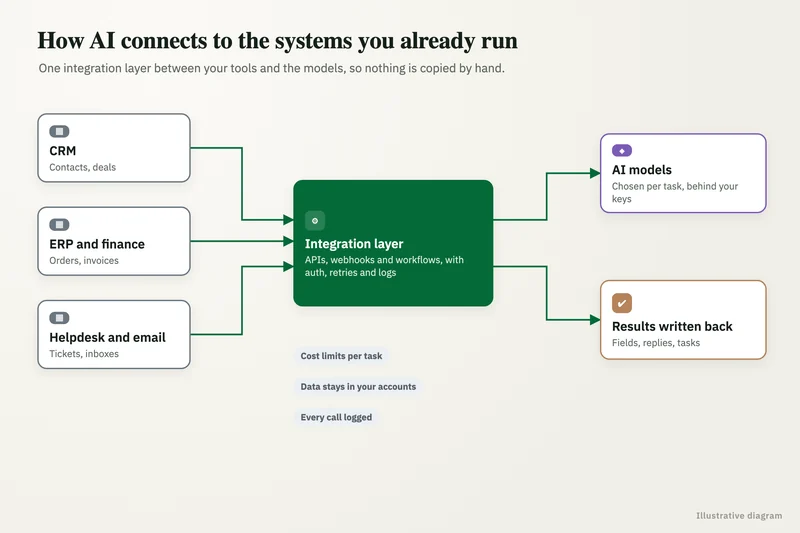
What is Gemini Enterprise, and how is it different from Gemini in Workspace?
Gemini Enterprise is Google's workplace agent platform, launched on October 9, 2025, and it is a separate product from the Gemini features built into Gmail, Docs and Sheets. Google's launch post describes four parts: Gemini models, a no-code workbench where staff build and run agents, a set of prebuilt Google agents for jobs such as deep research and data insights, and connectors that reach company data in Google Workspace, Microsoft 365 and business applications such as Salesforce and SAP. It replaced Google Agentspace, so older documentation may still use that name.
Gemini in Workspace is the assistant inside Google's own apps. Since January 2025 it has been bundled into Workspace Business and Enterprise plans; 9to5Google reported that a Business Standard customer who had paid $32 per user per month with the old Gemini add-on would pay $14 after the change. That matters for budgeting: if your goal is drafting emails and summarizing documents for a Workspace team, you may already own what you need.
Gemini Enterprise earns its price when people need one place to search and act across several systems, for example a support lead asking a question that pulls from Zendesk tickets, a Confluence runbook and a SharePoint policy at once, or a finance team running an agent that compiles a weekly variance note from files in three places.
Which Gemini Enterprise edition should you implement?
Small and mid-size teams under 500 users usually start on Business, while larger companies, or teams that need the fuller agent and governance feature set, start on Standard or Plus. Frontline is for large groups of shift or field staff who only use agents an administrator has provisioned for them, and Google requires at least 150 Standard or Plus users to add it.
The table combines Google's editions documentation with the launch prices SiliconANGLE reported on October 9, 2025. Google's documentation also lists VPC Service Controls, customer-managed encryption keys and data residency among its security options. Feature lists change often, so check the current editions page against your shortlist before you sign.
| Edition | Who it suits | Seats (Google docs) | Pooled storage per user | Published starting price |
|---|---|---|---|---|
| Business | Teams up to 500 people starting their first rollout | 1 to 500 users | 25 GiB | From $21 per seat per month, annual plan; 30-day free trial at launch |
| Standard | Companies above 500 users or needing the full feature set | 1 or more users | 30 GiB | From $30 per seat per month, annual plan |
| Plus | Heavier users and larger data volumes | 1 or more users | 75 GiB | From $30 per seat per month, annual plan; confirm the quote for your seat count |
| Pay-as-you-go | Trials and variable usage | 1 seat minimum | Usage-based | Usage-based |
| Frontline | Shift and field staff using admin-provisioned agents | 150 or more Standard or Plus users | 2 GiB | Not published |
How much does Gemini Enterprise implementation cost?
The total cost has three lines: seat licenses billed by Google, the one-time implementation work, and any usage-based charges for custom agents or API workflows built on Google Cloud. Seat prices are the only part Google publishes.
Implementation work is priced by whoever does it. Promevo, a Google Cloud partner, describes an 8 to 16 week accelerator to move a company from pilot to production, which gives a sense of the effort involved in a full program. Our AI implementation cost guide collects published third-party build ranges if you want a reference point for the services line.
Usage costs appear when you go beyond the no-code workbench. An agent built with code that reads invoices from a Drive folder and writes entries into NetSuite calls Gemini models through Google Cloud and is billed per use, separately from seats. Log the cost per task during testing and set a cap per task so the first monthly bill matches the estimate.
Worked example: budgeting a first-year rollout
Seat math settles the edition choice for most companies. The prices below are the launch figures SiliconANGLE reported; the headcounts are illustrations, so replace them with your own.
Company A has 80 people who would use Gemini Enterprise. On Business at $21 per seat, that is 80 x $21 = $1,680 a month, or $20,160 a year. The same 80 seats on Standard at $30 would be $2,400 a month, or $28,800 a year, so the step up costs $8,640 a year. If nobody needs the extra storage or features Standard adds, Business plus a funded implementation is the better use of that money.
Company B has 650 staff. Business is off the table because of its 500-user limit, so the starting point is Standard: 650 x $30 = $19,500 a month, or $234,000 a year at the published starting rate. At that size, a phased rollout matters more than the edition. Licensing 150 users in two pilot departments first ($54,000 a year at the same rate) and expanding once active-user numbers justify it avoids paying for hundreds of idle seats while permissions are still being cleaned up.
Neither figure includes implementation services, Google Cloud usage for custom agents, or staff time for training. Add those as separate lines so the business case is honest.
How should Gemini Enterprise connectors be set up?
Connect the fewest sources that answer the most questions, choose between indexing and live search for each one, and clean up permissions before anything goes live. A Google developer forum admin guide on Gemini Enterprise connectors makes the indexing choice explicit: data ingestion copies and indexes content on a schedule (hourly to daily), which suits knowledge bases and documentation, while search federation queries the source live, which suits fast-changing data such as open tickets.
The same guide lists the problems that cause most support calls after launch: employees signed in with a personal Gmail account instead of their work identity, so results ignore their real permissions; connectors failing with 401 errors because an admin's token expired; and documents missing because folder rules or inherited permissions excluded them. Each is cheap to prevent with a managed service account, single sign-on that forces the corporate account, and a test before launch.
Permissions are the bigger risk. Gemini Enterprise answers within each user's existing access, so a salary spreadsheet shared with the whole company in 2019 becomes searchable in plain English on day one. Run a sharing report on Google Drive, SharePoint and OneDrive first. Our Google Drive AI chatbot guide covers the Drive side of that clean-up in more detail.
- List each team's top 20 questions and the systems that hold the answers.
- Pick ingestion for stable documents and federation for live records such as tickets or deals.
- Run sharing reports and close any link open to the whole domain or to anyone with the link.
- Use a managed service account with rotated credentials, not one admin's personal token.
- Force sign-in with corporate identities through your identity provider.
- Test every connector with known questions and confirm each answer cites the right file.
No-code agents or custom agents: which jobs need engineering?
Use the no-code workbench for tasks a person starts and checks, and use custom code for jobs that should run on their own. Drafting an RFP response from past proposals, summarizing a contract or preparing a customer call brief are good workbench agents: a person triggers them and reads the output.
Jobs triggered by events are different. If every inbound order email should be classified, the order number extracted and a tagged ticket created in Zendesk, or every vendor invoice in a Drive folder should be read and posted to QuickBooks, that work needs code that calls Gemini models through Google Cloud. It also needs the parts a demo leaves out: a structured output schema, validation rules, a confidence threshold that routes doubtful results to a human-review queue, prompt and output logging, a cost cap per task and a way to roll back a bad change.
Systems without a ready connector can be reached through a narrow MCP server or custom action that exposes only the lookups a team needs. Our MCP server development guide explains how to scope those so an agent can read an order status without being able to change it.
How long does a Gemini Enterprise rollout take?
A first rollout with identity, three or four connectors, a handful of agents and training typically takes six to ten weeks; custom agents that write into other systems add more. That sits inside Promevo's 8 to 16 week range for moving from pilot to production and well under Softude's 2026 estimate of 3 to 5 months for a single custom AI use case. Permission clean-up is the step most likely to stretch the schedule.
- Week 1: confirm pilot teams, edition, identity provider, data rules and success measures.
- Weeks 1 to 2: admin roles, single sign-on, policies, retention and the first sharing reports.
- Weeks 2 to 4: fix overshared files, connect the first sources, build the test question set.
- Weeks 3 to 6: build workbench agents with each pilot team and train them on real tasks.
- Weeks 4 to 10: build coded agents with validation, review queues and logging, then test on real samples.
- Days 30 to 60 after launch: review active users, answer accuracy and cost, then pick the next teams.
How do you choose a Gemini Enterprise implementation partner?
Choose a Gemini Enterprise implementation partner on evidence of connectors and agents they have shipped and how they test them, not on a badge. Google Cloud's launch post points to an ecosystem of more than 100,000 partners, so depth varies widely. MIT NANDA reported in 2025 that AI projects built with specialist partners succeeded about 67% of the time versus about 33% for internal builds, and the difference came from integration and adoption experience, which is what to probe.
- Business or Standard for us, and what would change that advice?
- Which of our sources should be indexed and which searched live, and why?
- How will you find overshared files before the first connector goes live?
- Show us an agent you built that writes into another system, and its review step.
- How do you measure answer accuracy, and do we keep the test set?
- Who owns the Google Cloud project, agents, code and credentials after handover?
- Who fixes an agent when Google changes a model or an API?
Common mistakes, and when you do not need Gemini Enterprise
The usual mistakes are licensing every employee before permissions are fixed, connecting every system on day one, judging success by logins instead of tasks completed, and stopping at the chat interface when the real savings sit in back-office jobs that could run unattended.
You may not need Gemini Enterprise at all. If your team lives in Google Workspace and mostly wants help writing, summarizing and searching its own files, the Gemini features already in your Workspace plan may be enough. If your company runs on Microsoft 365, Copilot is the more natural fit, and if you have not chosen a vendor yet, compare options before booking any implementation; our ChatGPT Enterprise implementation and Claude implementation guides cover the alternatives. And if you need one specific workflow automated, such as invoice entry, a focused build is usually faster and cheaper than a platform rollout.
How we deliver Gemini Enterprise implementation
We are AI implementation consultants, so our Gemini work is configuration and engineering: edition selection, identity and admin setup, sharing clean-up in Drive and SharePoint, connector configuration and testing, workbench agents for pilot teams, and coded agents on Google Cloud that read documents and update systems such as Salesforce, NetSuite or QuickBooks. We are not a Google Cloud partner and do not resell licenses; you buy seats directly from Google or your reseller.
Every engagement starts with a free review of your teams, systems and data rules, followed by a fixed price for a defined scope. You own the Google Cloud project, agents, code, prompts and data from day one, and Google bills you directly. A person stays in the loop on anything that touches money, customers or regulated data. See our AI implementation services to see how a Gemini rollout fits into a wider build.
Case study · Logistics company, UK
Route planning automation
Dispatch typed every address into Google Maps, which optimizes only 25 stops and cannot add time at each stop. A Python tool that loads addresses automatically, adds buffer time per stop and optimizes the full route.
- Manual address entry eliminated
- Delivery estimates customers could rely on

FAQ
Frequently asked questions
How much does Gemini Enterprise cost per user?
At launch in October 2025, SiliconANGLE reported Gemini Business annual plans starting at $21 per seat per month and Gemini Enterprise Standard and Plus annual plans starting at $30. Plus and Frontline pricing is usually quoted by Google or a reseller. Implementation work and Google Cloud usage for custom agents are billed separately.
What is the difference between Gemini Enterprise and Gemini in Google Workspace?
Gemini in Workspace is the assistant inside Gmail, Docs, Sheets and other Google apps, included in Workspace Business and Enterprise plans since January 2025. Gemini Enterprise is a separate platform for searching and running agents across many systems, including Microsoft 365, Salesforce and SAP. Buy it when people need answers and actions that span tools, not just help inside Google's apps.
How long does it take to implement Gemini Enterprise?
A first rollout with sign-on, a few connectors, workbench agents and training typically takes six to ten weeks. Promevo describes 8 to 16 weeks to move from pilot to production. Custom agents that write into other systems and large permission clean-ups extend the timeline.
Does Gemini Enterprise work with Microsoft 365 and SharePoint?
Yes. Google's launch post says Gemini Enterprise connects to data in Google Workspace and Microsoft 365 as well as business applications such as Salesforce and SAP. Answers respect each user's source permissions, so review SharePoint sharing before connecting it.
What is the user limit on Gemini Business?
Google's editions documentation lists Gemini Business for 1 to 500 users. Above that, companies move to Standard or Plus, and Frontline requires 150 or more Standard or Plus users.
Do we need a Google partner to implement Gemini Enterprise?
No. You can buy licenses from Google or a reseller and hire any firm to configure and build on them. What matters is whether the team can show working connectors, tested agents and a handover where you own the Google Cloud project and code.
Is Gemini Enterprise secure enough for confidential company data?
Google's documentation lists VPC Service Controls, customer-managed encryption keys and data residency options. The bigger practical risk is internal oversharing, because connected files become easy to find. For regulated data such as health records, confirm contract terms with Google before connecting any source; this is not legal advice.
Keep reading
Related pages
Get started
Tell us what you want automated
Describe the task, the systems involved and the volume. We reply within one business day with an architecture, the tools we would use, running costs and a fixed-price build plan.
- Free 30-minute build review
- Fixed quote before any work starts
- You own the accounts, code, prompts and data
Prefer email? info@aiimplementationconsultants.com
Get a free build plan
Two lines is enough to start.