

Buyer's guide
ChatGPT Enterprise implementation: what a rollout includes, costs and takes
ChatGPT Enterprise implementation is the work that turns a signed OpenAI contract into a governed workspace people use every day: SSO and user provisioning, permissions, connectors to SharePoint, Google Drive or your CRM, shared GPTs for repeat tasks, training, and API workflows for jobs that should run without anyone typing a prompt. This guide is for IT, ops and team leads in US companies who have picked ChatGPT and now need to know which plan fits, what it really costs and what a good partner should deliver.
Get a free build plan
Two lines is enough. A specialist replies within one business day.
Spec: quick answer
What does ChatGPT Enterprise implementation include?
ChatGPT Enterprise implementation covers choosing between ChatGPT Business and Enterprise, setting up SAML SSO, SCIM provisioning and roles, fixing file permissions before connectors go live, building shared GPTs and projects, training staff on their own tasks, and building OpenAI API workflows for automated jobs. It ends with a usage and cost review 30 to 60 days after launch.
- Below roughly 150 users, ChatGPT Business is usually the realistic plan, not Enterprise.
- Enterprise mostly buys governance: SCIM, key management, data residency, compliance logs.
- Connectors expose whatever your SharePoint and Drive permissions already allow, so fix oversharing first.
- Seats help people work; automated workflows need the OpenAI API and real integration code.
What does ChatGPT Enterprise implementation include?
A ChatGPT Enterprise implementation is everything between buying seats and having a workspace that is secure, connected to company knowledge and actually used. Turning on licenses takes an afternoon. The weeks go into identity, permissions, connector approval, shared instructions for repeat work, training people on their own tasks, and building the automations that seats alone cannot run.
When we scope a rollout, the work breaks into the components below. Few companies need all of them on day one, and a good partner prices each one separately so you can drop what you do not need.
- Plan selection: which teams need ChatGPT Business or Enterprise seats, who needs nothing, and which jobs belong on the OpenAI API instead.
- Identity and admin: SAML SSO with Okta, Microsoft Entra ID or Google Workspace, SCIM provisioning on Enterprise, roles, retention settings and workspace policies.
- Permission clean-up: finding overshared SharePoint sites, Google Drive folders and Confluence spaces before any connector can read them.
- Connectors and company knowledge: approving which apps can be connected, testing that answers cite the right files, and blocking the ones that should stay out.
- Shared GPTs and projects: reusable instructions and reference files for tasks such as RFP drafts, contract summaries, support macros or sales call prep.
- Training and adoption: short role-based sessions built on real tasks, plus a usage review that shows which teams are and are not using it.
- API workflows: code that calls OpenAI models from your own systems for email triage, document extraction or CRM updates, with validation, a review queue and logging.
ChatGPT Business vs Enterprise: which plan should you implement?
ChatGPT Business suits most companies under about 150 users, while ChatGPT Enterprise suits larger or regulated organizations that need provisioning, key management, data residency and audit logs. Both give staff the same core assistant. eesel's July 2026 comparison of the two plans says Enterprise's premium mainly buys governance and compliance infrastructure rather than better AI.
The table summarizes the differences that usually decide the choice. It draws on eesel's comparison (last edited July 2026) and CloudZero's ChatGPT Enterprise pricing analysis (October 2026), because OpenAI's own pricing pages do not publish Enterprise rates. Confirm the current feature list with OpenAI before you sign.
| Question | ChatGPT Business | ChatGPT Enterprise |
|---|---|---|
| Published price | $20 per seat per month billed annually, $25 monthly | Not published; quote-based annual contract |
| Minimum size | 2 seats | 150 seats, as reported by CloudZero |
| Sign-in | SAML SSO and admin console | SAML SSO plus SCIM user provisioning |
| Data controls | No training on business data; SOC 2 | Adds Enterprise Key Management, role-based access, IP allowlisting, ISO 27001 |
| Data residency | Not listed | Ten regions, per eesel and CloudZero |
| Audit and logs | Admin console | Compliance API for per-user usage and logs |
| Health data | No BAA listed | HIPAA BAA eligibility, per CloudZero |
| Support | Standard | 24/7 priority support, per eesel |
How much does ChatGPT Enterprise cost?
OpenAI does not publish ChatGPT Enterprise prices. CloudZero's October 2026 analysis reports a typical figure of about $60 per user per month, a range of roughly $45 to $75, a 150-seat minimum and annual prepayment, which puts the practical entry point near $108,000 a year. Treat those as reported market figures to test in your own negotiation, not list prices.
CloudZero also describes a newer usage-based rate card for eligible token-based Enterprise agreements, priced per million tokens, with multipliers for features such as long context and regional processing (1.1x on all rates for regional processing). If OpenAI offers you a token-based agreement, ask for the rate card in writing and model your real usage against it before choosing it over flat seats.
Seat fees are only one line. The full first-year budget also includes the implementation work, any API usage for automated workflows, the identity provider changes, and the staff hours spent in training and in reviewing flagged outputs. For build-cost ranges across AI projects, our AI implementation cost guide collects the published third-party figures.
Worked example: when Enterprise makes sense and when it does not
The seat math alone often settles the plan question. The prices below are the published Business rate and CloudZero's reported Enterprise figures; the headcounts are illustrations, so swap in your own.
Company A has 60 people who would use ChatGPT. On Business billed annually that is 60 x $20 = $1,200 a month, or $14,400 a year. Enterprise at the reported 150-seat minimum and $60 per seat would cost about $108,000 a year, so Company A would pay for 90 empty seats to get SCIM, key management and data residency. Unless a customer contract or regulator demands those controls, Business is the sensible plan, and the money saved can fund connectors and one automated workflow.
Company B has 400 users, an Okta tenant, SOC 2 audits of its own and a healthcare client. Business would cost 400 x $20 = $8,000 a month, or $96,000 a year. Enterprise at the reported range of $45 to $75 per seat would cost roughly $216,000 to $360,000 a year. The difference of about $120,000 to $264,000 is the price of automated provisioning, the compliance API, residency, priority support and BAA eligibility. For Company B that is often a fair trade, because manually adding and removing 400 users and answering auditors without logs has its own cost.
The lesson: decide which governance controls you are actually required to have, price them, and let that decide the plan. Do not buy Enterprise for the name.
How should connectors and company knowledge be set up?
Connectors are what make ChatGPT useful at work, and they are also where most rollout risk sits. When ChatGPT searches SharePoint, Google Drive or another connected app, it works with the access each user already has. That sounds safe, but in most companies those permissions are far looser than anyone remembers: an HR folder shared with the whole company years ago becomes searchable in plain English the day the connector goes live.
So the first technical task in a ChatGPT Enterprise rollout is not prompts. It is a permission review of the systems you plan to connect, followed by a short list of approved connectors and a test set of questions whose correct answers and source files you already know. Our SharePoint AI chatbot guide goes deeper on the oversharing problem, since the same issue affects every assistant that reads Microsoft 365.
- List each team's knowledge sources and decide which ones ChatGPT may read.
- Run a sharing report on SharePoint, OneDrive and Google Drive, and close links shared with everyone.
- Approve connectors one at a time, starting with the lowest-risk source.
- Write 20 to 30 test questions per team with known answers and check that responses cite the right file.
- For internal systems with no ready connector, build a narrow MCP server or custom action that exposes only the lookups a team needs.
- Keep anything that writes to a CRM, ERP or ticketing system behind a confirmation step.
Seats or OpenAI API integration: which jobs need code?
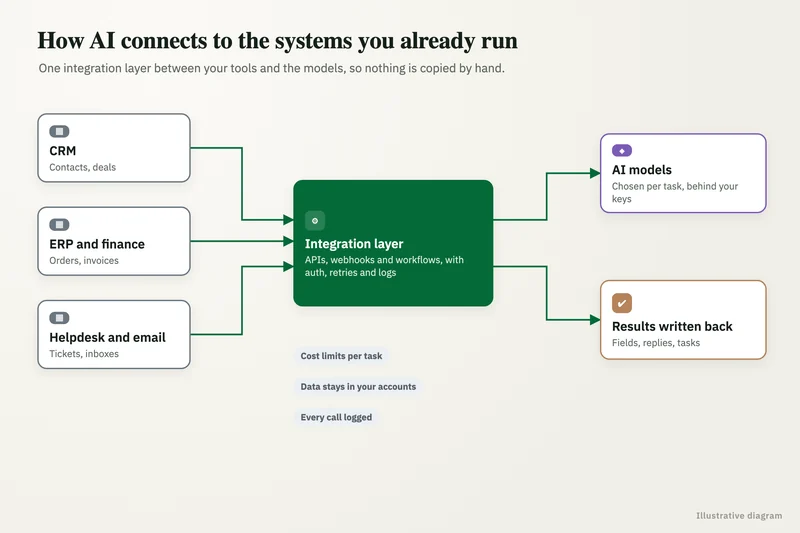
Seats help people do their work faster; they do not run work on their own. If a job should happen every time an email arrives, a PDF lands in a folder or a deal changes stage in HubSpot, it belongs on the OpenAI API, called from your own systems or a workflow tool such as n8n, Make or Zapier.
API workflows are billed per token on OpenAI's API pricing, separately from seats, and need engineering that a seat rollout does not: structured output schemas, validation rules, a human-review queue for low-confidence results, prompt and output logging, a cost cap per task and a rollback path. A typical first workflow reads inbound support or order emails, classifies them, extracts the order number and writes a draft reply and a tagged ticket into Zendesk for a person to approve.
Many companies end up with both: Business or Enterprise seats for knowledge work, and two or three API workflows for the repetitive back-office jobs. MIT NANDA reported in 2025 that the biggest returns from generative AI came from back-office automation, even though more than half of budgets went to sales and marketing, which is a good reason not to stop at seats.
How long does a ChatGPT Enterprise rollout take?
A seat rollout with SSO, a few approved connectors and training usually takes four to eight weeks; custom API workflows add more. statworx, a German OpenAI services partner, describes its packages as a 4-week entry pack (kickoff, enablement training and SSO/SCIM setup), an 8-week advanced pack with use-case workshops and change management, and a custom pack of 12 weeks or more for API integration and governance. That matches the order of work we follow below.
For larger builds, Softude's 2026 guide says one AI use case typically takes 3 to 5 months. A rollout that is mostly configuration sits well under that; an API workflow that writes into an ERP can approach it.
- Week 1: confirm teams, use cases, plan choice, identity provider and data rules.
- Weeks 1 to 2: configure SSO, SCIM if on Enterprise, roles, retention and workspace policies.
- Weeks 2 to 3: permission review and clean-up; approve the first connectors; build the test question set.
- Weeks 3 to 5: build shared GPTs and projects for each pilot team; train them on real tasks.
- Weeks 4 to 10: build API workflows with validation, a review queue and logging; test against real samples.
- Days 30 to 60 after launch: review active users, cost and error rates; expand to the next teams.
How do you choose a ChatGPT Enterprise implementation partner?
Judge a ChatGPT Enterprise implementation partner on what they have built and how they test, not on a logo. ITPro has reported that OpenAI is turning to consultancies and systems integrators to fill implementation gaps in its enterprise push, so the number of firms offering this work is growing fast and their depth varies.
There is a reason to use outside help at all. MIT NANDA reported in 2025 that AI projects bought from or built with specialist partners succeeded about 67% of the time, against about 33% for internal builds. The difference comes from integration, testing and adoption experience, so ask about exactly those.
- Business or Enterprise for us, and what would change your recommendation?
- How will you find and fix overshared files before connectors go live?
- Can you show a custom GPT, action or MCP server you built, and how its permissions work?
- Which of our jobs should run on the API instead of seats, and what will tokens cost per month?
- How do you test answer accuracy, and do we keep the test set?
- Who owns the workspace, the GPTs, the code and the API keys when the engagement ends?
- Who fixes a broken workflow when OpenAI retires a model or changes an endpoint?
Common mistakes, and when you do not need a partner
The most common mistakes are buying Enterprise too early, connecting every app on day one, training everyone with a generic webinar, and stopping at seats when the real savings sit in automated back-office work. Each one is cheap to avoid at the start and expensive to fix later.
You may not need a partner at all. If fewer than 30 people will use ChatGPT, nobody needs it connected to internal systems and no regulated data is involved, a Business workspace set up by your own IT admin with a one-page usage policy is usually enough. You also do not need an implementation partner if you have not chosen a vendor yet: comparing ChatGPT with Claude, Gemini or Copilot is a strategy decision that should come first. If you are already leaning toward Anthropic, our Claude implementation services guide covers that path.
How we deliver ChatGPT Enterprise implementation
We are AI implementation consultants, so our ChatGPT work is configuration and engineering, not slides. We set up Business or Enterprise workspaces, review and fix file permissions before connectors go live, build shared GPTs and custom actions, and write OpenAI API workflows for document extraction, email triage and CRM or ERP updates. We are not an OpenAI partner and do not resell licenses; you buy seats directly from OpenAI.
Every engagement starts with a free review of your teams, systems and data rules, then a fixed price for a defined scope. You own the workspace, API keys, code, prompts and data from day one, and seat and token bills go to you directly. A person stays in the loop on anything touching money, customers or regulated data. See our AI implementation services for how a ChatGPT rollout fits into a wider build.
FAQ
Frequently asked questions
What is the difference between ChatGPT Business and ChatGPT Enterprise?
Both give staff the same core assistant, SSO, an admin console and no training on business data. Enterprise adds governance features such as SCIM provisioning, Enterprise Key Management, data residency, a compliance API and priority support, according to eesel's July 2026 comparison. Business is self-serve at $20 per seat per month billed annually; Enterprise is a negotiated annual contract.
What is the minimum number of seats for ChatGPT Enterprise?
OpenAI does not publish a minimum, but CloudZero's October 2026 analysis reports a 150-seat minimum with annual prepayment. ChatGPT Business has a two-seat minimum, which is why most companies under about 150 users start there.
How long does it take to implement ChatGPT Enterprise?
A seat rollout with SSO, a few connectors and training usually takes four to eight weeks. statworx describes a 4-week entry package and a custom package of 12 weeks or more when API integration and governance are included. Permission clean-up in SharePoint or Google Drive is the step most likely to stretch the timeline.
Is ChatGPT Enterprise HIPAA compliant?
CloudZero lists HIPAA BAA eligibility among ChatGPT Enterprise features. Any use with protected health information needs a signed Business Associate Agreement and a check of which features the agreement covers. This is not legal advice, so your compliance lead should confirm the setup.
Does ChatGPT Enterprise train on our company data?
No. Both ChatGPT Business and Enterprise include a no-training guarantee for business data, according to eesel and CloudZero. The bigger practical risk is internal: connectors can surface files to employees who technically had access but were never meant to see them.
Can ChatGPT Enterprise connect to SharePoint, Google Drive and our CRM?
Yes, through connectors, and internal systems can be reached with custom actions or MCP servers. ChatGPT works within each user's existing access, so a permission review should come before connectors are switched on. Anything that writes back to a CRM or ERP should require a confirmation step.
Do we need an OpenAI partner to implement ChatGPT Enterprise?
No. OpenAI sells Enterprise directly, and an implementation firm does not need partner status to configure a workspace or build on the API. What matters is whether the firm can show working connectors, tested workflows and a clear handover where you own the accounts and code.
Keep reading
Related pages
Get started
Tell us what you want automated
Describe the task, the systems involved and the volume. We reply within one business day with an architecture, the tools we would use, running costs and a fixed-price build plan.
- Free 30-minute build review
- Fixed quote before any work starts
- You own the accounts, code, prompts and data
Prefer email? info@aiimplementationconsultants.com
Get a free build plan
Two lines is enough to start.