

Data guide
CRM data cleansing services: how to clean your CRM and keep it clean
CRM data cleansing services find and fix the duplicate, outdated, badly formatted and incomplete records in a CRM such as HubSpot, Salesforce or Zoho, then put rules in place so the mess does not come back. This guide is for sales ops, revenue ops and marketing leads who know their CRM data is unreliable and need to decide between an outsourced cleanup, a software tool or an automated pipeline. It covers what a proper cleanse includes, what it costs, and how to prevent the next one.
Get a free build plan
Two lines is enough. A specialist replies within one business day.
Spec: quick answer
What do CRM data cleansing services do and how much do they cost?
CRM data cleansing services remove duplicates, standardize fields, verify contact details, fill gaps and archive dead records, then add rules that stop bad data at entry. Published per-record rates for basic cleanup run from a few cents per record, rising when verification and enrichment are added. One-off cleanups decay quickly without ongoing automation.
- Fix duplicates and formats first, then verify and enrich; the order saves money.
- Native HubSpot and Salesforce dedup catches exact matches but misses most near-duplicates.
- Every merge needs a rule for which value survives, plus a log you can roll back.
- A one-off cleanse without entry rules and a nightly check will need repeating.
What do CRM data cleansing services include?
A real CRM cleanse is a sequence of jobs, not a single dedup click. Validity's State of CRM Data Management in 2025 report, based on 602 CRM users, found that 76% say less than half of their organization's CRM data is accurate and complete. The work below is what moves that number.
When comparing CRM data cleansing services, ask each provider which of these steps they perform, which they automate, and which they leave to you. Many vendors quote only deduplication and leave standardization, verification and prevention out of scope.
- Profiling: counting blanks, invalid formats, duplicates and stale records per field, so you know the size of the problem before paying to fix it.
- Standardization: one format for states, countries, phone numbers, job titles, industries and company names (stripping Inc, LLC and stray punctuation).
- Deduplication: matching contacts, companies and leads, including near-duplicates with typos, nicknames or different email addresses.
- Merging with survivorship rules: deciding which value wins when two records disagree, and keeping activity history attached.
- Verification: checking emails, phone numbers and domains still work, and flagging people who changed jobs.
- Enrichment: filling missing firmographics such as industry, headcount and location from a data provider.
- Archiving: moving dead records out of active views without deleting history you may need.
- Prevention: required fields, picklists, duplicate rules and automated checks so new data arrives clean.
Why don't HubSpot and Salesforce duplicate tools solve this on their own?
Built-in tools catch the easy cases. HubSpot's documentation explains that it deduplicates contacts by matching the email property and companies by the primary company domain. That stops a second record for the same email, but it does nothing when the same buyer exists as jane.doe@acme.com and jdoe@acme.com, or when a company was entered once with its domain and once without.
Salesforce ships standard matching rules for accounts, contacts and leads, with fuzzy matching on certain fields, and duplicate rules that either alert the user or block the record. Its Trailhead training notes that orgs created from Spring '15 onward get standard duplicate rules automatically, while older orgs have to set them up. In practice, many teams leave rules on alert, users click through the warning, and imports or integrations add records the rules never see.
The gap is the messy middle: records that are probably the same but not certainly. That is where a cleansing service or an automated pipeline earns its fee.
How does AI-assisted CRM data cleansing work?
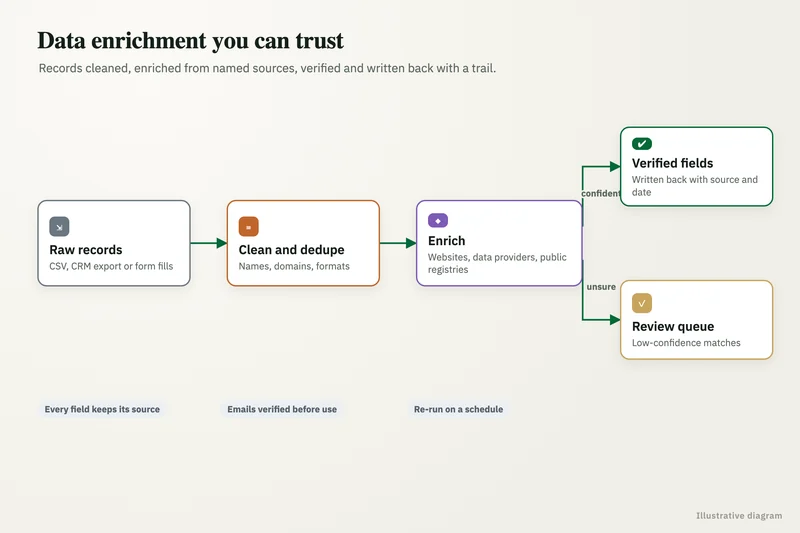
AI helps most on the judgment calls that rules cannot make. Exact keys such as email and domain still do the first pass, because they are cheap and certain. Fuzzy matching on name, company and phone then produces candidate pairs. For the uncertain pairs, a language model compares both records and returns a structured verdict (same person, different person, unsure) with a confidence score and the fields it relied on.
We never let the model merge on its own. Pairs above a high confidence threshold are merged automatically under the survivorship rules; pairs in the middle go to a human-review queue where someone approves or rejects them in a few seconds each; pairs below the threshold are left alone. Every merge is logged with both original records, so it can be reversed.
The same approach standardizes free-text fields that rules struggle with. A model can map "VP Sales & Biz Dev", "Vice President, Sales" and "Head of Sales" to a seniority and department picklist, or map hundreds of hand-typed industry values to your official list, with a validation step that rejects anything outside the allowed values.
- Pass 1, exact: email, company domain, external ID.
- Pass 2, fuzzy: normalized name plus company plus phone, scored.
- Pass 3, model review: uncertain pairs only, structured output with confidence.
- Gate: auto-merge above threshold, human review in the middle, skip below.
- Log: both originals stored before every merge, for audit and rollback.
Should you hire a service, buy software or automate the cleanup?
Each route suits a different situation. Outsourced cleanup is a one-time project. Software gives your ops team tools to run cleanups themselves. An automated pipeline cleans what exists and then keeps watching every new record. The table below compares them.
| Option | Best for | Strength | Weak spot |
|---|---|---|---|
| Outsourced cleansing service | A one-time backlog, migration prep before a CRM switch | Fast, no tool to learn | Data decays again; you send records to a third party |
| Dedup and hygiene software | Ops teams with time to run and tune it | Repeatable, runs inside your CRM | Rules need tuning; near-duplicates still need human judgment |
| Automated cleansing pipeline | CRMs fed by forms, imports and integrations every day | Cleans continuously, logs every change, routes edge cases to review | Needs a build up front and an owner afterwards |
| Do nothing beyond native tools | Small CRMs with one entry point | Free | Misses most near-duplicates and formatting drift |
How much do CRM data cleansing services cost?
Pricing is usually per record, per project or as a software subscription. Prospeo's 2026 buyer guide, citing a Damco pricing framework, puts basic cleanup at roughly $0.02-0.10 per record and cleanup with enrichment at roughly $0.15-0.50 per record. Most outsourced vendors on page one, such as Eminenture, do not publish prices and quote after a sample.
Here is how those ranges play out on a 50,000-record CRM. Basic cleanup at $0.02-0.10 per record comes to about $1,000-5,000. Cleanup with enrichment at $0.15-0.50 per record comes to about $7,500-25,000. The spread is wide because enrichment depends on how many records are missing data and which provider fills it.
Two things change the real cost more than the rate. First, cleaning before enriching avoids paying to enrich duplicates and dead contacts. Second, a one-off cleanup that is not followed by prevention has to be bought again, so compare a single project against the cost of a pipeline that keeps the CRM clean.
| Scope (50,000 records) | Per-record range (Prospeo 2026, citing Damco) | Approximate total |
|---|---|---|
| Basic cleanup: dedup, standardize, format | $0.02-0.10 | $1,000-5,000 |
| Cleanup plus verification and enrichment | $0.15-0.50 | $7,500-25,000 |
How to clean CRM data step by step
Whether you hire a service or run it yourself, this order prevents rework. We follow it on every cleansing build.
Standardization tends to pay off more than people expect. In one of our case studies, an Australian insurance brokerage had each insurer's spreadsheet in a different layout; standardizing them into one pipeline lifted reporting accuracy from about 75% to 99%. CRM fields behave the same way: until values share a format, matching and reporting both suffer.
- 1. Snapshot: export every object and its associations before touching anything.
- 2. Profile: measure blanks, invalid values and suspected duplicates per field.
- 3. Agree survivorship rules: newest non-blank value wins, or the system of record wins, or the most active owner wins, field by field.
- 4. Standardize: phone numbers, countries, states, titles, industries, company names.
- 5. Deduplicate: exact pass, fuzzy pass, model-assisted review of the uncertain middle.
- 6. Verify and enrich: only the surviving records, so you do not pay for duplicates.
- 7. Merge through the CRM's API, logging both originals for every merge.
- 8. Archive dead records into a separate view or list rather than deleting them.
- 9. Turn on prevention, then re-measure the same profile to show the change.
How do you keep CRM data clean after the cleanse?
Prevention is cheaper than any cleanup. Most dirty data enters through a few doors: web forms, list imports, integrations from billing or support tools, and reps typing in a hurry. Close each door with a specific control.
We usually add a nightly job in n8n or Python that runs the same matching passes against records created or changed that day, posts suspected duplicates to a review queue, and sends a short summary to the CRM owner. Because it only checks the day's changes, it is quick and cheap to run.
- Forms: validate email and phone format at submit, and map to existing companies by domain.
- Imports: run every list through the standardize and match steps before it reaches the CRM.
- Integrations: use external IDs so sync jobs update records instead of creating new ones.
- Manual entry: required fields and picklists instead of free text; Salesforce duplicate rules set to block where the match is certain.
- Monitoring: a weekly data-quality score per field, so decay is visible before reps complain.
Questions to ask before you hire a CRM data cleansing service
These questions separate a careful provider from a bulk data shop. Ask them in writing and compare answers side by side.
- Do you work through the CRM's API in our account, or do we export data to you?
- Which matching method do you use for near-duplicates, and what happens to uncertain pairs?
- What are the survivorship rules, and can we set them per field?
- Do you keep a merge log we can use to reverse a mistake?
- Where does enrichment data come from, and is it priced per record found or per record attempted?
- What prevention do you leave behind so we do not pay for this again next year?
- Who owns any scripts, workflows or matching rules built during the project?
When you don't need a CRM data cleansing service
If your CRM has a few thousand records and one entry point, an afternoon with native duplicate tools and a sorted export may be enough. If you are about to migrate CRMs, run the cleanse as part of the migration rather than twice. And if nobody uses the CRM to make decisions, fix adoption first, because clean data no one trusts still goes unused.
When the CRM feeds lead routing, forecasting or an AI sales agent, clean data stops being optional. Those systems act on whatever is in the record.
How we build CRM data cleansing pipelines
We build cleansing as an implementation project: connect to HubSpot, Salesforce, Zoho or another CRM through its API in your account, run the profile, standardize, match and review passes, merge with a full log, enrich only the survivors, and leave a nightly prevention job running. Our data enrichment services cover the verification and enrichment step, and the same pipeline can feed lead scoring and routing.
We scope the work in a free review using a sample export and quote a fixed price. You own the accounts, scripts, matching rules and data, and a person approves any merge the system is not certain about.
Case study · Insurance brokerage, Australia
Automation and dashboarding
Policy data arrived as spreadsheets from several insurers, each in a different structure, and every client report took hours of manual cleanup. An automated pipeline that standardizes every insurer's file and feeds a single reporting dashboard.
- Report time cut from 4-5 hours to under 5 minutes
- Reporting accuracy up from about 75% to 99%

FAQ
Frequently asked questions
What is CRM data cleansing?
CRM data cleansing is the process of finding and fixing duplicate, outdated, incomplete and inconsistently formatted records in a CRM. It usually covers deduplication, standardization, verification, enrichment and archiving, followed by rules that stop bad data at entry.
How often should you clean CRM data?
Run a full cleanse once, then check continuously rather than repeating big projects. A nightly or weekly automated check on new and changed records catches duplicates and format problems while they are few, and a quarterly data-quality review shows whether decay is creeping back.
How much does CRM data cleansing cost per record?
Prospeo's 2026 buyer guide, citing a Damco framework, puts basic cleanup at about $0.02-0.10 per record and cleanup with enrichment at about $0.15-0.50 per record. Many outsourced vendors only quote after reviewing a sample of your data.
Does HubSpot remove duplicates automatically?
Partly. HubSpot deduplicates contacts by email address and companies by primary domain, and merges form submissions that match. It does not catch the same person under two different emails or a company entered without a domain, which is where most duplicates hide.
Can AI clean CRM data?
AI is useful for judging uncertain duplicate pairs and for mapping free-text fields such as job titles and industries to standard values. It should work behind confidence thresholds, with uncertain cases sent to a person and every merge logged so it can be reversed.
What is the difference between data cleansing and data enrichment?
Cleansing fixes what is already in your CRM: duplicates, formats, dead contacts. Enrichment adds what is missing, such as industry, headcount or a verified phone number, from an outside source. Clean first, then enrich, so you do not pay to enrich duplicates.
Is it safe to send CRM data to a cleansing vendor?
It depends on the vendor's contract, security and where the data goes. Working through the CRM's API inside your own account avoids bulk exports to a third party. Ask any provider where data is stored, for how long, and who can see it.
Keep reading
Related pages
Get started
Tell us what you want automated
Describe the task, the systems involved and the volume. We reply within one business day with an architecture, the tools we would use, running costs and a fixed-price build plan.
- Free 30-minute build review
- Fixed quote before any work starts
- You own the accounts, code, prompts and data
Prefer email? info@aiimplementationconsultants.com
Get a free build plan
Two lines is enough to start.