

Integration guide
Zoho CRM AI integration: Zia, the MCP servers or a custom build
Zoho CRM AI integration now has four routes: Zia, the AI built into Zoho CRM; Zoho's pre-built CRM MCP servers for Claude and other MCP clients; Deluge functions and Zoho Flow that call OpenAI or Claude from inside a workflow; and an external service that reads and writes CRM records through the API. This guide is for sales, support and RevOps leads on Zoho who know which job they want automated and need to pick a route, budget it and set it up without damaging their CRM data.
Get a free build plan
Two lines is enough. A specialist replies within one business day.
Spec: quick answer
How do you integrate AI with Zoho CRM?
You integrate AI with Zoho CRM by switching on Zia features in your edition, connecting Claude or another MCP client through Zoho's CRM MCP servers, calling OpenAI or Claude from Deluge functions or Zoho Flow, or building an external service on the Zoho CRM API for high-volume, rules-heavy work that needs validation and human approval.
- Try Zia first for scoring, summaries and email help, since it ships inside your edition.
- The CRM MCP servers suit people asking questions in chat, not unattended processing.
- Size every custom build against Zoho's daily API credit and concurrency limits per edition.
- Write AI output to dedicated fields and let a person or a rule promote it.
What are the four ways to do Zoho CRM AI integration?
The right route depends on who starts the work and how much of your own logic sits between the model and your records. If a rep or manager asks a question and reads the answer, Zia or an MCP client is usually enough. If a new lead, an inbound email or a stage change should trigger research, scoring and updates with nobody typing a prompt, you are into workflow functions or a custom build.
Most Zoho accounts end up mixing routes. Zia might score leads and suggest the best time to call, a sales manager might query the pipeline from Claude through an MCP server, and an external service might classify every inbound email and attach it to the right deal. The table sets the four side by side.
| Route | What it is | Best for | Main limit |
|---|---|---|---|
| Zia (built in) | Zoho's own AI in the CRM: predictions, Zia scores, anomaly detection, email intelligence, record summaries, smart prompts and Zia agents | Standard jobs on Zoho data with no extra systems | You get the behaviour Zoho ships, and many features depend on your edition and on months of clean history |
| CRM MCP servers | Zoho's pre-built MCP servers that expose CRM data and actions to Claude Desktop, Cursor, VS Code and Windsurf | Managers and reps asking questions and making small edits from a chat window | A person drives every session, and calls draw on the same API credits as any integration |
| Deluge functions and Zoho Flow | Custom functions or Flow steps that call a model API when a workflow rule fires | Short AI steps on records already moving through a workflow | Deluge caps a function at 5,000 executed statements, so long or chained model calls fit poorly |
| External custom build | Your own service using Zoho's OAuth, the CRM REST API and webhooks or notifications, plus a model provider | High-volume, multi-system or rules-heavy work such as lead triage, email-to-deal and data cleanup | Needs design, accuracy testing, monitoring and someone to maintain it |
What does Zia do, and what does it cost?
Zia is Zoho's built-in AI layer, and for many Zoho CRM users it is the cheapest place to start because it is part of the subscription. Zoho's AI features page for the CRM lists predictions such as Zia scores, churn prediction, field prediction and AI forecasting; recommendations such as best time to contact; anomaly detection on trends and workflows; email intelligence including sentiment, intent, summaries and a writing assistant; call transcription; record summaries; a prompt builder; and smart prompts, which Zoho says can run on Zia LLM or on third-party models such as ChatGPT.
Edition matters. Elsner's Zoho CRM pricing guide (updated October 2026) lists Standard at $14, Professional at $23, Enterprise at $40 and Ultimate at $52 per user per month on annual billing, and places Zia predictions, lead scoring and anomaly detection in Enterprise and above. Check Zoho's own edition comparison for the exact feature before you plan around it, because Zoho has been moving some AI features between tiers.
The common complaint about Zia is not price but fit. Predictions only become useful once there is enough clean history to learn from, and Zia's generative features follow Zoho's design rather than your playbook. If you need follow-up drafts in your own voice, decisions based on data outside Zoho, or a choice of model provider with full logging, Zia is a starting point rather than the finished system.
What are Zia LLM, Zia Agents and Agent Studio?
Zia LLM is Zoho's own language model family. In its 17 July 2025 announcement, Zoho said it built three models of 1.3 billion, 2.6 billion and 7 billion parameters, to be deployed in its data centres in the US, India and Europe, and that the models are not trained on consumer data and do not retain customer information. The same release said Zoho also supports integrations with outside models including ChatGPT, Llama and DeepSeek.
The release also introduced prebuilt Zia Agents (including a Deal Analyzer and a Revenue Growth Specialist), Zia Agent Studio, a prompt-based builder with access to more than 700 actions across Zoho products, an agent marketplace, and an MCP server. Zoho said these were in early access with general availability planned for the end of 2025 and pricing to be set at general availability, so confirm what is switched on in your own account and data centre today.
For a buyer, the practical point is data location. If keeping CRM data on Zoho's servers is a hard requirement, Zia LLM and Agent Studio are the first routes to test. If you need a frontier model's reasoning, your own rules or data from other systems, the work moves to OpenAI, Claude, Gemini or Bedrock through one of the routes below, with its own security review.
What can the Zoho CRM MCP servers do?
Zoho's developer documentation describes four pre-built Zoho CRM MCP servers: Data Insights for read-only queries, Data Operations for creating, reading, updating and deleting records, Module Customization for configuring the data model, and Workflow and Process Automation for managing rules and tasks. They work with MCP clients such as Claude Desktop, Cursor, Visual Studio Code and Windsurf, and authenticate through an OAuth login on first use.
Two details from that documentation matter for planning. Every action respects the signed-in user's CRM role, so the AI can do only what that person could do. And MCP calls consume API credits exactly like standard API calls, so a busy team chatting with the CRM shares the same daily allowance as your existing integrations.
In practice this is the quickest way to give a sales manager an assistant that knows live pipeline data: asking Claude which deals above a set amount have had no activity for three weeks, or for a summary of every open item on an account before a renewal call. It is not a scheduler or a pipeline. It does not watch for new records, apply your scoring rules overnight or hold a write until someone approves it. We would keep the Module Customization and Workflow servers away from day-to-day users and give most people the read-only Data Insights server.
When do you need a custom Zoho CRM AI integration?
You need a custom build once the work must run with nobody starting it, or once the logic is specific to your business. Zia and the MCP servers cover common jobs; they stop fitting when the rules are yours, the volume is high or the data sits partly outside Zoho.
Deluge functions and Zoho Flow can bridge part of the gap and are worth trying first for a single short step, such as summarizing a note or tagging an email with intent. Zoho's Deluge documentation caps a function at 5,000 executed statements and an invokeUrl response at 5 MB, and long-running external calls can be terminated, so a job that reads a long email thread, a company website and an ERP record before deciding usually belongs in an external service that the workflow calls by webhook.
- Work is triggered by a record change, form, email or schedule, dozens or hundreds of times a day.
- Decisions follow your rules: territory, ideal customer fit, product line, contract status or SLA tier.
- The job reads data from outside Zoho CRM, such as NetSuite, QuickBooks, a support inbox or the web.
- Output writes to fields that drive routing, forecasting or customer messages, so it needs validation and approval.
- You want to choose the model provider (OpenAI, Claude, Gemini or Bedrock) and log every prompt and output.
- You need audit history, cost caps per task and an eval set that reruns after each change.
How is a custom Zoho CRM AI integration built?
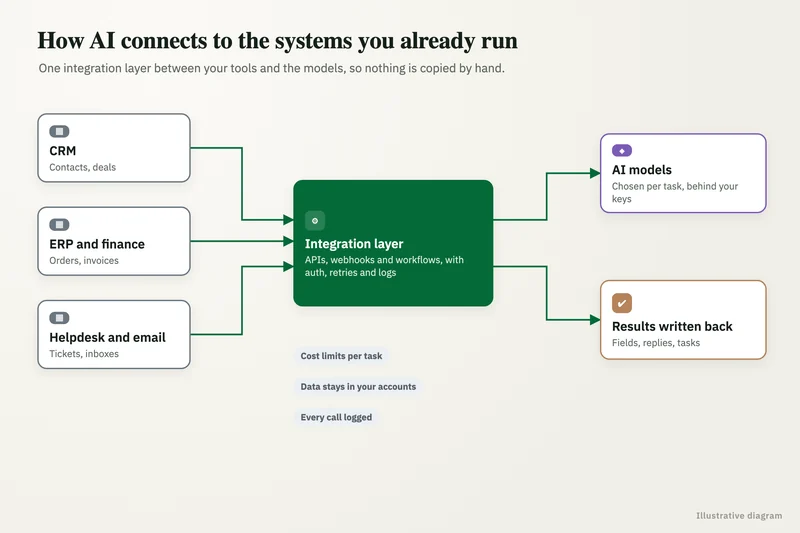
A custom build has five parts: a trigger, a context step, a model step, a rules step and a write-back step. Each has a Zoho-specific detail that decides whether it holds up in production.
API limits are the constraint most demos skip. Zoho's API limits documentation sets a daily credit allowance per organisation that grows with user licences, plus a cap on simultaneous calls. An AI service shares both with every other integration in the account, including MCP sessions, so it should batch reads, cache records that have not changed and queue writes rather than fire them all at once.
- Trigger: a workflow rule that calls a webhook, or Zoho's notification API on create and edit events, so the service reacts instead of polling every few minutes.
- Context: read the lead or contact, account, recent emails, notes and related deals in as few calls as possible, plus any outside data, and cache what has not changed.
- Model step: a fixed output schema (for example fit score, reason, product line, suggested owner, next step) so every field can be validated.
- Rules step: duplicate checks, allowed picklist values, a confidence threshold and a cost cap per task.
- Write-back: update dedicated AI fields, add a note with the reasoning and create a task for the owner; anything below the threshold lands in a custom view for review.
- Failure handling: queue requests, retry rate-limit and server errors with backoff, make every write safe to repeat, and alert someone when a record fails twice.
| Zoho CRM edition (Zoho API limits docs) | API credits per 24 hours | Maximum | Concurrent calls |
|---|---|---|---|
| Free | 5,000 | 5,000 | 5 |
| Standard | 50,000 + 250 per user licence + add-ons | 100,000 | 10 |
| Professional | 50,000 + 500 per user licence + add-ons | 3,000,000 | 15 |
| Enterprise | 50,000 + 1,000 per user licence + add-ons | 5,000,000 | 20 |
| Ultimate | 50,000 + 2,000 per user licence + add-ons | No cap | 25 |
Worked example: AI lead triage on Zoho CRM Enterprise
Here is a worked example with round numbers for illustration, not a client result. A B2B distributor on Zoho CRM Enterprise has 20 user licences and receives 1,200 web and email leads a month. An inside sales coordinator spends about 6 minutes on each: checking the company website, reading the enquiry, setting lead status and fit, assigning an owner by territory and writing a note for the rep. That is about 120 hours a month.
A custom build receives each new lead from a workflow webhook, reads the lead and any matching account, fetches the company website, and asks the model for a fit score, a one-line reason, the likely product line and a suggested owner based on the territory table. Leads above the confidence threshold get their AI fields filled, an owner assigned and a call task created. Leads below it, or that match an open deal, land in a custom view for the coordinator.
On Zoho's side, under the published formula, 20 Enterprise licences give 50,000 + 20,000 = 70,000 API credits a day. The build needs a handful of calls per lead (read lead, search accounts, update fields, add a note, create a task), so even if each lead used 20 credits, 40 leads a day would use 800 credits, about 1 percent of the allowance. The real limit is more likely concurrency during a burst, which is why writes go through a queue. If around three quarters of leads pass cleanly and the rest take a minute to check, coordinator time drops to a few hours of exception review. Your own pass rate depends on enquiry quality and how clean your account records are, which is why we test on a sample of real leads before quoting.
How do you keep Zoho CRM data safe when you add AI?
Safety comes down to scopes, where AI writes and where data goes. The most common mistake is an OAuth client with full CRM scope used by every script, so one bug or injected instruction can touch every module.
Treat incoming text as data, never as instructions. A web form, email body or chat message can contain text written to manipulate a model, so the service should only produce the fixed output schema and never call tools based on what a visitor typed. Check whether your model provider plan keeps prompts out of training and how long it retains them; if that is unacceptable, Zia LLM's on-Zoho processing is the alternative to test. If records hold protected health information, every vendor in the chain needs a signed Business Associate Agreement, which model vendors offer only on certain API or enterprise tiers. This is not legal advice.
- One OAuth client per integration, with only the scopes that job needs, and tokens kept in a secrets manager.
- Write AI output to dedicated fields (for example AI Fit Score, AI Summary) before anything overwrites a field reps rely on.
- Keep owner changes, stage changes and customer emails behind an approval step, Blueprint transition or auditable rule.
- Log every prompt, output, cost and write against the Zoho record ID so any change can be traced and rolled back.
- Test in a Zoho CRM sandbox first, then switch on for one lead source or one team before the whole organisation.
How much does Zoho CRM AI integration cost, and how do you choose a partner?
Budget three lines: your Zoho edition (which decides Zia features and API allowance), usage-based model fees if you call OpenAI, Claude, Gemini or Bedrock, and the one-time build. Build cost depends on how many systems are connected, how messy the inputs are and how strict the accuracy bar is; our AI implementation cost guide sets out published third-party ranges and the running costs to expect.
Choose a partner who starts by asking which route fits, not one who sells the same tool for every job. If Zia or an MCP server covers your case, a good partner will say so and save you a build. We scope every Zoho build after a free review of real records, quote a fixed price, and hand over the code, prompts, OAuth clients and model accounts so you own all of it. A person stays in the loop on anything that changes ownership, money or customer messages. Ask these questions of anyone you consider, including us.
- Which route would you use for this job (Zia, an MCP server, a Deluge function or a custom build), and why not the others?
- What OAuth scopes will the integration use, and which fields will the AI be allowed to write?
- What happens to a record the model is unsure about, and where does a person review it?
- How will you test accuracy before go-live, and on how many real records?
- How will the integration share API credits and concurrency with our existing syncs?
- What will it cost to run each month in model usage, and how is that capped per task?
Case study · Logistics company, UK
Route planning automation
Dispatch typed every address into Google Maps, which optimizes only 25 stops and cannot add time at each stop. A Python tool that loads addresses automatically, adds buffer time per stop and optimizes the full route.
- Manual address entry eliminated
- Delivery estimates customers could rely on

FAQ
Frequently asked questions
Does Zoho CRM have built-in AI?
Yes. Zoho CRM's built-in AI is Zia, which covers predictions and Zia scores, anomaly detection, email intelligence, call transcription, record summaries and smart prompts. Which features you get depends on your edition; Elsner's 2026 pricing guide places Zia predictions and lead scoring in Enterprise and above.
Can I connect ChatGPT or Claude to Zoho CRM?
Yes. Smart prompts in Zoho CRM can use third-party models such as ChatGPT, and Zoho's pre-built CRM MCP servers let Claude Desktop and other MCP clients read and update records within the signed-in user's permissions. For unattended, rules-based work, a custom service calls OpenAI or Claude and writes back through the Zoho CRM API.
Zoho Zia vs ChatGPT: which should I use in Zoho CRM?
Use Zia when the job is standard and you want data processed on Zoho's own servers, since Zoho says Zia LLM does not train on or retain customer data. Use ChatGPT, Claude or another external model when you need stronger drafting, your own rules, data from other systems or a specific provider. Many teams use both: Zia for scoring, an external model for drafting and triage.
What are the Zoho CRM API limits for an AI integration?
Zoho's API limits documentation gives each organisation a daily credit allowance of 50,000 plus a per-licence amount (250 on Standard, 500 on Professional, 1,000 on Enterprise, 2,000 on Ultimate), with caps of 100,000, 3 million, 5 million and none respectively. Concurrent calls are limited to 10, 15, 20 and 25. MCP server calls draw on the same credits.
Can I call OpenAI from a Zoho Deluge function?
Yes. A Deluge custom function can call a model API with invokeUrl when a workflow rule fires, which suits short tasks like summarizing a note. Zoho's documentation limits a function to 5,000 executed statements and a 5 MB response, and slow external calls can time out, so longer multi-step jobs are safer in an external service the workflow triggers.
Is Zia LLM free?
In its July 2025 announcement Zoho said Zia LLM, Zia Agents, Agent Studio and the MCP server were in early access, with pricing to be announced at general availability, planned for the end of 2025. Check your edition and Zoho's current pricing page for what is included in your account today.
How long does a Zoho CRM AI integration take?
Turning on Zia features or connecting an MCP client is mostly configuration and permission testing. A custom build, such as lead triage with scoring, routing and a review view, takes longer because it needs field mapping, accuracy tests on real records and monitoring. We scope each workflow separately after a free review.
Keep reading
Related pages
Get started
Tell us what you want automated
Describe the task, the systems involved and the volume. We reply within one business day with an architecture, the tools we would use, running costs and a fixed-price build plan.
- Free 30-minute build review
- Fixed quote before any work starts
- You own the accounts, code, prompts and data
Prefer email? info@aiimplementationconsultants.com
Get a free build plan
Two lines is enough to start.