

Platform guide
Azure OpenAI consulting: what a partner builds in Microsoft Foundry, and what it costs to run
Azure OpenAI consulting means hiring an engineering team to build and run an AI application on OpenAI models inside your own Azure subscription, which in 2026 means inside Microsoft Foundry. This guide is for IT, operations and product leads at US companies that already run on Microsoft 365, Entra ID and Azure and want a production system rather than a sandbox demo. It explains what changed with Foundry, what the build includes, how Microsoft bills it, how long it takes and how to judge a partner.
Get a free build plan
Two lines is enough. A specialist replies within one business day.
Spec: quick answer
What does an Azure OpenAI consultant do?
An Azure OpenAI consultant builds production AI on OpenAI models hosted in your Azure tenant through Microsoft Foundry: choosing the deployment type for your data residency needs, grounding answers in SharePoint or other documents, adding content filters and evaluation, hosting agents, connecting CRMs and ERPs, and setting quotas and cost controls so the monthly bill stays predictable.
- Azure OpenAI now sits inside Microsoft Foundry, alongside thousands of models from other vendors.
- Deployment type decides where prompts are processed: Global, US Data Zone or a single region.
- Start on pay-as-you-go; Provisioned Throughput bills every hour it exists, used or not.
- Most of the budget goes on retrieval, integration and review screens, not model calls.
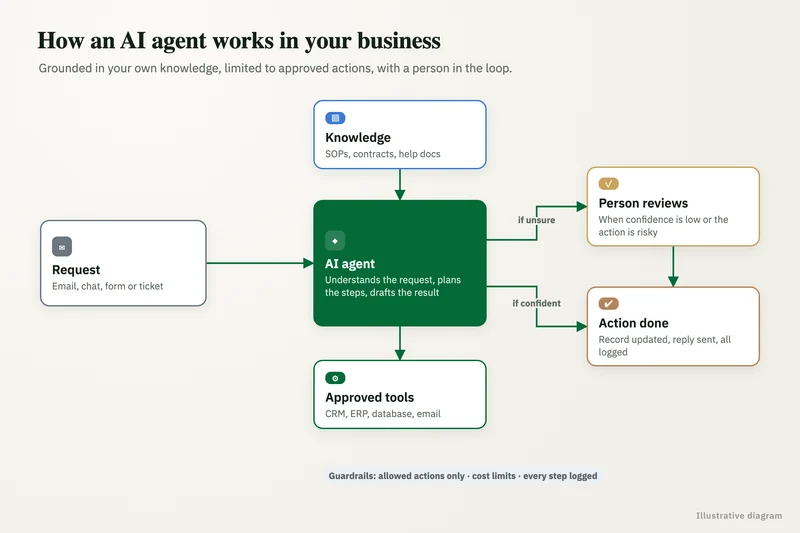
What is Azure OpenAI consulting in 2026?
Azure OpenAI consulting is the hands-on work of turning OpenAI models on Azure into a working business application with tests, logs, owners and a known running cost. Microsoft gives you the models, a deployment API and managed services around them. It does not pick the workflow, map your Dynamics or Salesforce fields, tidy your SharePoint permissions or design the screen where a person approves an uncertain answer. Those are the jobs a partner is hired for.
The product name is the first thing that confuses buyers. What used to be a standalone Azure OpenAI Service portal is now one part of Microsoft Foundry, Microsoft's platform for building and deploying models and agents. Microsoft's own data privacy documentation now covers all Foundry Models sold by Azure and states that this group includes Azure OpenAI models. SiliconANGLE's Ignite coverage of November 17, 2026 reports that Foundry offers more than 11,000 models from OpenAI, Anthropic, Meta, Mistral AI and others, with a model router and an AI Gateway. So an Azure OpenAI project in 2026 can quietly become a multi-model project, which is useful for cost but adds decisions.
Companies usually call in outside help at one of three points: the Azure team is strong on infrastructure but has never shipped retrieval or agents, a proof of concept works in a playground but has no evaluation, logging or quotas, or security wants private networking, customer-managed keys and an audit trail before anything touches real data.
Foundry, Copilot Studio, the OpenAI API or Bedrock: which should you build on?
Build in Microsoft Foundry when your identity, data and purchasing already run through Microsoft and the use case needs custom code: your own retrieval, tool calls into business systems or an agent that runs without a person typing. Choose Copilot Studio when a low-code agent inside Teams or Microsoft 365 is enough. Choose the direct OpenAI API when you are a small team with no Azure footprint. Choose Amazon Bedrock when the rest of your estate is on AWS.
The table is the shortcut we use on a first call. It is about where your logins, data and contracts already live, because that drives security review time and integration effort far more than which model scores best on a benchmark.
| Your situation | Usually best fit | Why |
|---|---|---|
| Microsoft 365, Entra ID and Azure subscriptions are standard; custom logic needed | Microsoft Foundry (Azure OpenAI and other Foundry Models) | Entra identities, private endpoints, Azure Monitor and the existing Microsoft agreement all apply |
| Staff-facing assistant in Teams with simple actions | Copilot Studio | Low-code builder, fewer engineering hours, Microsoft-managed hosting |
| Agent built in code that staff should reach from Teams or Microsoft 365 Copilot | Foundry Agent Service, published to Teams | Microsoft's Build 2026 post describes one publishing path to both surfaces |
| Small company, no cloud preference, one model vendor | Direct OpenAI API | Fewest moving parts and no Azure subscription to manage |
| Data lake, IAM and logging already on AWS | Amazon Bedrock | Same reasoning as Foundry, applied to the AWS estate |
What does an Azure OpenAI implementation include?
A production build is a handful of Azure services wired around one workflow. The model call is a few lines; the effort goes into giving it the right context, checking what comes back and writing the result somewhere a person will act on it. These are the pieces we scope, and any partner should be able to explain each one for your case.
Not every project needs all of them. An HR policy assistant for staff may need only retrieval over SharePoint, content filters and a Teams front end. An agent that reads supplier emails, checks open purchase orders in Dynamics 365 or NetSuite and drafts a reply needs tool definitions, user-scoped permissions and a human approval step before anything is sent.
- Deployment design: deployment type per workload, quotas per subscription and region, separate dev, test and production resources.
- Model choice: a shortlist tested on your own examples, with a smaller model for classification and a larger one only where reasoning pays for itself.
- Retrieval: indexing SharePoint, OneDrive, Azure Blob or a database, chunking, embeddings and answers that cite the passage they came from.
- Agents: tool definitions for your APIs, hosted runtime in Foundry Agent Service or your own containers, and per-user access through Entra ID.
- Integration: reads and writes into Dynamics 365, Salesforce, HubSpot, NetSuite, ServiceNow or Zendesk, with retries and duplicate checks.
- Security: private endpoints, managed identities instead of keys in code, customer-managed encryption keys where required, and diagnostic logs to a workspace you own.
- Evaluation and review: a labelled test set rerun on every prompt or model change, and a queue where low-confidence results wait for a person.
Which Azure OpenAI deployment type should you choose?
Pick the deployment type from your data residency requirement first and price second. Microsoft's deployment types documentation (updated August 2026) says Global deployments may process prompts in any Azure region, Data Zone deployments process data only within a Microsoft-specified zone (US, EU or Asia Pacific), and Standard and Regional Provisioned deployments process data within the Azure geography you choose. Data at rest stays in your designated geography in every case.
Microsoft's own advice is to start most workloads on Global Standard, because new models launch there first, it has the lowest price and the widest region coverage. For many US companies the practical answer is Data Zone Standard: it keeps processing inside the United States without tying you to one region's capacity. Global Batch costs 50% less than Global Standard with a 24-hour target turnaround, which suits back-office jobs such as classifying a ticket backlog overnight.
| Deployment type | Where prompts are processed | Billing | Good for |
|---|---|---|---|
| Global Standard | Any Azure region | Pay per token | Most workloads without a residency rule; first access to new models |
| Data Zone Standard | Within the US (or EU, APAC) zone | Pay per token | US-only processing requirement with flexible capacity |
| Standard (regional) | Within your chosen Azure geography | Pay per token | Strict single-geography requirements |
| Global or Data Zone Batch | Any region, or within the zone | 50% discount, 24-hour target | Overnight bulk jobs that can wait |
| Provisioned (Global, Data Zone or Regional) | Matches the scope in the name | Per PTU per hour, or reservations | Steady, high, latency-sensitive production traffic |
How is Azure OpenAI billed, and when does Provisioned Throughput make sense?
Standard deployments bill per token at the rate Microsoft publishes for each model, so cost rises and falls with use. Provisioned Throughput Units (PTUs) are different. Microsoft's provisioned throughput documentation says all provisioned deployments are billed at an hourly rate per PTU regardless of tokens consumed, the meter starts when the deployment is created and stops only when it is deleted, and deployments cannot be paused. Reservations on a one-month or one-year term lower the effective hourly rate, but Microsoft notes that reservations do not guarantee capacity.
Microsoft lists predictable traffic, latency-sensitive use, real-time scenarios and production volumes where per-token billing gets expensive as the cases for PTUs, and says standard deployments remain the better fit for development, testing, low volume and highly variable traffic. We price every workload on pay-as-you-go first, move anything that can wait to batch, and only model a reservation once several weeks of real traffic show a steady floor.
Retrieval and hosting add their own lines. An index over your documents, agent hosting, storage and logging each bill separately from tokens. At Ignite on November 17, 2026, Virtualization Review reported that Foundry IQ Serverless, Microsoft's managed knowledge layer for agents, becomes generally available in December with consumption pricing that scales to zero when idle, which helps internal tools that sit quiet at night and on weekends.
A worked example: the PTU meter versus a pay-as-you-go pilot
Microsoft's billing documentation uses a 300 PTU deployment as its example, charged at the hourly rate multiplied by 300. Left running for a 30-day month, that deployment accrues 300 PTUs times 720 hours, or 216,000 PTU-hours, whether it handles a million requests or none. Microsoft also notes that partial hours are prorated, so a test deployment that exists for 15 minutes is charged a quarter of the hourly rate. The arithmetic is simple, and it explains how a provisioned test deployment that nobody deleted turns into a large, unexpected line on an Azure invoice.
Compare a pilot of a staff policy assistant on Data Zone Standard. Suppose 150 employees ask 3,000 questions in the first month. We log input and output tokens per question during testing, multiply by monthly volume at the chosen model's published rate, and add the index and hosting lines. Because every component bills on use, a quiet week costs almost nothing. We set a per-request token cap and an Azure budget alert at the estimate, so the first invoice is close to the forecast and a runaway loop stops instead of spending.
The lesson is the same one our AI implementation cost guide makes: for internal assistants at this scale, running cost is rarely what sinks the budget. Document cleanup, permissions work and integration are where the money goes, so a partner who leads with a PTU reservation before measuring traffic is pricing the wrong problem.
Is Azure OpenAI private and secure enough for regulated data?
It can be, if it is configured properly. Microsoft's data privacy page for Foundry Models sold by Azure states that prompts, completions and embeddings are not available to OpenAI or other model providers, are not used to train generative AI foundation models without your permission, and that the models are stateless, with no prompts or completions stored in the model. It also states that these models do not interact with services operated by the model providers, such as ChatGPT or the OpenAI API. Stored data is encrypted at rest with AES-256 by default, with the option of a customer-managed key.
Abuse monitoring is the detail buyers miss. Microsoft says a sample of prompts and completions may be selected for review, first by automated systems and then by human reviewers where needed, with data kept in the geography of your Foundry resource. Approved customers have been able to apply for modified abuse monitoring, which turns off that storage and human review. The page's change log of November 17, 2026 says this option will not be available for models released on or after November 1, 2026, from a date Microsoft will announce with at least 30 days' notice. If your security policy depends on it, check the model release date before you design around it.
For health data, the rule is simple: any vendor handling protected health information needs a signed Business Associate Agreement, and every other service in the chain, from the front end to the log store, must be covered too. We keep a person in the loop for anything touching money, patients or customer records. This is not legal advice; your compliance team should confirm the setup against your obligations.
How long does an Azure OpenAI implementation take?
A narrow use case can reach a working pilot in weeks; a production system with integrations and security review usually takes a few months. Published figures vary with scope. EPC Group, a Microsoft-focused consultancy, lists an Azure OpenAI proof of concept at 2-4 weeks and a production chatbot at 8-12 weeks. Softude's 2026 guide puts a typical single AI use case at 3-5 months end to end. AlphaBold's October 2026 cost guide cites public Microsoft Marketplace offers with proof-of-concept engagements around $15,000 and broader Azure OpenAI consulting engagements at $75,000 or more, and stresses that these are vendor examples rather than market rates.
The spread comes from scope, not from how fast anyone writes prompts. Retrieval over clean PDFs in one SharePoint library is quick. Per-user permissions across many sites, scanned documents, writes into an ERP and a formal security review all add weeks. We run each project in this order, with an exit test at every stage.
- Weeks 1-2: process mapping, sample inputs, a success metric and a model shortlist tested on real examples.
- Build: retrieval or agent logic, content filters, integrations and the human-review screen.
- Evaluation: a labelled test set, with accuracy and cost per task measured against the target.
- Pilot: a small group of real users with prompt and output logging switched on.
- Production: quotas, budget alerts, a rollback path, a runbook and handover to your team.
How do you choose an Azure OpenAI consulting partner?
Hire the team that can show how it will test, monitor and integrate your workflow, not the one with the most Microsoft badges on its footer. Partner designations describe a firm's relationship with Microsoft. They do not tell you whether the team has written records into Dynamics without duplicates or what the agent does when retrieval returns nothing useful. We are an independent implementation team and do not claim Microsoft partner status, so hold us to the same questions.
- Which deployment type will each workload use, and why does that meet our residency rules?
- Which systems will the build read from and write to, and how are API errors and duplicates handled?
- How will you measure accuracy before launch, and on what test set?
- Where does a low-confidence answer go, and who reviews it?
- What will the monthly Azure bill be at our volume, and what quotas and budget alerts will you set?
- Will you recommend Provisioned Throughput, and on what traffic evidence?
- Will everything run in our subscription, under our Entra ID and our keys?
- How will you handle a model being retired or replaced by a newer version?
- Who owns the code, prompts, infrastructure templates and evaluation data at the end?
- What is fixed in the price, and what counts as a change?
Common mistakes, and when not to use Azure OpenAI
Three mistakes come up again and again. Buying or leaving a provisioned deployment running before measuring traffic, which bills every hour. Pointing retrieval at a whole SharePoint tenant without checking permissions, so staff can surface files they should never see; Microsoft's Ignite announcement of SharePoint integration with permission enforcement helps, but only if the underlying site permissions are right. And skipping an evaluation set, which leaves nobody able to say whether a prompt or model change made answers better or worse.
Azure is also not always the answer. If your company does not run on Microsoft today, adopting Azure to host one assistant adds subscriptions, identity design and a new bill. If a packaged product already fits, such as an AI receptionist or the AI features inside Zendesk, buying it is often faster. If the need is staff chat with simple actions, Copilot Studio may be enough. And if you have not chosen a workflow and a success metric yet, a platform decision is premature.
How we deliver Azure OpenAI projects
We scope each build in a free review and then quote a fixed price for a defined result. The review covers the workflow, the systems it touches, a sample of real inputs, the accuracy you need and the security rules your team has set. Everything runs in your Azure subscription, so the resources, code, prompts, evaluation sets and data are yours from day one, and Microsoft bills you directly for usage.
Our team has delivered 100+ projects for 200+ clients over 8+ years, mostly automation and data work that connects AI to the systems where work already happens. If you are weighing platforms, our Amazon Bedrock, Copilot Studio and private LLM deployment guides cover the neighbouring options, and our AI implementation services page explains how we take a workflow from review to production.
Case study · Logistics company, UK
Route planning automation
Dispatch typed every address into Google Maps, which optimizes only 25 stops and cannot add time at each stop. A Python tool that loads addresses automatically, adds buffer time per stop and optimizes the full route.
- Manual address entry eliminated
- Delivery estimates customers could rely on

FAQ
Frequently asked questions
Is Azure OpenAI the same as Microsoft Foundry?
Not exactly. Azure OpenAI models are now part of Foundry Models sold by Azure, inside Microsoft Foundry, which also hosts models from Anthropic, Meta, Mistral AI and others plus agent hosting and retrieval services. If you are building on OpenAI models in Azure today, you do it through Foundry.
Does Azure OpenAI use my data to train models?
No, according to Microsoft. Its data privacy documentation says prompts, completions and embeddings are not available to OpenAI, are not used to train foundation models without your permission, and are not stored in the stateless models. A sample may be reviewed for abuse monitoring, with data held in your resource's geography.
What is the difference between Global, Data Zone and Standard deployments?
They differ in where prompts are processed. Global may use any Azure region, Data Zone stays inside a zone such as the US or EU, and Standard stays in the Azure geography you pick. Microsoft recommends Global Standard for most workloads, while US companies with residency rules often choose Data Zone Standard.
How much does Azure OpenAI cost per month?
It depends on volume and deployment type. Standard deployments bill per token at Microsoft's published model rates, batch jobs cost 50% less than Global Standard, and provisioned deployments bill per PTU per hour whether used or not. Retrieval, hosting and logging add separate usage-based lines.
Should we buy Provisioned Throughput Units?
Usually not at the start. Microsoft says standard deployments are the better fit for development, testing, low volume and variable traffic, and that provisioned deployments bill every hour until deleted. Consider a one-month or one-year reservation only after real traffic shows a steady, high floor.
How long does an Azure OpenAI implementation take?
EPC Group lists a proof of concept at 2-4 weeks and a production chatbot at 8-12 weeks, while Softude's 2026 guide puts a typical single AI use case at 3-5 months. Integrations, document cleanup and security review usually take longer than the model work.
Copilot Studio or Azure OpenAI in Foundry: which do we need?
Copilot Studio suits low-code assistants inside Teams and Microsoft 365 with simple actions. Foundry suits custom code: your own retrieval, tool calls into ERPs or CRMs, and agents that run in the background. Foundry agents can also be published into Teams and Microsoft 365 Copilot, so staff see them in familiar tools.
Keep reading
Related pages
Get started
Tell us what you want automated
Describe the task, the systems involved and the volume. We reply within one business day with an architecture, the tools we would use, running costs and a fixed-price build plan.
- Free 30-minute build review
- Fixed quote before any work starts
- You own the accounts, code, prompts and data
Prefer email? info@aiimplementationconsultants.com
Get a free build plan
Two lines is enough to start.