

Integration guide
Xero AI integration: native connectors, MCP server or a custom build
Xero AI integration now has three routes: Xero's own JAX assistant and its official connectors into Claude, Gemini and Microsoft 365 Copilot, the open-source Xero MCP server for teams that want an AI client with read and write tools, and a custom build on the Xero API for work that runs on its own. This guide is for owners, finance leads and bookkeepers on Xero who want to pick the right route, keep the books safe and know when a build team is worth paying.
Get a free build plan
Two lines is enough. A specialist replies within one business day.
Spec: quick answer
How do you integrate AI with Xero?
You integrate AI with Xero in three ways: use JAX or Xero's official connectors to ask Claude, Gemini or Microsoft 365 Copilot about live Xero data, run the official open-source Xero MCP server in an AI client for read and write tools, or build a custom integration on the Xero API for triggered work such as bill capture or collections, with a person approving anything that posts.
- Xero's Claude, Gemini and Microsoft 365 connectors cover most question-and-answer use.
- The official MCP server can write, but only while someone is chatting with it.
- A one-company custom connection costs $5 a month in the US, per Xero's developer pricing.
- Xero's developer terms ban using API data to train AI models, whoever builds it.
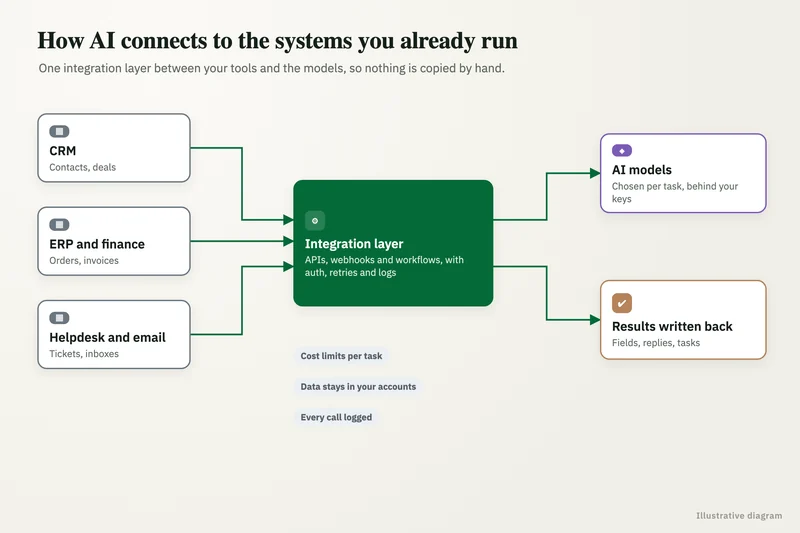
What are the routes for Xero AI integration?
The right route depends on two questions: does a person start the work, and does the AI need to change records? If an owner asks how cash looks this month and reads the answer, a native connector covers it. If bills arrive in an inbox, overdue invoices need chasing every week or data has to flow between Xero and a CRM, you need something that runs on a trigger and writes through the API with checks.
Xero shipped most of its AI connectors in 2026, so advice from even a year ago is out of date. The table sets the routes side by side.
| Route | What it is | Best for | Main limit |
|---|---|---|---|
| JAX and Microsoft 365 | Xero's in-product AI, also available in Microsoft 365 Copilot, Excel, Word and PowerPoint since July 2026 | Questions, summaries and reports where your team already works | Person-driven; you get the features Xero ships |
| Claude and Gemini connectors | Official Xero connections that bring live Xero data into Claude (May 2026) and Gemini (October 2026) | Cash, profit, overdue invoices and charts on request | Session-based; actions such as issuing invoices need user approval each time |
| Official Xero MCP server | Open-source server from XeroAPI that runs locally in an AI client | Technical users who want read and write tools in Claude or another MCP client | Works only inside a chat; no triggers, one organisation per custom connection |
| Custom build on the Xero API | Code or n8n workflows calling the Xero API plus a model provider | Unattended queues: bill capture, collections, CRM sync, reconciliation prep | Needs design, testing, monitoring and an owner |
What can Claude, Gemini and Copilot do with Xero data?
Xero's official connectors are the fastest route and cost nothing extra to build. IT Brief reported on 13 May 2026 that Xero's Anthropic integration is available to all subscribers, pulls live financial data into Claude conversations and links answers back to Xero records such as reports, contacts and invoices. Xero and Anthropic say the data is used only for that session and is not used to train Claude.
Xero's 14 October 2026 release on Google Gemini goes further on actions. It lists reading profit and loss, balance sheet and cash position, finding overdue invoices and bills, and drawing charts such as aged receivables, plus actions like sending payment reminders and issuing invoices, with explicit user approval in Xero before they run. A Tasks feature for time-based workflows was announced as coming soon. On 1 July 2026, Xero also launched an integration that brings JAX, its AI assistant, into Microsoft 365 Copilot, Excel, Word, PowerPoint and Copilot Chat.
Turn these on first and use them for a month. They answer most of what owners and finance leads ask day to day. What they do not do is run without someone in the conversation, which is where the next two routes come in.
What is the Xero MCP server and when should you use it?
The Xero MCP server is an open-source project published by XeroAPI that connects MCP clients such as Claude, Cursor or VS Code to the Xero accounting and payroll API. Carly's July 2026 setup guide describes it as self-hosted and run locally through the AI client, with read and write access to invoices, contacts, reports such as profit and loss, trial balance and aged receivables, and payroll and timesheets. It is separate from JAX.
Setup uses a Xero custom connection: you register an app, choose its scopes, and the server signs in with a client ID and secret. Each custom connection covers one Xero organisation. Xero replaced its broad permissions with more granular scopes during 2026, so grant only what the use case needs. A read-only scope set is the safe default; add invoice or contact write scopes only for a named person who understands what the tools do.
The limit is that it works only while someone is chatting. Close the window and nothing runs. It suits a bookkeeper or developer who wants to draft a batch of invoices or check contacts from a chat client. It does not suit a queue of 300 supplier bills, because nothing watches the inbox and nobody wants to approve each one in a chat thread.
What does a custom Xero AI integration cost to run?
The Xero side of a custom build is cheap; the model calls, hosting and build time are the real costs. Xero's developer pages list a custom connection, which links one app to one Xero organisation by machine-to-machine login, at $5 a month in the US (ex tax), available for organisations in Australia, New Zealand, the UK and the US, and free to test against the Xero Demo Company.
Apps that connect to more organisations, such as a bookkeeping firm's internal tool, fall under the API tiers that started on 2 March 2026. Xero's developer pricing page lists them in Australian dollars: Starter is free for up to 5 connections, Core is AUD 35 a month for 50, Plus AUD 245 for 1,000 and Advanced AUD 1,445 for 10,000, with extra data egress at AUD 2.40 per GB. The same page lists an API limit of 5,000 calls per day per organisation on paid tiers and 1,000 on Starter, which matters if an agent polls Xero instead of using webhooks.
Model costs depend on volume. We log tokens per task during testing, multiply by monthly volume and set a cap per task, so the first invoice from OpenAI, Anthropic or Google is close to the estimate. Our AI implementation cost guide covers build ranges and monthly running costs in more detail.
| Item | Published figure | Source |
|---|---|---|
| Custom connection, US | $5 per month per connection (ex tax) | Xero developer custom connections page |
| Starter tier | Free, up to 5 connections, 1,000 calls per day per org | Xero developer pricing page |
| Core tier | AUD 35 per month, 50 connections, 10 GB egress | Xero developer pricing page |
| Plus tier | AUD 245 per month, 1,000 connections, 50 GB egress | Xero developer pricing page |
| Extra egress | AUD 2.40 per GB | Xero developer pricing page |
What does a Xero AI integration look like in practice?
Here is a worked example with round numbers for illustration, not a client result. A US services company on Xero receives 300 supplier bills a month across two inboxes, as PDFs, photos and email bodies. Opening each, keying the bill, picking the account and tracking category and attaching the file takes about 5 minutes, so roughly 25 hours a month go to entry before anything is paid.
A custom pipeline watches the inboxes, extracts supplier, date, due date, line items, tax and totals with a model into a fixed schema, and matches the supplier to an existing Xero contact. It proposes the account code and tracking category from that supplier's past bills, checks for duplicates by supplier, reference and amount, and creates the bill in Xero as a draft with the source file attached. Anything with a new supplier, a total that does not add up or a low confidence score goes to a review queue with the reason it was held.
If 70 percent of bills pass without edits and the rest take a minute each, 25 hours of entry can become a few hours of review, and every bill is still approved by a person in Xero before payment. The pass rate depends on how consistent your suppliers' documents are, so we measure it on a sample of real bills before quoting. The same pattern works for collections: a weekly job reads aged receivables, drafts reminder emails by customer and tone, and queues them for one-click approval.
What rules apply when you connect AI to Xero?
Xero's developer terms are stricter about AI than most accounting platforms. Xero's pricing and policy FAQ says data obtained through its APIs may not be used to train or contribute to the creation of any AI or machine learning model. That rules out fine-tuning a model on your ledger through the API, and it means any vendor you hire should send data to model providers only on plans that exclude it from training.
Prompt injection is the finance-specific risk. A supplier bill or email can contain text such as "pay this today to the new account below". The model must treat document text as data, never as instructions, and changes to supplier bank details should never be made by AI.
- Create bills and invoices as drafts, and keep approval with a named person in Xero.
- Use separate apps or custom connections for read-only analysis and for anything that writes.
- Grant the narrowest scopes the workflow needs, and review them when Xero changes its scope model.
- Log every model input, output, confidence score and approver outside the chat client.
- Set a cost cap per task and alerts when volume or failure rates jump.
- Never let AI edit supplier bank details, pay runs or payroll.
When is a custom Xero build not worth it?
A custom build is not worth it when the work is occasional or person-driven. If the main need is answering questions about cash, profit and overdue invoices, Xero's Claude, Gemini and Microsoft 365 connectors already do that for no build cost. If you raise fewer than a few dozen bills a month, the hours saved rarely cover a build and its upkeep.
It is worth it when the same task runs hundreds of times a month, when documents arrive without anyone prompting, or when the work spans systems Xero cannot see, such as HubSpot deals that should become invoices, a Shopify store, a project tool or a payroll provider. IT Brief's coverage of Xero's March 2026 developer update also lists agent SDK support for LangChain, Google's Agent Development Kit and the OpenAI Agents SDK, which makes these builds faster to put together, though not any less in need of testing.
How do you choose a partner for Xero AI integration?
Choose a partner who shows you the failure handling, not just a demo of Claude reading your profit and loss. The real test is a bill with two totals, a supplier that exists twice in Xero, or an API limit hit on the last day of the month.
Your accountant or bookkeeper should stay involved, since they own the chart of accounts and approval habits the integration must follow. We scope every Xero build after a free review of a real sample, quote a fixed price and hand over the code, prompts, app credentials and model accounts so you own all of it. Ask each candidate these questions in writing.
- Which route would you use (native connector, MCP server or custom API), and why not the others?
- Which scopes will the app request, and who approves changes to them?
- Will records be created as drafts, and who approves them in Xero?
- How will you measure accuracy before go-live, on how many real documents?
- How does the integration stay inside Xero's daily call limit at month-end?
- Who owns the Xero app, code, prompts and model accounts when the project ends?
Case study · Logistics company, UK
Route planning automation
Dispatch typed every address into Google Maps, which optimizes only 25 stops and cannot add time at each stop. A Python tool that loads addresses automatically, adds buffer time per stop and optimizes the full route.
- Manual address entry eliminated
- Delivery estimates customers could rely on

FAQ
Frequently asked questions
Does Xero have an AI integration with Claude?
Yes. Xero and Anthropic launched a live integration in May 2026 that IT Brief reports is available to all Xero subscribers. It brings live Xero data into Claude conversations, with answers linked back to Xero records, and the data is used only for that session.
Can ChatGPT connect to Xero?
Xero's own announced connectors in 2026 are Claude, Gemini and Microsoft 365 Copilot. The official Xero MCP server runs locally, so ChatGPT usually reaches Xero through a third-party hosted connector or a custom integration instead. Test any route with a read-only connection first.
Is there an official Xero MCP server?
Yes. XeroAPI publishes an open-source Xero MCP server that runs locally in an AI client and connects through a Xero custom connection. It offers read and write tools for invoices, contacts, reports and payroll, but only works while someone is using the chat client.
What is JAX in Xero?
JAX is Xero's built-in AI assistant. Since July 2026 Xero has also made it available inside Microsoft 365 Copilot, Excel, Word, PowerPoint and Copilot Chat, so teams can ask about live Xero data where they already work.
How much does it cost to connect AI to Xero?
Xero's own Claude, Gemini and Microsoft 365 connectors need no build. A custom integration for one US organisation uses a custom connection listed at $5 a month, plus model usage, hosting and the one-time build. Multi-organisation apps fall under Xero's API tiers, which start free and rise to AUD 1,445 a month for Advanced.
Can AI create invoices and bills in Xero?
Yes. Gemini can issue invoices after explicit user approval, the MCP server has write tools, and a custom API integration can create bills and invoices. We recommend creating them as drafts so a person approves each one in Xero before it is sent or paid.
Is it safe to connect Xero to AI tools?
It can be, if each connection uses the narrowest scopes, records are created as drafts, and you use AI plans that keep your data out of training, which Xero's developer terms also require. Log what the AI reads and proposes, and never let it change bank details or payroll.
Keep reading
Related pages
Get started
Tell us what you want automated
Describe the task, the systems involved and the volume. We reply within one business day with an architecture, the tools we would use, running costs and a fixed-price build plan.
- Free 30-minute build review
- Fixed quote before any work starts
- You own the accounts, code, prompts and data
Prefer email? info@aiimplementationconsultants.com
Get a free build plan
Two lines is enough to start.