

Integration guide
QuickBooks AI integration: built-in agents, chat connectors or a custom build
QuickBooks AI integration now comes in four forms: the AI agents Intuit builds into QuickBooks, the QuickBooks connector in Claude and plugin in ChatGPT, Intuit's open-source MCP server for developers, and a custom build that processes bills, invoices and payments without anyone typing a prompt. This guide is for owners, controllers and ops leads on QuickBooks Online who know which accounting work they want off their plate and need to pick the right route, keep the books safe and budget for the API.
Get a free build plan
Two lines is enough. A specialist replies within one business day.
Spec: quick answer
How do you integrate AI with QuickBooks?
You integrate AI with QuickBooks Online in one of four ways: switch on Intuit's built-in AI agents, connect Claude or ChatGPT through Intuit's official connector, run Intuit's open-source MCP server for developer tools, or build a custom integration on the QuickBooks Online API for unattended, high-volume work such as bill entry, with a person approving anything that posts.
- Try QuickBooks' built-in AI agents first, because they need no build at all.
- The Claude and ChatGPT connectors suit owners asking questions and sending invoices in chat.
- Scheduled work from inboxes or other systems needs a custom build with approval steps.
- Intuit now meters API reads, so design custom builds to read less and write freely.
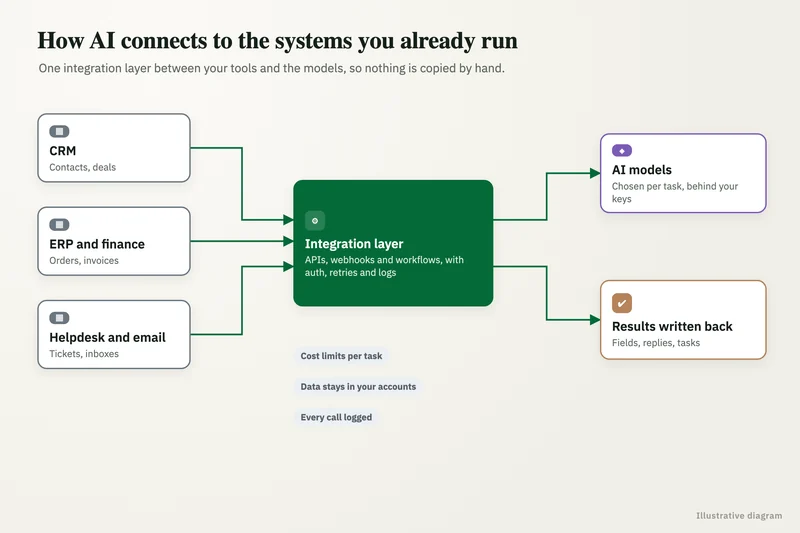
What are the four routes to QuickBooks AI integration?
The right route depends on two things: who starts the work, and whether data has to move between QuickBooks and another system. A person asking a question or sending an invoice can use a chat connector. A pile of vendor bills arriving by email at 2 a.m., or a Shopify order that must become a QuickBooks sales receipt, needs something that runs on a trigger and checks its own work.
Most small and mid-size companies end up combining two routes. The owner uses Claude or ChatGPT to check overdue invoices and chase customers, while a custom pipeline handles accounts payable in the background. The table compares the four.
| Route | What it is | Best for | Main limit |
|---|---|---|---|
| Built-in QuickBooks AI agents | Intuit's own agents inside QuickBooks, such as the Accounting, Payments, Finance, Customer, Payroll and Project Management agents | Categorizing transactions, reconciliation help, payment reminders and reporting inside screens you already use | You get the features Intuit ships for your plan, with Intuit's rules |
| Claude connector or ChatGPT plugin | Intuit's official QuickBooks apps inside Claude and ChatGPT | Owners and finance staff who want to ask questions and create, review and send invoices or estimates in conversation | A person drives every action; nothing runs on a schedule or reads an inbox |
| Intuit's QuickBooks Online MCP server | An open-source server from Intuit that exposes QuickBooks entities and reports as tools to MCP clients | Developers and finance-ops teams prototyping their own AI tools against a sandbox company | Runs locally, needs your own Intuit developer app and OAuth setup, and is not a finished product |
| Custom build on the QuickBooks Online API | Code or workflow tooling (n8n, Make, Python) calling the API, plus a model provider such as OpenAI, Claude or Gemini | Unattended, repeatable work: bill capture, invoice creation from a CRM, payment matching, exception triage | Needs design, testing, monitoring, API fee planning and an owner |
What can QuickBooks' built-in AI agents do?
Check the native agents before you pay anyone to build something. Insightful Accountant's coverage of Intuit's July 2025 launch lists a Payments Agent that predicts late payments and automates invoice follow-up, an Accounting Agent for transaction categorization and reconciliation, a Finance Agent for reporting, KPI analysis and scenario planning, a Customer Agent that drafts emails and tracks sales opportunities, a Payroll Agent and a Project Management Agent for quotes, milestones and budgets.
Which agents you see depends on your QuickBooks plan and edition, so log in and check rather than relying on a feature list. If an agent covers 80 percent of what you wanted, turn it on and spend your budget on the remaining gap. The gap is usually anything that starts outside QuickBooks: PDFs in a shared mailbox, orders in an ecommerce platform, deals in HubSpot or Salesforce, or rules that are specific to how your business codes expenses.
How do you connect Claude or ChatGPT to QuickBooks?
Intuit publishes an official QuickBooks connector in Claude's connector directory and a QuickBooks plugin in ChatGPT. On 28 July 2026 Intuit announced that both moved beyond read-only access: according to Intuit's announcement, a user can now create, update and send invoices and estimates, set up recurring invoices, generate payment links, send overdue reminders, look up employees, payslips, benefits and time off, and compare lending terms. Intuit says the user reviews and sends each action, and that the data is never used to train foundation models. Accountants Daily reported in August 2026 that these sit inside multi-year partnerships Intuit signed with Anthropic and OpenAI.
Setup is a sign-in, not a project. The care goes into who connects and with which QuickBooks user, because the AI can do whatever that user can do.
- Decide which QuickBooks user will connect. Use a named user with only the access the task needs, not the primary admin.
- In Claude, add the QuickBooks connector from the connector directory; in ChatGPT, search for Intuit QuickBooks in the apps list. Sign in through Intuit's own screen and pick the company.
- Start with questions only (overdue invoices, top customers, unpaid bills) for a week before allowing anyone to send invoices from chat.
- Agree a rule for the team: every invoice or estimate drafted in chat is reviewed against the customer record before it is sent.
- Check your Claude or ChatGPT business plan's data retention settings, since prompts and answers live in that tool's history too.
- Note that Intuit says the payment features are not available outside the US or in US territories.
What is the QuickBooks MCP server and who should use it?
Intuit publishes an open-source QuickBooks Online MCP server on GitHub. Its README describes 145 tools covering create, read, update, delete and search across 29 entity types (customers, vendors, invoices, bills, payments, estimates, employees and more) plus 11 reports such as the profit and loss, balance sheet, cash flow and trial balance.
It is a developer tool, not a ready product. The README says it runs locally as a stdio subprocess on the developer's machine, and it needs an app registered in the Intuit Developer portal with a client ID, client secret, company realm ID and refresh token. A sandbox company accepts localhost redirects, while production needs a public HTTPS callback URL that matches the app's settings exactly. That makes it a good way to prototype an AI workflow against test data, and a poor choice for a shared finance tool, where you want hosted infrastructure, logging and controlled credentials.
Treat broad tool access carefully. A server that can delete invoices and edit vendors will do so if a prompt asks it to, so in anything beyond a sandbox we expose a short list of named tools, read-only first, rather than every entity the server supports.
When do you need a custom QuickBooks AI integration?
You need a custom build once the work has to happen without a person starting it, or when the data comes from another system. Chat connectors wait for a prompt. A queue of bills, receipts, remittance advices or orders does not, and nobody should paste each one into Claude.
The second signal is control. Anything that writes to the ledger at volume needs validation against your vendor list, chart of accounts and open purchase orders, a confidence threshold, a duplicate check and a record of who approved what. A custom pipeline gives you all of that, and our AI integration services page explains how we scope and hand one over.
- Inputs arrive on their own: an AP mailbox, a Google Drive or SharePoint folder, a web form, an EDI or bank feed export.
- Data must move between QuickBooks and a CRM, ecommerce platform, payroll tool or project system.
- The same task repeats dozens or hundreds of times a month.
- Output creates bills, invoices, journal entries or payments that affect cash.
- You need an audit trail of every AI decision for your accountant or auditor.
- The business runs several QuickBooks companies and the same process must apply to each.
What does a custom QuickBooks AI integration look like? A worked example
Here is an illustration with round numbers, not a client result. A distributor receives 400 vendor bills a month by email. A bookkeeper opens each PDF, finds the vendor, keys in the lines, picks the expense account and class, and attaches the file, at about 5 minutes a bill. That is roughly 33 hours a month before any queries to vendors.
The pipeline has six steps. A trigger picks up each new email in the AP mailbox and saves the attachment. A model extracts vendor name, bill number, dates, line items, tax and total into a fixed schema. A lookup matches the vendor against QuickBooks vendors and checks the bill number has not been entered before. A rules step assigns the expense account from the vendor's history and your coding rules, and flags totals that do not add up. Bills that pass every check are created in QuickBooks with the PDF attached, ready for approval and payment. Anything else lands in a review screen showing the extracted fields beside the PDF and the reason it was held.
If 70 percent of bills pass cleanly and each held bill takes a minute or two to fix, the 33 hours drop to a few hours of exception review. Your own pass rate depends on how consistent your vendors' invoices are and how clean your vendor list is, which is why we test on a sample of real bills before giving a fixed quote. The same pattern works in reverse for accounts receivable: closed-won deals or completed jobs become draft invoices that a person checks and sends.
What do QuickBooks API limits and fees mean for an AI build?
Since 2025, reading data out of QuickBooks Online through the API can cost money, and that changes how an AI integration should be designed. Apideck's September 2025 summary and Truto's March 2026 guide both describe Intuit's App Partner Program, which went live on 28 July 2025. Core API calls, mostly data-in operations such as creating and updating records, are free and unlimited on every tier. CorePlus calls, mostly reads and queries, are metered.
On those sources' figures, the free Builder tier includes 500,000 CorePlus credits a month and blocks reads above that. Silver costs $300 a month for 1 million credits plus $3.50 per 1,000 extra calls, Gold costs $1,700 a month and Platinum $4,500 a month with the lowest overage rate. Apideck notes that usage is counted across all production apps in a developer workspace and only successful calls count. A single company's internal integration often fits comfortably in the free tier, but an AI agent that re-reads the whole customer list on every question will not, so we cache reference data such as vendors, accounts and items and read only what changed.
Rate limits matter too. Truto's 2026 guide, summarizing Intuit's developer documentation, lists 500 requests per minute per company, 10 concurrent requests and 40 batch requests per minute, with HTTP 429 errors when a limit is hit. It also notes that access tokens last one hour, so a reliable integration refreshes tokens automatically and stores the rotated refresh token securely. Month-end is when these limits bite, so builds should queue writes, retry with backoff and run heavy syncs outside working hours.
| Item | Published figure | Source |
|---|---|---|
| Core API calls (mostly writes) | Free and unlimited on all tiers | Apideck (Sept 2025), Truto (Mar 2026) |
| Builder tier | $0; 500,000 CorePlus credits a month, reads blocked above that | Truto (Mar 2026) |
| Silver tier | $300 a month; 1 million credits; $3.50 per 1,000 extra calls | Apideck (Sept 2025) |
| Gold tier | $1,700 a month | Apideck (Sept 2025) |
| Platinum tier | $4,500 a month; 75 million credits; $0.25 per 1,000 extra calls | Apideck (Sept 2025) |
| Rate limit | 500 requests per minute per company; 10 concurrent; 40 batch per minute | Truto (Mar 2026) |
How do you keep your books safe when you add AI to QuickBooks?
Safety in a QuickBooks AI integration comes down to three controls: what the connection is allowed to do, what a person must approve, and what gets logged. QuickBooks itself is where your approvals and closing dates live, so use them rather than relying on the AI to behave.
Prompt injection deserves a specific mention for accounting. A vendor email or invoice memo can contain text such as an instruction to change bank details. A well-built pipeline treats everything inside a document as data to extract, never as an instruction, and never changes vendor payment details from an email without a person verifying by phone.
- Connect with a dedicated QuickBooks user or app scope that has only the access the workflow needs.
- Keep a closing date and password set in QuickBooks so nothing posts into a closed period.
- Create AI-drafted bills and invoices for review, and have a person approve payment and sending.
- Log every extraction, confidence score, decision and API response, and keep the log for your audit period.
- Hold changes to vendor bank details, customer credit limits and journal entries for human approval only.
- Test in a QuickBooks sandbox company before touching your live file.
What about QuickBooks Desktop?
Everything above applies to QuickBooks Online. Intuit's Claude and ChatGPT apps, the MCP server and the App Partner Program are built on the QuickBooks Online platform, so Desktop users do not get the same chat connectors.
Desktop can still be automated through Intuit's QuickBooks SDK and Web Connector, which sync data with an application on a schedule from the machine running QuickBooks. That works, but it adds a dependency on a specific computer being on and logged in. If you are planning a Desktop to Online move anyway, do it before the AI build, not after, so you only build once.
How do you choose a partner for QuickBooks AI integration?
Choose on failure handling and ownership, not on the demo. Every vendor can show a chatbot listing overdue invoices. The difference shows when a bill has no matching vendor, the PDF is a phone photo, the API returns a 429 at month-end or a refresh token expires over a holiday weekend.
Ask each candidate the questions below and get the answers in writing. We scope every QuickBooks build after a free review of real samples, quote a fixed price, and hand over the code, prompts, Intuit developer app and model accounts so you own them. For budgeting the build and the monthly model bill, see our AI implementation cost guide, and for the same decision on Oracle's ERP, our NetSuite AI integration guide.
- Which route would you use for this workflow (native agent, chat connector, MCP or custom), and why not the others?
- Which QuickBooks user or app will the integration act as, and what can it change?
- What happens to a bill or invoice the model is unsure about, and who sees it?
- How will you keep API reads within the free tier or our budget?
- How do you handle token expiry, rate limits and failed writes?
- Who owns the Intuit developer app, code and prompts when the project ends?
Case study · Logistics company, UK
Route planning automation
Dispatch typed every address into Google Maps, which optimizes only 25 stops and cannot add time at each stop. A Python tool that loads addresses automatically, adds buffer time per stop and optimizes the full route.
- Manual address entry eliminated
- Delivery estimates customers could rely on

FAQ
Frequently asked questions
Does QuickBooks integrate with ChatGPT?
Yes. Intuit offers an official QuickBooks plugin inside ChatGPT. Intuit announced in July 2026 that it can create, update and send invoices and estimates, generate payment links and look up payroll information, with the user reviewing each action before it completes.
Can Claude connect to QuickBooks?
Yes. Intuit publishes a QuickBooks connector in Claude's connector directory. You sign in through Intuit, choose the company, and can then ask questions about your books and draft, review and send invoices and estimates in the conversation.
Does QuickBooks have built-in AI?
Yes. Intuit launched a set of AI agents in QuickBooks in July 2025, including Accounting, Payments, Finance, Customer, Payroll and Project Management agents. Which ones you get depends on your plan and edition, so check inside your own QuickBooks account.
Does the QuickBooks API cost money?
Writing data is free, but reading it can be metered. Under Intuit's App Partner Program, live since July 2025, Core calls (mostly writes) are unlimited and free, while CorePlus calls (mostly reads) are free up to 500,000 a month on the Builder tier and blocked above that unless you move to a paid tier.
Can AI enter bills into QuickBooks automatically?
Yes, with a custom integration. It reads bills from a mailbox or folder, extracts the fields, matches the vendor and checks for duplicates, then creates the bill in QuickBooks for approval. Bills the model is unsure about should go to a review queue instead of posting.
Is it safe to give an AI tool access to QuickBooks?
It can be, if the connection uses a user or app with limited access, a person approves anything that moves money, a closing date protects past periods, and every action is logged. Never let an AI change vendor bank details from an email without a phone check.
Does QuickBooks AI integration work with QuickBooks Desktop?
The Claude and ChatGPT connectors and Intuit's MCP server are built for QuickBooks Online. Desktop can be automated through the QuickBooks SDK and Web Connector, but that depends on the machine running QuickBooks, so many teams move to Online first.
Keep reading
Related pages
Get started
Tell us what you want automated
Describe the task, the systems involved and the volume. We reply within one business day with an architecture, the tools we would use, running costs and a fixed-price build plan.
- Free 30-minute build review
- Fixed quote before any work starts
- You own the accounts, code, prompts and data
Prefer email? info@aiimplementationconsultants.com
Get a free build plan
Two lines is enough to start.