

Integration guide
Odoo AI integration: native agents, MCP or a custom build
Odoo AI integration now has three routes: the AI agents built into Odoo, which version 20 can trigger from automated actions and let update records, an external AI client such as Claude or ChatGPT connected to your database over MCP, and a custom integration that runs unattended work through Odoo's external API. This guide is for operations, finance and IT leads running Odoo who already know which workflow they want automated and need to pick the right route, check what their plan allows and decide whether to bring in a build team.
Get a free build plan
Two lines is enough. A specialist replies within one business day.
Spec: quick answer
How do you integrate AI with Odoo?
You integrate AI with Odoo in three ways: configure Odoo's native AI agents (ChatGPT or Gemini, with skills, tools and document sources), connect an external AI client to your database through MCP, or build a custom integration on Odoo's JSON-2 external API for high-volume, unattended work with human review. Agentic AI and external API access require Odoo's Custom plan.
- Check your plan first: Odoo ties agentic AI and the external API to its Custom plan.
- In Odoo 20 every AI feature draws IAP credits, so budget usage per workflow.
- Native agents suit work inside Odoo; queues and multi-system jobs usually need a custom build.
- New integrations should use the JSON-2 API, because XML-RPC and JSON-RPC are being retired.
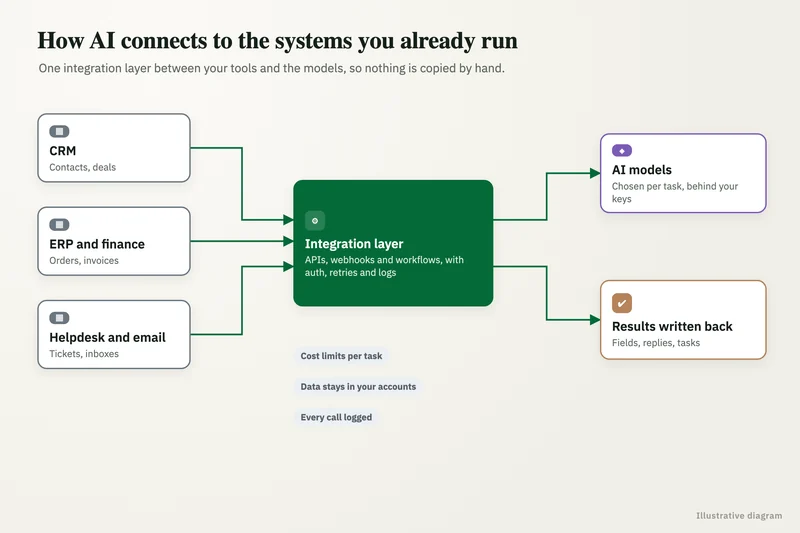
What are the three routes to Odoo AI integration?
The route depends on where the work starts and how often it runs. If a person in Odoo wants an answer, a draft or a quick record change, a native agent is the shortest path. If your team already lives in Claude or ChatGPT and wants to query Odoo from there, MCP is the bridge. If documents, emails or orders arrive on their own hundreds of times a week and must land in Odoo correctly, you need a custom integration that runs on a trigger, validates its output and queues anything doubtful for a person.
Most Odoo companies end up with a mix. Sales might use a native agent to create leads from a pasted email, finance might ask Claude about receivables over MCP, and purchasing might run a custom pipeline that reads supplier invoices from a shared inbox. The table compares the three.
| Route | What it is | Best for | Main limit |
|---|---|---|---|
| Native Odoo AI agents | Agents configured inside Odoo with a system prompt, a ChatGPT or Gemini model, skills (formerly topics), tools and sources | Users working inside Odoo screens; light record creation and updates; agents called from automated or scheduled actions in Odoo 20 | Draws IAP credits; limited to the models and tools Odoo offers; logic lives inside Odoo only |
| External AI client over MCP | Claude, ChatGPT or another MCP client connected to your Odoo database through the MCP connection added in Odoo 20 | Managers and analysts asking questions and making small edits from the AI tool they already use | A person drives each session; not a scheduler, document pipeline or audit system |
| Custom integration | A service that calls Odoo's JSON-2 API with an API key and a model provider of your choice (OpenAI, Claude, Gemini, Bedrock or open-weight) | Unattended, repeatable work: vendor bills, sales order intake, product data, support triage, cross-system flows | Needs design, testing, monitoring and an owner; external API requires the Custom plan |
What changed for AI in Odoo 20?
Odoo 20, unveiled at Odoo Experience 2026 in Brussels (September 24-26), moved AI agents from answering questions to doing work. Odoo's own Odoo 20 release notes list the changes that matter most for integration planning, and they are worth reading against what Odoo 19 could do. The Odoo 19 documentation is explicit that the standard Ask AI agent can open views and display reports but cannot create leads or alter data.
The billing change is the one buyers miss. Odoo's release notes state that all AI features now need credits bought through In-App Purchase (IAP), so an agent that runs on every incoming email has a running cost that grows with volume. Measure credits per task during testing, the same way you would measure tokens on a direct model API.
- Agents can be summoned by automated and scheduled actions, so they can run without someone opening a chat.
- Users can ask an AI agent to update records and to create things from an uploaded instruction file such as a PDF.
- Databases can be connected to external AI clients via MCP (Model Context Protocol).
- Topics are renamed skills: collections of instructions and tools that shape how an agent behaves in a context.
- If an agent hits its maximum tool call limit, it asks the user for confirmation before continuing.
- Agent conversations are stored for up to 30 days after the last message.
- Automation chats show how agents handled each run, which helps when you debug failures.
Do you need the Odoo Custom plan for AI integration?
For anything beyond basic assistance, usually yes. Odoo's pricing page ties agentic AI and the external API to the Custom plan, and its developer documentation states that access to data via the external API is only available on Custom pricing plans. The Custom plan is also the one that lets you run on Odoo.sh or on-premise rather than only Odoo Online.
That has two practical effects. First, a company on Standard that wants a custom pipeline writing vendor bills into Odoo will need a plan change before any build starts, so put the subscription difference into the business case. Second, self-hosted Odoo Community users do not get Odoo's paid AI features in the same way, so they tend to rely on community modules (the Odoo Community Association publishes an AI bridge addon) or a custom service that talks to Odoo directly. Confirm what your edition and contract include with your Odoo account manager before you design anything.
How do you set up native Odoo AI agents properly?
A native agent is only as reliable as its instructions, tools and sources. Odoo's AI agent documentation describes a system prompt that defines the agent's role, a response style (Analytical, Balanced or Creative), a choice of ChatGPT or Gemini models, skills that bundle instructions with tools, and sources such as PDFs, web links, Documents files and Knowledge articles. Turning on Restrict to Sources keeps the agent from answering outside the material you gave it.
Treat an agent like a new employee with system access. Give it one job, the narrowest tools that job needs and a clear rule for when to stop and ask. A setup sequence we follow is below.
- Pick one workflow with a measurable baseline, such as leads created from inbound emails per week.
- Write the system prompt as a job description: inputs, required fields, what to do when a field is missing.
- Add only the tools that job needs; an agent that drafts quotes does not need to post journal entries.
- Load sources (price lists, product sheets, policies) and enable Restrict to Sources for customer-facing answers.
- Test on 30-50 real past examples in a staging or duplicate database and log every wrong output.
- Check how many IAP credits each run uses before you attach the agent to an automated action.
When is native Odoo AI not enough?
Native agents stop being the right fit when the work needs controls, scale or systems that live outside Odoo. The clearest sign is a queue that never empties: supplier invoices from several mailboxes, customer purchase orders as PDFs, product records that need enriching every night. Each of those needs extraction to a fixed schema, matching against Odoo master data, business rules and an exception screen, and that is easier to build, test and version as a separate service.
Model choice is another signal. Odoo's agents offer ChatGPT and Gemini models, so if you need Claude, a model on Amazon Bedrock or an open-weight model in your own cloud for data residency reasons, the work sits outside Odoo and writes back through the API. The same applies when one workflow spans Odoo and a CRM, a carrier portal, SharePoint or a supplier database. Our AI integration services cover exactly this kind of build.
- Work is triggered by a file, email, webhook or schedule, at high daily volume.
- Output writes to accounting records that affect money: vendor bills, customer invoices, credit notes.
- You need confidence scores, duplicate checks and a review queue with the reason each item was held.
- You need a model or hosting option Odoo does not offer.
- You need logs kept longer than Odoo's 30-day agent conversation history.
How does a custom Odoo AI integration work? A worked example
Here is an illustration with round numbers, not a client result. A distributor receives 800 supplier invoices a month. Each takes a clerk about 5 minutes to open, key into Odoo Accounting, match to the purchase order and attach. That is around 67 hours a month before anyone chases a mismatch.
A custom pipeline for this has six stages. A watcher picks up each PDF from the accounts payable mailbox or a Google Drive folder. An extraction step reads supplier, invoice number, dates, lines, taxes and totals into a strict schema. A lookup step calls the JSON-2 API to find the supplier (res.partner) and open purchase orders, then compares quantities and prices line by line. A rules step flags duplicates, price variances above your tolerance and missing purchase orders. Clean matches are created as draft vendor bills with the PDF attached, never posted. Everything else goes to a review list showing the reason it was held.
If 75 percent of invoices match cleanly and the rest need a minute of review each, the 67 hours fall to a few hours of exception handling, and a named person still confirms every bill. Your real pass rate depends on scan quality and how tidy your supplier and product data are, which is why we measure it on a sample of your own invoices before quoting. Our AI document processing page explains the extraction side in more depth.
What should developers know about Odoo's API and MCP before building?
Build new Odoo AI integrations on the JSON-2 API. Odoo's external API reference describes the /json/2 endpoint, authenticated with a bearer API key, and says the older XML-RPC and JSON-RPC endpoints are scheduled for removal in Odoo 22 (fall 2028) and Odoo Online 21.1 (winter 2027). An integration written against the old endpoints today will need rework within a year or two on Odoo Online.
Key management needs a plan too. The same reference says API keys created through the user's preferences cannot last more than three months, so a production integration needs a rotation routine and an alert before expiry, or it will stop quietly. Run integrations as a dedicated integration user whose access rights cover only the models the workflow touches, not as an administrator.
MCP is the right tool for people, not for pipelines. Connecting Claude or ChatGPT to Odoo over MCP gives a manager a fast way to ask about overdue invoices or stock levels in plain English. It is not a substitute for a service that runs on a schedule, retries on failure and records what it changed. If you need custom MCP tools for your own models and approval rules, our MCP server development guide covers the design choices.
How do you keep Odoo data safe when you add AI?
Security in an Odoo AI integration comes down to access rights, approvals and where data travels. Any route that uses a hosted model sends Odoo data to that provider, so check whether your plan with OpenAI, Google or Anthropic keeps prompts out of training and what retention applies. If you handle protected health information, you need vendors that sign a Business Associate Agreement on the tier you use. This is not legal advice.
- One integration user per workflow, with record rules limited to the companies and models it needs.
- Draft, never post: AI-created invoices, bills and journal entries stay in draft until a person validates them.
- Prompt injection defense: text inside a customer email, chatter message or PDF is data, never an instruction.
- Confidence thresholds route uncertain extractions to review instead of retrying the model.
- Log every prompt, output and record ID changed, kept as long as your auditors require.
- A kill switch: one setting that pauses the automated action or the external service without a deploy.
How do you choose a partner for Odoo AI integration?
Choose a partner who can explain what happens when things go wrong, not only show a demo. An agent creating a lead from a tidy email looks the same from any vendor. The difference shows when an invoice references two purchase orders, a supplier exists twice, or an API key expires on a Friday night.
Odoo implementation partners know modules and configuration well; AI build teams know extraction, evaluation and model costs. You need both skills on the project, from one firm or two. We scope each Odoo build after a free review of real samples, quote a fixed price and hand over the code, prompts, API keys and model accounts, so you own all of it. For budgeting the build and the monthly bill, see our AI implementation cost guide.
- Which route (native agent, MCP or custom) fits this workflow, and why not the others?
- Does this need our plan to change, and what will IAP credits or model usage cost per month at our volume?
- Which API will you use, and how will you rotate keys that expire every three months?
- How will you measure accuracy before go-live, on how many of our real documents?
- What does a reviewer see when the AI is unsure, and who owns that queue?
- When should we not build this, because a native Odoo feature already covers it?
Case study · Logistics company, UK
Route planning automation
Dispatch typed every address into Google Maps, which optimizes only 25 stops and cannot add time at each stop. A Python tool that loads addresses automatically, adds buffer time per stop and optimizes the full route.
- Manual address entry eliminated
- Delivery estimates customers could rely on

FAQ
Frequently asked questions
Does Odoo have built-in AI?
Yes. Odoo includes an AI app with an Ask AI assistant and configurable AI agents that use ChatGPT or Gemini models, plus AI features in apps such as Accounting, eCommerce and Documents. In Odoo 20, agents can update records and be triggered by automated and scheduled actions, and all AI features draw credits bought through IAP.
Can ChatGPT or Claude connect to Odoo?
Yes. Odoo 20's release notes add the option to connect your database to AI clients via MCP, so tools like Claude or ChatGPT can query and act on Odoo data within the user's permissions. For scheduled or high-volume work, a custom integration over Odoo's JSON-2 API is usually the better fit.
Is Odoo AI free?
Not entirely. Odoo's Odoo 20 release notes say all AI features need credits bought via In-App Purchase, and Odoo's pricing page ties agentic AI and the external API to the Custom plan. Budget both the plan and the usage before rolling AI out across teams.
Can I use AI with Odoo Community edition?
You can, but not through Odoo's paid AI features in the same way. Community users typically add community modules, such as the AI bridge addon published by the Odoo Community Association, or run a custom service that reads and writes Odoo data through its API with a model provider of their choice.
Can AI create invoices or vendor bills in Odoo?
Yes. A native agent with the right tools or a custom integration using the JSON-2 API can create accounting records. Keep AI-created invoices and bills in draft so a person validates them before posting, and add duplicate and price-variance checks before anything reaches the ledger.
Which Odoo API should an AI integration use?
Use the JSON-2 API at the /json/2 endpoint with a bearer API key. Odoo's external API reference says the XML-RPC and JSON-RPC endpoints are scheduled for removal in Odoo 22 (fall 2028) and Odoo Online 21.1 (winter 2027), and that API keys cannot last more than three months, so plan key rotation.
How long does an Odoo AI integration take?
Configuring a native agent for one task is mostly prompt writing, tool selection and testing on past examples. A custom pipeline, such as invoice capture with purchase order matching and a review queue, takes longer because it needs extraction tuning, API work and accuracy testing on real documents, so scope it workflow by workflow.
Keep reading
Related pages
Get started
Tell us what you want automated
Describe the task, the systems involved and the volume. We reply within one business day with an architecture, the tools we would use, running costs and a fixed-price build plan.
- Free 30-minute build review
- Fixed quote before any work starts
- You own the accounts, code, prompts and data
Prefer email? info@aiimplementationconsultants.com
Get a free build plan
Two lines is enough to start.