

Integration guide
Freshdesk AI integration: Freddy AI, MCP or a custom build
Freshdesk AI integration has four routes: Freshworks' own Freddy AI Agent and Copilot, the Freshdesk MCP server that went generally available in September 2026, a Marketplace or bolt-on AI vendor, or a custom service that reads and writes tickets through the Freshdesk API. This guide is for support leads, CX ops and IT owners who run Freshdesk and want to pick the right route, price it at their real ticket volume and build it so it holds up at peak hour.
Get a free build plan
Two lines is enough. A specialist replies within one business day.
Spec: quick answer
How do you integrate AI with Freshdesk?
You integrate AI with Freshdesk by switching on Freddy AI Agent (billed per session) and Copilot (per agent), connecting Claude or Copilot Studio through the Freshdesk MCP server, installing a third-party AI app, or building a custom service that receives automation-rule webhooks, calls OpenAI, Claude or Gemini, and writes tags, fields and notes back through the API.
- Freddy AI Agent bills per 24-hour session, so price it on conversations, not tickets.
- The MCP server suits staff assistants; its yearly action caps make it wrong for bulk automation.
- Freshdesk API limits range from 100 to 700 calls a minute, with lower caps on ticket writes.
- Write AI output to tags, fields and private notes first, then expand to customer replies.
What are the four ways to do Freshdesk AI integration?
The right route depends on who the AI serves and whose logic it follows. If the goal is deflecting common questions on chat, email or your portal, Freddy AI Agent is the shortest path. If the goal is faster human agents, Freddy AI Copilot fits. If staff want to ask Claude or Copilot Studio about tickets in plain English, the Freshdesk MCP server now covers that. If tickets need data from other systems or follow your own routing rules, you are looking at a custom build.
Most teams end up combining two routes. A common pattern is Freddy AI Agent on chat for order-status and password questions, plus a custom service that classifies every email ticket, looks up the customer in Shopify, HubSpot or NetSuite, and leaves a private note before an agent opens it.
| Route | What it is | Best for | Main limit |
|---|---|---|---|
| Freddy AI Agent | Freshworks' customer-facing AI on chat, email and portal, billed per session | Answering repeat questions from your solution articles | Behaviour is what Freshworks ships; cost rises with every session |
| Freddy AI Copilot | Agent-side add-on: reply suggestions, summaries, tone and writing help | Speeding up agents on tickets that reach a person | Per-seat fee, and only on Pro and Enterprise |
| Freshdesk MCP server | Lets Claude Desktop, Claude Code, Cursor, VS Code or Copilot Studio read and act on Freshdesk | Staff asking questions and running one-off actions in an AI client | API key per user and a yearly action cap per account |
| Custom build | Your service using automation-rule webhooks, the Freshdesk API and a model provider | Multi-system triage, lookups, backlog cleanup, your own rules | Needs design, testing, monitoring and an owner |
How much does Freshdesk AI cost? Freddy pricing explained
Freshdesk charges for AI in three ways: sessions for Freddy AI Agent, a seat fee for Copilot and, since the MCP launch, actions for AI clients. Freshworks' Freshdesk pricing page (checked November 2026) lists the plans at $19 (Growth), $55 (Pro) and $89 (Enterprise) per agent per month on annual billing. The first 500 Freddy AI Agent sessions are included, and further sessions cost $49 per 100, which works out to $0.49 each. Freddy AI Copilot is a $29 per agent per month add-on on Pro and Enterprise. Freddy AI Insights is included in Enterprise.
Two details change the math. First, a session is not a ticket: Freshworks' session FAQ defines it as all interactions between one end user and the AI agent within a 24-hour window, so a customer who comes back three times in one afternoon is one session, while the same customer on three different days is three. Second, the same FAQ describes the 500 free sessions as a one-time allowance and says purchased sessions do not carry forward to the next billing cycle, so buying a large pack for a slow month wastes money.
| Item (Freshdesk pricing page, Nov 2026) | Published price | Note |
|---|---|---|
| Growth / Pro / Enterprise | $19 / $55 / $89 per agent per month, annual | Plan sets API and MCP limits |
| Freddy AI Agent sessions | First 500 included, then $49 per 100 | One session = one user's interactions in 24 hours |
| Freddy AI Copilot | $29 per agent per month | Pro and Enterprise only |
| MCP actions add-on | $15 per 1,000 actions | On top of each plan's yearly allowance |
| Connector app tasks | $80 per 5,000 tasks | For Freshworks connector apps |
What changed with the Freshdesk MCP server in September 2026?
Freshworks made its MCP integration generally available on September 10, 2026, according to its Freshdesk support article on Model Context Protocol. It is supported on the current Freshdesk standalone plans and Freshdesk Unified Omni 2026, and it exposes more than 40 tools across tickets, conversations (replies and notes), contacts, agents, groups, companies and solution articles. Supported clients listed are Claude Code, Claude Desktop, Cursor, Microsoft Copilot Studio and Visual Studio Code.
The limits are what matter for planning. Each successful tool call counts as one action, and a single request that needs several tools uses several actions. The same article sets these allowances per account: Growth gets 25 actions a minute and 1,200 a year, Pro gets 50 a minute and 6,000 a year, and Enterprise gets 100 a minute and 12,000 a year. Authentication is by API key only, and each user connects their client with their own key.
In practice, MCP is a good fit for a support manager asking Claude to summarise this week's escalations or draft a solution article from resolved tickets. It is a poor fit for automation. A Pro account's 6,000 yearly actions is 500 a month across the whole team, which one triage job on 6,000 monthly tickets would burn through in days. For volume work, call the REST API from your own service instead.
When do you need a custom Freshdesk AI integration?
You need a custom build when the AI must follow your rules, read your other systems or use a model you choose. Freddy covers the standard support jobs well; it stops fitting when every tenth ticket needs a lookup in another system or when routing depends on contract tiers that Freshdesk does not hold.
A custom build is also the safer option when you need a full audit trail. With your own service, each prompt, response, dollar of model spend and field change is stored next to the Freshdesk ticket number, retained for as long as your records policy says, and checked against a fixed set of past tickets whenever someone edits a prompt.
- Tickets need data from outside Freshdesk before anyone can act: orders, invoices, subscriptions, warranty or shipment records.
- Routing follows your logic: account tier, region, product line, language coverage or SLA.
- Your security team has already approved one model vendor (OpenAI, Claude, Gemini, Bedrock) or wants an open-weight model hosted in your cloud.
- The job is back-office, not conversational: retagging a backlog, filling custom fields, preparing refund approvals.
- You need cost caps per ticket and an evaluation set that reruns before each change ships.
How is a custom Freshdesk AI integration built?
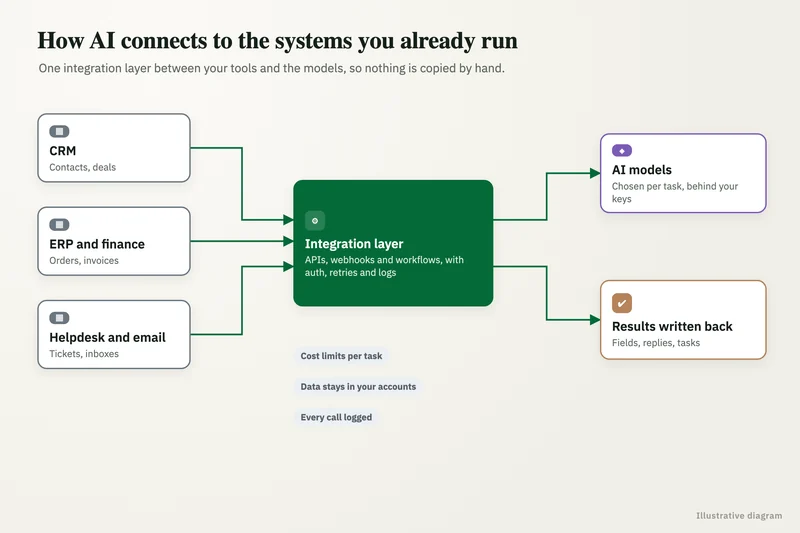
Every custom Freshdesk build we scope breaks into the same chain: an event that starts it, gathering context, one model call, checks against your rules, and writing the result back. Getting the Freshdesk details right at each link is what keeps it running on a busy Monday.
Start with events. A Freshdesk automation rule on ticket creation or update can call a webhook to your service with the ticket ID, so you are not polling the API every minute. Your service then reads the full ticket, its conversations and the requester through the API. Freshdesk's API documentation uses basic authentication with an API key as the username, which means the key carries the permissions of the agent who owns it. Create a dedicated agent for the integration with only the roles it needs, so its notes are clearly labelled and its access can be revoked without touching a real person's login.
Rate limits shape the design. Freshdesk's API documentation sets the per-minute limits below, and invalid requests count against them too. Ticket writes have their own lower caps, so a backlog job on Growth that updates 30,000 old tickets at 50 updates a minute takes ten hours and must run as a queued job, not a loop.
- Trigger: an automation rule with conditions so only the right tickets (for example, email channel, no group assigned) call the webhook.
- Context: read the ticket, conversations, contact and company; search solution articles; pull outside records by order or account ID.
- Model step: a fixed output schema (intent, priority 1 to 4, suggested group, draft reply, confidence, cited article IDs) validated field by field.
- Rules step: allowed values for each tag and custom field, a confidence threshold, a cost cap per ticket and a hard block on refunds or account changes.
- Write-back: tags, custom fields and a private note with the draft and its sources; public replies only for categories you have approved.
- Failure handling: queue every job, back off and retry on 429 responses, make writes safe to repeat, and alert a person after two failures.
| Freshdesk plan (API docs) | All calls per minute | Ticket create / update per minute | Tickets list per minute |
|---|---|---|---|
| Growth | 100 | 50 | 40 |
| Pro | 400 | 160 | 100 |
| Enterprise | 700 | 280 | 200 |
Worked example: Freddy AI Agent or a custom build?
Here is an example with round numbers for illustration, not a client result. A US software company runs 15 agents on Freshdesk Pro and handles 6,000 tickets a month, half by email and half by chat. A two-week pilot suggests Freddy AI Agent could fully handle about 2,500 conversations a month, which map to roughly 2,500 sessions.
On the native route, after the one-time 500 free sessions, 2,500 sessions at $0.49 cost $1,225 a month. Adding Copilot for all 15 agents adds $435. That is $1,660 a month, or $19,920 a year, on top of the plan. For a lot of teams that is a fair price, and it needs no engineering. If Freddy answers your tickets well, stay native.
The custom route earns its place on the other 3,500 tickets that Freddy cannot close because they need account data. A service that classifies each email ticket, pulls the subscription from the billing system and writes a draft into a private note needs about four Freshdesk API calls per ticket (read ticket, read conversations, search articles, update). At 3,500 tickets that is about 14,000 calls a month, a tiny share of Pro's 400 calls a minute. Running it costs model tokens, a small server and log storage; we measure that per ticket during the pilot so the quote rests on real numbers. The decision is then simple: compare the build quote plus running cost with the agent minutes saved on those 3,500 tickets, measured against today's handle time.
How do you keep customer data safe in a Freshdesk AI integration?
Safety comes down to which key the AI uses, where it writes and where ticket text goes. Customers can type anything into a ticket, including text meant to steer a model, so the service accepts only its fixed output fields and ignores any instruction that appears inside ticket content.
API keys need extra care in Freshdesk because both the REST API and the MCP server authenticate with them. A key pasted into a personal Claude Desktop config carries that agent's full permissions, so decide who may connect MCP clients before anyone does it. Confirm in writing that your model plan keeps ticket text out of training, and find out its prompt retention period. Support desks in healthcare carry an extra duty: any vendor touching protected health information must sign a Business Associate Agreement with you, and the big model vendors offer that only on selected API or enterprise plans. This is not legal advice.
- A dedicated integration agent with the narrowest role that works, and its key stored in a secrets manager.
- AI writes to tags, custom fields and private notes first; public replies only for approved categories.
- Refunds, cancellations, account changes and legal complaints go to a person every time.
- A log row per ticket with the prompt, response, spend and fields changed, so a bad write can be found and undone.
- Test on a sandbox or a single group first, then widen to other groups, channels or brands.
How do you choose a partner for Freshdesk AI integration?
The best sign is a partner willing to tell you Freddy is enough. If Freddy AI Agent and Copilot already close your tickets at a price you accept, you do not need us or anyone else. When a build does make sense, quality shows in the edge cases: a ticket in two languages, a customer with three open orders, a 429 at Monday 9 a.m., an API key that belonged to someone who left.
Our process starts with a free review of real Freshdesk tickets, then a fixed-price quote. At handover you hold the code, prompts, integration agent and every model account. Anything involving refunds, customer accounts or regulated data waits for a human decision. Put the questions below to every vendor on your shortlist, us included.
- Which route fits our tickets (Freddy, MCP, a third-party app or custom), and what rules out the rest?
- Which agent and API key will the integration run under, and what can that key do?
- Which Freshdesk fields can your service change on its own, and where must an agent approve first?
- What accuracy test will you run before go-live, and how many of our past tickets go into it?
- How will it stay inside our plan's per-minute limits during our busiest hour?
- What is the expected monthly running bill, and what hard limit stops it growing?
Case study · Logistics company, UK
Route planning automation
Dispatch typed every address into Google Maps, which optimizes only 25 stops and cannot add time at each stop. A Python tool that loads addresses automatically, adds buffer time per stop and optimizes the full route.
- Manual address entry eliminated
- Delivery estimates customers could rely on

FAQ
Frequently asked questions
Does Freshdesk have built-in AI?
Yes. Freshdesk includes Freddy AI Agent for customer conversations, with the first 500 sessions included and further sessions at $49 per 100, according to Freshworks' pricing page in November 2026. Freddy AI Copilot adds reply suggestions and summaries for human agents at $29 per agent per month on Pro and Enterprise.
What counts as a Freddy AI Agent session?
Freshworks' session FAQ defines a session as all interactions between one end user and the AI agent within a 24-hour window. Several messages from the same customer on the same day count once, while the same customer on different days counts each time. Check your own plan's billing page, since email and chat agents can be metered differently.
Can I connect Claude or ChatGPT to Freshdesk?
Claude Desktop, Claude Code, Cursor, VS Code and Microsoft Copilot Studio can connect through the Freshdesk MCP server, which became generally available on September 10, 2026. ChatGPT or any other model can be connected through a custom integration that calls the Freshdesk API, or through Zapier or Make. Each MCP user authenticates with their own Freshdesk API key.
What are the Freshdesk API rate limits?
Freshdesk's API documentation lists 100 calls per minute on Growth, 400 on Pro and 700 on Enterprise. Ticket create and update calls are capped lower, at 50, 160 and 280 per minute. Invalid requests also count, so a misconfigured integration can use up the limit for every other tool on the account.
How many MCP actions does Freshdesk include?
Freshdesk's MCP support article lists 1,200 actions a year on Growth, 6,000 on Pro and 12,000 on Enterprise, with per-minute caps of 25, 50 and 100. Extra actions cost $15 per 1,000 on the pricing page. Each successful tool call counts as one action, so a complex request can use several.
Should I use Freddy AI or build a custom Freshdesk integration?
Use Freddy AI Agent if most tickets can be answered from your solution articles and the session cost at your volume is acceptable. Choose a custom build when answers need data from other systems, routing follows your own rules, or you need full logs and a model of your choosing. Many teams run both.
How long does a Freshdesk AI integration take?
Switching on Freddy AI Agent or Copilot is mostly configuration, cleaning up solution articles and testing. A custom build with triage, an outside data lookup and draft replies takes longer because it needs field mapping, a dedicated integration agent, accuracy testing on real tickets and monitoring. We give a timeline per workflow once the free review is done.
Keep reading
Related pages
Get started
Tell us what you want automated
Describe the task, the systems involved and the volume. We reply within one business day with an architecture, the tools we would use, running costs and a fixed-price build plan.
- Free 30-minute build review
- Fixed quote before any work starts
- You own the accounts, code, prompts and data
Prefer email? info@aiimplementationconsultants.com
Get a free build plan
Two lines is enough to start.