

Integration guide
Clio AI integration: Manage AI, Clio for Claude or a custom build
Clio AI integration now has three routes: Clio's own AI (Manage AI and Clio Work), the Clio connector that brings matters and research into Claude, and a custom build on the Clio API for work that runs without anyone prompting, like intake, document filing and time capture. This guide is for managing partners, firm administrators and legal ops leads on Clio who want to pick the right route, keep client data protected and know when to bring in a build team.
Get a free build plan
Two lines is enough. A specialist replies within one business day.
Spec: quick answer
How do you integrate AI with Clio?
You integrate AI with Clio in three ways: use Clio's built-in Manage AI and Clio Work, connect Claude through Clio's MCP connector (Clio for Claude) for matter questions, research and drafting with approval on every change, or build a custom integration on the Clio Manage API v4 with webhooks for unattended work like intake, document routing and time entries.
- Clio for Claude is included with Clio Work and asks approval before changing records.
- Unattended work like intake and document filing needs a custom build on the Clio API.
- Clio's API allows about 50 requests per minute per token at peak, so design for it.
- ABA Formal Opinion 512 shapes the controls: confidentiality, supervision, client communication and fees.
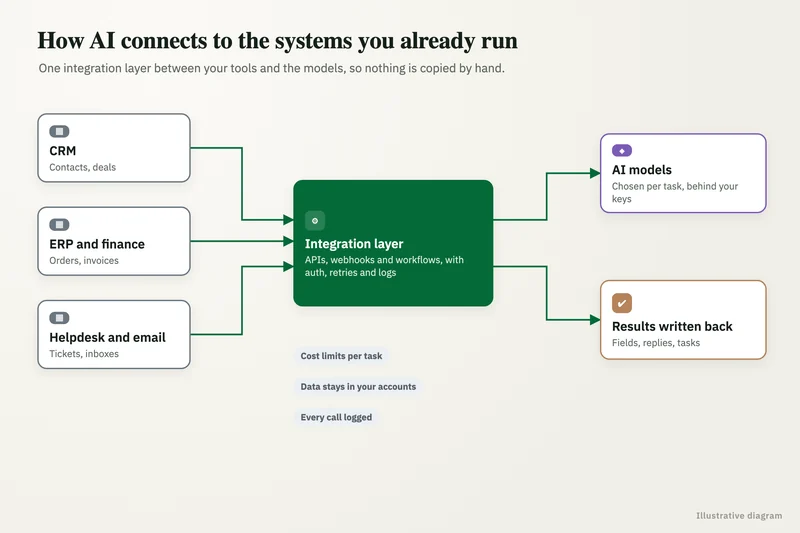
What are the three routes for Clio AI integration?
The right route depends on who starts the work. If a lawyer asks a question about a matter and reads the answer, Clio's own AI or the Claude connector covers it. If calls, emails, web forms or documents arrive on their own and must land in the right matter with the right contact, task and deadline, you need an integration that runs on a trigger and writes to Clio through the API with checks in place.
Most firms use more than one. Associates might research and draft in Clio Work while the intake team runs a pipeline that turns web inquiries into Clio Grow leads with conflict-check data attached. The table compares the three.
| Route | What it is | Best for | Main limit |
|---|---|---|---|
| Native Clio AI (Manage AI, Clio Work) | AI inside Clio: matter summaries, drafting, document analysis, legal research | Lawyers and staff working inside Clio screens | Works on what is already in Clio, in the ways Clio designs |
| Clio for Claude (MCP connector) | Clio's official connector that exposes Clio Work and matter records to Claude | Research, drafting and matter questions from Claude, with approval on writes | A person drives every session; it is not an intake or document pipeline |
| Custom build on the Clio API | Code or workflow tooling calling the Clio Manage API v4 (and Grow APIs), triggered by webhooks, forms, inboxes or calls | Intake, document routing, deadline extraction, time capture, reporting across systems | Needs design, testing, monitoring and an owner |
What can Clio's built-in AI do?
Start with what you already pay for. Clio Duo, the assistant inside Clio Manage, has been rebranded Manage AI, according to PracticeProof's 2026 roundup of Clio updates. Layer3 Labs' 2026 explainer describes it summarizing matters, drafting client communications and billing narratives, and analyzing documents using the firm's own Clio data, and notes that its answers are limited to what is stored in Clio Manage.
Clio Work is the research and drafting side, built on Clio's acquisition of vLex. Clio describes it as matter-aware legal AI for research, analysis, strategy and drafting that combines authorized matter context with authoritative law. If your main goal is faster research and first drafts, these two may be all you need, and they involve no build.
What is the Clio MCP server (Clio for Claude)?
Clio for Claude is Clio's official connector built on the Model Context Protocol. eSEOspace's November 2026 review reports it was added to Claude's connector directory in October 2026, is included with Clio Work at no extra cost and requires a Clio Work license assigned by the firm's administrator. Claude's listing describes 26 tools covering legal research, docket review, drafting with export to Word or PDF, review tables across documents, citation checks, and matter status, parties, deadlines, tasks, calendar and time logging.
The controls are sensible by default. The connector requests read and write access, but every tool starts at Needs approval, so Claude asks before it creates or changes a record. Clio applies the same per-person access checks as its web app, and conversations stay in Claude rather than in Clio Work history. Two limits to know: accounts that sign in only through vLex single sign-on were not supported at the time of that review, and Clio Grow records need Clio Grow connected to Clio Manage.
Keep approval switched on for any tool that creates, updates or deletes records. A lawyer clicking approve on a time entry is cheap; unwinding a wrong deadline on a calendar is not.
When do you need a custom Clio API integration?
You need a custom integration when work arrives without a lawyer asking for it. A chat connector cannot sit on your intake line at 9 p.m., read 40 inbound emails with attachments, or file medical records into the right matter folder every morning. That needs a service that listens for events, applies your rules and writes to Clio through the API.
The Clio developer documentation gives the building blocks. Clio maintains the Clio Manage API (v4) and the Clio Grow APIs. Data lives in four regions with separate hosts: US (app.clio.com), Canada, EU and Australia, and an integration must call the host for your firm's region. Webhooks notify an integration when records such as matters and activities change, so it does not have to poll. And requests are rate limited per access token, with a default of 50 requests per minute during peak hours and a 429 Too Many Requests response when you exceed it.
That rate limit shapes design. A build that reads 300 matters one at a time at 10 a.m. will stall, so we batch reads, queue writes, retry with backoff and run heavy syncs off-peak. Our AI integration services page explains how we scope and hand over builds like this.
- Work is triggered by a call, form, email, upload or schedule rather than a person typing.
- The same task runs dozens of times a day across many matters.
- Output creates contacts, matters, tasks, calendar entries or time entries.
- The process spans other systems: phones, e-signature, document storage, accounting or a marketing CRM.
- You need your own log of what the AI read, proposed and who approved it.
What does a Clio intake integration look like in practice?
Here is a worked example with round numbers for illustration, not a client result. A personal injury firm gets 250 web and phone inquiries a month. An intake specialist spends about 10 minutes per inquiry retyping details into Clio Grow, checking for conflicts and creating the follow-up task, which is roughly 42 hours a month before a single consultation is booked.
A custom pipeline has five parts. A trigger picks up each inquiry from the web form, the intake inbox or an AI receptionist call summary. An extraction step pulls the caller, opposing parties, incident date, location and practice area into a fixed schema. A check step searches existing Clio contacts and matters for name matches to flag possible conflicts for a person to clear. A rules step applies your criteria, such as practice area fit and a possible limitations date, and marks urgent ones. Finally, the lead is created in Clio Grow with a summary and a task for the right attorney, and anything unclear goes to a review queue instead.
If most inquiries pass cleanly, 42 hours of typing can shrink to a few hours of reviewing summaries and clearing flagged conflicts, while every acceptance decision stays with a lawyer. The AI never accepts a client, gives legal advice or clears a conflict on its own. Your results depend on how consistent your inquiries are, so we test on a sample of real, redacted inquiries before quoting.
How does ABA Formal Opinion 512 affect Clio AI integration?
ABA Formal Opinion 512, issued July 29, 2024, is the ABA's first formal guidance on generative AI. It applies six duties under the Model Rules to AI use: competence, confidentiality, communication, candor toward the tribunal, supervision and fees. Commentators summarizing the opinion note that the level of human review should match the task, and that firms should consider telling clients about AI use, for example in engagement letters. State bars add their own guidance, so check yours. This is not legal advice.
For an integration, those duties turn into concrete design choices. Confidentiality means model providers that do not train on your data and clear retention terms. Supervision means approval steps and logs a partner can review. Fees mean time entries drafted by AI still reflect real work. The checklist below is what we build in by default.
- Use AI provider plans that exclude prompts and outputs from training, with known retention.
- Connect under scoped Clio users or apps with only the permissions each workflow needs.
- Keep a person approving anything that creates matters, deadlines, client messages or time entries.
- Treat text inside emails and documents as data, never as instructions to the AI (prompt injection).
- Log inputs, outputs, confidence and approver for every action, stored where the firm controls it.
- Document the workflow so supervising attorneys can explain it to a client or a bar.
Which law firm workflows suit Clio AI integration best?
The best candidates are high-volume, rules-based and painful to type. Start with one, measure it for a month, then add the next.
Avoid starting with anything that produces client-facing legal judgments without review. Research and drafting already have strong native tools; integrations pay back fastest on the administrative work around them.
- Intake: web forms, calls and emails turned into Clio Grow leads with conflict flags and tasks.
- Document routing: inbound records, correspondence and court notices filed to the right matter with a summary.
- Deadline extraction: dates pulled from notices and orders into proposed calendar entries for attorney approval.
- Time capture: draft time entries from emails, calls and documents, reviewed before billing.
- Reporting: matter, billing and pipeline data combined with marketing and accounting systems in one dashboard.
How do you choose a partner for Clio AI integration?
Choose a partner who shows you what happens when things go wrong. Any demo can summarize a matter. The difference shows when a caller gives a nickname, two matters share a client, a document has no matter number or Clio returns a rate-limit error at the busiest hour.
Ask each candidate these questions in writing. We scope every Clio build after a free review of a real, redacted sample, quote a fixed price, and hand over the code, prompts and accounts so the firm owns all of it. For budgeting, see our AI implementation cost guide.
- Which route fits this workflow (native, Clio for Claude or API build), and why not the others?
- Which Clio permissions will the integration use, and which region host?
- How do you handle the API rate limit and webhook failures?
- What happens to an inquiry or document the model is unsure about, and who sees it?
- Which AI provider and plan will process client data, and what are its retention terms?
- Who owns the code, prompts and model accounts when the project ends?
Case study · Logistics company, UK
Route planning automation
Dispatch typed every address into Google Maps, which optimizes only 25 stops and cannot add time at each stop. A Python tool that loads addresses automatically, adds buffer time per stop and optimizes the full route.
- Manual address entry eliminated
- Delivery estimates customers could rely on

FAQ
Frequently asked questions
Does Clio integrate with ChatGPT or Claude?
Clio has an official connector for Claude, Clio for Claude, added to Claude's directory in October 2026 and included with Clio Work. eSEOspace reports the same connection powers Clio for Codex in the ChatGPT desktop app, but not regular ChatGPT chat. Other AI tools connect through custom builds on the Clio API.
What is Clio Manage AI?
Manage AI is the new name for Clio Duo, the AI assistant inside Clio Manage. It summarizes matters, drafts communications and billing narratives and analyzes documents using your firm's Clio data. Its answers are limited to what is stored in Clio Manage.
Can AI create matters or time entries in Clio?
Yes. Clio for Claude can create and change records, but each tool asks for approval by default. A custom integration can create contacts, matters, tasks and time entries through the Clio Manage API v4, and should keep a person approving anything that affects clients, deadlines or bills.
What are the Clio API rate limits?
Clio's developer documentation sets a default of 50 requests per minute per access token during peak hours, with higher limits off-peak that vary by region. Exceeding it returns a 429 Too Many Requests error, so integrations should batch, queue and retry.
Is it ethical for law firms to connect AI to Clio?
It can be, if the firm meets its duties under ABA Formal Opinion 512 and its state bar's guidance: competence, confidentiality, client communication, supervision and reasonable fees. That means vetted AI providers, scoped access, human review and clear records. This is not legal advice.
How long does a Clio AI integration take?
Turning on Manage AI or connecting Clio for Claude is mostly licensing and settings. A custom pipeline, such as intake with conflict flags or document routing, takes longer because it needs testing on real, redacted samples and monitoring, so we scope each workflow after a free review.
Keep reading
Related pages
Get started
Tell us what you want automated
Describe the task, the systems involved and the volume. We reply within one business day with an architecture, the tools we would use, running costs and a fixed-price build plan.
- Free 30-minute build review
- Fixed quote before any work starts
- You own the accounts, code, prompts and data
Prefer email? info@aiimplementationconsultants.com
Get a free build plan
Two lines is enough to start.