

Integration guide
Procore AI integration: native agents, the API and custom builds
Procore AI integration means getting AI to read and act on your RFIs, submittals, daily logs, drawings and specs where your project teams already work, either through Procore's own Helix agents or through a custom service that connects Procore to OpenAI, Claude, Gemini or Bedrock via the Procore API. This guide is for operations, VDC and IT leads at US general contractors and specialty contractors who want to decide which route fits, how it is built, and what must stay under a project manager's sign-off.
Get a free build plan
Two lines is enough. A specialist replies within one business day.
Spec: quick answer
How do you integrate AI with Procore?
You integrate AI with Procore in two ways: use Procore's built-in AI (Procore Assist, pre-built agents and Agent Builder in Procore Helix) for tasks inside Procore, or build a custom integration that listens to Procore webhooks, reads records through the REST API with a service account, calls a model, and writes drafts back for a person to approve.
- Try Procore's native agents first for RFI drafting and daily log summaries inside one project.
- Go custom when AI must combine Procore with your ERP, estimating data or company-wide history.
- Procore's default API limit is 3,600 requests an hour, so plan document backfills as queued jobs.
- AI drafts RFIs and submittal checks; a project manager always submits and approves them.
What are the main routes for Procore AI integration?
There are three routes, and the choice depends on where the data lives and who owns the logic. If the task sits inside one Procore project, such as drafting an RFI from a superintendent's note, Procore's own AI is the obvious place to start. If the task needs data that Procore does not hold, such as job cost from your ERP, bid history from estimating or lessons from closed projects, you need a custom integration or a Marketplace app that already does that job.
At Groundbreak 2025, Procore announced new AI capabilities in Procore Helix, its intelligence layer, according to its October 15, 2025 press release: Agent Builder in open beta for creating task-specific agents from natural-language prompts, pre-built agents such as the RFI Creation Agent, and updates to the Procore Assist conversational assistant. Availability and pricing vary by contract, so ask your Procore account team what is live on your plan before you scope anything custom.
| Route | What it is | Best for | Main limit |
|---|---|---|---|
| Procore Helix (Assist, pre-built agents, Agent Builder) | AI built into Procore that works on Procore data with no code | RFI drafting, daily log summaries, document Q&A inside a project | Works within what Procore exposes; logic and models are Procore's |
| Marketplace app | A third-party AI product installed from the Procore App Marketplace | A packaged job such as drawing QA, takeoff or safety observations | You inherit the vendor's scope, pricing and data handling |
| Custom integration | Your own service using Procore webhooks, the REST API and a model provider | Cross-system work, company-wide search, your own rules and approvals | Needs design, testing, monitoring and an owner |
Which construction workflows are worth automating with AI in Procore?
The best candidates are high-volume, text-heavy tasks where a draft saves time and a person still makes the call. These are the jobs we look at first when a contractor asks about Procore AI integration, roughly in order of how quickly they pay back.
- RFI drafting: turn a field question, a marked-up photo and the relevant spec section into a clean RFI with drawing and spec references for the PM to review.
- RFI answer search: before an RFI goes out, check closed RFIs, addenda and specs on this and past projects for an existing answer.
- Submittal pre-checks: compare a product data sheet against the spec section's requirements and list mismatches for the reviewer, without approving anything.
- Daily log summaries: roll up manpower, weather, delays, deliveries and notes into a weekly owner report or a schedule-impact list.
- Observations and punch items: classify field observations by trade, location and severity, and flag repeats across projects.
- Change event triage: match emails and RFIs that may carry cost or schedule impact to open change events so nothing is missed.
- Closeout document checks: list missing O&M manuals, warranties and as-builts against the spec's closeout requirements.
When is a custom Procore AI integration worth it over native agents?
Build custom when the answer needs more than one project or more than one system. Native agents work on the Procore data in front of them. A custom service can search every closed RFI across ten years of projects, join Procore commitments to your ERP's job cost, or apply your company's own submittal checklist, and it can use the model your security team has approved.
Stay native when the task is generic and contained. If Agent Builder can already draft RFIs your PMs accept with light edits, a custom build adds cost without adding value. The honest test is a two-week pilot of the native agent on one live project, measured on how many drafts the PM sent with minor edits versus rewrote.
- The task needs data from your ERP (for example Sage 300 CRE or Viewpoint Vista), estimating, scheduling or a document store outside Procore.
- You want answers drawn from all past projects, not just the current one.
- Your company has its own checklists, approval chains or naming rules that the AI must follow.
- Your security team requires a specific model provider, a private deployment or full prompt and output logs.
- You need per-task cost caps and an accuracy test that reruns before every prompt change.
How does a custom Procore AI integration work technically?
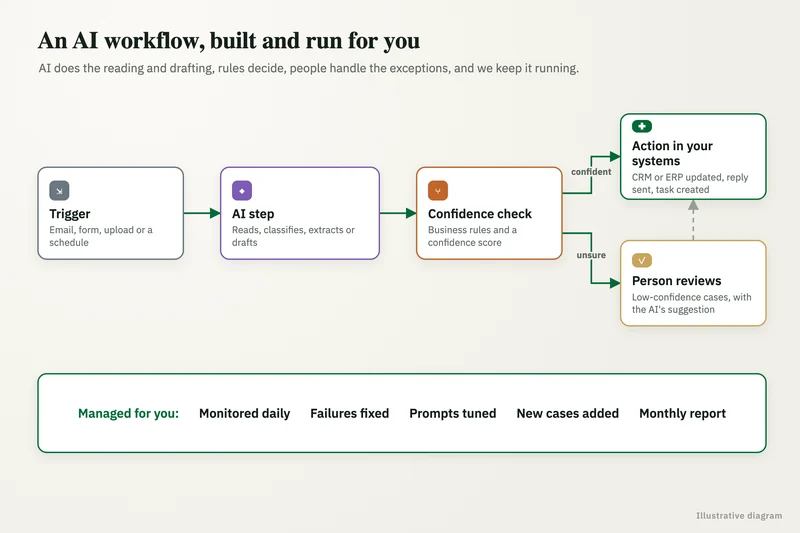
A custom build runs as its own service, installed into your Procore company like any other app, and moves through five stages: event, fetch, model, rules and write-back.
Installation and access come first. Procore's support documentation describes Developer Managed Service Accounts (DMSA): when a company admin installs a data connection app from the App Marketplace, or through a custom install, Procore creates a service account in the Company Directory, and the developer specifies the exact company and project tool permissions the app needs. The service then authenticates with the OAuth client credentials grant using that account's client ID and secret. In practice this means your admin can see what the AI can touch, limit it to the RFIs, Submittals and Daily Log tools, and remove it in one place.
Events beat polling. Procore webhooks can notify your endpoint when a supported resource such as an RFI or submittal is created, updated or deleted, and they are configured at company or project level in the Admin tool. The notification tells you which record changed; your service then reads the full record, its attachments and related drawings through the REST API, so each call is spent on work rather than checking for changes.
Rate limits decide how big jobs are scheduled. Procore's API defaults to 3,600 requests per hour, according to its developer documentation as summarised by integration vendor Hingepoint. Procore API support can raise that to 7,200 or 14,400, at which point a spike limit of 100 requests per 10 seconds applies, and every response carries X-Rate-Limit headers showing what remains. Going over returns a 429. Day-to-day RFI work fits easily inside the default; a one-off job that indexes years of project documents for search does not, and must run as a throttled queue over several days or after a limit increase.
- Event: a webhook on RFI, submittal or daily log changes, filtered to the projects in scope.
- Fetch: read the record, attachments, linked drawings and spec sections, plus outside data such as cost codes from the ERP.
- Model: a fixed output schema (draft question, cited drawing and spec references, suggested ball-in-court, confidence) checked field by field.
- Rules: allowed values, a confidence threshold, a cost cap per task and a block on any status change that would submit or approve.
- Write-back: a draft RFI, a comment or a related item for the PM, never a submitted or approved record.
- Failure handling: a queue that reads the rate limit headers, waits on a 429, retries safely and alerts a person after repeated failures.
What makes construction data hard for AI?
Construction records are messier than most business data, and that is where Procore AI projects usually slip. Plan for these issues in scoping rather than discovering them in testing.
- Drawings: sheet references, revisions and clouded changes matter, so the AI must cite the current revision, not an older set.
- Specs: answers depend on the exact section and paragraph, so retrieval has to work at section level with citations.
- Scanned PDFs and photos: field markups, handwritten notes and phone photos need OCR or vision models, with a review step when confidence is low.
- Inconsistent entry: different superintendents fill daily logs differently, so summaries need rules for missing or vague entries.
- Permissions: project teams, owners and subcontractors see different data, and the AI must never show a subcontractor another trade's pricing.
Worked example: sizing an RFI and daily log integration
Here is an illustration with round numbers, not a client result. A US general contractor runs 12 active projects in Procore. Together they create about 400 RFIs a month, and superintendents file a daily log on about 22 working days a month per project.
The RFI assistant reads each new RFI draft, its attachments, the referenced drawing and spec section, searches closed RFIs, and writes a suggested question and references back as a comment. That is about 8 API calls per RFI, or 3,200 calls a month. The weekly daily log summary reads around 10 records per project per working day, about 2,640 calls a month. Combined, roughly 5,800 calls a month is less than two hours of the default 3,600-per-hour limit spread across the whole month.
The one job that needs planning is the first load. Indexing 60,000 documents from closed projects at one or two calls each, plus file downloads, would take at least 17 to 34 hours at the default limit if nothing else used the API. Your other integrations share that same limit, so we schedule the backfill overnight across several nights, or ask Procore API support for a higher limit before starting.
To judge payback, measure today's time per RFI from field question to submitted RFI, and the hours PMs spend assembling weekly owner reports. Multiply by monthly volume and the loaded hourly cost of those people, then set that against the build quote and the monthly model and hosting bill.
Who should approve AI output in Procore?
A person with authority on the project approves anything that becomes part of the contract record. RFIs, submittal responses, change events and daily logs can matter in disputes and claims, so AI output should arrive as a draft with its sources, and the PM, project engineer or superintendent decides what is submitted.
We set these rules on every Procore build, and we recommend them whichever partner you use.
- AI never submits an RFI, approves a submittal, or changes ball-in-court on its own.
- Every draft shows the drawing sheets, revisions and spec paragraphs it relied on, so a reviewer can check in seconds.
- The service account has only the tool permissions its job needs, set at install through DMSA.
- Prompts, outputs, costs and writes are logged against the Procore record ID for later review.
- Model plans exclude your project data from training, and the retention period is written down.
How do you choose a Procore AI integration partner?
Choose a partner who will test Procore's native agents with you before proposing a build, and who asks about drawings, revisions and permissions in the first call. Generic AI agencies tend to treat Procore like a CRM; construction data needs revision-aware retrieval and strict approval rules.
We start with a free review of a sample of your RFIs, submittals and daily logs, recommend native, Marketplace or custom, and quote a fixed price for any build. You own the code, prompts, service account and model accounts at handover, and nothing goes into the contract record without a named person's approval.
- Which of our workflows would you leave to Procore Helix, and why?
- Which Procore tools and projects will the service account be allowed to read and write?
- How do you make sure the AI cites the current drawing revision?
- How will the first document load fit inside our API limit alongside our other integrations?
- What is the monthly running cost per project, and what cap stops it?
Case study · Logistics company, UK
Route planning automation
Dispatch typed every address into Google Maps, which optimizes only 25 stops and cannot add time at each stop. A Python tool that loads addresses automatically, adds buffer time per stop and optimizes the full route.
- Manual address entry eliminated
- Delivery estimates customers could rely on

FAQ
Frequently asked questions
Does Procore have built-in AI?
Yes. Procore Helix is Procore's AI layer, and at Groundbreak 2025 Procore announced Agent Builder in open beta, pre-built agents such as the RFI Creation Agent, and updates to the Procore Assist assistant. What is available depends on your Procore contract, so confirm with your account team.
Can ChatGPT or Claude connect to Procore?
Yes, through a custom integration or a Marketplace app that reads Procore data through the REST API and passes it to the model. The integration runs under a service account whose tool permissions your admin controls. Check which model plan is used and whether it excludes your data from training.
What are the Procore API rate limits?
Procore's API defaults to 3,600 requests per hour. Procore API support can raise it to 7,200 or 14,400, and a spike limit of 100 requests per 10 seconds then applies. Exceeding a limit returns a 429 response, and rate limit headers on every response show how many calls remain.
Can AI review submittals in Procore?
AI can pre-check a submittal by comparing product data against the spec section and listing mismatches for the reviewer. It should not approve or reject submittals, because those decisions carry contractual and safety weight. Treat it as a checklist that makes the human review faster.
Can AI write RFIs in Procore?
Yes. Procore's RFI Creation Agent drafts RFI content from project documents, and a custom build can do the same using your company's past RFIs and standards. In both cases the PM or project engineer should review the draft and submit it.
How long does a Procore AI integration take?
Turning on a native Procore agent is mostly configuration and a pilot on one project. A custom build needs a service account install, webhook setup, revision-aware document retrieval, accuracy testing on your own RFIs and a scheduled first load of documents. We give a timeline for each workflow after the free review.
Keep reading
Related pages
Get started
Tell us what you want automated
Describe the task, the systems involved and the volume. We reply within one business day with an architecture, the tools we would use, running costs and a fixed-price build plan.
- Free 30-minute build review
- Fixed quote before any work starts
- You own the accounts, code, prompts and data
Prefer email? info@aiimplementationconsultants.com
Get a free build plan
Two lines is enough to start.