

Integration guide
monday.com AI integration: built-in AI, MCP, external agents or a custom build
monday.com AI integration now has four routes: monday's own AI features billed in AI credits, the monday.com MCP connection that lets Claude, ChatGPT, Copilot and Cursor read and update boards, external agents brought into monday, and a custom build that uses monday's GraphQL API and webhooks. This guide is for operations, project and RevOps leads who run work on monday.com and want AI to triage requests, fill columns, write updates and sync with other systems without corrupting their boards.
Get a free build plan
Two lines is enough. A specialist replies within one business day.
Spec: quick answer
How do you integrate AI with monday.com?
You integrate AI with monday.com by using AI Blocks, Sidekick and monday agents inside the platform (billed in AI credits), connecting Claude, ChatGPT or Copilot through monday's MCP connection, bringing external agents into monday, or building a service on the monday GraphQL API and webhooks for high-volume work with validation and human approval.
- Built-in AI Blocks are quickest, but every action draws down AI credits.
- The MCP connection suits people working in chat, not unattended processing.
- API daily call limits make webhooks, not polling, the right trigger for custom builds.
- Write AI output to its own column and let a status change promote it.
What are the four ways to do monday.com AI integration?
The right route depends on who starts the work and how much logic sits between the model and your boards. If a person asks a question and reads the answer, a chat connection is enough. If every new form submission, email or deal should be classified, enriched and routed without anyone typing a prompt, you need automations or a custom build.
monday.com has opened the platform in both directions during 2026. Its product blog of July 8, 2026 announced that teams can bring agents from Claude, OpenAI, Azure AI Foundry, ElevenLabs, Microsoft Copilot Studio, Mistral AI, Cursor, Bedrock and others into monday.com, and use the monday.com MCP connection to update boards, assign work and pull information from Cursor, Claude, Microsoft Copilot and ChatGPT. The table compares the routes.
| Route | What it is | Best for | Main limit |
|---|---|---|---|
| Built-in monday AI | AI Blocks in automations, Sidekick, and monday's own agents | Summaries, categorizing items, extracting fields and drafting updates on monday data | Behaviour is what monday ships, and usage consumes AI credits |
| MCP connection | monday's MCP server used from Claude, ChatGPT, Copilot or Cursor | Managers and staff asking about boards and making small edits from chat | A person drives every session; not a scheduler or pipeline |
| External agents in monday | Agents built on Claude, OpenAI, Copilot Studio, Bedrock and others, assigned work inside monday | Teams that already run agents elsewhere and want them working on boards | You still build, test and govern the agent itself |
| Custom build on the API | Your service using the GraphQL API, webhooks and a model provider, often via n8n, Make or code | High-volume, multi-system or rules-heavy work: intake triage, CRM sync, document extraction | Needs design, testing, monitoring and respect for API limits |
What do monday AI credits cost?
monday.com moved AI usage onto a credit model in 2026, so built-in AI is no longer free at volume. Each plan carries a credit allowance, and actions draw it down. Till Freitag's monday AI credits explainer (updated July 2026) lists 8 credits for each AI Block action in an automation and for each AI workflow run with AI Blocks, says Sidekick messages and images started consuming credits on July 20, 2026, and puts additional credits at $0.01 each on yearly purchases, with monthly purchases costing more. Check the current allowance on your own plan in monday's billing settings, since it differs by tier and sign-up date.
Run the numbers before you switch an automation on. Suppose a support board receives 1,500 requests a month and you add one AI Block to categorize each item and one to extract the customer and product. That is 2 actions at 8 credits, or 16 credits per item, and 24,000 credits a month. At $0.01 per credit, each AI Block costs about $80 per 1,000 items once you are past your plan's allowance, so this one board could add up to about $240 a month. That is about 16 cents per request, modest for triage, but it adds up when several AI steps run on every item across many boards.
According to the same explainer, when credits run out monday shows enforcement banners and blocks new AI actions, while automations already running continue. Plan for that: a triage board that silently stops categorizing new automations at month end is a support problem, not just a billing one.
When is the MCP connection enough?
The MCP connection is enough when a person is in the loop on every request. A project director can ask Claude which items on the delivery board are overdue and who owns them, a sales manager can ask ChatGPT to summarize this week's updates on a deal board, and a team lead can ask Copilot to create items from meeting notes. The person reads the result and decides what to do.
It is not enough when work must happen on its own, at volume, with checks. A chat session does not run when a form is submitted at 2 a.m., does not apply your validation rules consistently and does not leave a reliable audit trail of every change. Use MCP for questions and small edits, and use automations or a custom build for processing. If your team wants a private MCP server that also exposes other internal systems next to monday, our MCP server development guide covers how that is built.
What monday.com API limits does a custom AI build have to respect?
monday's API is a single GraphQL endpoint, and its limits shape the design of any custom AI integration. monday's developer documentation (2026) sets a combined complexity budget of 10 million points per minute for reads and writes on personal API tokens, 1 million on trial, NGO and free accounts, and rejects any single query above 5 million complexity points. Daily call limits and concurrency vary by plan, as below.
The daily cap is the one that catches teams out. A script that polls a board once a minute uses 1,440 calls a day on polling alone, which is more than a Standard or Basic account allows. The fix is to trigger on webhooks when items are created or columns change, batch reads into one query that asks only for the columns you need, and queue writes so bursts do not breach concurrency.
| Plan | Daily API calls | Concurrent requests | Queries per minute |
|---|---|---|---|
| Free | 200 | 40 | 1,000 |
| Basic / Standard | 1,000 | 40 | 1,000 |
| Pro | 10,000 | 100 | 2,500 |
| Enterprise | 25,000 | 250 | 5,000 |
Which monday.com AI use cases pay off first?
The best first projects are high-volume, repetitive steps where a wrong answer is easy to catch. In our scoping, these come up most often for teams running work on monday.com, and each can start on built-in AI and move to a custom build if volume or rules outgrow it.
- Intake triage: a form, email or portal request becomes an item, and AI sets type, priority, owner group and due date, with low-confidence items flagged for a person.
- Email to item: inbound emails to a shared inbox are parsed into items with requester, account and requested date filled into columns.
- Document extraction: attached PDFs such as purchase orders, certificates or briefs are read and key fields written to columns for review.
- Status summaries: a weekly digest per board or portfolio, written from item updates and column changes, posted for leadership.
- CRM sync: deals moving to won in HubSpot or Salesforce create a delivery project in monday from a template, with scope pulled from the deal notes.
- Meeting notes to tasks: transcripts become draft items with owners and dates that a team lead approves before they go live.
How does a custom monday.com AI integration work?
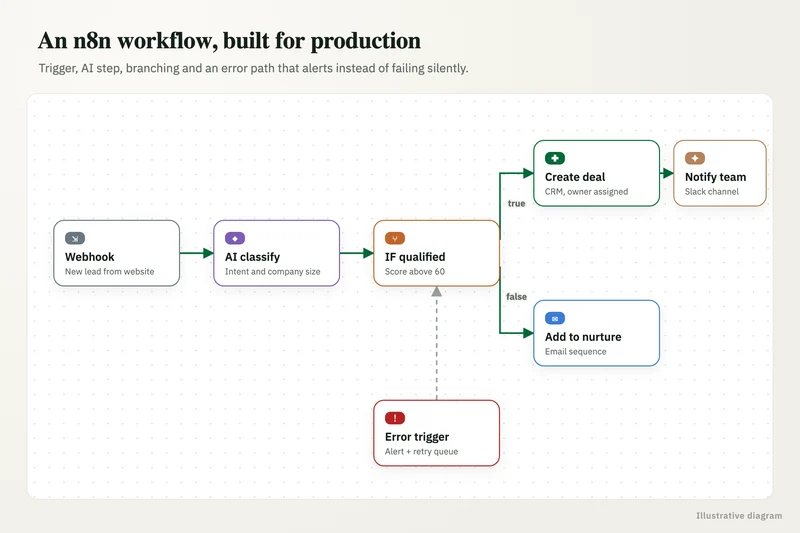
A custom build is a small service between monday and the model, with checks on both sides. A webhook fires when an item is created or a column changes. The service fetches only the columns it needs in one GraphQL query, adds any context from other systems, and calls the model with a structured output schema so the reply comes back as fields, not prose.
Before anything is written back, the service validates the output: the owner must exist, the date must be in the future, the category must be one of the board's labels. Results go into separate AI columns, such as AI category and AI confidence, rather than overwriting the fields people rely on. A status column decides what happens next: above the confidence threshold, an automation copies the value across; below it, the item lands in a review group for a person.
Every call is logged with the input, output, model, tokens and cost, and a cap per item stops runaway loops. We usually build the orchestration in n8n, Make or Python depending on volume and who will maintain it, and the model can be OpenAI, Claude, Gemini or a model on Bedrock. The same pattern is what our AI integration services page describes for CRMs and ERPs.
How do you keep monday data safe when you add AI?
Treat board access like any other system credential. API tokens carry the permissions of the user who created them, so use a dedicated integration user with access only to the boards the automation needs, or a monday app with scoped OAuth permissions, and store the token in a secrets manager rather than in a workflow node.
Check where board content goes. Customer names, contract values and HR details should be sent only to model providers on business or API terms that do not train on your data, never pasted into consumer chat plans. If boards hold protected health information, every vendor in the chain needs a Business Associate Agreement before you connect anything. Keep a person in the loop on items that change money, customer commitments or regulated records, and keep the logs so you can show what the AI changed and when.
Common mistakes, and when not to build a custom integration
The most common mistake is letting AI write straight into the columns that drive automations, so one wrong category triggers the wrong notifications, owners and due dates across a board. The second is polling the API on a timer and hitting the daily call limit by mid-afternoon. The third is turning on AI Blocks across many boards without estimating credits, then finding new AI actions blocked when the allowance runs out.
A custom build is not always worth it. If built-in AI Blocks handle the job at a credit cost you are comfortable with, stay there. If the need is people asking questions about boards, the MCP connection costs nothing to build. Build custom when volume makes credits expensive, when you need rules monday's AI Blocks cannot express, when data must move between monday and other systems, or when you need logging and approval steps that the built-in tools do not provide.
How we deliver monday.com AI integration
We scope each monday.com AI integration in a free review and quote a fixed price for a defined result. The review looks at the boards and columns involved, a sample of real items, the systems on either side and the accuracy you need. You own the code, workflows, prompts and model accounts, so usage is billed to you directly and nothing is locked inside our tools.
Our team has delivered 100+ projects for 200+ clients, most of them automations that connect the tools teams already use. Our case studies include a regulatory consulting firm whose compliance tool, with recurring tasks, owners, due-date reminders and client-wise dashboards, cut status reports from 4-5 hours to under 15 minutes. If you run sales on HubSpot alongside monday, our HubSpot AI integration guide covers that side of the sync.
Case study · Insurance brokerage, Australia
Automation and dashboarding
Policy data arrived as spreadsheets from several insurers, each in a different structure, and every client report took hours of manual cleanup. An automated pipeline that standardizes every insurer's file and feeds a single reporting dashboard.
- Report time cut from 4-5 hours to under 5 minutes
- Reporting accuracy up from about 75% to 99%

FAQ
Frequently asked questions
Does monday.com have built-in AI?
Yes. monday.com includes AI Blocks in automations, the Sidekick assistant and monday agents, which can categorize items, extract fields, summarize updates and draft content. Since 2026 these features consume AI credits, with each plan carrying an allowance and extra credits available to buy.
Can I connect ChatGPT or Claude to monday.com?
Yes. monday.com's MCP connection, announced on its product blog in July 2026, lets Claude, ChatGPT, Microsoft Copilot and Cursor read boards, update items and assign work from chat. For unattended processing at volume, a custom integration using the monday API and a model provider's API is the better fit.
How many AI credits does a monday automation use?
Till Freitag's 2026 explainer of monday AI credits lists 8 credits per AI Block action in an automation and per AI workflow run with AI Blocks. An automation with two AI steps on 1,500 items a month uses about 24,000 credits. Check your plan's allowance and current rates in monday's billing settings.
What are the monday.com API rate limits?
monday's developer documentation sets daily call limits of 200 on Free, 1,000 on Basic and Standard, 10,000 on Pro and 25,000 on Enterprise, plus a combined complexity budget of 10 million points per minute on personal tokens. A single query above 5 million complexity points is rejected. Custom integrations should use webhooks instead of polling to stay inside these limits.
Can n8n, Make or Zapier connect monday.com to AI?
Yes. All three have monday.com connectors and AI steps, so they can take a new item, send its contents to a model and write the result back. n8n can be self-hosted, which suits high volumes and teams that want data on their own servers, while Make and Zapier are quicker to start on their hosted plans.
Is it safe to send monday.com board data to an AI model?
It can be, if you use model providers on business or API terms that do not train on your data, a dedicated integration user with access only to the boards needed, and logging of every call. Boards with protected health information need a Business Associate Agreement with each vendor in the chain.
How long does a custom monday.com AI integration take to build?
A single workflow, such as intake triage on one board with one or two connected systems, is typically a matter of weeks rather than months. Time grows with the number of systems, the messiness of attachments and the accuracy bar. We confirm the timeline and a fixed price after a free review.
Keep reading
Related pages
Get started
Tell us what you want automated
Describe the task, the systems involved and the volume. We reply within one business day with an architecture, the tools we would use, running costs and a fixed-price build plan.
- Free 30-minute build review
- Fixed quote before any work starts
- You own the accounts, code, prompts and data
Prefer email? info@aiimplementationconsultants.com
Get a free build plan
Two lines is enough to start.