

Integration guide
GoHighLevel AI integration: AI Employee, marketplace apps or a custom build
GoHighLevel AI integration has three routes: HighLevel's own AI Employee features (Conversation AI, Voice AI, Agent Studio and the rest), a third-party AI app connected through the marketplace or a webhook, and a custom build that reads and writes contacts, opportunities and calendars through the HighLevel API. This guide is for agency owners and for operations and sales leads at businesses that run on HighLevel, who want AI qualifying leads, booking appointments or updating the pipeline and need to choose the route, price it and set it up without breaking sub-account data.
Get a free build plan
Two lines is enough. A specialist replies within one business day.
Spec: quick answer
How do you integrate AI with GoHighLevel?
You integrate AI with GoHighLevel by switching on the built-in AI Employee tools (billed per plan or pay-per-use), installing a marketplace AI app that syncs contacts and calendars, or building a custom service on the HighLevel API v2 and workflow webhooks, which suits your own qualification rules, outside data and approval steps.
- Native AI Employee tools are the fastest start for standard chat, voice and review replies.
- HighLevel's AI pricing changed again in November 2026, so recheck rates before quoting clients.
- Custom builds must respect 100 API requests per 10 seconds per app per location.
- Write AI output to dedicated custom fields and keep stage changes behind rules or review.
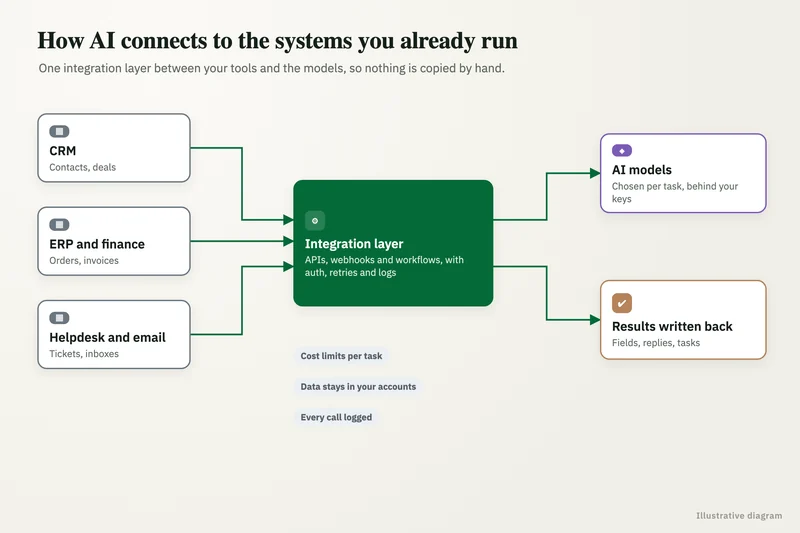
What are the three ways to do GoHighLevel AI integration?
The right route depends on how standard the job is and where the logic lives. If the job is answering inbound SMS, web chat or calls and booking into a HighLevel calendar, the native tools often cover it. If a specialist product already does the job better, such as a dedicated AI receptionist, a marketplace app connects it. If the decisions follow your own rules, pull in data from outside HighLevel or need approval before anything changes, a custom build is the route.
Agencies often mix routes across clients: native Conversation AI for a salon sub-account, a third-party voice agent for a law firm that wanted a specific platform, and a custom qualification service for a home-services client with complex territory rules. The table compares the three.
| Route | What it is | Best for | Main limit |
|---|---|---|---|
| Native AI Employee | HighLevel's Conversation AI, Voice AI, Reviews AI, Agent Studio and related tools inside each sub-account | Standard inbound chat, SMS and calls, review replies and appointment booking on HighLevel calendars | You get the behaviour HighLevel ships; model choice and logic are limited to what its settings expose |
| Marketplace or third-party AI app | An external AI product that connects by OAuth, API key or webhook, such as an AI receptionist that books on a HighLevel calendar | A specific capability HighLevel does not offer well, without writing code | Another vendor, another bill and another place your contact data is stored |
| Custom build | Your own service using HighLevel API v2, workflow webhooks and a model provider (OpenAI, Claude, Gemini or Bedrock) | Your own scoring and routing rules, outside data, multi-location logic, audit trails and human approval | Needs design, testing, monitoring and a rate-limit plan |
What does GoHighLevel's native AI cost in 2026?
HighLevel sells its AI either as an AI Employee subscription per sub-account or on pay-per-use rates, and its help center article on AI product pricing (modified November 10, 2026) lists the current numbers. The AI Employee plans are Starter at $20 a month (only for agencies on the $497 plan), Growth at $50 and Unlimited at $97.
On pay-per-use, Conversation AI is billed by tokens at rates that depend on the model selected, not a flat price per message. Voice AI has two styles: a traditional pipeline billed as a voice engine at $0.045 per minute plus text-to-speech (one listed option is $0.015 per minute) plus model tokens, and speech-to-speech models listed at $0.10 to $0.20 per minute. Reviews AI is $0.01 per AI-assisted reply sent, and Agent Studio runs on pay-per-use rates regardless of AI Employee subscription. HighLevel's own article warns that pricing and model availability may change and recommends confirming in-app rates before quoting, which matters for agencies that rebill AI to clients.
| HighLevel AI item (help center, Nov 10, 2026) | Listed price | Billing unit |
|---|---|---|
| AI Employee Starter | $20/month | Per sub-account, $497 plan agencies only |
| AI Employee Growth | $50/month | Per sub-account |
| AI Employee Unlimited | $97/month | Per sub-account |
| Conversation AI (pay-per-use) | Varies by model | Input and output tokens |
| Voice AI, traditional | $0.045/min voice engine, plus text-to-speech and tokens | Per minute plus tokens; telephony billed separately |
| Voice AI, speech-to-speech | $0.10 to $0.20/min depending on model | Per minute |
| Reviews AI | $0.01 | Per AI-assisted review reply sent |
When is a third-party AI app the better GoHighLevel integration?
A third-party app makes sense when a specialist product clearly outperforms the native feature for one job and connects through a supported method. AI receptionist products are the common case: Frontdesk's help documentation, for example, describes an OAuth connection where you pick a HighLevel calendar and the AI books appointments into it directly.
Before installing one, check what it writes back. Many apps book the appointment but leave the contact's custom fields, tags and pipeline stage untouched, so your HighLevel workflows never fire. Ask whether it can set tags or fields that trigger your existing follow-up, where it stores call recordings and transcripts, and whether its per-minute or per-seat price beats HighLevel's own Voice AI at your volume. For voice platforms such as Vapi or Retell AI, our comparison guide covers their pricing and trade-offs.
When do you need a custom GoHighLevel AI integration?
You need a custom build once the AI must make decisions by your rules, act without a conversation starting it, or use data HighLevel does not hold. Native Conversation AI is designed to talk to a lead; it is not designed to score a batch of imported contacts against your ICP, look up a property record, or decide which of twelve locations should own a lead.
Custom also suits agencies that want one AI service across many sub-accounts, with a single prompt set, a single eval set and per-client settings, rather than configuring each sub-account by hand. And it is the route when you need a full log of every prompt, output and field change for client reporting or disputes.
- Lead scoring and routing that reads form answers, website data and enrichment before assigning an owner or location.
- Reactivation of old contact lists, where the AI drafts personalized messages that a person approves before sending.
- Call and conversation summaries written to custom fields and notes after every inbound call.
- Pipeline hygiene: flagging stale opportunities, duplicate contacts and missing fields across sub-accounts.
- Syncing HighLevel with an ERP, booking system or practice management tool HighLevel does not connect to natively.
How is a custom GoHighLevel AI integration built?
A custom build has the same five parts as any CRM AI integration: a trigger, a context step, a model step, a rules step and a write-back. The HighLevel-specific details are authentication, the sub-account structure and rate limits.
Authentication is either a Marketplace app using OAuth, which suits agencies installing the same service across many sub-accounts, or a Private Integration token for a single business. HighLevel's developer documentation sets API v2 limits at a burst of 100 requests per 10 seconds and 200,000 requests per day, counted per Marketplace app per resource, where a resource is one location (sub-account) or company. Each installation gets its own quota, so adding sub-accounts does not divide your allowance. For Private Integration tokens, the burst limit applies per token per location but the daily limit is shared by all such tokens on that location. Exceeding a limit returns a 429 response with headers such as X-RateLimit-Remaining and X-RateLimit-Daily-Remaining, which the service should read to pace itself.
- Trigger: a HighLevel workflow sends a webhook to your service when a form is submitted, a contact is tagged or an opportunity changes stage, so nothing polls the API.
- Context: read the contact, custom fields, recent conversation messages and the opportunity, plus outside data such as the company website or your booking system.
- Model step: a fixed output schema (for example fit score, reason, service line, suggested location, next step) validated field by field.
- Rules step: allowed values per custom field, a confidence threshold, duplicate checks and a cost cap per task.
- Write-back: update AI-specific custom fields, add a note with the reasoning and set a tag that fires your existing HighLevel follow-up workflow.
- Failure handling: queue work per location, back off on 429 and 5XX responses, make every write safe to repeat and alert someone after a second failure.
Worked example: AI lead qualification for a 10-location agency client
Here is a worked example with round numbers for illustration, not a client result. An agency runs HighLevel for a home-services brand with 10 locations, each a sub-account. Together they get about 3,000 web and ad leads a month. Today a coordinator spends about 4 minutes per lead checking the address against service areas, reading the form, tagging the job type and moving the opportunity, roughly 200 hours a month.
A custom service receives a webhook for each new lead, reads the contact and form fields, checks the address against each location's service area, asks the model to classify the job type and urgency from the free-text description, and returns a score with a reason. Leads above the threshold get their custom fields set, the opportunity moved to the right stage and a tag that starts the location's booking sequence. Leads below it, or outside every service area, go to a review view for the coordinator.
On the API side that is about 8 calls per lead, so around 24,000 calls a month spread over 10 locations, a small fraction of the 200,000 a day each location allows. The burst limit matters more during a one-off backfill: rescoring 20,000 old contacts in one location at three calls each (read, update fields, add tag) is 60,000 calls, which at 100 requests per 10 seconds takes at least 100 minutes and uses close to a third of that location's daily quota, so the job is paced overnight, not fired at once. If the location also wants AI answering calls, 2,000 minutes a month of HighLevel's traditional Voice AI at the listed voice engine and text-to-speech rates comes to about $120 before tokens and telephony.
How do you keep client data and messaging compliant in HighLevel?
The main risks are AI sending messages that should not go out and data moving to places nobody approved. A few controls handle most of both.
Messaging rules apply to AI as much as to people. The FCC ruled on February 8, 2024 that AI-generated voices count as artificial voices under the TCPA, so outbound AI calls need prior express consent, and US business texting through HighLevel's phone system requires A2P 10DLC registration. Some states also require disclosure that a caller is an AI. If any sub-account handles protected health information, every vendor in the chain, including the AI app and model provider, needs a signed Business Associate Agreement. This is not legal advice.
- One integration per job, with only the scopes it needs, and tokens stored in a secrets manager rather than in workflow steps.
- AI writes to its own custom fields first; changes to owner, stage or do-not-contact status go through rules or approval.
- Outbound AI messages and calls only to contacts with recorded consent, checked by the service before sending.
- Log every prompt, output, cost and write against the HighLevel contact ID, so a client question can be answered in minutes.
- Test in a sandbox sub-account cloned from a snapshot before switching on for live locations.
How do you choose a partner for GoHighLevel AI integration?
Choose a partner who will tell you when the native AI Employee is enough. A partner who only sells custom builds, or only resells one chatbot app, will fit every problem to their product. The real test is how they handle the messy cases: a contact present in two sub-accounts, a lead with no address, a 429 during a Monday morning ad spike.
We scope every HighLevel build after a free review of real leads and workflows, quote a fixed price, and hand over the code, prompts, app credentials and model accounts so you own them. A person stays in the loop on anything that changes money, customer messages or consent. Ask these questions of anyone you consider, including us.
- Would native Conversation AI or Voice AI cover this, and if not, why not?
- Which custom fields and tags will the AI write, and which will it never touch?
- How will you handle the per-location rate limit during backfills and busy periods?
- Where are prompts, transcripts and logs stored, and who can see them?
- How will you test accuracy on our own leads before go-live?
- What will it cost each month in model usage and HighLevel AI fees, and how is that capped?
Case study · Logistics company, UK
Route planning automation
Dispatch typed every address into Google Maps, which optimizes only 25 stops and cannot add time at each stop. A Python tool that loads addresses automatically, adds buffer time per stop and optimizes the full route.
- Manual address entry eliminated
- Delivery estimates customers could rely on

FAQ
Frequently asked questions
Does GoHighLevel have built-in AI?
Yes. HighLevel's AI Employee includes Conversation AI for chat and SMS, Voice AI for calls, Reviews AI, Agent Studio and other tools. It is sold per sub-account as Starter ($20, for $497 plan agencies), Growth ($50) or Unlimited ($97) a month, or on pay-per-use rates, according to HighLevel's help center as of November 2026.
Can I connect ChatGPT or Claude to GoHighLevel?
Yes. You can call OpenAI or Claude from a custom service that HighLevel workflows trigger by webhook, or use a third-party app that connects both. Native Conversation AI also lets you pick from models HighLevel offers, billed by tokens. A custom service gives you full control of prompts, logging and which model handles each step.
What are the GoHighLevel API rate limits?
HighLevel's developer documentation sets API v2 limits at 100 requests per 10 seconds and 200,000 requests per day, counted per Marketplace app per location or company. Private Integration tokens share the daily limit across all tokens on a location. Going over returns a 429 response with headers showing remaining requests.
How much does GoHighLevel Voice AI cost per minute?
HighLevel's November 2026 pricing article lists the traditional Voice AI pipeline at $0.045 per minute for the voice engine plus text-to-speech (one option is $0.015 per minute) and model tokens, with speech-to-speech models at $0.10 to $0.20 per minute. Telephony is billed separately. Check in-app rates before quoting, since HighLevel notes they may change.
Should I use GoHighLevel Conversation AI or build a custom AI agent?
Use Conversation AI when the job is answering inbound conversations and booking appointments on HighLevel calendars. Build custom when the AI must apply your own scoring or routing rules, use outside data, work across many sub-accounts with one configuration, or write high-impact fields behind an approval step.
Can one AI integration serve all sub-accounts in my HighLevel agency?
Yes, a Marketplace app installed by OAuth can serve many locations, and each installation gets its own rate-limit quota. Store per-client settings such as service areas, tone and allowed actions separately so one prompt set can serve every location without mixing client data.
How long does a GoHighLevel AI integration take?
Turning on native Conversation AI or connecting an existing app is mostly configuration and testing. A custom build such as lead scoring and routing across locations takes longer because it needs field mapping, accuracy testing on real leads and monitoring. We scope each workflow separately after a free review.
Keep reading
Related pages
Get started
Tell us what you want automated
Describe the task, the systems involved and the volume. We reply within one business day with an architecture, the tools we would use, running costs and a fixed-price build plan.
- Free 30-minute build review
- Fixed quote before any work starts
- You own the accounts, code, prompts and data
Prefer email? info@aiimplementationconsultants.com
Get a free build plan
Two lines is enough to start.