

Integration guide
Epicor AI integration: Prism agents, MCP or a custom build
Epicor AI integration in late 2026 has four practical routes: Epicor's own Prism agents inside Kinetic and Prophet 21, Claude or ChatGPT connected over MCP, a packaged document tool for orders and invoices, or a custom build on the REST API v2 for work that must run unattended and write back. This guide is for operations, finance and IT leads at manufacturers and distributors on Epicor who need to know which route fits which job, what each one depends on, and where a build team is worth paying for.
Get a free build plan
Two lines is enough. A specialist replies within one business day.
Spec: quick answer
How do you integrate AI with Epicor ERP?
You integrate AI with Epicor in four ways: switch on Epicor Prism agents inside Kinetic or Prophet 21, connect Claude or ChatGPT over MCP for governed questions and actions, buy a packaged order and invoice automation tool, or build a custom pipeline on the Kinetic REST API v2 using business objects, BAQs and Epicor Functions for unattended work that creates records.
- Check Prism first: Epicor now ships embedded agents for Kinetic and Prophet 21.
- MCP lets Claude or ChatGPT reach Epicor, but curated BAQs decide what the AI sees.
- Unattended order, invoice or quote queues usually need a REST API v2 build.
- Every v2 call needs an API key, and cloud queries return 100 rows by default.
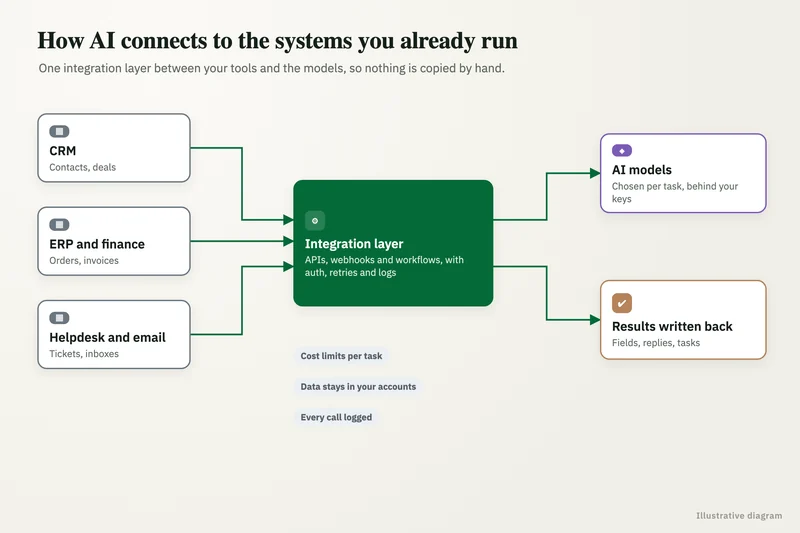
What are the routes for Epicor AI integration?
The right route depends on two questions: does a person start the work, and does the AI need to create or change records? If a buyer asks why MRP suggested a purchase and reads the answer, an embedded agent or a chat client over MCP is enough. If customer purchase orders, supplier invoices or RFQs arrive by email all day and must become Epicor documents, you need something that runs on a trigger, writes through the API and holds anything uncertain for a person.
Most mid-size Epicor shops will end up with a mix: Prism or Claude for questions, and one or two background pipelines for the highest-volume paperwork. The table puts the options side by side.
| Route | What it is | Best for | Main limit |
|---|---|---|---|
| Epicor Prism agents | Epicor's embedded AI agents inside Kinetic and Prophet 21 | Questions over live ERP data, MRP explanations, freight spend checks, business rules in plain English | You get the agents Epicor ships; scope stays inside Epicor workflows |
| Prism Agent Foundry | Epicor's self-service workspace for building custom agents on the platform | Company-specific agents that must stay inside Epicor's guardrails | New in 2026; your team or partner still designs and tests each agent |
| Claude or ChatGPT over MCP | An outside AI client calling Epicor through a Model Context Protocol connection | Analysis and person-driven actions from a chat window | Only as good as the BAQs and functions exposed to it |
| Packaged document automation | Third-party tools that turn emailed orders and invoices into Epicor transactions | Standard sales order and AP invoice entry on Prophet 21 or Eclipse | Fixed product scope and its own subscription |
| Custom build on REST API v2 | Code or n8n workflows calling Epicor business objects, BAQs and Epicor Functions plus a model provider | Unattended queues across systems: orders, quotes, supplier documents, CRM sync | Needs design, testing, monitoring and an owner |
What are Epicor Prism and Epicor AI agents?
Epicor Prism is Epicor's set of vertical AI agents embedded in Kinetic and Prophet 21. Futurum Group's August 2026 analysis describes it as letting users reach live ERP data through a conversational interface, with tasks automated through pre-approved actions. ERP Today reported in August 2026 that Prism reached general availability in Latin America with more than 18 pre-built agents, following earlier launches in other regions including the UK and Europe, and that agent actions remain subject to human oversight.
At Insights 2026 in May, Epicor added an agentic stack on top. Distribution Strategy's coverage lists Epicor Lux, a design framework for how people and agents work with the ERP; Prism Agent Foundry, a self-service environment for building custom agents; and named agents including a Freight Spend Agent that looks for carrier discrepancies and freight leakage, an MRP Log Agent that explains why purchasing or inventory suggestions were generated, a Reasoning Agent and a Prophet 21 Business Rules Agent that edits ERP business rules from plain-language prompts. The same report says the Prism Knowledge Agent handles more than 70,000 requests a month and that more than 30 further agents are in development across logistics, invoicing, compliance and financial planning.
Treat Prism as the first thing to check, not the last. If an Epicor agent already answers the question or runs the check you need, a custom build only adds cost. Be realistic about maturity, though. In the EpiUsers.help forum thread reviewing Insights 2026, one user wrote that "anything around Prism feels like it's still a year or two away from delivering real value", and another said they would not let AI run transactions in their ERP without strong guardrails, review steps and auditability. Ask your Epicor account team which agents are generally available for your product, version and region, and what they cost, because none of the coverage we read publishes Prism pricing.
Can Claude or ChatGPT connect to Epicor?
Yes. Epicor says Prism supports MCP, the Model Context Protocol that lets AI clients call business systems as tools, and trade coverage of Insights 2026 described live demos of governed ERP actions from Claude and ChatGPT over MCP. Third-party integration platforms such as Stacksync also offer MCP-based connectors between Epicor and model providers such as OpenAI.
The connection is the easy part. What decides answer quality is which queries and functions you expose. Experienced Epicor developers in the same EpiUsers.help thread made the point that the value lies less in any single BAQ and more in building reliable, well-described tools for the AI layer. A BAQ written for a person scanning a grid often has cryptic column aliases, open-ended parameters and joins that duplicate rows. Before exposing one, rename columns in business terms, make it answer one question, and test it against the questions your planners and buyers actually ask. Our MCP server development guide covers how we design and secure those tools.
How does a custom Epicor AI integration work on REST API v2?
A custom build reads from and writes to Epicor through the Kinetic REST API v2, never straight into the SQL database. Writing through business objects means Epicor applies the same validation, pricing and credit rules it applies on screen, so an AI-created sales order behaves like one a person entered. According to the KnowledgeLib 2026 reference on Kinetic REST API v2, v2 arrived in Epicor 10.2.700, became the standard surface in Kinetic 2022.2, and exposes three things an AI pipeline uses: business object services for records, BAQ endpoints for curated reads, and Epicor Functions for custom server-side logic called by POST.
Three mechanics catch teams out. First, every v2 request needs an API key as well as a user token or login; the key is created in API Key Maintenance and tied to an access scope, so you can restrict an integration to the services it needs. Second, the same reference notes that OData queries return 100 rows by default, that cloud tenants cannot raise that limit, and that results are cut off silently, so a pipeline that does not page with $top and $skip will reason over a partial list without knowing it. Third, integration traffic consumes Web Services licences, and responses slow down when those licences are exhausted, so a busy pipeline needs its own licensed integration account and sensible batching.
Epicor Functions are often the cleanest place for AI output to land. Instead of letting an outside system make a dozen calls to build an order, you write one function that takes a validated payload, creates the order on hold, attaches the source document and returns the order number. The model proposes, the function and Epicor's own rules check, and a person releases.
- Trigger: a shared mailbox, EDI error queue, supplier portal download or schedule, not a person typing.
- Extraction: a model reads PDFs, spreadsheets and email bodies into a fixed schema with confidence scores.
- Matching: customer part numbers mapped to Epicor parts through cross-references and order history.
- Validation: price, unit of measure, ship-to and credit checks against live Epicor data just before writing.
- Write: an Epicor Function or business object call creates the document on hold, with the source file attached.
- Review: anything below threshold goes to a queue showing the document, the proposal and the reason it was held.
What does an Epicor AI integration look like in practice?
Here is a worked example with round numbers for illustration, not a client result. A distributor on Prophet 21 receives 800 customer purchase orders a month by email, in more than 50 layouts. Keying each one, translating customer item codes and checking prices takes about 5 minutes, so roughly 67 hours a month go to order entry before anyone chases an exception.
First check what is already covered. If most volume arrives by EDI, or a packaged tool such as Conexiom, which expanded its Epicor partnership for orders, quotes and AP invoices on Prophet 21 and Eclipse according to ERP Today in July 2026, fits your documents, buying may beat building. A custom pipeline earns its fee when orders need your own matching rules, touch a second system such as HubSpot or Salesforce, or include quotes and supplier documents a packaged tool does not handle.
If 70 percent of orders pass without edits and the rest take a minute of review each, 67 hours of keying can become about 4 hours of exception review (240 held orders at a minute each), with every order still released by a named person. The real pass rate depends on how consistent customer documents are and how clean the cross-reference table is, so we measure it on a few hundred real orders before quoting. The same pattern covers supplier acknowledgements, RFQs and vendor invoices on Kinetic.
Does it matter if you run Epicor on-premises or in the cloud?
It matters for timing, not for whether AI is possible. ERP Today reported in October 2026 that Epicor's published schedule ends on-premises development with Kinetic release 2028.1, with Active Support ending on 31 December 2029, and with a final Prophet 21 on-premises release in May 2028 and Active Support ending on 30 June 2029. Epicor says it is concentrating development on Epicor Cloud for faster access to new features and AI capabilities, while Prism remains embedded in both Kinetic and Prophet 21 during those windows.
For a buyer, the practical rule is to build against the REST API v2 and Epicor Functions rather than database triggers or screen scraping, so the integration moves with you if you migrate. On-premises sites also need a secure way for a cloud model provider to reach the API, or a self-hosted workflow layer such as n8n inside the network that calls out to the model.
What goes wrong in Epicor AI integrations?
Most failures come from treating Epicor like a database rather than a set of documents with states, rules and licences. These are the traps we design around in every ERP build.
- Silent truncation: a query capped at 100 rows makes the AI conclude a customer has 100 open orders when there are 340.
- Duplicate orders on retry: a timed-out call retried without a unique external reference creates a second order.
- Released too early: AI-created orders and invoices should land on hold, and only a person should release them.
- Licence contention: a pipeline sharing a Web Services licence pool with people slows everyone during month-end.
- Over-broad keys and users: one API key and integration account per use case, scoped to the services it needs.
- Prompt injection: a supplier PDF that says to change remit-to details must be treated as data, never as an instruction, and bank details are never changed by AI.
- No baseline: without minutes per order and error rates measured before launch, nobody can show the project paid back.
How do you choose a partner for Epicor AI integration?
Choose a partner who shows you the failure handling, not just the demo. Anyone can show Claude answering a question about open orders through a BAQ. The difference shows up when a PDF lists two ship-to addresses, a customer exists twice, or the API rejects a call at month-end.
Your Epicor partner or account team is usually the right owner for licensing, cloud migration and switching on Prism. For pipelines that read documents, call models and write back across systems, you need a team that designs, tests and maintains that code, working alongside them. Do not buy a custom build if a Prism agent or a packaged tool already covers the job, or if volume is a few documents a day. We scope every build after a free review of a real document sample, quote a fixed price and hand over the code, prompts, API keys and accounts so you own all of it. For budget ranges, see our AI implementation cost guide. Ask each candidate these questions in writing.
- Which route would you use for this workflow (Prism, MCP, packaged tool or REST API v2), and why not the others?
- Which BAQs and Epicor Functions will you create, and who maintains them after upgrades?
- How will you handle the 100-row default page and Web Services licence limits?
- What happens to a document the model is unsure about, and who sees it?
- How do you prevent duplicate records when a call is retried?
- Who owns the code, prompts, model accounts and API keys when the project ends?
Case study · Logistics company, UK
Route planning automation
Dispatch typed every address into Google Maps, which optimizes only 25 stops and cannot add time at each stop. A Python tool that loads addresses automatically, adds buffer time per stop and optimizes the full route.
- Manual address entry eliminated
- Delivery estimates customers could rely on

FAQ
Frequently asked questions
Does Epicor have AI agents?
Yes. Epicor Prism is a set of AI agents embedded in Kinetic and Prophet 21, and at Insights 2026 Epicor added Prism Agent Foundry for building custom agents. Named agents include freight spend, MRP explanation, reasoning and Prophet 21 business rules agents, with more in development.
Can ChatGPT or Claude connect to Epicor Kinetic?
Yes. Epicor says Prism supports MCP, and Insights 2026 coverage described governed ERP actions from Claude and ChatGPT over MCP. Third-party connectors also exist. What the AI can see and do depends on the BAQs, functions and permissions you expose, so design those before connecting.
What is the Epicor REST API v2?
It is the standard integration interface for Kinetic, offering OData endpoints for business objects, BAQs and Epicor Functions. Every request needs an API key tied to an access scope plus a user token or login. Custom AI integrations should write through it rather than directly into the database.
Can AI enter sales orders in Epicor automatically?
Yes, through a custom pipeline or a packaged order automation tool that creates orders through Epicor's APIs. The safe pattern is to create AI-built orders on hold with the source document attached, send low-confidence ones to a review queue, and let a person release every order.
How much does Epicor AI cost?
The coverage we read does not publish Epicor Prism pricing, so ask your Epicor account team. A custom integration adds a one-time build cost, model usage billed by your provider, hosting, and any extra Web Services licences the integration needs. Packaged order tools carry their own subscriptions.
Do we need Epicor Cloud to use AI?
No. Prism is embedded in both Kinetic and Prophet 21, and custom builds work against the REST API v2 on-premises too. Epicor is focusing new development on its cloud, so build against the API and Epicor Functions, which keeps the integration portable if you migrate later.
How long does an Epicor AI integration take?
Connecting an AI client over MCP is mostly configuration plus time to clean up and test the BAQs you expose. A document pipeline such as order entry takes longer, because extraction and part matching must be tuned on real documents, so we scope it per workflow after reviewing a sample.
Keep reading
Related pages
Get started
Tell us what you want automated
Describe the task, the systems involved and the volume. We reply within one business day with an architecture, the tools we would use, running costs and a fixed-price build plan.
- Free 30-minute build review
- Fixed quote before any work starts
- You own the accounts, code, prompts and data
Prefer email? info@aiimplementationconsultants.com
Get a free build plan
Two lines is enough to start.