

Integration guide
AI integration with legacy systems: how to add AI without replacing the old software
AI integration with legacy systems means getting a model to read from, and sometimes write to, software that was never built to talk to AI: an IBM i order screen, an on-premise ERP, a custom SQL Server app from 2009. This guide is for operations and IT leads who cannot replace that system this year but still want AI doing real work around it. It covers the six ways in, how to pick one, how to write back without corrupting records, and when replacing the system is the better call.
Get a free build plan
Two lines is enough. A specialist replies within one business day.
Spec: quick answer
How do you integrate AI with legacy systems?
You integrate AI with legacy systems by choosing a safe access route (an existing API, a read-only database copy, file exports, a monitored inbox, or UI automation), running the AI in a separate layer, and writing results back through staging tables or the system's own import routines with human review. The legacy code itself usually stays untouched.
- Most legacy systems can support AI without a rebuild if you pick the right access route.
- Read from a copy of the data; write back only through validated, reversible paths.
- Screen automation works for systems with no API but needs the most monitoring.
- Replace the system instead when nobody can support it or the data is unreliable.
What does AI integration with legacy systems actually involve?
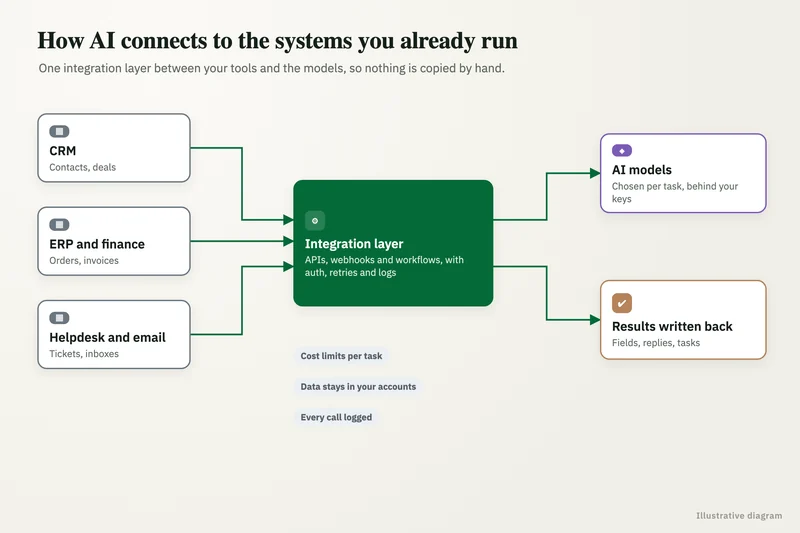
It involves building a bridge, not changing the old system. The AI runs in its own layer (n8n, a small Python service or a function in your cloud) and talks to the legacy application through whatever door it already has: an API, a database, a file it exports, an email it sends, or the screen a clerk types into.
That separation matters for three reasons. The legacy code, which often has no tests and one person who understands it, stays untouched. The AI layer can be changed, rolled back or switched off without a release of the core system. And every read and write passes through one place where it can be logged, validated and limited.
The work therefore looks less like data science and more like careful integration engineering: finding the right tables or fields, agreeing what the AI may change, handling locked records and batch windows, and proving with real past cases that the output is correct before anything goes live. It sits inside our broader AI integration services, but legacy targets add constraints that modern SaaS tools do not have, which is why they deserve their own plan.
Which access route fits your legacy system?
Pick the most structured route the system offers, because structure means fewer breakages. An API beats a database, a database beats a file, a file beats an inbox, and all of them beat driving the screen. Many projects combine two: read from a database copy, write back through a file import the system already accepts.
The table below is the decision aid we use in a first review. Effort and risk are relative to each other, not fixed quotes.
| Access route | Typical legacy example | Read / write | Relative effort | Main risk | Use it when |
|---|---|---|---|---|---|
| Existing API or web service (REST or SOAP) | Dynamics GP eConnect, older ERP SOAP endpoints | Read and write | Low | Undocumented fields, rate limits | The vendor exposes one, even an old one |
| Read-only database copy or replica | Db2 on IBM i via ODBC, on-prem SQL Server | Read only | Low to medium | Querying the live database and slowing it | You need data for AI context, scoring or search |
| Staging table plus the system's own import | Batch order import, journal import programs | Write | Medium | Imports that bypass business rules | AI output must become records in the system |
| Scheduled file exports and SFTP drops | Nightly CSV or fixed-width extracts, EDI files | Read and write | Low to medium | Stale data, format changes | The system already exchanges files with partners |
| Monitored inbox or printed reports | Spool files, emailed POs, PDF statements | Read | Low | Messy layouts, missed emails | The data arrives as documents, not records |
| UI automation (RPA or a computer-use agent) | Green-screen 5250 sessions, thick Windows clients | Read and write | High | Screen changes break the bot | There is no other door and volume justifies it |
Can you integrate AI with a legacy system that has no API?
Yes, and most of the systems we see fall into this group. No API rarely means no access: the data still lives in a database, still leaves the system as exports or reports, and still enters it through screens or import programs.
The usual order of preference is this. First, ask for read access to a copy of the database, such as a nightly restore or a replica, so AI queries never compete with the clerks using the live system. Second, look for an import routine the system already trusts, because writing through it keeps the system's own validation in play. Third, use the files the system already sends out. Only when none of those exist do we automate the user interface.
UI automation has two flavours. Classic RPA tools such as Microsoft Power Automate desktop flows or UiPath replay exact keystrokes and screen positions, which is fast and predictable but breaks when a screen changes. Newer computer-use capabilities from OpenAI and Anthropic let a model look at the screen and decide where to click, which tolerates small changes but is slower, costs more per task and needs tighter supervision. For high-volume, unchanging green screens, classic RPA driven by AI decisions is usually the steadier choice.
A further option is to wrap whichever route you choose in a small internal API, or an MCP server, so that every AI tool in the company calls the same controlled interface instead of each one inventing its own connection to the old system.
How should AI write back to an old system safely?
Treat write-back as the high-risk part of the project, because a legacy system rarely has an undo button. Reading data wrongly produces a bad suggestion; writing data wrongly produces a bad invoice, a wrong shipment or a ledger entry someone has to find by hand.
These are the rules we build in by default when AI output has to land in a legacy system.
- Stage first: the AI writes to a staging table or file, never straight into core tables.
- Use the system's own import or entry program so its validation, numbering and audit trail still apply.
- Validate before staging: customer and item codes must exist, totals must reconcile, dates must be in range.
- Set confidence thresholds: anything below them, or above a value limit you set, goes to a human-review queue.
- Make writes idempotent: each item carries a unique source ID so a retry cannot create a duplicate order.
- Respect batch windows and record locks: schedule writes around end-of-day jobs and retry locked records later.
- Log every prompt, output and resulting record number so any change can be traced and reversed.
- Keep a kill switch: one setting that stops all writes while reads and drafts keep running.
Worked example: AI order entry on an IBM i ERP
The numbers in this example are illustrative, chosen to show the math, not a client result. A distributor runs order entry on an IBM i system through 5250 screens. Customers email purchase orders as PDFs and spreadsheets, about 400 a week. A clerk spends roughly 6 minutes keying each one, which is 2,400 minutes or 40 hours of keying a week, and mistyped item codes cause returns.
The integration reads the shared order inbox, extracts customer, ship-to, item lines, quantities and requested dates, and matches each line against item and price data pulled nightly from Db2 through a read-only ODBC connection. Orders that pass validation are written to a staging file and loaded by the ERP's existing batch order import, so the system's pricing and credit checks still run. Anything with an unknown item, a price mismatch or a confidence score below the threshold lands in a review screen with the source document beside it.
Suppose 70% of orders pass straight through and the rest need a one-minute check. Keying time falls from 2,400 minutes to about 120 minutes of review a week (120 orders at one minute each), plus whatever time exceptions take to resolve. Use your own measured baseline instead of these figures: if you do not know minutes per order and orders per week today, measure them for two weeks before you buy anything.
Nothing in that design touches RPG code or the live order tables directly. If the AI layer stops, orders simply wait in the inbox and staff key them the old way.
How to integrate AI with legacy systems, step by step
A single workflow on a legacy system typically moves through six stages. Narrow scope is what keeps the timeline short: one trigger, one or two systems, one clear definition of done.
- 1. Pick one workflow with a measurable baseline: minutes per task, tasks per month, error rate.
- 2. Map the access: which tables, files, screens or imports hold the data, and who can grant read access.
- 3. Build a test set from real past cases with known correct answers, including the ugly ones.
- 4. Build the AI layer against a copy of the data, with validation, staging and the review queue.
- 5. Run in shadow mode: the AI produces outputs alongside staff, and you compare them before any write is switched on.
- 6. Go live with limits, then widen: start with a share of volume or one customer group, review the logs weekly, and expand once error rates hold.
Checklist: what to have ready before an AI legacy integration
Most delays on legacy projects come from access and knowledge, not from the AI. Work through this list before you ask any vendor for a quote, and the quotes you get back will be far easier to compare.
- A named owner who knows the legacy system's data and can answer questions within a day.
- Confirmation of what access is allowed: API, read-only database user, file drops or screen sessions only.
- A test or copy environment, or at minimum a restored backup the AI layer can read.
- Documentation of the import programs the system already accepts and their file layouts.
- The batch schedule: when end-of-day jobs run and when records are locked.
- A sample of 50 to 200 real inputs with the correct outcomes recorded.
- Data rules: what may leave your network, and whether models must run in your own cloud.
- A clear statement of what the AI may change and what it may only suggest.
Common mistakes, and when to replace the system instead
The most common mistake is pointing AI queries at the live production database. A few heavy queries during order cut-off can slow the system for everyone, which turns an AI project into an outage. Use a copy. The second is writing straight into tables and skipping the system's own logic, so numbering, credit checks or audit fields are missed. The third is choosing screen automation first because it looks quickest, then spending months repairing it after every update.
The wider evidence points the same way. MIT NANDA reported in 2025 that projects bought from or built with specialist partners succeeded about 67% of the time, against about 33% for internal builds, and named brittle workflows and poor fit with daily work among the causes of failure. Gartner predicted in June 2025 that over 40% of agentic AI projects will be canceled by the end of 2027 because of cost, unclear value or weak risk controls. Both findings favour narrow, controlled integrations over ambitious agents with broad write access.
Integration is not always the right answer. Replace the system first if no one can support it and the vendor is gone, if the data inside it is so unreliable that AI would only automate errors, if the hardware or operating system is out of security support and holds regulated data, or if a replacement is already funded and live within months. In those cases, AI effort is better spent on the migration itself, for example extracting and cleaning records for the new platform.
What does it cost, and how do we scope it?
Cost depends mostly on the access route and the write-back rules, not on the model. A read-only route feeding AI summaries or search is the lightest build; staged write-back with validation and a review screen takes more; screen automation adds ongoing upkeep. Our AI implementation cost guide sets out published third-party market ranges and the monthly running costs to expect.
We scope every legacy integration in a free review: the system, the access available, a sample of real inputs and what the AI should change. You then get a fixed price for a defined build. Clients own the accounts, code, prompts and data, and a person stays in the loop on anything touching money, customers or regulated data.
Legacy data often arrives as spreadsheets in many layouts, which is exactly the problem in one of our case studies: for an Australian insurance brokerage we built a pipeline that standardized every insurer's spreadsheet into one dashboard, cutting report time from 4-5 hours to under 5 minutes.
Case study · Insurance brokerage, Australia
Automation and dashboarding
Policy data arrived as spreadsheets from several insurers, each in a different structure, and every client report took hours of manual cleanup. An automated pipeline that standardizes every insurer's file and feeds a single reporting dashboard.
- Report time cut from 4-5 hours to under 5 minutes
- Reporting accuracy up from about 75% to 99%

FAQ
Frequently asked questions
Do we need to modernize our legacy system before adding AI?
Usually not. Most AI integrations read from a copy of the legacy data and write back through import routines the system already has, so the core code stays as it is. Modernize first only if the system is unsupported, insecure or holds data too unreliable to automate.
Can AI work with mainframe or AS/400 (IBM i) systems?
Yes. Data on IBM i can usually be read through ODBC or JDBC connections to Db2, reports can be captured from spool files, and orders or journals can be loaded through existing batch imports. Where only 5250 screens are available, RPA can drive them with the AI deciding what to enter.
Is RPA still needed now that AI agents can use a computer?
For high-volume, stable screens, classic RPA is still faster and more predictable. Computer-use agents from OpenAI and Anthropic handle layout changes better but are slower and need closer supervision. Many builds use RPA for the keystrokes and a model for reading documents and making the decisions.
Is it safe to send legacy system data to OpenAI, Claude or Gemini?
It can be, on API or enterprise tiers whose data terms you have checked, and only with the fields the task needs. Where data must stay inside your environment, models can run through Amazon Bedrock or Microsoft Foundry in your own cloud account, or as open-weight models you host.
How long does it take to integrate AI with a legacy system?
It depends on access more than on the AI. A single workflow with read access already granted and an existing import routine moves far faster than one that needs new database permissions or screen automation. Shadow mode, where the AI runs alongside staff before any write is switched on, adds time but is the step that makes go-live safe. Our implementation roadmap guide lays out the phases in order.
Can we use MCP to connect AI tools to an old system?
Yes, as a wrapper. An MCP server can expose a small set of approved actions, such as looking up an order or staging a new one, on top of a database copy or import routine. Every AI tool then uses the same controlled interface instead of its own direct connection.
Keep reading
Related pages
Get started
Tell us what you want automated
Describe the task, the systems involved and the volume. We reply within one business day with an architecture, the tools we would use, running costs and a fixed-price build plan.
- Free 30-minute build review
- Fixed quote before any work starts
- You own the accounts, code, prompts and data
Prefer email? info@aiimplementationconsultants.com
Get a free build plan
Two lines is enough to start.