

Integration guide
Pipedrive AI integration: what to use, what to build
Pipedrive AI integration connects a language model to your deals, people, organizations and activities so it can summarize, draft, score and update records instead of your reps doing it by hand. There are four ways to do it, from Pipedrive's own AI features to a custom agent built on the Pipedrive API, and they differ a lot in what they can write back and what they cost to run. This guide is for sales ops and revenue leads who know what they want automated and need to pick the right route before a vendor picks it for them.
Get a free build plan
Two lines is enough. A specialist replies within one business day.
Spec: quick answer
How do you integrate AI with Pipedrive?
Pipedrive AI integration has four routes: Pipedrive's built-in AI features (Sales Assistant, AI email creation and summaries), the Pipedrive app in ChatGPT launched in December 2025, no-code flows in Zapier or Make that call OpenAI, Claude or Gemini, or a custom agent on Pipedrive's API v2 with webhooks. Custom builds must respect Pipedrive's daily API token budget.
- Turn on Pipedrive's built-in AI first; several features come with every plan.
- The ChatGPT app answers questions about your pipeline but is not an automation engine.
- Daily API token budgets make polling-based Zapier and Make flows fail at volume.
- Use webhooks, API v2 and a review queue for any AI that writes to deals.
What can a Pipedrive AI integration do?
A Pipedrive AI integration reads CRM records, sends the relevant context to a model and acts on the answer: writing a note, updating a field, creating an activity or drafting an email for a rep to send. The useful jobs are the repetitive ones reps skip when they are busy, which is exactly why the pipeline data gets stale.
The jobs we get asked to build most often fall into a short list. Each one maps to Pipedrive objects you already use, so the integration does not need a new tool for reps to learn.
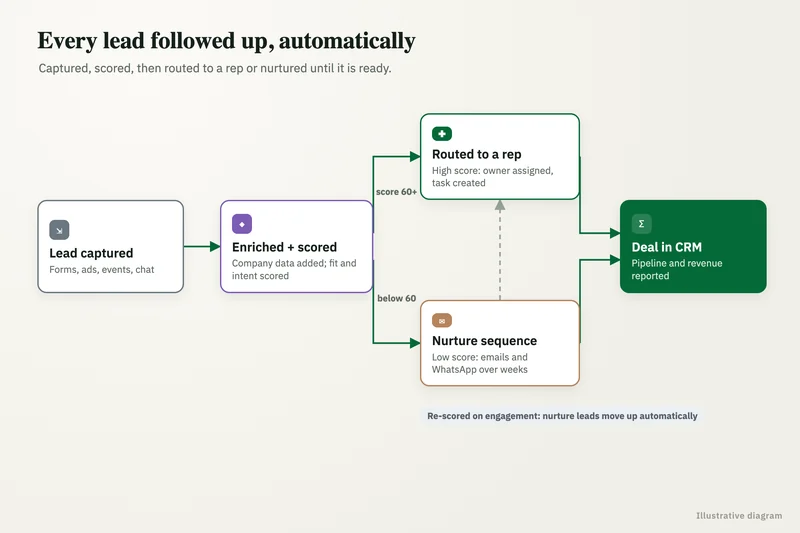
- Lead intake: web form or inbound email arrives, the AI enriches the organization, scores fit against your ideal customer rules and creates the lead with an owner.
- Call and meeting notes: a transcript is summarized into next steps and written as a note on the right deal, with follow-up activities created.
- Deal hygiene: stalled deals, missing close dates and empty required fields are flagged daily to the owner instead of at the end of the quarter.
- Follow-up drafts: the AI drafts a reply using the deal history and your product notes; the rep edits and sends.
- Pipeline questions: managers ask in plain language which deals slipped this month and why, without building a report.
What AI is already built into Pipedrive?
Check the native features before paying for anything. Pipedrive's support article on Pipedrive AI lists features available on all four plans (Lite, Growth, Premium and Ultimate): an AI import assistant, AI-assisted report creation, AI-powered Marketplace search, smart app recommendations, the Sales Assistant (in beta) and a mobile business card scanner. AI email creation, AI-powered notifications, AI email summarization and AI suggested replies are listed for Premium and Ultimate only, and some beta features are limited to selected users.
These cover a lot of single-user drafting and summarizing. They do not run multi-step workflows across other systems, apply your own scoring rules, or pull from documents outside Pipedrive such as proposals, contracts or product sheets in Google Drive or SharePoint. That gap is where the other three routes come in.
Is the Pipedrive ChatGPT integration enough?
For pipeline questions and drafting, it may be. Pipedrive announced on December 17, 2025 that a Pipedrive app is available in ChatGPT. Per Pipedrive's newsroom, it lets users surface insights, summarize lead activity and generate content such as lead summaries and email drafts from their Pipedrive data. It requires an OpenAI Business, Enterprise, Edu or Pro plan, a workspace admin sets it up, and it is not available to ChatGPT users on EU data residency.
What it is not is a background automation. It responds when a person asks; it does not fire when a deal changes stage, score every new lead or chase missing fields overnight. If the job must happen without anyone asking, you need a workflow tool or a custom build. If your team is on Claude or Gemini rather than ChatGPT, the same logic applies: chat connectors help individuals, event-driven integrations change the process.
Pipedrive AI integration options compared
The right route depends on whether the AI needs to act on its own and how many records it touches a day. This is the comparison we walk through when scoping a Pipedrive project.
| Route | Good for | Writes to Pipedrive? | Watch out for |
|---|---|---|---|
| Built-in Pipedrive AI | Email drafts, summaries, reports, imports | Inside the Pipedrive interface, user-triggered | Some features Premium and Ultimate only; no custom rules or outside data |
| Pipedrive app in ChatGPT | Ad hoc pipeline questions and drafts | Not designed as an automation | Needs Business, Enterprise, Edu or Pro ChatGPT plan; not on EU data residency |
| Zapier or Make plus a model API | Simple triggers at low volume | Yes, via the connector | Polling and per-record lookups spend API tokens; weak error handling |
| Custom agent on API v2 and webhooks | Lead scoring, enrichment, multi-system workflows | Yes, with your own review rules | Needs field mapping, token budgeting and someone to maintain it |
How do Pipedrive API limits affect AI automations?
This is the part most tool listicles skip, and it is the most common reason a working Pipedrive AI flow starts failing a few weeks in. Pipedrive's developer documentation describes token-based rate limiting: each account gets a daily budget of 30,000 base tokens multiplied by a plan multiplier (Lite 1, Growth 2, Premium 5, Ultimate 7) and by the number of seats, plus any purchased top-ups. Every API request spends tokens. When the budget runs out, further requests are rejected with a 429 status until it resets the next day.
There is also a burst limit per API token: 20 requests per 2 seconds on Lite, 40 on Growth, 100 on Premium and 120 on Ultimate, with search limited to 10 requests per 2 seconds on every plan. Pipedrive says its API v2 endpoints cost fewer tokens than the original v1 endpoints. Truto's 2026 engineering guide adds that the rollout ran from March 1 to December 31, 2025, that webhooks do not consume tokens, and that clients ignoring 429 responses can escalate to 403 blocks.
The design consequences are concrete. Listen for changes with webhooks instead of polling. Use v2 endpoints and cursor pagination (up to 500 records per request) for backfills. Batch AI work so one model call scores many leads, not one call and three lookups per record. Leave headroom in the budget for your reps' other integrations, such as email sync and calling tools, which draw on the same account.
Worked example: a 10-seat Growth account
Take a team of 10 reps on the Growth plan. The daily budget is 30,000 x 2 x 10, or 600,000 tokens, shared by every integration on the account. That sounds large until you see how a naive flow spends it.
Suppose a Zapier flow polls for updated deals every minute: that is 1,440 checks a day before any real work. Now suppose that for each changed deal it searches for the person, fetches the organization and writes a note: four calls per deal. With 300 deal changes a day that is another 1,200 calls, and the search calls also hit the stricter search burst limit of 10 per 2 seconds. Multiply each call by the token cost Pipedrive lists for that endpoint and you can see the budget being eaten by plumbing rather than by useful AI work.
Rebuilt with a webhook on deal updates, the polling cost disappears, since webhooks do not consume tokens. Fetching only the records the change actually needs through lower-cost v2 endpoints, caching organizations that rarely change, and writing one note cuts per-deal calls. The same team gets the same automation with a fraction of the token spend and fewer 429 failures at month end, when reps are most active.
How to build a custom Pipedrive AI integration that lasts
A custom build is worth it when the AI must apply your rules, combine Pipedrive with other systems, or run at volume. These are the build steps and controls we use.
- Authenticate with OAuth 2.0 for anything beyond an internal script, and refresh access tokens before they expire (Truto's guide notes about one hour).
- Discover custom fields per account: Pipedrive identifies them by 40-character hash keys that differ between accounts, so map them by name at setup and store the mapping.
- Subscribe to webhooks for deal, person and activity changes; queue events so bursts do not exceed rate limits.
- Ground the model in your data: deal history from Pipedrive plus product sheets, pricing rules and case notes retrieved from Google Drive or SharePoint, with citations.
- Write notes and activities directly, but send stage changes, value changes and deletions to a review queue for the deal owner.
- Set a cost cap per task for model calls and a daily token alarm at, say, 70 percent of the Pipedrive budget.
- Log every prompt, output and write-back, run an eval set of past deals after each change, and keep a rollback for bad batches.
Common mistakes with Pipedrive AI integrations
Most failures come from treating the CRM as a scratchpad for the model rather than as the system reps trust. These are the ones we see most.
- Letting AI move deal stages automatically, which corrupts forecasts the moment it misreads an email.
- Hardcoding custom field keys from one account, so the integration breaks when copied to a sandbox or a second company.
- Polling every minute in Zapier or Make and hitting 429 errors when the team is busiest.
- Writing long AI summaries into notes that nobody reads; short, structured next steps get used.
- Skipping data cleanup: duplicate organizations and stale contacts make every AI answer worse, so dedupe first.
- Scoring leads without agreed rules, which turns the AI's score into an argument instead of a filter.
When you do not need a custom Pipedrive build
If your need is drafting emails and summarizing threads, Pipedrive's built-in AI on Premium or Ultimate may be all you need. If managers mainly want to ask questions about the pipeline and your company already pays for ChatGPT Business or Enterprise, the Pipedrive app in ChatGPT is a low-effort test. If you run a handful of triggers a day, a well-built Zapier or Make flow on webhooks is fine.
A custom build earns its price when the AI must run unattended, apply your own scoring or routing rules, enrich records from outside sources, or handle hundreds of updates a day within the token budget. For published market ranges on build cost, see our AI implementation cost guide.
How we deliver Pipedrive AI integration
We start with a free review of the workflow, your Pipedrive plan and seats, your custom fields, the other systems involved and a sample of real deals, then quote a fixed price for a defined scope. If a native feature or the ChatGPT app covers it, we tell you. If not, we build on webhooks and API v2, test against past deals, and go live with owners approving any change to stage or value.
You own the accounts, code, prompts and data, and model usage is billed to your own provider account. Our AI integration services page covers how we connect models to CRMs, ERPs and document stores, and our AI sales agent and lead generation services cover what happens once the integration is in place.
Case study · Logistics company, UK
Route planning automation
Dispatch typed every address into Google Maps, which optimizes only 25 stops and cannot add time at each stop. A Python tool that loads addresses automatically, adds buffer time per stop and optimizes the full route.
- Manual address entry eliminated
- Delivery estimates customers could rely on

FAQ
Frequently asked questions
Does Pipedrive have built-in AI?
Yes. Pipedrive's support documentation lists AI features on all plans, including an AI import assistant, AI-assisted reports and the Sales Assistant in beta. AI email creation, AI notifications, email summarization and suggested replies are listed for Premium and Ultimate plans only.
Can ChatGPT connect to Pipedrive?
Yes. Pipedrive announced an app in ChatGPT on December 17, 2025 that lets users summarize lead activity, surface insights and draft emails from their Pipedrive data. It needs an OpenAI Business, Enterprise, Edu or Pro plan, set up by a workspace admin, and is not available on EU data residency.
Can I connect Claude or Gemini to Pipedrive?
Yes, through a workflow tool such as Zapier, Make or n8n, or through a custom integration that calls the model API and the Pipedrive API. The model choice matters less than the integration design: webhooks, field mapping, review rules and token budgeting decide whether it works at volume.
What are Pipedrive's API rate limits?
Pipedrive's documentation sets a daily token budget of 30,000 base tokens times a plan multiplier (Lite 1, Growth 2, Premium 5, Ultimate 7) times seats, plus top-ups. Burst limits run from 20 to 120 requests per 2 seconds by plan, and search is capped at 10 per 2 seconds. Exceeding the budget returns 429 errors until the next day.
Why do my Zapier AI flows with Pipedrive keep failing?
The usual causes are polling triggers and per-record lookups that drain the daily API token budget or hit burst limits, plus custom field changes that break mappings. Switching to webhook triggers, batching lookups and adding retries with backoff fixes most of them.
Should AI be allowed to update deal stages in Pipedrive?
Not automatically at first. Let the AI write notes and create activities, and send stage, value and close date changes to the deal owner for approval. Forecasts depend on those fields, so measure accuracy on past deals before giving the AI more room.
How much does a Pipedrive AI integration cost?
It depends on scope: the number of systems connected, record volume and how much the AI writes back. Running costs include model usage billed by your provider, hosting or a workflow tool plan, and possibly Pipedrive API token top-ups at high volume. Our AI implementation cost guide lists published third-party build ranges.
Keep reading
Related pages
Get started
Tell us what you want automated
Describe the task, the systems involved and the volume. We reply within one business day with an architecture, the tools we would use, running costs and a fixed-price build plan.
- Free 30-minute build review
- Fixed quote before any work starts
- You own the accounts, code, prompts and data
Prefer email? info@aiimplementationconsultants.com
Get a free build plan
Two lines is enough to start.