

Integration guide
Applied Epic AI integration: three routes and how to choose
Applied Epic AI integration means connecting an AI model to your agency management system so it can read clients, policies and activities, and write results back as notes, activities and attachments. You can get there three ways: Applied's own built-in AI, a certified third-party app, or a custom build on the Epic API. This guide is for agency operations, service and IT leads who want to know which route fits which workflow, what licensing it takes and where projects go wrong.
Get a free build plan
Two lines is enough. A specialist replies within one business day.
Spec: quick answer
How do you integrate AI with Applied Epic?
Applied Epic AI integration works through three routes: Applied's native AI features (announced as Epic Conductor in September 2026), certified vendor apps such as voice AI that read and write Epic records, or a custom build on Applied's Epic APIs. Custom builds need an agency-side SDK-API license and Applied's approval for production access.
- Check what Epic Conductor now does natively before paying anyone to rebuild it.
- Certified vendor apps suit one channel, such as phone calls, with little engineering.
- Custom builds need an SDK-API license, production approval and careful write-back rules.
- Start with one high-volume, low-risk workflow and keep a CSR approving every write.
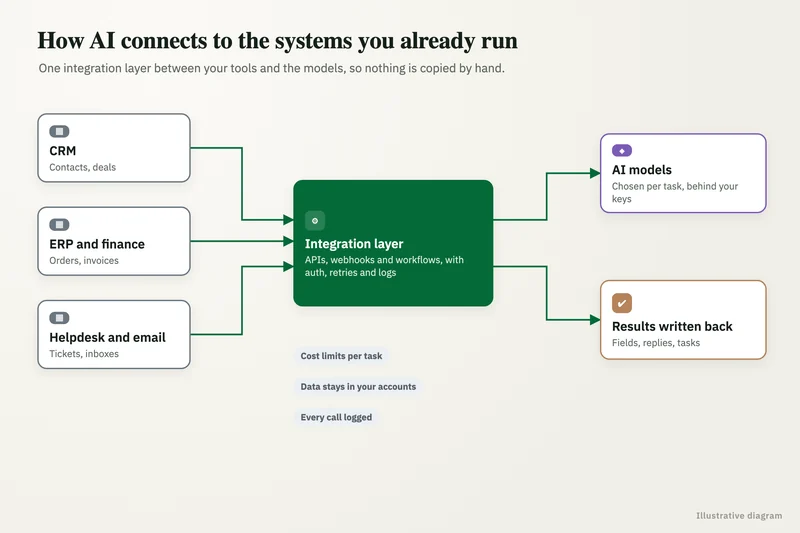
What does Applied Epic AI integration actually involve?
An Applied Epic AI integration is a connection that lets a model look up agency data in Epic, do a task with it, and log the outcome back to the right account. The model is the easy part. The work is in authentication, mapping to Epic's structure of clients, policies, lines and activities, respecting branch and security group permissions, and deciding what the AI may write without a person checking it.
Most agencies come to this with one of four jobs in mind: answering and logging inbound service calls, pulling data from carrier documents into Epic, preparing renewal and remarketing work, or producing reports that combine Epic data with carrier spreadsheets. Each of those has a different best route, which is why the first decision is not which AI model to use but how the AI will reach Epic at all.
- Read access: client lookup by phone number or name, policy numbers, effective dates, lines of business, producer and CSR assignments.
- Write access: activities with owners and due dates, notes and call summaries, attachments such as dec pages and endorsements.
- Permissions: what the integration's account can see is limited by Epic's branch, department and security group settings.
- Carrier data: policy download and eDocs arrive through IVANS on the carrier's schedule, not the instant a policy changes.
What AI is now built into Applied Epic?
Before scoping any build, check what Applied ships itself. Insurance Business reported on September 29, 2026 that Applied Systems is building AI directly into Epic under the name Epic Conductor. Per that report, it extracts information from carrier documents such as dec pages, applications and submissions and writes it back into Epic, checks every bound policy against what was quoted and flags coverage gaps or missing endorsements, routes commercial new business and remarketing submissions through one workflow, and runs small commercial quoting from email.
Applied says the platform cuts data entry by more than 50 percent. Treat that as the vendor's own figure until you see it on your book of business. The practical point is that document extraction and quote-to-bind checking are now native territory. Paying for a custom extraction pipeline into Epic in 2026 only makes sense if your documents, carriers or rules fall outside what the native features handle well, or if your agency is not on a version or package that includes them.
Applied Epic AI integration routes compared
Each route trades control for speed. Native features need no integration work but follow Applied's roadmap. Certified vendor apps go live quickly for one channel. A custom build costs more up front but can do work no packaged product does, such as combining Epic data with carrier spreadsheets, your CRM or your own underwriting appetite rules.
The table below is how we lay out the options when an agency asks us to scope an Epic project. It is a starting point for the conversation with your Applied account manager and any vendor, not a substitute for it.
| Route | Best for | What you need | Main limit |
|---|---|---|---|
| Native Epic AI (Epic Conductor) | Carrier document extraction, quote vs bound checks, submissions routing | The right Epic version and package from Applied | You cannot change the logic or add sources outside Epic |
| Certified vendor app | Inbound service calls, after-hours answering, call logging | A vendor contract; Sonant, for example, states its Epic connection carries no separate API fee | One channel per product; data and prompts sit in the vendor's platform |
| Custom build on Epic APIs | Cross-system workflows, agency-specific rules, reporting across carriers | SDK-API license, Applied production approval, an engineering team | Higher build effort; you own upkeep |
| Screen automation (RPA) | Legacy tasks with no API route | An RPA tool and a stable Epic layout | Breaks when screens change; hard to audit |
How do you get API access to Applied Epic?
Production API access is a licensing step, not just a technical one. Applied's own blog on Epic APIs (December 18, 2025) lists three requirements: an SDK-API license, a utility license, and Applied Epic itself. It describes API groups for attachments, contacts and clients, and calls for a configured authentication method plus an API key.
Applied's Epic SDK documentation states that the SDK license runs on an annual renewal cycle and must be renewed each year to keep using the SDK methods; the License Utility on your Central Server shows the status. Applied does not publish the fee, so ask your Applied account manager for it early, because it belongs in your budget alongside the build.
For newer integrations, Supergood's API report card for Applied Epic says Applied exposes REST APIs through the Applied Dev Center with OAuth 2.0 and scopes such as epic/clients:read, that app registration and sandbox keys are self-serve, and that production requires Applied approval plus the agency-side SDK-API license. In practice that means a developer can start building against a sandbox while the agency sorts out licensing in parallel, which saves weeks.
- Confirm your Epic version and whether you are hosted or on-premise.
- Ask Applied for the SDK-API license cost and renewal date.
- Register the app and get sandbox keys in the Applied Dev Center.
- Create a dedicated integration user with the narrowest security group that still covers the workflow.
- Request production approval once the sandbox tests pass.
Which agency workflows should you connect to AI first?
Pick work that is frequent, rules-based and easy to check, and keep anything that binds coverage or moves money behind a human. These are the workflows we see agencies ask about most, roughly in order of how safe they are to automate.
- Call logging: a voice agent or call summarizer writes a structured activity to the right client after every service call, with the CSR as owner.
- Certificate of insurance requests: the AI reads the request email, finds the client and policy, drafts the certificate details and queues it for a CSR to issue.
- Renewal prep: 90 days out, the AI pulls expiring policies, summarizes loss runs and prior notes, and drafts the remarketing activity for the account manager.
- Carrier spreadsheet consolidation: commission statements and production reports from each carrier are normalized into one view next to Epic data.
- Endorsement intake: the AI extracts requested changes from emails and attachments and creates a pre-filled activity; a person submits to the carrier.
- FNOL triage: first notice of loss calls or emails are logged with key facts and routed; claim decisions stay with people.
Worked example: sizing a renewal-prep integration
Run the numbers on your own book before you buy. Here is the method with illustrative inputs; swap in your own counts and times from a two-week sample.
Say an agency renews 300 commercial policies a month and an account manager spends 20 minutes on each pulling the policy, reading notes, checking loss runs and setting up the remarketing activity. That is 6,000 minutes, or 100 hours a month. If the integration drafts that package and the account manager spends 5 minutes reviewing and correcting it, the work drops to 25 hours. The 75 hours freed is the number to weigh against the build price, the SDK-API license and monthly model and hosting costs.
Two checks keep the estimate honest. First, measure the correction rate during a pilot: if account managers rewrite half the drafts, the saving shrinks fast. Second, count only time that is actually redeployed to selling or service. Our case studies include an insurance brokerage in Australia where an automated pipeline that standardized every insurer's spreadsheet into one dashboard took report time from 4-5 hours to under 5 minutes. A baseline that concrete is what makes a project easy to approve.
How should a custom Applied Epic AI integration be built?
A sound build treats Epic as the system of record and the AI as a drafting assistant that proposes changes. We design every Epic integration around the same controls, because they are cheap to include at the start and painful to retrofit after an error lands in a client file.
- Read through the API, never by scraping screens, so every action is logged against the integration user.
- Write activities and notes freely, but route anything that changes policy data, premiums or coverage into a review queue.
- Use confidence thresholds: low-confidence document extractions go to a CSR with the source page highlighted.
- Match records on policy number and client lookup code, not on names alone, to avoid attaching notes to the wrong insured.
- Plan for IVANS timing: if a downloaded policy has not arrived yet, the workflow waits and retries instead of creating duplicates.
- Log every prompt, model output and write-back, with a cost cap per task and a one-click rollback for bad batches.
- Keep model, hosting and vendor accounts in the agency's name so the agency owns the prompts, code and data.
Compliance and E&O questions to settle first
An AI that touches client files is part of your errors and omissions exposure, so decide who is accountable before it goes live. The safe default is that the AI drafts and a licensed person decides on anything about coverage, binding or claims.
Phone channels add their own rules. The FCC ruled on February 8, 2024 that AI-generated voices count as artificial voices under the TCPA, so outbound AI calls need prior express consent. States with two-party consent rules for recording also apply when a voice agent records service calls. If your agency places employee benefits, any vendor handling protected health information needs a signed Business Associate Agreement. This is not legal advice; check the specifics with your counsel and your E&O carrier.
When should you not build a custom Epic integration?
Skip the custom build if Epic Conductor already covers the workflow on your package, if a certified vendor does the one job you need at a monthly fee you accept, or if your process is not stable enough to write rules for. Automating a messy renewal process only produces messy drafts faster.
Also wait if nobody can own the integration after launch. Carriers change document layouts, Applied updates APIs, and model vendors retire models. Someone has to watch the error queue and approve fixes. If you cannot name that person, start with a native or vendor option and revisit a custom build later.
How we deliver Applied Epic AI integration projects
We start with a free review of the workflow, your Epic setup, a sample of real documents or calls and the accuracy you need, then quote a fixed price for a defined scope. If native Epic features or an existing vendor app will do the job, we say so. If a custom build is right, we build against the sandbox while you arrange the SDK-API license, test on a set of real past cases, and go live with a CSR approving writes until the error rate earns more autonomy.
You own the accounts, code, prompts and data, and a person stays in the loop on anything touching money, clients or regulated data. See our AI integration services for how we connect models to systems like Epic, CRMs and document stores.
Case study · Insurance brokerage, Australia
Automation and dashboarding
Policy data arrived as spreadsheets from several insurers, each in a different structure, and every client report took hours of manual cleanup. An automated pipeline that standardizes every insurer's file and feeds a single reporting dashboard.
- Report time cut from 4-5 hours to under 5 minutes
- Reporting accuracy up from about 75% to 99%

FAQ
Frequently asked questions
Does Applied Epic have built-in AI?
Yes. Insurance Business reported on September 29, 2026 that Applied Systems is building AI into Epic as Epic Conductor, covering carrier document extraction, quote versus bound policy checks, submissions routing and small commercial quoting from email. Availability depends on your Epic version and package, so confirm with your Applied account manager.
Do I need an SDK license to integrate AI with Applied Epic?
For a custom integration, yes. Applied's December 2025 blog lists an SDK-API license, a utility license and Applied Epic as requirements, and its SDK documentation says the license renews annually. Certified vendor apps may handle access under their own agreement with Applied, so ask each vendor how their connection is licensed.
Can an AI receptionist connect to Applied Epic?
Yes. Some voice AI vendors are certified Applied integration partners; Sonant, for example, says it pulls client and policy data during live calls and writes notes, summaries and activities back to the correct Epic account. A custom voice agent can do the same through the Epic APIs if you need routing or rules a packaged product does not offer.
Is it safe to let AI write data into Applied Epic?
It is safe for low-risk writes like activities and call notes when the integration uses a dedicated user with narrow permissions and logs every action. Changes to policy data, premiums or coverage should go to a review queue for a licensed person. Start with a CSR approving every write and relax that only when measured error rates justify it.
Should we use RPA or the API to connect AI to Epic?
Use the API wherever it covers the task. Screen automation breaks when layouts change and is harder to audit, while API calls are logged against a named integration user and respect Epic's permission model. RPA is a fallback for legacy tasks with no API route.
How long does an Applied Epic AI integration take?
Softude's 2026 guide puts a typical single AI use case at 3-5 months across the market. A narrowly scoped Epic workflow can move faster when sandbox development runs in parallel with licensing, because the SDK-API license and Applied's production approval often set the pace. Start those steps on day one.
Keep reading
Related pages
Get started
Tell us what you want automated
Describe the task, the systems involved and the volume. We reply within one business day with an architecture, the tools we would use, running costs and a fixed-price build plan.
- Free 30-minute build review
- Fixed quote before any work starts
- You own the accounts, code, prompts and data
Prefer email? info@aiimplementationconsultants.com
Get a free build plan
Two lines is enough to start.