

Cost guide
AI video generation cost: from price per second to price per approved video
AI video generation cost in October 2026 runs from about $0.05 to $0.60 per second of generated footage on usage-based APIs, or roughly $18 to $149 a month on avatar platform plans, before retakes and review time. This guide is for marketing, enablement and sales teams who need dozens or hundreds of business videos and want a budget per finished, approved video rather than a headline rate. Every price below comes from the vendor's own pricing page, checked this month.
Get a free build plan
Two lines is enough. A specialist replies within one business day.
Quick answer
How much does AI video generation cost?
AI video generation cost depends on the type of tool. Google's Gemini API lists Veo at $0.05 to $0.60 per second, and Runway's API lists $0.05 to $0.12 per second for its own models. Avatar platforms bill by plan: Synthesia Pro is $89 a month, HeyGen Business $149. Retakes typically multiply the raw rate.
- Budget per approved video, not per generated second, because rejected takes are billed too.
- Avatar presenters and generated scenes are different products with different pricing models.
- OpenAI removed the Sora API in September 2026, so never build on a single renderer.
- For volume work, the pipeline and review step cost more to get right than rendering.
What does AI video generation cost in 2026?
There are two price models, and mixing them up is the most common budgeting error. Generative scene models (Google Veo, Runway, Kling and others) bill per second of footage they render, usually through an API. Avatar platforms (Synthesia, HeyGen) sell monthly plans with a minute or credit allowance, where a presenter reads your script in front of a background.
The table below shows published prices as listed on each vendor's pricing page in October 2026. These are third-party list prices, not our prices, and vendors change them often, so recheck before you sign anything.
Two patterns stand out. Resolution and audio move the per-second rate by up to ten times on the same vendor. And the cheapest tier is rarely the cheapest result, because a lower-quality model that needs five attempts can cost more per usable clip than a better model that needs two.
| Vendor and product | How it bills | Published price (Oct 2026) |
|---|---|---|
| Google Veo, Standard tier (Gemini API) | Per second, audio included | $0.40/s at 720p or 1080p; $0.60/s at 4K |
| Google Veo, Fast tier (Gemini API) | Per second, audio included | $0.10/s at 720p; $0.12/s at 1080p; $0.30/s at 4K |
| Google Veo, Lite tier (Gemini API) | Per second, audio included | $0.05/s at 720p; $0.08/s at 1080p; no 4K |
| Runway API, top in-house model | Credits at $0.01 each | 12 credits/s, so $0.12/s |
| Runway API, Turbo model | Credits at $0.01 each | 5 credits/s, so $0.05/s |
| Synthesia Starter | Plan with video minutes | $29/month, or $18/month billed yearly |
| Synthesia Pro | Plan with video minutes | $89/month, or $64/month billed yearly (up to 720 minutes a year) |
| HeyGen Creator / Pro | Plan with credits | $29/month (600 credits) / $49/month (1,000 credits) |
| HeyGen Business | Plan with credits | $149/month (1,500 credits), extra seats $20/month |
Why is cost per approved video the number that matters?
Every generation is billed, including the ones you throw away. A 15-second clip at Veo's Standard rate of $0.40 per second costs $6 to render, but if your reviewer approves one take in three, the real cost of that clip is $18 in rendering alone.
How many takes you need is not something any vendor publishes, and it varies by subject. Product shots with simple motion usually land faster than scenes with people, hands, text on screen or a specific brand color. ZDNET's Jack Wallen reported in April 2025, as summarized by CO/AI, that roughly nine in ten videos from the unnamed service he tested were unusable for professional work. That is one tester on one tool, not an industry rate, but it shows why the attempts-per-keeper number belongs in your budget.
We measure it during a pilot. Render a batch of 20 to 30 real clips, record how many the reviewer approves, and use that ratio for the full budget. The formula we use is simple:
- Render cost per take = seconds per clip x price per second at the resolution you need.
- Render cost per approved clip = render cost per take x takes per approved clip (from the pilot).
- Review cost per approved clip = minutes a reviewer spends per clip x their loaded hourly rate / 60.
- Total per approved video = render + review + script and caption model calls + any music or stock licenses.
Worked example: AI video generation cost for 200 product videos
Take a Shopify store that wants one 15-second clip per SKU for 200 SKUs, at 1080p, generated from the product photo and catalog record, and assume the pilot showed three takes per approved clip. The assumption of three takes is ours for illustration; your pilot number replaces it.
At Veo's Lite tier, $0.08 per second, a take costs $1.20, an approved clip $3.60 and the 200-clip batch about $720 in rendering. At the Fast tier, $0.12 per second, a take costs $1.80, an approved clip $5.40 and the batch about $1,080. At the Standard tier, $0.40 per second, a take costs $6, an approved clip $18 and the batch about $3,600. Runway's Turbo model at $0.05 per second would put the same batch near $450, if its output passes your review at the same rate.
Now add review. If a reviewer spends two minutes per take watching and approving or rejecting, three takes per clip means six minutes per approved clip, or 20 hours for the batch. At an assumed loaded cost of $50 an hour that is $1,000, which is more than the rendering bill on the two cheaper tiers. This is why batch review screens, side-by-side takes and an automatic pre-check against the product record matter as much as the model price.
The lesson is not that one tier is right. It is that the ranking can flip once you count takes and review time, so test two or three renderers on your own products before you commit to one.
What do avatar video platforms cost for training and sales videos?
Avatar platforms are priced like software seats, and for training video they are often the cheaper route. Synthesia's Pro plan billed yearly is $64 a month and includes up to 720 minutes of video a year. A team producing 40 training modules of five minutes each, 200 minutes in total, would fit inside that allowance for about $768 a year, with room to regenerate modules when a policy changes.
HeyGen prices in credits that are shared across its features. Its Business plan is $149 a month with 1,500 credits, five custom avatars, SSO and LMS export, with extra seats at $20 a month. Because credit consumption depends on the feature and length, we size HeyGen budgets by rendering a sample of real scripts and reading the credit usage, rather than converting credits to minutes on paper.
Two costs sit outside the plan price. Custom avatars of your own staff need a recorded capture session and written consent from the person. And personalized sales videos, one per prospect, usually run through the vendor's API, and HeyGen lists API rates on its developer portal rather than on its plan page, so get the API rate in writing before planning a CRM-driven campaign.
What does an automated AI video pipeline cost to build?
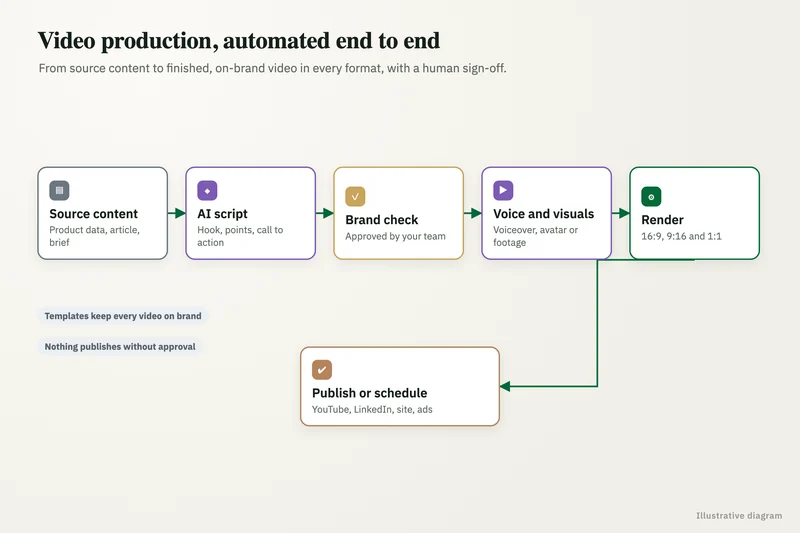
Rendering is the running cost; the pipeline around it is the build cost. For anything beyond a handful of videos, someone has to connect the trigger (a new SKU in Shopify, a changed SOP in SharePoint, a deal stage in HubSpot), write scripts from the source data, call the renderer, apply the brand template, queue each video for review and publish what is approved.
We size the build in these parts, because each can be cut or kept on its own:
- Source data connection: reading product records, documents or CRM fields, with checks for missing values.
- Script generation: prompts and a tone guide that only use facts in the source record, with a word limit per format.
- Render integration: API calls to one or more renderers, retries with a fixed limit, and a spend cap per job.
- Brand template: intro and end cards, captions, lower thirds, fonts, colors, music level and export sizes.
- Review queue: each video shown with its script and source data, approve or reject, and a reason for rejections.
- Publishing and logging: delivery to the website, YouTube, a social scheduler, an LMS or a sales sequence, with cost per job recorded.
How did the Sora API shutdown change AI video pricing decisions?
It made renderer lock-in a cost line. OpenAI removed its entire Videos API, including all Sora models, on September 24, 2026, and Make's help center told users that scenarios using those modules would stop running after that date. Any business that had built its video workflow on Sora alone had to rebuild that step on another vendor at its own expense.
Google is retiring its Veo preview models on the Gemini API on October 22, 2026, and its pricing page tells developers to move to Gemini Omni Flash or the generally available models. Preview models are often the ones teams test first, so check which model names your current workflow actually calls.
The practical defense is architectural. We put the renderer behind one small interface in the pipeline, keep prompts and templates independent of any single vendor, and keep an eval set of approved clips so a replacement model can be tested against real past output in a day rather than a month.
Which hidden costs push AI video budgets over?
Most overruns come from items that never appear on a pricing page. These are the ones we check for in every scope.
- Retakes: billed at full rate, and the ratio rises for people, hands, on-screen text and exact brand colors.
- Resolution creep: moving from 1080p to 4K on Veo's Fast tier raises the rate from $0.12 to $0.30 per second.
- Audio: some APIs price footage with and without sound differently, so confirm which rate your call uses.
- Seats: avatar platforms charge per user, so reviewers and editors add to the monthly bill.
- Labeling and consent: synthetic media shown to people in the EU falls under the EU AI Act's Article 50 transparency duties from August 2, 2026, and avatars of real staff need written consent. This is not legal advice.
- Model retirement: a deprecated model forces prompt and template retesting, as Sora and the Veo previews showed this year.
- Storage and delivery: hundreds of rendered files, versions and captions need a home and a naming scheme.
When is AI video generation not worth the cost?
AI video pays off when you need many versions of a similar video, or need to update videos often. It is a poor buy in a few situations, and we say so in reviews.
A single flagship brand film, where every frame is scrutinized, is usually better shot or produced by a studio. Videos built on real customer footage, testimonials or a physical demonstration of your product need a camera, because generating a fake version of a real event creates trust and legal problems. And if you only need four or five videos a year, a monthly avatar plan or a freelance editor beats building any pipeline.
The strongest cases are catalog clips per SKU, training modules that change with procedures, multilingual versions of the same script, and short personalized sales messages. In each, the template stays fixed and the data changes, which is exactly where automation removes repeated work.
How do we quote an AI video project?
We start with a free review of the videos you need, the data behind them and where they will be published, then run a small pilot batch on two or three renderers so you see real takes-per-approval and cost per approved clip before any larger commitment. The build is then quoted at a fixed price.
Platform and API accounts sit in your name, so rendering is billed to you directly at the vendor's rate and you can see every charge. You own the templates, prompts, pipeline code and every rendered file. A named person on your team approves videos before anything is published. Our AI video generation service page shows how the pipeline is built, and our AI implementation cost guide covers build budgets for automation projects more broadly.
Case study · Logistics company, UK
Route planning automation
Dispatch typed every address into Google Maps, which optimizes only 25 stops and cannot add time at each stop. A Python tool that loads addresses automatically, adds buffer time per stop and optimizes the full route.
- Manual address entry eliminated
- Delivery estimates customers could rely on
FAQ
Frequently asked questions
How much does AI video generation cost per minute?
On usage-based APIs, multiply the per-second rate by 60. Google's Veo Lite tier at $0.08 per second is $4.80 per minute at 1080p, the Fast tier $7.20 and the Standard tier $24, before retakes. Avatar platforms such as Synthesia and HeyGen bill by monthly plan instead, so the per-minute cost depends on how much of the allowance you use.
Is AI video cheaper than hiring a video production company?
For repeated, template-based videos such as product clips, training modules and translated versions, usually yes, because the rendering cost per clip is small and changes do not need a reshoot. For a one-off brand film or anything built on real footage, a production company is often the better buy. Compare against your own last production invoice per finished minute rather than published averages.
What is the cheapest AI video generator for business?
On list price, the lowest per-second rates we checked in October 2026 were Runway's Turbo model at $0.05 per second through its API and Google's Veo Lite tier at $0.05 per second at 720p. The cheapest result is the one with the lowest cost per approved video, which you only find by testing your own content on two or three tools.
How much does HeyGen or Synthesia cost for a business?
Synthesia lists Starter at $29 a month ($18 billed yearly) and Pro at $89 a month ($64 billed yearly), with Enterprise on custom pricing. HeyGen lists Creator at $29, Pro at $49 and Business at $149 a month, with Enterprise on request. For automated or personalized videos, check API pricing separately: HeyGen, for example, publishes its API rates on its developer portal rather than on the plan page.
Can we still use Sora for business videos?
Not through the API. OpenAI removed its Videos API and all Sora models on September 24, 2026, so automated workflows that called Sora stopped working. Teams that relied on it need to move that step to another renderer such as Google Veo or Runway and retest their prompts.
Do retakes count toward AI video costs?
Yes. Usage-based APIs and credit systems bill every generation, whether you keep it or not. Measure how many takes your reviewer needs per approved clip in a pilot batch, then multiply your per-take cost by that number to get a realistic budget.
Do AI-generated business videos need to be labeled?
If the videos reach people in the EU, the EU AI Act's Article 50 transparency duties for synthetic media apply from August 2, 2026, including to US companies. We build an on-screen label and metadata into the template where needed. This is not legal advice, so confirm the approach for your markets with counsel.
Keep reading
Related pages
Get started
Tell us what you want automated
Describe the task, the systems involved and the volume. We reply within one business day with an architecture, the tools we would use, running costs and a fixed-price build plan.
- Free 30-minute build review
- Fixed quote before any work starts
- You own the accounts, code, prompts and data
Prefer email? info@aiimplementationconsultants.com
Get a free build plan
Two lines is enough to start.